
Setup: Honeywell Home Smart Thermostat 9000 Color Touchscreen TH9320WF User Manual
Content
Honeywell Home Smart Thermostat 9000 Color Touchscreen TH9320WF: Complete Product Manual and Guide
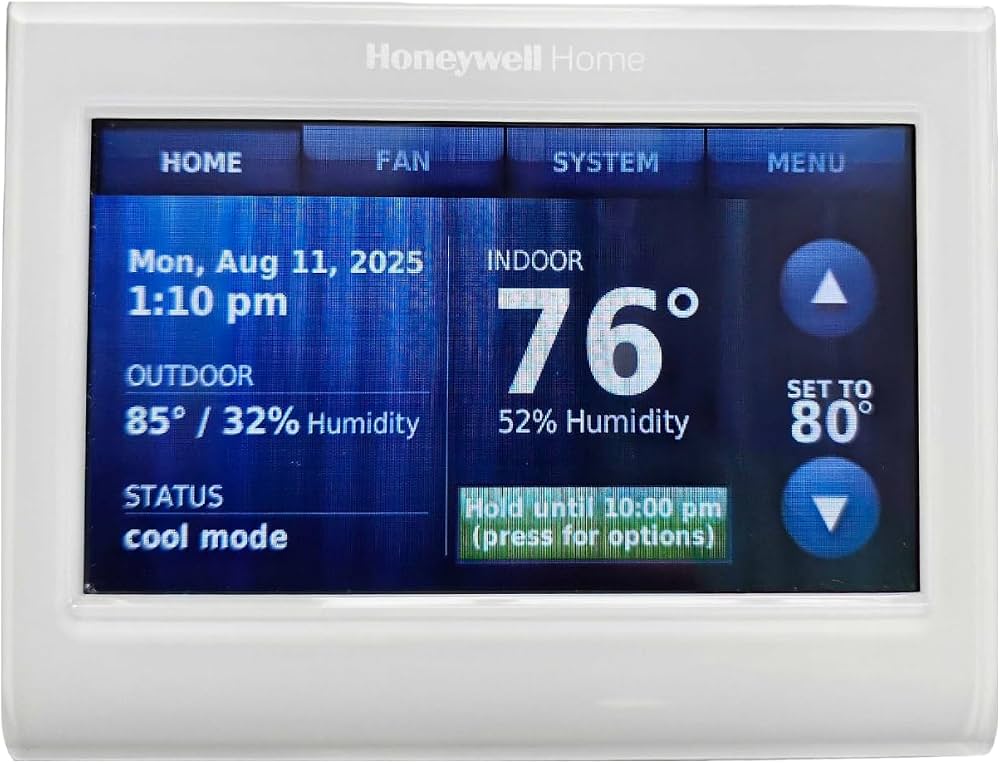
Introduction to the Honeywell Home Smart Thermostat 9000
The Honeywell Home Smart Thermostat 9000 Color Touchscreen (Model TH9320WF5003/U) represents a significant advancement in home climate control technology, offering homeowners a sophisticated yet user-friendly solution for managing their heating and cooling systems remotely. This intelligent thermostat combines a vibrant color LCD touchscreen display with comprehensive Wi-Fi connectivity, enabling complete temperature management from any device with internet access.
Designed for modern smart homes, the Honeywell Home Smart Thermostat 9000 Color Touchscreen TH9320WF delivers exceptional energy savings potential while maintaining optimal comfort levels throughout your residence. The device supports up to 3 heat and 2 cool stages for heat pump systems, or 2 heat and 2 cool stages for conventional systems, making it compatible with most 24-volt heating and cooling configurations including forced-air, hydronic, heat-pump, oil, gas, and electric systems.
This smart thermostat is ideal for environmentally conscious homeowners seeking to reduce their carbon footprint and utility bills, tech-savvy individuals who appreciate remote home automation, and anyone looking to enhance their home's comfort and convenience. The Honeywell Home Smart Thermostat 9000 Color Touchscreen TH9320WF typically retails between $200-$300, with availability through major retailers and HVAC distributors. The device carries an Energy Star certification, confirming its efficiency credentials and potential for significant annual heating and cooling cost reduction.
Key Features and Benefits
The Honeywell Home Smart Thermostat 9000 features advanced Smart Response technology that learns your preferred heating and cooling cycles, automatically adjusting to ensure optimal comfort at preprogrammed times. The color touchscreen display provides exceptional clarity and allows customization to match your home décor with selectable color options. Monthly home energy reports give you detailed insights into your heating and cooling habits, empowering data-driven decisions about energy consumption.
Remote access capabilities through the Total Connect Comfort app enable complete thermostat control from your smartphone, tablet, or computer. You can adjust heating and cooling setpoints, receive email notifications about temperature extremes or humidity issues, and monitor energy usage in real-time from anywhere. The thermostat's geofencing feature automatically adjusts temperatures when household members leave or arrive, optimizing comfort and efficiency simultaneously.
Technical Specifications and Compatibility
- Model Information: The Honeywell Home Smart Thermostat 9000 Color Touchscreen TH9320WF operates under manufacturer part number TH9320WF5003/U with UPC 085267344951.
- Connectivity and Networking: The device features Wi-Fi 802.11b, 802.11g, and 802.11n compatibility operating on 2.4GHz frequency bands. Simple, secure connection to your home network enables all remote access and app-based functionality.
- Display and User Interface: The color LCD touchscreen provides a 4.5-inch width display with graphical buttons and intuitive menu navigation. The display language is selectable for English, French, or Spanish, accommodating diverse user preferences. Indoor and outdoor temperature readings along with humidity levels display prominently on the home screen.
- System Support and Staging: The thermostat supports up to 3 heat and 2 cool stages for heat pump systems, or up to 2 heat and 2 cool stages for conventional systems. Fan function includes On, Auto, and Circulating settings for advanced comfort control.
- Programming Features: The device utilizes sensors for priority scheduling and includes geofencing technology that automatically adjusts temperatures based on household member location. Seven-day programmable scheduling enables customized comfort settings for different times and days.
- Physical Dimensions: Measuring 4.5 inches wide by 3.5 inches high by 0.87 inches deep (114 x 89 x 22mm), the compact design fits standard thermostat wall mounts without requiring additional modifications.
Installation and Setup Guide for the Honeywell Home Smart Thermostat 9000
- Pre-Installation Assessment: Before beginning installation of the Honeywell Home Smart Thermostat 9000 Color Touchscreen TH9320WF, verify that your HVAC system is compatible with 24-volt low-voltage control. This thermostat is not compatible with millivolt systems (such as gas fireplaces) or 120V/240V systems (such as electric baseboard heat). Consult your heating and cooling system equipment documentation or contact an HVAC professional if you're uncertain about your system type.
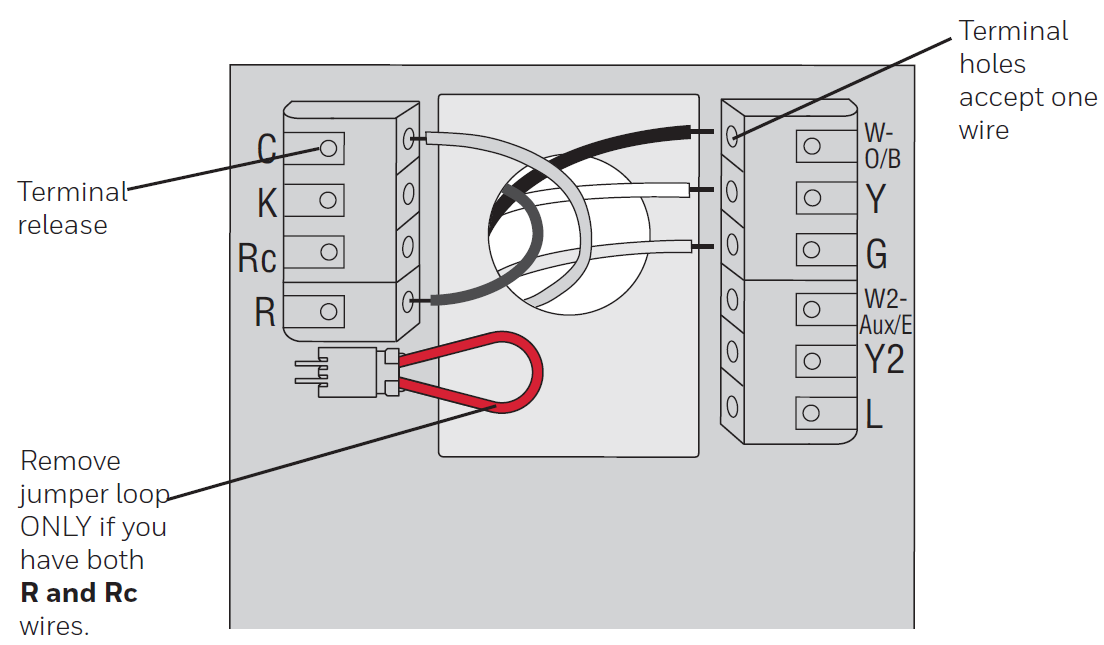
- Wiring Considerations: Proper wiring is critical—improper commissioning can cause unintended HVAC operation leading to property damage or safety hazards. If you lack experience with thermostat wiring, professional installation is strongly recommended. Document your existing thermostat's wire configuration before removal, photographing the terminal connections for reference.
- Wi-Fi Network Setup: Ensure your home Wi-Fi network operates on 2.4GHz frequency (the Honeywell Home Smart Thermostat 9000 Color Touchscreen TH9320WF does not support 5GHz bands). Position your thermostat within reasonable Wi-Fi range to maintain stable connectivity; consider Wi-Fi extenders if your thermostat location has weak signal strength.
- App Configuration: After physical installation and power-up, download the Total Connect Comfort app on your smartphone or tablet. Follow the in-app setup wizard to connect your thermostat to your Wi-Fi network and create your user account. This enables remote access and email alert functionality.
Wallplate installation
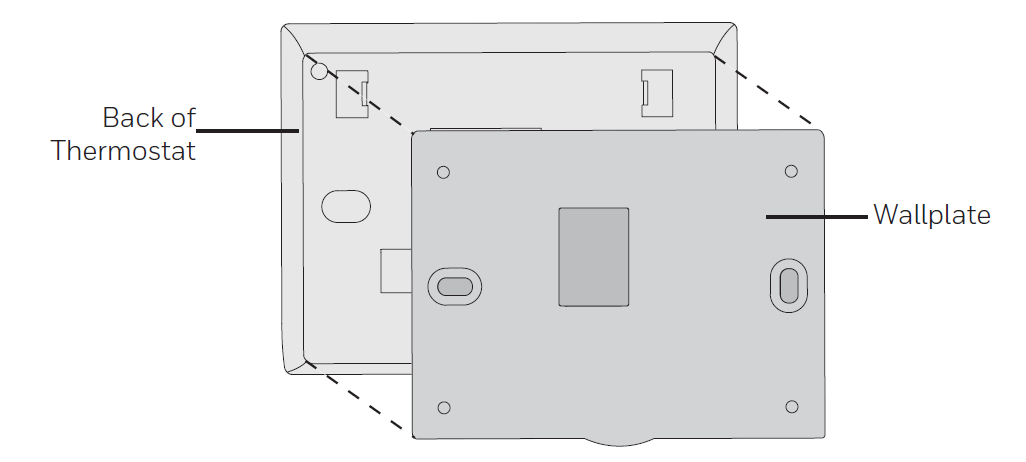
- Separate the wallplate from the thermostat.
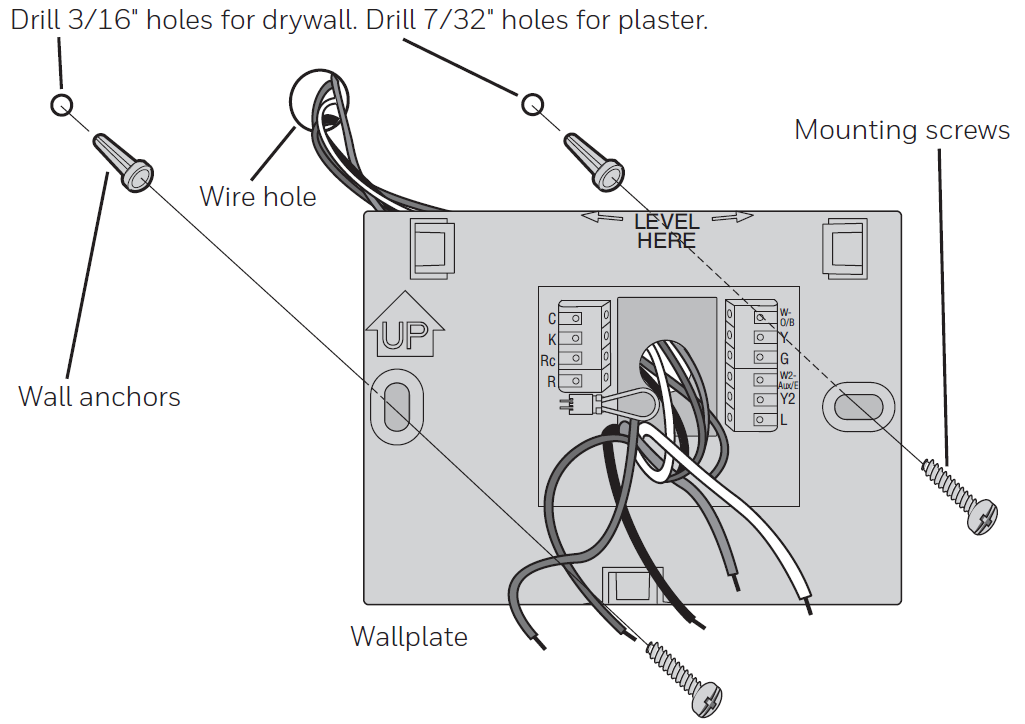
- Mount the wallplate as shown below.
Wiring
Programming and Optimization Tips
- 7-Day Scheduling: The Honeywell Home Smart Thermostat 9000 Color Touchscreen TH9320WF supports seven-day programmable scheduling, allowing different temperature setpoints for weekdays and weekends. Set lower heating temperatures and higher cooling temperatures during periods when occupants are away to maximize energy savings without compromising comfort upon return.
- Geofencing Setup: Enable geofencing by linking the thermostat to your smartphone via the Total Connect Comfort app. This feature automatically adjusts temperatures when the last household member leaves and returns home, optimizing comfort and efficiency without manual intervention.
- Energy Savings Strategies: Utilize the monthly energy reports to identify consumption patterns and adjust schedules accordingly. Reducing heating by just 2-3 degrees during winter months or increasing cooling setpoints by similar amounts during summer can generate substantial annual savings.
- Humidity Monitoring: The thermostat displays indoor humidity levels and can send email alerts when humidity becomes problematic. Monitor these readings to identify potential moisture issues and adjust your HVAC system's dehumidification settings for optimal indoor air quality.
Pros and Cons of the Honeywell Home Smart Thermostat 9000
Advantages
- Comprehensive Remote Control: The Total Connect Comfort app provides complete access to thermostat functions from any internet-connected device, allowing temperature adjustments whether you're at work, traveling, or away from home for extended periods.
- Intuitive Color Touchscreen Interface: The high-definition display with graphical buttons and customizable colors makes navigation straightforward for users of all technical skill levels, eliminating confusion associated with traditional button-based thermostats.
- Energy Star Certified Efficiency: Verified energy savings potential helps reduce annual heating and cooling costs significantly, with many households saving $200+ annually through optimized temperature scheduling and remote management.
- Smart Learning Technology: The thermostat's ability to learn your preferences means it automatically optimizes comfort schedules over time, reducing manual adjustments and improving overall efficiency.
- Flexible System Compatibility: Support for multiple heat pump and conventional system configurations ensures compatibility with most existing HVAC installations without requiring system modifications.
- Excellent Warranty Coverage: The five-year limited warranty provides peace of mind and protection against defects, backed by Honeywell's reputation as the industry's most trusted thermostat brand.
Disadvantages
- Wi-Fi Dependency: The thermostat requires a stable 802.11b/g/n 2.4GHz Wi-Fi connection; weak network signals in certain home locations may limit functionality or cause connectivity interruptions.
- Incompatibility with Certain Systems: The device is not compatible with millivolt systems such as gas fireplaces or 120V/240V systems like electric baseboard heat, potentially limiting installation options for some homeowners.
- Initial Setup Requirements: Installation and Wi-Fi configuration may require technical knowledge; improper wiring can cause unintended HVAC operation, and professional installation is recommended for those unfamiliar with thermostat wiring.
- Mid-Range Price Point: At $200-$300, the Honeywell Home Smart Thermostat 9000 Color Touchscreen TH9320WF falls in the mid-to-premium category, which may be cost-prohibitive for budget-conscious consumers seeking basic smart thermostat functionality.
Customer Reviews and User Feedback
The Honeywell Home Smart Thermostat 9000 Color Touchscreen TH9320WF has received positive feedback from verified purchasers, with users consistently praising the intuitive touchscreen interface and reliable remote access capabilities. Many customers highlight the convenience of adjusting temperatures from their smartphones, particularly when away from home, noting substantial energy savings compared to their previous thermostats.
Common user praise includes appreciation for the clear, easy-to-read statistics displayed on the color screen, the seamless integration with popular smart home platforms, and the comprehensive monthly energy reports that provide actionable insights into consumption patterns. Users frequently mention the professional, sleek design that complements modern home décor without appearing out of place.
Some users have reported occasional Wi-Fi connectivity challenges in homes with weak network signals in certain locations, recommending Wi-Fi extenders or router repositioning as solutions. A small number of customers noted that the initial setup requires careful attention to wiring, emphasizing the value of professional installation for those unfamiliar with HVAC systems. Overall, the thermostat receives strong recommendations for homeowners prioritizing energy efficiency, remote control capability, and user-friendly smart home integration. Purchase this device if you value convenience, energy savings, and modern smart home technology; consider alternatives only if your HVAC system uses millivolt or 120V/240V configurations.
Troubleshooting Common Issues
- Wi-Fi Connectivity Problems: If your Honeywell Home Smart Thermostat 9000 Color Touchscreen TH9320WF loses Wi-Fi connection, verify that your router is functioning properly and that the thermostat is within range. Restart both devices and confirm that your network operates on 2.4GHz frequency. Consider relocating your router or installing a Wi-Fi extender if signal strength is weak in your thermostat's location.
- App Access Issues: If you cannot access your thermostat through the Total Connect Comfort app, verify that you're using the correct login credentials and that your internet connection is active. Log out of the app completely, restart your device, and log back in. If problems persist, reset the thermostat to factory settings and reconfigure your Wi-Fi connection.
- Extreme Temperature Alerts: The thermostat sends email notifications when temperatures become too hot or too cold. Check your email spam folder to ensure alert messages aren't being filtered incorrectly. Verify that you've enabled email notifications in your Total Connect Comfort app settings.
- Battery Backup Function: The Honeywell Home Smart Thermostat 9000 Color Touchscreen TH9320WF keeps time during power failures and automatically updates for daylight savings time. If the display goes blank during a power outage, the thermostat will resume normal operation once power is restored.
Energy Efficiency and Cost Savings
The Energy Star certification of the Honeywell Home Smart Thermostat 9000 Color Touchscreen TH9320WF confirms its ability to deliver measurable energy savings. For the average American household, nearly half of annual energy costs go toward heating and cooling—typically exceeding $900 annually. Implementing smart temperature scheduling with this thermostat can reduce that figure substantially.
Remote access capabilities allow you to avoid heating or cooling an empty home, and geofencing ensures comfort is restored automatically before occupants arrive. Smart Response technology learns your preferences and optimizes schedules over time, continuously improving efficiency. Many utility companies offer rebates on Energy Star certified smart thermostats; check with your local utility to discover available incentives that may offset your purchase price.
Warranty and Support
The Honeywell Home Smart Thermostat 9000 Color Touchscreen TH9320WF includes a comprehensive five-year limited warranty covering manufacturing defects and component failures. This extended warranty period reflects Honeywell's confidence in product quality and provides substantial peace of mind.
For technical support, visit the official Honeywell Home support website where you'll find FAQs, troubleshooting guides, video tutorials, and detailed technical documentation. Live chat support is available for complex issues, and you can locate professional HVAC contractors through Honeywell's partner network if professional assistance is needed.
Conclusion and Recommendations
The Honeywell Home Smart Thermostat 9000 Color Touchscreen TH9320WF represents an excellent investment for homeowners seeking to combine modern smart home technology with measurable energy savings. Its intuitive touchscreen interface, comprehensive remote access capabilities, and proven Energy Star efficiency make it a standout choice in the mid-range smart thermostat market.
This device is particularly recommended for tech-savvy homeowners who value convenience and remote control, environmentally conscious individuals seeking to reduce their carbon footprint, and anyone looking to optimize their HVAC system's performance. The five-year warranty and strong customer reviews provide additional confidence in this purchase decision. If your HVAC system uses compatible 24-volt low-voltage control and you prioritize energy efficiency alongside smart home integration, the Honeywell Home Smart Thermostat 9000 Color Touchscreen TH9320WF deserves serious consideration.
```
Faqs
How do I install the honeywell home Smart Thermostat 9000 Color Touchscreen TH9320WF for the first time?
What should I do if my honeywell home Smart Thermostat 9000 Color Touchscreen TH9320WF won't connect to Wi-Fi?
Does the honeywell home Smart Thermostat 9000 Color Touchscreen TH9320WF require a C-wire for installation?
How do I create and edit schedules on honeywell home Smart Thermostat 9000 Color Touchscreen TH9320WF?
Why is my honeywell home Smart Thermostat 9000 Color Touchscreen TH9320WF not turning on the heat or cool?
How do I optimize energy savings with honeywell home Smart Thermostat 9000 Color Touchscreen TH9320WF features?
What HVAC systems are compatible with honeywell home Smart Thermostat 9000 Color Touchscreen TH9320WF?
How do I clean and maintain my honeywell home Smart Thermostat 9000 Color Touchscreen TH9320WF?
More honeywell home manuals
- Setup: Honeywell Home Round™ Smart Thermostat TH8732WFH5004 User Manual
- Setup: Honeywell Home Prestige® Touch Screen Thermostat User Manual
- Setup: Honeywell Home ElitePRO S1100 Smart Thermostat User Manual
- Setup: Honeywell Home RTH9580 Smart Colour Touchscreen Programmable Thermostat User Manual
- Setup: Honeywell Home X8S Smart Thermostat User Manual
- Setup: Honeywell Home X1N Non-Programmable Thermostat RTH11B/RTHC11B User Manual
Leave a Comment