
Setup & Features: Hp EliteDesk 800 G5 Desktop Mini User Manual
Content
HP EliteDesk 800 G5 Desktop Mini: Compact Business Power for Modern Workspaces
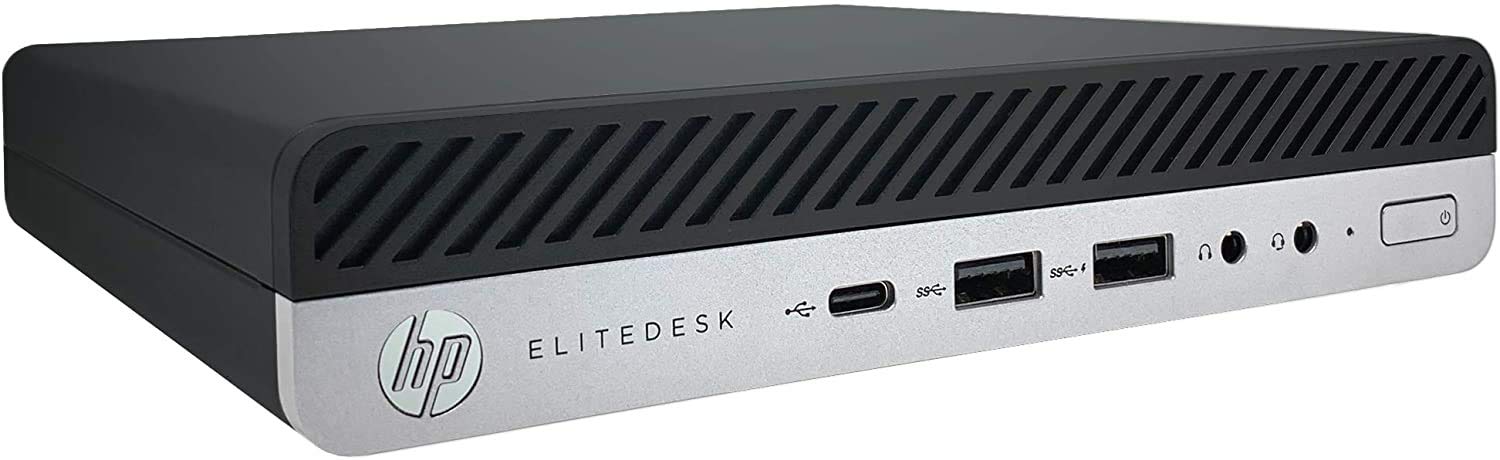
The hp EliteDesk 800 G5 Desktop Mini is a space-saving business desktop built for professionals who need reliable performance without the bulk of a traditional tower. Designed for offices, front desks, remote workstations, digital signage, and home office setups, this compact PC delivers strong everyday productivity in a chassis that fits almost anywhere. With 9th Gen Intel Core processor options, fast DDR4 memory, NVMe SSD storage, and enterprise-focused connectivity, it is a practical choice for users who want a secure and dependable small form factor desktop.
One of its biggest advantages is flexibility. The HP EliteDesk 800 G5 Desktop Mini can handle multitasking, office applications, web-based tools, video conferencing, and multiple displays with ease. It is especially appealing to IT teams and business buyers because of its manageability features, upgrade potential, and durable design. The system is also quiet and efficient, making it ideal for workspaces where noise and clutter need to be minimized.
In the current refurbished and renewed market, the estimated price range typically falls between $120 and $300 depending on CPU, RAM, storage, and condition. New-old-stock or specialty configurations may cost more, especially if bundled with accessories or Windows 11 Pro. Availability is generally strong through online marketplaces, business resellers, and refurbished hardware stores, making it a cost-effective option for organizations and individuals looking for enterprise-grade value.
Specifications for HP EliteDesk 800 G5 Desktop Mini
- Processor options: Intel Core i5 and Core i7 9th Gen models, including low-power T-series chips for efficient business performance.
- Memory: DDR4 SDRAM, commonly 8 GB to 16 GB in retail units, with upgrade paths up to 64 GB on many configurations.
- Storage: NVMe PCIe M.2 SSD options such as 256 GB, with some models supporting 500 GB to 2 TB SATA or larger-capacity storage upgrades.
- Graphics: Integrated Intel UHD Graphics 630 for standard business tasks, web apps, streaming, and light multi-display use.
- Connectivity: Gigabit Ethernet, Bluetooth 5.0, and Wi-Fi 6 on supported configurations for modern wireless networking.
- Ports: USB 3.1 Gen 1 and Gen 2 Type-A, USB-C on select models, DisplayPort outputs, RJ-45, and audio connectivity.
- Dimensions: Approximately 175 mm wide, 177 mm deep, and 34 mm high, with a weight around 1.77 kg.
- Typical performance: Strong office productivity performance, quick boot times from SSD storage, and smooth multitasking with 8 GB or more of RAM.
Compared with larger small-form-factor desktops, the hp EliteDesk 800 G5 Desktop Mini offers a smaller footprint but similar business-class manageability. It is also more compact than many standard mini PCs while still providing better expansion and corporate support features than entry-level consumer models.
Detailed Description of the HP EliteDesk 800 G5 Desktop Mini
The HP EliteDesk 800 G5 Desktop Mini is built around a business-first design philosophy. Its compact chassis houses desktop-class components engineered for reliability, thermal efficiency, and long-term use. The system is designed to support typical office workflows such as spreadsheet management, CRM software, accounting tools, cloud collaboration, and multiple browser tabs without slowing down.
In real-world use, this mini desktop works well in conference rooms, reception counters, healthcare workstations, retail kiosks, and executive offices. The small chassis allows flexible placement behind a monitor, under a desk, or mounted in a VESA-compatible setup. Its sturdy construction, clean industrial styling, and professional finish make it suitable for visible workplace environments.
User experience is generally strong for a machine in this category. Boot times are fast with SSD storage, application launches feel responsive, and the system remains quiet under light to moderate workloads. The hp EliteDesk 800 G5 Desktop Mini also benefits from enterprise-focused build quality, including durable materials and a layout designed for serviceability and upgrades. For users who want a dependable compact business PC, it offers a balanced mix of speed, efficiency, and practicality.
Setup Guide for HP EliteDesk 800 G5 Desktop Mini
Setting up the HP EliteDesk 800 G5 Desktop Mini is straightforward. Start by placing the unit in a well-ventilated area with enough clearance around the vents. Connect the power adapter, attach a monitor through DisplayPort or an approved adapter, and connect a keyboard and mouse through USB.
- Power on the system and follow the on-screen Windows setup prompts.
- Select language, region, keyboard layout, and network settings.
- Connect to Ethernet or Wi-Fi, then sign in with a Microsoft or work account.
- Run Windows Update and install the latest HP drivers and firmware updates.
- Configure power settings, display scaling, and security options for your workflow.
For pairing and connectivity, enable Bluetooth from Windows settings if your configuration includes Bluetooth 5.0. If wireless peripherals do not connect, verify batteries, confirm pairing mode, and restart Bluetooth services. Safety precautions include avoiding blocked vents, using only the correct power adapter, and disconnecting power before opening the chassis for upgrades. If the machine does not display an image, check monitor input selection, cable seating, and alternate DisplayPort outputs.
Troubleshooting the HP EliteDesk 800 G5 Desktop Mini
Common issues with the HP EliteDesk 800 G5 Desktop Mini usually relate to display output, storage, memory, or connectivity. If the system will not power on, confirm the power cable, adapter, and wall outlet are working. If the fan runs but there is no display, reseat the memory, test another monitor, and try a different port.
- No boot or blinking power light: Check RAM seating, disconnect external devices, and perform a power reset.
- No display signal: Verify the monitor input, use a known-good DisplayPort cable, and test integrated graphics output.
- Slow performance: Close background apps, check startup programs, and confirm the SSD has enough free space.
- Wi-Fi or Bluetooth problems: Update drivers, toggle wireless settings, and move closer to the access point.
- Overheating or loud fan noise: Clean vents, improve airflow, and ensure the unit is not placed against a wall or inside a sealed enclosure.
When error messages appear during startup, note the exact code shown on screen and consult HP diagnostics or BIOS support tools. Preventive care includes keeping firmware current, cleaning dust from vents, and using surge protection. Warranty coverage depends on seller and configuration, especially for refurbished units. For help, use HP support channels, the reseller’s warranty service, or enterprise IT support if the desktop was purchased as part of a fleet deployment.
Pros & Cons of HP EliteDesk 800 G5 Desktop Mini
Pros
- Very compact design that saves desk space and supports clean workstation setups.
- Strong business performance for office productivity, web apps, and multitasking.
- Enterprise-grade build quality with practical upgrade and maintenance options.
- Fast storage and responsive system behavior with NVMe SSD configurations.
- Good connectivity for modern offices, including USB-C, DisplayPort, Ethernet, Wi-Fi, and Bluetooth on many models.
- Excellent value in the refurbished market compared with newer business minis.
Cons
- Integrated graphics limit gaming, 3D workloads, and advanced creative editing.
- Cooling and power limits make it less suitable for heavy sustained CPU workloads than larger desktops.
- Some configurations need upgrades out of the box to feel fully modern, especially 8 GB RAM models.
- Port layout and adapter needs may require extra accessories for older monitors.
For value for money, the hp EliteDesk 800 G5 Desktop Mini performs strongly against many refurbished mini PCs and budget small-form-factor systems. It is best for buyers who want reliability, quiet operation, and business-class features rather than raw workstation power.
Customer Reviews of the HP EliteDesk 800 G5 Desktop Mini
Typical user feedback is positive, with many buyers rating it around 4.4 out of 5 stars for everyday business use. Customers frequently praise the compact size, fast boot times, and solid multitasking performance. One common testimonial is that it “feels much faster than expected for such a small machine.”
Common complaints usually involve older Windows licensing, missing accessories on refurbished listings, or the need to upgrade RAM and storage for heavier workloads. Some users also mention that display adapters may be required depending on monitor type. Overall, the HP EliteDesk 800 G5 Desktop Mini is often recommended for office work, home productivity, and cost-conscious business deployments. Buyers who want a dependable mini desktop with long-term usability generally consider it a smart purchase.
Faqs
How do I set up the hp EliteDesk 800 G5 Desktop Mini for first-time use?
What should I do if the hp EliteDesk 800 G5 Desktop Mini will not power on?
Which monitors and accessories are compatible with the hp EliteDesk 800 G5 Desktop Mini?
How can I improve performance on the hp EliteDesk 800 G5 Desktop Mini?
Why is my hp EliteDesk 800 G5 Desktop Mini running hot or making more noise than usual?
Can I upgrade the RAM or storage in the hp EliteDesk 800 G5 Desktop Mini?
How do I fix display problems on the hp EliteDesk 800 G5 Desktop Mini?
What maintenance should I perform to keep the hp EliteDesk 800 G5 Desktop Mini reliable?
More hp manuals
- How to Use: Hp 1920 × 1080 at 60 Hz for a 21.5-inch Monitor User Manual
- How to Use: Hp Docking Station/Advanced Docking Station User Manual
- Specs & Features: Hp Webcam HD 5210 User Manual
- How to Use: Hp Compaq Business PC User Manual
- Features & Specs: Hp DeskJet 720C User Manual
- Setup & Features: Hp ZBook Create 15.6 Inch G8 Notebook PC User Manual
Leave a Comment