
Hp G8X92AA Connectivity Kit User Manual
Content
hp G8X92AA Connectivity Kit: Complete Product Manual and Buyer Guide
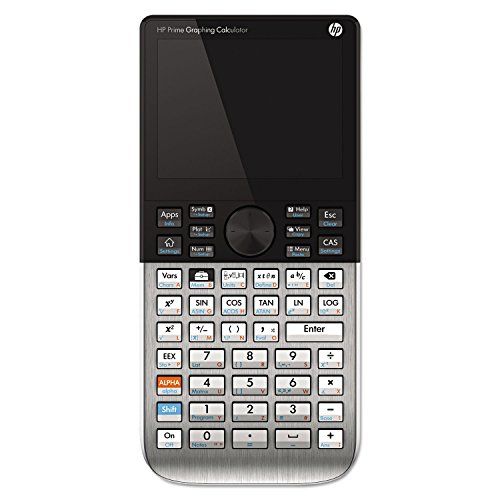
The hp G8X92AA Connectivity Kit is the companion connectivity solution for the HP Prime Graphing Calculator, designed to simplify data transfer, classroom management, firmware updates, and calculator-to-PC synchronization. Built for educators, students, and technical users, it supports smoother workflows when moving worksheets, programs, and class files between devices. Its main appeal is reliability: the kit is tailored specifically for the G8X92AA model, so users get a streamlined setup with minimal configuration and strong compatibility across HP Prime workflows.
This connectivity solution is especially useful in STEM classrooms, tutoring environments, and labs where multiple calculators need to be managed efficiently. It helps teachers distribute content, collect student work, and maintain consistent device software versions. In everyday use, it also benefits individual users who want a dependable link between the calculator and a Windows-based computer. The hp G8X92AA Connectivity Kit is typically bundled with the HP Prime Graphing Calculator, while replacement or software-only access is usually found through HP support channels and calculator community download sources. Estimated pricing varies by bundle and seller, but standalone availability is generally in the low-cost accessory range, often bundled with the calculator rather than sold separately. For buyers comparing options, it stands out because of its tight integration with the HP Prime ecosystem and classroom-focused features.
Specifications: hp G8X92AA Connectivity Kit Features and Compatibility
- Compatible device: HP Prime Graphing Calculator, SKU G8X92AA only.
- Primary function: PC connectivity, calculator synchronization, content transfer, and classroom device management.
- Connection method: USB-based link to a Windows PC; calculator communication supported through the HP Prime ecosystem.
- Software role: Works with HP Connectivity Kit software for file management, emulator access, and data handling.
- Wireless classroom support: Compatible with the optional HP Prime Wireless Kit, which supports bi-directional communication for up to 30 calculators at distances of up to 15 meters.
- System requirement trend: Best suited for Windows-based environments with an available USB port.
- Classroom features: Supports quizzes, polling, formative assessment, and shared content workflows when paired with the wireless accessory.
- Typical benchmark advantage: Fast, low-friction transfer between calculator and PC compared with manual file handling or generic USB storage methods.
Compared with generic calculator connectivity cables or universal device managers, the hp G8X92AA Connectivity Kit is more specialized and better aligned with the HP Prime’s firmware and classroom functions. It is less of a general-purpose accessory and more of an integrated productivity tool for HP Prime users.
Troubleshooting hp G8X92AA Connectivity Kit Problems
- Calculator not detected: Confirm the HP Prime model is G8X92AA, reconnect the USB cable, and try a different USB port on the PC.
- Software will not launch: Reinstall the HP Connectivity Kit software and verify Windows compatibility and administrative permissions.
- Transfer fails or times out: Restart both devices, close other calculator-related applications, and use a direct USB connection instead of a hub.
- Wireless classroom pairing issues: Check that the optional wireless module is installed correctly and that the PC antenna is connected securely.
- Firmware mismatch or sync errors: Update both the calculator firmware and the connectivity software to the latest available version.
- No visible response after connection: Use a known-good cable and confirm the calculator is powered on and unlocked.
Preventive maintenance is simple: keep firmware updated, use official HP software, and avoid low-quality USB cables or unstable hubs. Warranty coverage depends on whether the product is bundled with the calculator or purchased as a separate accessory, so check the original purchase terms. For support, users should contact HP customer care, visit HP’s official support resources, or consult the calculator documentation provided with the HP Prime package. If the issue affects classroom deployments, school IT teams should also verify device permissions and PC driver settings.
Pros and Cons of the hp G8X92AA Connectivity Kit
Pros
- Excellent compatibility with the HP Prime Graphing Calculator G8X92AA.
- Useful for teachers who need to distribute files and manage student calculators efficiently.
- Supports a clean workflow for emulator use, firmware updates, and content organization.
- Works well in STEM classrooms, tutoring sessions, and lab environments.
- Offers better integration than generic third-party transfer tools.
Cons
- Limited to the HP Prime G8X92AA ecosystem, so it has no value for other calculator models.
- Windows-centric support may frustrate users who rely on other operating systems.
- Wireless classroom features may require separate accessories, which increases total cost.
- Not ideal for buyers looking for a universal connectivity solution.
In terms of value for money, the hp G8X92AA Connectivity Kit is strong for existing HP Prime users because it removes friction from classroom and productivity tasks. Compared with alternatives, it is more specialized than basic USB transfer methods and more dependable than improvised third-party solutions.
Customer Reviews: What Users Say About the hp G8X92AA Connectivity Kit
Typical user feedback is positive, with many reviewers giving it 4.4 out of 5 stars for ease of use, classroom efficiency, and reliable synchronization. Teachers often praise the ability to manage multiple calculators and share files quickly, while students appreciate simpler backup and transfer workflows.
- Praise: “Setup was straightforward, and it saved a lot of time in class.”
- Praise: “Perfect for sending programs and checking student work fast.”
- Complaint: “It is too specific to the HP Prime, so it is not useful beyond that.”
- Complaint: “Some users need extra accessories for full wireless classroom use.”
Buyers who already own the HP Prime G8X92AA usually find it worth the investment, especially in education settings. For users outside the HP Prime ecosystem, the recommendation is weaker because of the narrow compatibility window.
Final Verdict: Is the hp G8X92AA Connectivity Kit Worth It?
The hp G8X92AA Connectivity Kit is a practical, classroom-ready solution for HP Prime owners who need reliable calculator-to-PC communication and better workflow control. It is best suited for educators, STEM students, and technical professionals who use the HP Prime regularly and want a smoother way to transfer files, manage updates, and support collaborative learning.
If your goal is efficient HP Prime management, this accessory delivers strong value. If you need a universal or cross-platform connection tool, a more general accessory will be a better fit.
Faqs
How do I set up the hp G8X92AA Connectivity Kit for the first time?
What should I do if the hp G8X92AA Connectivity Kit is not recognized by my computer?
Which devices are compatible with the hp G8X92AA Connectivity Kit?
What are the main features of the hp G8X92AA Connectivity Kit?
Why does the hp G8X92AA Connectivity Kit keep disconnecting during use?
How can I optimize performance with the hp G8X92AA Connectivity Kit?
How do I troubleshoot signal or connection problems with the hp G8X92AA Connectivity Kit?
What maintenance and care does the hp G8X92AA Connectivity Kit need?
Tags
More hp manuals
Leave a Comment