
Hp Model V24 Monitor User Manual
Content
HP V24 Monitor: Complete Product Manual and Buying Guide
Introduction
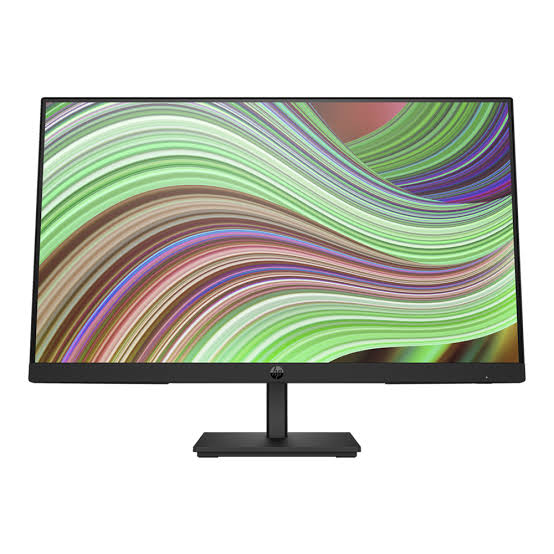
The hp Model V24 Monitor is a practical 24-inch Full HD display designed for everyday productivity, home office work, and general multimedia use. With a 1920 x 1080 resolution, a slim profile, and a no-fuss feature set, it offers a balanced mix of clarity, affordability, and easy setup. The hp Model V24 Monitor is especially appealing to users who want a dependable screen for web browsing, document editing, video streaming, and dual-monitor workstations without paying premium pricing.
One of its biggest advantages is simplicity. The monitor typically includes HDMI and VGA connectivity, a 75Hz refresh rate, anti-glare treatment, low blue light mode, and tilt adjustment for basic ergonomic comfort. These features make it a solid choice for students, remote workers, small businesses, and budget-conscious buyers who need a reliable everyday display. Its 24-inch size also fits well on compact desks while still providing enough screen space for multitasking.
Estimated pricing for the HP V24 monitor generally falls in the budget category, often around $80 to $130 depending on retailer, bundle options, and region. Availability is usually good through major online electronics stores, office supply retailers, and marketplace listings. If you are searching for an affordable 24-inch FHD monitor for office tasks or casual use, this model remains a strong value-oriented option.
Specifications
HP V24 Monitor technical specifications
- Display size: 24 inches class, Full HD desktop monitor
- Native resolution: 1920 x 1080 pixels
- Panel type: TN on many V24 listings; some V24-branded variants may differ by region
- Aspect ratio: 16:9
- Brightness: 250 nits typical
- Contrast ratio: 1000:1 static
- Response time: 5 ms typical
- Refresh rate: 75Hz on many models
- Ports: 1 HDMI, 1 VGA
- Features: Anti-glare coating, low blue light mode, tilt adjustment, on-screen controls
- Mounting: VESA support on select versions
- Use case performance: Smooth enough for office work, streaming, spreadsheets, and light multitasking
Compared with similar entry-level 24-inch monitors, the HP V24 Monitor is positioned as a basic productivity screen rather than a premium creator display. It generally trades advanced color accuracy and wide viewing angles for lower cost and simpler hardware. That makes it a better fit than IPS-based alternatives for users who prioritize price and standard desktop use over design work or gaming-grade performance.
Troubleshooting
Common problems and quick fixes
- No signal on screen: Check HDMI or VGA cable seating, confirm the correct input source, and restart both the monitor and computer.
- Blank display but power light is on: Increase brightness, verify the PC is awake, and test with another cable or device.
- Flickering image: Replace a damaged cable, lower refresh rate to a supported setting, or try a different input port.
- Incorrect resolution: Set the display to 1920 x 1080 in operating system display settings.
- Washed-out colors: Disable power-saving modes, adjust contrast and brightness, and confirm the monitor is set to its native resolution.
Error messages on budget monitors are often generic, such as “No Signal,” “Input Not Supported,” or “Check Cable Connection.” These usually indicate a source or compatibility issue rather than a hardware failure. Preventive care includes keeping the panel clean with a soft microfiber cloth, avoiding excessive pressure on the screen, and using a stable power source. If the issue persists after cable and input checks, review the warranty terms and contact HP support through the official support portal or the phone number listed in your region’s product documentation. For help, users should also consult the retailer invoice, since some sellers provide their own return window or exchange policy.
Pros & Cons
Strengths
- Affordable entry-level price makes it attractive for students and office setups
- 24-inch Full HD panel offers enough workspace for documents, web apps, and video calls
- Simple HDMI and VGA connectivity supports older and newer PCs
- Anti-glare finish helps reduce reflections in bright rooms
- Low blue light mode is useful for long work sessions
Weaknesses
- TN-based variants may have narrower viewing angles than IPS alternatives
- Color accuracy is adequate for daily use but not ideal for photo editing
- Built-in features are limited compared with higher-end business monitors
- Audio and advanced USB hub functions are typically not included
For the money, the hp Model V24 Monitor delivers good value if your priority is practical everyday computing rather than premium visuals. Compared with similarly priced office monitors from Acer, Dell, or Lenovo, it competes well on basic specs and brand trust, though some alternatives may offer IPS panels or more ergonomic stands. Buyers who need a low-cost screen for productivity will likely be satisfied, while content creators and competitive gamers should consider a more advanced model.
Customer Reviews
Average customer sentiment for the HP V24 monitor is generally positive, with many users rating it around 4 out of 5 stars for value and ease of use. Reviewers often praise the sharp Full HD image, lightweight design, and fast setup process. One common comment is that it works especially well as a second monitor for laptops and desktops.
Typical complaints focus on viewing angles, basic stand adjustability, and the lack of premium extras such as speakers or USB-C. A frequent testimonial theme is: “Great monitor for office work and browsing, but not the best choice for color-sensitive tasks.” Buyers who want a dependable budget display usually recommend it, while users expecting gaming-level performance or professional-grade color reproduction often look elsewhere.
Frequently Asked Questions
Is the HP V24 monitor good for work from home?
Yes. It is a strong fit for email, documents, spreadsheets, meetings, and web apps.
Does the HP V24 monitor support gaming?
It can handle casual gaming at 75Hz on supported variants, but it is not a competitive gaming monitor.
What is the best use for the HP V24 monitor?
The best use is everyday productivity, home office work, and general entertainment.
Faqs
How do I set up the hp Model V24 Monitor for the first time?
Why is my hp Model V24 Monitor showing a no signal message?
What resolution and refresh settings work best with the hp Model V24 Monitor?
Is the hp Model V24 Monitor compatible with laptops, desktops, and gaming consoles?
How do I fix a blurry or fuzzy image on the hp Model V24 Monitor?
What features of the hp Model V24 Monitor improve everyday productivity?
How can I reduce eye strain when using the hp Model V24 Monitor for long hours?
What is the best way to clean and maintain the hp Model V24 Monitor?
More hp manuals
Leave a Comment