
Hp Monitor 3WL44AA User Manual
Content
HP 22m 3WL44AA Product Manual and Buying Guide
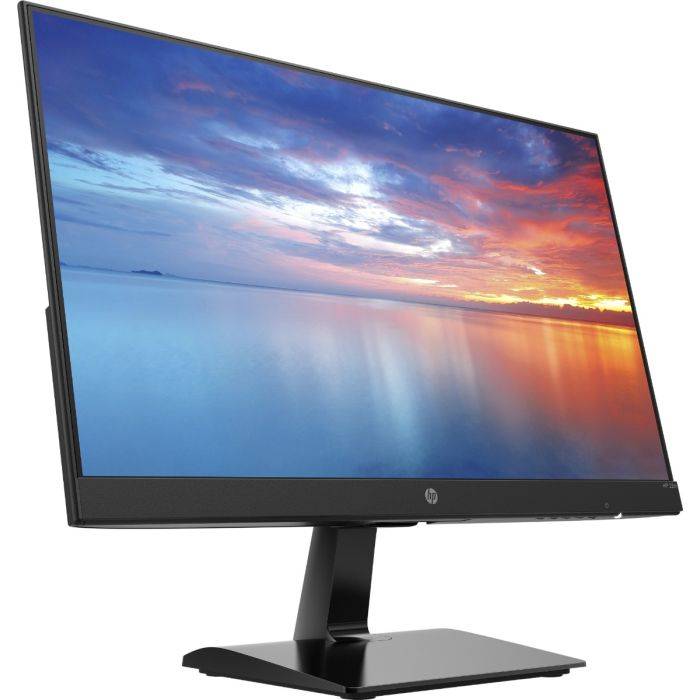
The HP 22m 3WL44AA is a compact 21.5-inch Full HD monitor designed for everyday productivity, home offices, schoolwork, and light entertainment. Built around an IPS panel with LED backlight, it delivers wide viewing angles, solid color consistency, and a clean, minimalist design that fits easily on smaller desks. For users searching for a reliable HP monitor for work from home, study, or a secondary display, this model stands out for its simple setup, slim profile, and practical port selection.
This monitor is especially appealing to students, remote workers, and casual users who need a no-fuss display with dependable image quality. Its 1920 x 1080 resolution, 60 Hz refresh rate, and 5 ms gray-to-gray response time provide smooth enough performance for office tasks, web browsing, streaming, and general content consumption. The anti-glare screen helps reduce reflections in bright rooms, while the 178-degree horizontal and vertical viewing angles make it suitable for shared viewing or multi-monitor setups.
In terms of value, the HP 22m 3WL44AA typically sits in the budget-to-midrange category, with an estimated price range of about $90 to $160 depending on seller, region, and stock availability. Availability is still found through selected online retailers and marketplace listings, though pricing may vary significantly based on condition and bundle options. If you want a dependable HP monitor 3WL44AA for everyday use without paying for advanced gaming or professional color-grade features, this model remains a practical choice.
Specifications for HP 22m 3WL44AA 21.5-Inch Full HD IPS Monitor
- Display size: 21.5 inches / 54.6 cm diagonal
- Panel type: IPS with LED backlight
- Resolution: Full HD 1920 x 1080 at 60 Hz
- Aspect ratio: 16:9
- Brightness: 250 nits typical
- Static contrast ratio: 1000:1
- Response time: 5 ms gray-to-gray
- Viewing angles: 178° horizontal / 178° vertical
- Pixel pitch: 0.247 mm
- Pixel density: about 102 ppi
- Video inputs: 1 HDMI, 1 VGA
- Anti-glare display coating for reduced reflections
- Stand adjustment: tilt from approximately -5° to +20°
- Power input: 100 to 240 V AC
- Typical power usage: around 18 W, with low standby consumption
Compared with similar 21.5-inch office monitors, the hp Monitor 3WL44AA offers a balanced mix of image clarity, viewing comfort, and basic connectivity. It is less feature-rich than premium business displays with USB hubs, height adjustment, or DisplayPort, but it is often more affordable and easier to recommend for budget-conscious buyers. Against entry-level TN-panel monitors, it generally provides better color stability and wider viewing angles.
Pros and Cons of HP 22m 3WL44AA
Pros
- IPS panel produces wider viewing angles and more consistent color than basic TN alternatives.
- Full HD resolution is sharp enough for productivity, streaming, and general desktop work.
- Compact 21.5-inch size works well on small desks and in secondary monitor setups.
- Anti-glare finish improves usability in bright rooms and under office lighting.
- HDMI and VGA support makes it easy to connect to both newer and older systems.
- Good value for everyday use, especially for schools, home offices, and light-duty workstations.
Cons
- 60 Hz refresh rate is fine for office use but not ideal for fast gaming.
- No built-in speakers on many market listings, so external audio may be needed.
- Limited ergonomic adjustment, with tilt only and no height or swivel controls.
- Brightness and contrast are suitable for daily tasks but not for professional creative work.
- Smaller screen size may feel restrictive for users who prefer larger multitasking space.
Overall, the hp Monitor 3WL44AA is a strong budget-friendly option if your priority is dependable performance rather than advanced features. Compared with larger 24-inch office monitors, it saves desk space and often costs less, but it gives up some comfort for multitasking and extended work sessions. For basic productivity, it remains a sensible and cost-effective purchase.
Customer Reviews and User Feedback for HP 22m 3WL44AA
Typical user feedback for the HP 22m 3WL44AA is positive, with many buyers praising the sharp Full HD image, slim design, and easy setup. A common rating pattern from shoppers is around 4 out of 5 stars, especially among users who want a simple monitor for office documents, online classes, and video streaming.
- “Great everyday monitor for home office use. The picture is clear and the stand is stable.”
- “Nice color quality for the price, and the HDMI connection worked instantly.”
- “Good value overall, but I wish it had height adjustment and better speakers.”
The most frequent complaints involve limited ergonomics, modest brightness, and the lack of premium extras such as USB ports or speaker integration. Buyers who expect gaming-grade speed or professional content-creation performance often look elsewhere. For most everyday users, though, the HP 22m 3WL44AA is recommended as a reliable, affordable, and easy-to-use monitor that delivers exactly what a basic desktop display should.
Faqs
How do I set up hp Monitor 3WL44AA for the first time?
What should I do if hp Monitor 3WL44AA is not displaying a signal?
Which devices are compatible with hp Monitor 3WL44AA?
How do I get the best picture quality from hp Monitor 3WL44AA?
Why does hp Monitor 3WL44AA look blurry or stretched?
Can hp Monitor 3WL44AA be used for work-from-home and multitasking?
How should I clean and maintain hp Monitor 3WL44AA safely?
What power or cable problems can affect hp Monitor 3WL44AA performance?
More hp manuals
Leave a Comment