
Setup: Hp T630 Thin Client User Manual
Content
HP t630 Thin Client: Complete Product Manual and Buyer’s Guide
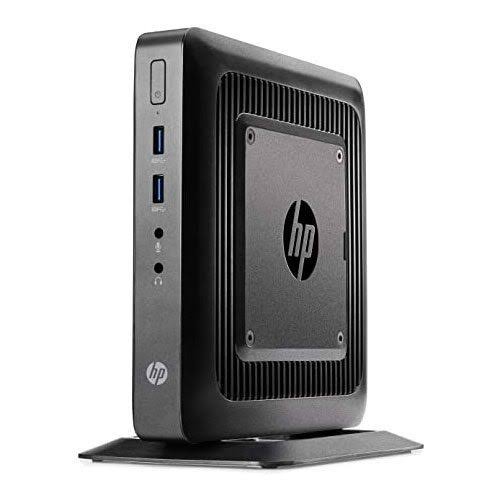
The HP t630 Thin Client is a business-focused desktop endpoint built for secure virtual workspaces, cloud applications, and remote desktop environments. Powered by an AMD GX-420GI quad-core processor at 2.0 GHz with boost speeds up to 2.2 GHz, it delivers dependable performance for office tasks, call centers, kiosks, healthcare terminals, and education labs. With support for up to 32 GB DDR4 memory, dual DisplayPort outputs, and integrated Radeon R7E graphics, the HP t630 Thin Client is designed to handle modern multi-monitor productivity with ease.
One of its biggest advantages is flexibility. Depending on the configuration, it can include flash storage ranging from 8 GB to 128 GB, optional wireless connectivity, and a second M.2 slot for expansion. This makes it a strong fit for organizations that need a compact thin client for Citrix, VMware Horizon, Microsoft remote desktop, or browser-based workflows. The small footprint also helps save desk space while keeping cable clutter to a minimum.
In today’s market, the HP t630 Thin Client is commonly found as refurbished or renewed hardware rather than brand-new stock. Typical pricing varies widely by configuration and condition, but buyers can usually expect an estimated range of about $80 to $250 for used or refurbished units, with higher prices for upgraded RAM, larger flash storage, Wi-Fi, or bundled accessories. It remains a practical value option for businesses looking for a cost-effective thin client workstation without paying premium prices for newer models.
Pros and Cons of the HP t630 Thin Client
Pros
- Strong multi-monitor support with dual DisplayPort 1.2 outputs, making it a good choice for office and trading-style desktop setups.
- Upgradeable memory up to 32 GB, which is generous for a thin client and improves responsiveness in virtual desktop use.
- Compact, energy-efficient design that reduces power consumption compared with traditional desktops.
- Business-friendly connectivity including Gigabit Ethernet, multiple USB ports, serial, and legacy PS/2 support.
- Good value for money in refurbished condition, especially for organizations deploying many units at once.
Cons
- Not ideal for heavy local computing, media editing, or modern gaming because it is designed for remote workloads.
- Older hardware architecture means it trails newer thin clients in performance and long-term platform support.
- Storage options can be limited on lower-end configurations, so basic models may feel restrictive.
- Compared with newer alternatives, it lacks the efficiency and speed of more recent AMD Ryzen-based or fanless thin client systems.
For buyers comparing thin client alternatives, the HP t630 Thin Client stands out as a solid midrange business endpoint rather than a cutting-edge machine. It offers better expandability than many entry-level models, but newer thin clients may provide improved security features, quieter operation, and longer support windows.
HP t630 Thin Client Customer Reviews and User Feedback
Users generally rate the HP t630 Thin Client around 4.3 out of 5 stars for business reliability, compact design, and smooth performance in virtual desktop environments. Many buyers praise its quiet operation, dual monitor capability, and straightforward setup for office deployments.
Common compliments include “easy to deploy,” “fast enough for remote work,” and “great value as a refurbished thin client.” Frequent complaints focus on older internal storage, limited local processing power, and the fact that some units ship with minimal RAM or flash memory. A few users also mention that accessories and OS configurations vary by seller, so checking the exact spec sheet before purchase is essential.
Recommended for IT teams, small businesses, and home users who need a reliable remote workstation. Less suitable for anyone wanting a full desktop replacement for demanding apps. If you want a budget-friendly thin client desktop for virtual office tasks, the HP t630 Thin Client remains a practical and purchase-worthy option.
Key Specifications of the HP t630 Thin Client
- Processor: AMD GX-420GI quad-core, 2.0 GHz with up to 2.2 GHz boost
- Graphics: Integrated AMD Radeon R7E
- Memory: Up to 32 GB DDR4-1866 SDRAM
- Storage: M.2 flash options from 8 GB up to 128 GB depending on configuration
- Ports: Dual DisplayPort, USB 2.0, USB 3.0, Gigabit Ethernet, serial, audio, and PS/2 support
- Expansion: Secondary M.2 2242 slot on supported configurations
- Typical use: Virtual desktop access, cloud apps, kiosk systems, and enterprise endpoints
Setup Tips for Better Performance
- Use the latest firmware and firmware-approved OS image for better stability and security.
- Choose at least 4 GB to 8 GB RAM for smoother multitasking in remote desktop sessions.
- Prefer SSD or higher-capacity flash configurations if the unit will store local profiles or management software.
- Connect dual monitors through DisplayPort for the best productivity setup.
- Pair with a reliable Gigabit Ethernet connection for the most responsive virtual desktop experience.
Faqs
How do I set up the hp T630 Thin Client for the first time?
What should I do if the hp T630 Thin Client will not boot or shows a blank screen?
Which operating systems and remote desktop platforms work best with the hp T630 Thin Client?
How can I improve performance on an hp T630 Thin Client during remote sessions?
Why is my hp T630 Thin Client running slowly after login?
What display and peripheral devices are compatible with the hp T630 Thin Client?
How do I secure the hp T630 Thin Client in an office or call center environment?
What routine maintenance does the hp T630 Thin Client need to stay reliable?
Tags
More hp manuals
Leave a Comment