
Setup: Hp Z840-Series Workstation User Manual
Content
HP Z840-Series Workstation Overview
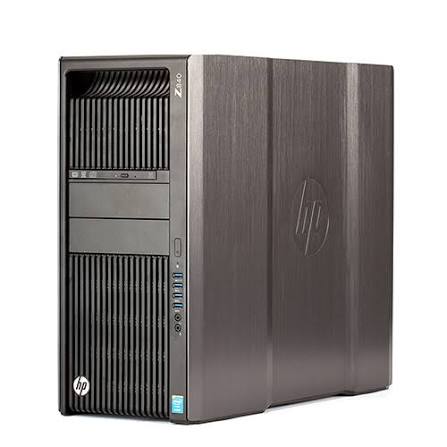
The hp Z840-Series Workstation is a powerful dual-processor tower built for professionals who need reliable performance for demanding workloads such as 3D rendering, CAD, simulation, video editing, scientific computing, and heavy multitasking. It stands out for its expandability, workstation-class reliability, and support for high-core-count Intel Xeon processors, making it a practical choice for creators and technical teams that need more flexibility than a standard desktop can offer.
One of the biggest advantages of the hp Z840-Series Workstation is its modular design. It supports Intel Xeon E5 v3 and v4 processor families, ECC DDR4 memory, multiple PCIe expansion cards, and large storage configurations, giving users a future-ready platform for complex professional environments. The system is especially attractive to engineering firms, media studios, IT departments, and power users who want a rugged tower workstation with strong upgrade potential and enterprise-grade durability.
In today’s market, the hp Z840-Series Workstation is usually available mainly as a refurbished, renewed, or custom-built system rather than as a brand-new retail product. Pricing typically varies widely based on CPU count, memory, storage, and graphics configuration, but a realistic estimate is about $400 to $2,000+ depending on condition and specs. For buyers seeking a budget-friendly workstation with high-end expandability, the Z840 remains a compelling option.
Detailed Specifications and Performance Features
- Processor support: Intel Xeon E5-2600 v3 and v4 series, with dual-socket capability for high core counts.
- Memory support: Up to 16 DIMM slots with ECC DDR4 registered memory; configurations commonly scale from 64GB to 512GB, with some builds supporting up to 1TB or more depending on memory type.
- Storage options: Multiple SATA and SAS drive bays, plus SSD and high-speed storage support for large project files and media workloads.
- Expansion slots: Multiple PCIe Gen3 slots for professional GPUs, RAID controllers, capture cards, and networking upgrades.
- Power supply: High-wattage workstation PSU options such as 1125W, 1275W, or 1450W for demanding multi-GPU or dual-CPU builds.
- Connectivity: Front and rear USB ports, dual Gigabit Ethernet on many configurations, audio I/O, and legacy ports useful in professional environments.
- Chassis size: Large tower form factor designed for cooling, serviceability, and long-term hardware expansion.
Compared with midrange workstations like the HP Z640 or Dell Precision T7810, the hp Z840-Series Workstation offers a larger platform, more expansion room, and stronger multi-socket scaling. Its performance is especially strong in threaded workloads, where dual Xeon configurations can significantly improve rendering, encoding, and simulation times.
Pros and Cons of the HP Z840-Series Workstation
Pros
- Excellent expandability for CPUs, memory, storage, and PCIe cards.
- Dual Xeon support makes it ideal for content creation, virtualization, and engineering tasks.
- ECC memory improves reliability for mission-critical workloads.
- Robust cooling and enterprise-grade build quality support long operating sessions.
- Strong value for money on the refurbished market compared with newer high-end workstations.
Cons
- Large and heavy chassis takes up significant desk or floor space.
- Older platform means lower efficiency than newer workstation generations.
- High-end configurations can increase noise, power consumption, and heat output.
- Some modern features, such as newer CPU platforms and advanced connectivity, are not available.
For users who need maximum expandability at a lower cost, the hp Z840-Series Workstation often delivers better value than newer entry-level towers. However, buyers focused on energy efficiency or the latest CPU architecture may prefer a newer alternative.
Customer Reviews and Real-World Feedback
Customer feedback for the hp Z840-Series Workstation is generally very positive, with many users praising its reliability, upgrade flexibility, and ability to handle demanding professional workloads. Typical ratings for well-maintained refurbished systems often fall around 4.5 out of 5 stars.
- Praise: Users frequently highlight the workstation’s strong multi-core performance and quiet stability under load.
- Praise: Many buyers appreciate the easy-to-service interior and room for multiple drives and expansion cards.
- Complaint: Some users mention the size and weight as drawbacks for home offices.
- Complaint: Others note that older hardware can feel less efficient compared with newer systems.
- Recommendation: Best for professionals who want a dependable, upgradeable workstation at a lower price than current-generation models.
Common testimonials describe the system as a “workhorse” and “excellent for rendering and CAD,” while complaints usually focus on age, power use, and limited portability. For buyers prioritizing performance, durability, and value, the hp Z840-Series Workstation remains a smart purchase.
Faqs
How do I set up hp Z840-Series Workstation for the first time without missing any critical steps?
What should I do if hp Z840-Series Workstation does not power on or shows no display?
Which processors and memory options work best in hp Z840-Series Workstation for heavy multitasking?
Can I upgrade storage and graphics in hp Z840-Series Workstation for creative or CAD workloads?
How do I fix slow performance on hp Z840-Series Workstation after upgrades or long-term use?
What operating systems and software are typically compatible with hp Z840-Series Workstation?
How should I clean and maintain hp Z840-Series Workstation to keep it reliable?
Why does hp Z840-Series Workstation fail to recognize new RAM, drives, or expansion cards?
Tags
More hp manuals
Leave a Comment