
Jbl 12-Series Portable Speaker IRX112BT User Manual
Content
jbl 12-Series Portable Speaker IRX112BT Manual: Overview, Features, and Buying Guide
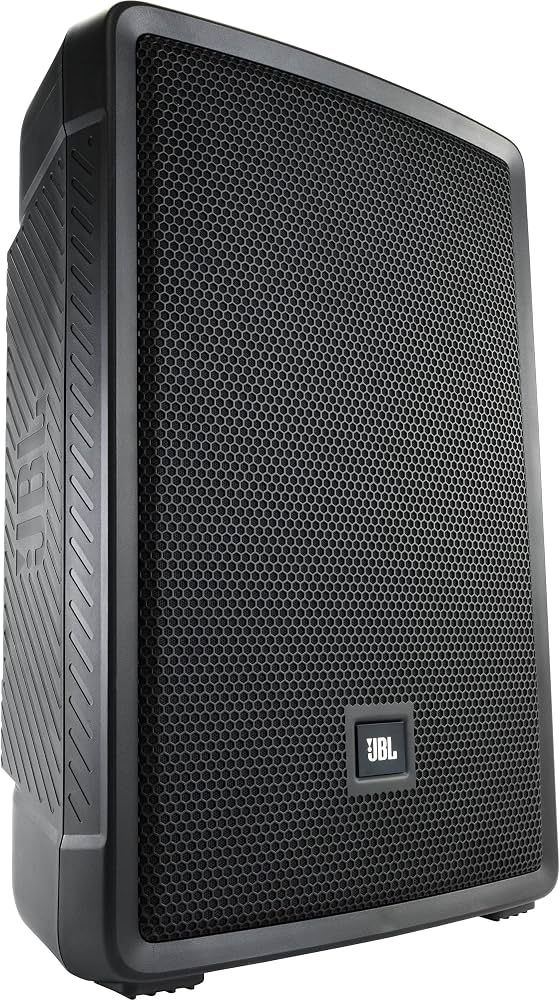
The jbl 12-Series Portable Speaker IRX112BT is a powered 12-inch two-way portable PA speaker designed for live sound, mobile DJs, presenters, musicians, and event hosts who need dependable audio in a lightweight cabinet. It combines a 12-inch woofer, Bluetooth 5.0 streaming, two combo mic/line inputs, and JBL’s DSP-driven tuning tools to deliver clear output for speech, music, and small- to medium-sized venues. With a peak power rating of 1300 watts, a maximum SPL around 127 dB, and a frequency response of 53 Hz to 20 kHz, it offers solid headroom and balanced performance for portable professional use.
One of the biggest advantages of the jbl 12-Series Portable Speaker IRX112BT is its ease of setup. The built-in EQ presets, feedback suppression, and ducking mode help users get reliable results quickly, even without advanced audio knowledge. Its molded polypropylene enclosure and 35 mm pole socket also make it practical for frequent transport and stand mounting. The speaker weighs about 27.3 lb, which makes it portable enough for solo setup while still feeling durable on the job.
Typical pricing usually falls in the mid-range portable PA category, often around the high-$300s depending on retailer, promotions, and region. Availability is generally strong through pro-audio retailers, music stores, and online marketplaces, though stock can vary by market. For buyers comparing powered PA speakers, the IRX112BT stands out as a value-focused option for users who want Bluetooth playback, vocal-friendly inputs, and a simple all-in-one speaker solution.
Troubleshooting the JBL IRX112BT: Common Problems and Fixes
If the speaker will not power on, check the IEC power cable, wall outlet, and power switch first. If sound is weak or distorted, lower the input gain, verify the source level, and try a different cable or input channel. For Bluetooth issues, re-pair the device, move closer to the speaker, and make sure no other paired device is interfering with the connection. If feedback occurs, reduce microphone gain, reposition the speaker in front of the microphones, and use the built-in feedback suppression feature.
Common error-style issues are usually operational rather than numeric. Flashing indicators, no audio, or clipping typically point to gain staging problems, muted source devices, or overloaded inputs rather than a specific fault code. To prevent problems, avoid running the system at maximum gain for long periods, keep vents and connectors clean, and store the unit in a dry environment away from moisture and impact.
Warranty coverage for JBL professional loudspeaker products commonly includes long-term limited protection, with enclosure and product coverage typically separated from amplifier coverage. For service questions, contact JBL Professional support through the official JBL Professional website or the retailer where the product was purchased. If additional help is needed, authorized service centers and dealer support are the best options for repair, parts, and warranty verification.
Pros and Cons of the JBL IRX112BT Powered 12-Inch Speaker
Pros
- Strong value for money for a powered Bluetooth PA speaker with professional features.
- Lightweight, portable design makes it practical for DJs, presenters, churches, and rehearsal spaces.
- Two combo mic/line inputs plus XLR pass-thru output support flexible live-sound setups.
- Bluetooth 5.0 streaming is convenient for break music, backing tracks, and simple playback.
- Built-in DSP presets, feedback suppression, and ducking simplify setup for non-technical users.
Cons
- No built-in battery, so AC power is required for every use.
- Not weatherproof, which limits outdoor use in rain or damp conditions.
- Best performance is in small to medium venues, so larger events may need a subwoofer or extra tops.
- Compared with premium alternatives from higher-end PA lines, it offers fewer advanced networking and tuning features.
For most buyers, the jbl 12-Series Portable Speaker IRX112BT delivers excellent performance per dollar, especially when compared with similarly priced portable powered speakers that lack Bluetooth, useful DSP presets, or JBL’s established pro-audio reputation.
Customer Reviews of the JBL IRX112BT: Ratings, Praise, and Complaints
Customer feedback is generally positive, with many users giving the speaker around 4 to 5 stars for sound clarity, easy setup, and Bluetooth convenience. Buyers frequently praise the clean vocal reproduction, solid low-end output for a 12-inch cabinet, and the fact that it feels easy to transport for gigs and rehearsals. One common compliment is that it offers “big sound in a manageable size,” which makes it attractive for mobile performers.
Common complaints usually focus on the lack of a built-in battery and the need for mains power at every event. Some users also mention that Bluetooth is convenient for playback but not ideal for highly latency-sensitive performance use. Overall, the speaker is often recommended for DJs, small venue owners, worship teams, and solo performers who want a dependable powered PA speaker with modern connectivity. Buyers looking for a battery-powered or weather-resistant model may want to compare it with other portable PA alternatives before purchasing.
Faqs
How do I set up jbl 12-Series Portable Speaker IRX112BT for the first time?
Why is my jbl 12-Series Portable Speaker IRX112BT not pairing over Bluetooth?
What audio devices are compatible with jbl 12-Series Portable Speaker IRX112BT?
How can I reduce feedback and distortion when using jbl 12-Series Portable Speaker IRX112BT?
What is the best way to optimize sound quality on jbl 12-Series Portable Speaker IRX112BT?
How do I troubleshoot low volume on jbl 12-Series Portable Speaker IRX112BT?
How should I clean and maintain jbl 12-Series Portable Speaker IRX112BT for long-term use?
Can jbl 12-Series Portable Speaker IRX112BT be used for both indoor events and outdoor gatherings?
More jbl manuals
Leave a Comment