
Jbl 2.0 Soundbar User Manual
Content
JBL 2.0 Soundbar Review and Product Manual
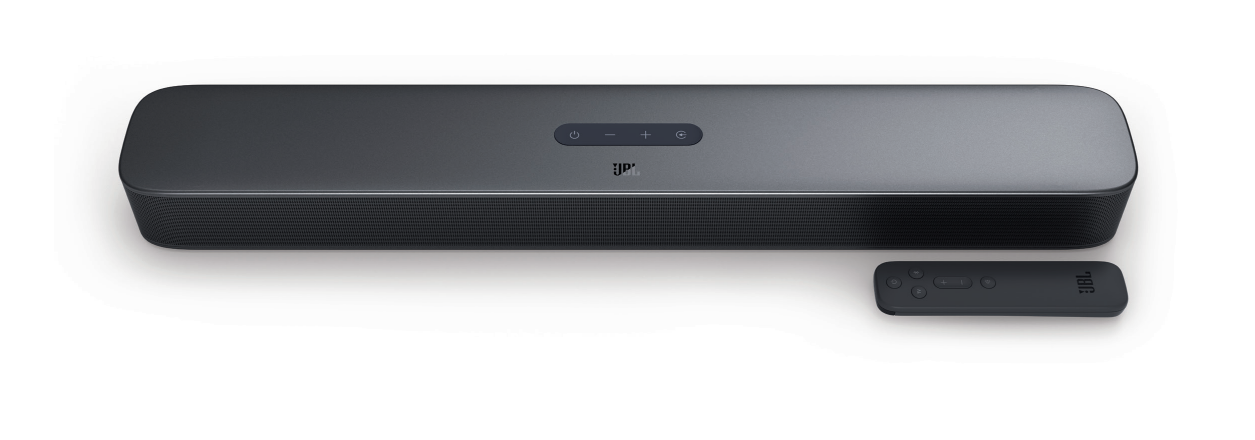
The JBL 2.0 Soundbar is a compact, easy-to-use home audio upgrade designed for users who want better TV sound without the complexity of a full surround system. Built as a 2.0-channel soundbar, it focuses on clear dialogue, punchy everyday audio, and simple setup for bedrooms, small living rooms, apartments, and secondary TVs. The JBL 2.0 Soundbar is especially appealing to viewers who stream movies, watch sports, or play casual console games and want a cleaner, more immersive sound than built-in TV speakers can deliver.
Key benefits include wireless Bluetooth streaming, HDMI ARC support on many variants, optical connectivity, and a slim all-in-one design that fits easily under most televisions. Depending on the version, power output is typically around 80W, with a frequency response in the 70Hz to 20kHz range, which gives it a balanced sound profile for speech, podcasts, and everyday entertainment. Some JBL 2.0 Soundbar models also include USB playback support, though availability can vary by region. With its minimalist design and straightforward controls, it is a strong choice for users who want a simple soundbar for TV with reliable brand support.
Estimated pricing usually falls in the budget-to-midrange category, often around $90 to $275 depending on the retailer, model variant, and market availability. In 2026, it remains widely available through major electronics stores, online marketplaces, and audio retailers. For shoppers searching for a compact JBL soundbar for TV, this model offers a practical mix of convenience, brand trust, and value.
Pros & Cons of the JBL 2.0 Soundbar
Pros
- Simple setup: HDMI ARC and optical input make it easy to connect to most modern TVs with minimal configuration.
- Compact design: The slim footprint works well in small rooms, dorms, and apartment setups.
- Clear dialogue: Voices are typically easy to hear, making it a good TV soundbar for news, streaming, and casual viewing.
- Bluetooth streaming: Wireless audio playback from phones and tablets adds convenience for music and podcasts.
- Good value for money: It is often cheaper than larger 2.1 soundbars and soundbar systems with subwoofers.
Cons
- Limited bass: As a 2.0-channel system without a dedicated subwoofer, low-end impact is modest.
- Basic feature set: Compared with premium alternatives, it lacks advanced room calibration, app control, and multi-driver surround processing.
- Best for small spaces: In larger rooms, the sound may feel less expansive than a 2.1 soundbar or a Dolby Atmos model.
- Alternative options: If deeper bass matters, a 2.1 soundbar from JBL or competitors like Sony and Vizio may be a better fit.
Overall, the JBL 2.0 Soundbar delivers solid value for users who prioritize simplicity and clear TV audio over cinematic bass-heavy performance.
Customer Reviews and Real-World Feedback
Customer feedback for the JBL 2.0 Soundbar is generally positive, with many buyers rating it around 4 out of 5 stars for ease of use and sound improvement over TV speakers. Users frequently praise the crisp dialogue, compact size, and quick Bluetooth pairing. A common testimonial theme is that it “makes TV speech much easier to hear” and “fits perfectly under a small television.”
Common complaints usually focus on the bass response and the limited number of inputs. Some users also note that it is not the best choice for bass-heavy movies or large rooms. For buyers who want a straightforward upgrade for streaming and everyday TV viewing, the JBL 2.0 Soundbar is often recommended. If the goal is stronger home theater performance, many reviewers suggest moving up to a soundbar with a separate subwoofer.
- Average user sentiment: 4/5 stars
- Most praised feature: Clear voices and easy setup
- Most mentioned issue: Thin bass output
- Best for: Budget-conscious buyers, small rooms, and casual TV listeners
JBL 2.0 Soundbar Specifications at a Glance
- Channel configuration: 2.0-channel soundbar
- Power output: Up to 80W depending on the model
- Connectivity: Bluetooth, optical input, HDMI ARC on supported versions
- Frequency response: Approximately 70Hz to 20kHz
- Design: Slim, wall-mount-friendly, compact all-in-one format
- Best use cases: TV audio, streaming, music playback, small-room entertainment
Who Should Buy the JBL 2.0 Soundbar?
The JBL 2.0 Soundbar is a smart purchase for anyone who wants an affordable soundbar for TV with better clarity than built-in speakers. It is especially suitable for users who watch a lot of dialogue-driven content, use Bluetooth for music, or need a compact audio solution for a smaller room. Buyers who want deeper bass, wider soundstage, or advanced surround features should consider a larger JBL soundbar or a 2.1-channel alternative.
Final Verdict
If you want a practical, easy-to-install upgrade, the JBL 2.0 Soundbar is a dependable option that balances sound quality, convenience, and value. It is not built for blockbuster-level bass, but for everyday TV use it remains one of the more attractive choices in the compact soundbar category.
Faqs
How do I set up the jbl 2.0 Soundbar for the first time?
Why is my jbl 2.0 Soundbar not producing any sound from the TV?
What devices are compatible with the jbl 2.0 Soundbar?
How can I improve bass and overall sound quality on the jbl 2.0 Soundbar?
Does the jbl 2.0 Soundbar support Bluetooth pairing, and how do I connect it?
Why does the audio on my jbl 2.0 Soundbar lag behind the picture?
How do I clean and maintain a jbl 2.0 Soundbar safely?
What should I check if my jbl 2.0 Soundbar keeps disconnecting or cutting out?
Leave a Comment