
Setup: Jbl Quantum 50C Headset User Manual
Content
JBL Quantum 50C Headset
Introduction
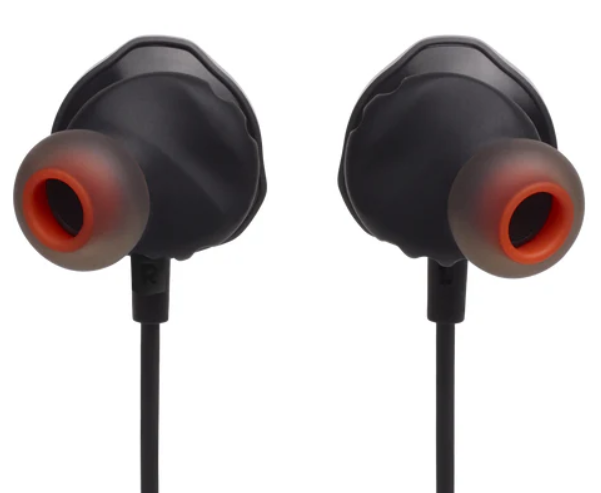
The JBL Quantum 50C Headset is a wired in-ear gaming headset designed to deliver immersive audio experiences for gamers across multiple platforms. Equipped with 8.6mm dynamic drivers and featuring JBL QuantumSURROUND sound technology, this headset ensures precise spatial awareness to help players detect direction and distance of in-game sounds with crystal-clear clarity. Its Hi-Res certified JBL QuantumSOUND Signature delivers rich bass and detailed highs, making it ideal for competitive gaming and casual play alike.
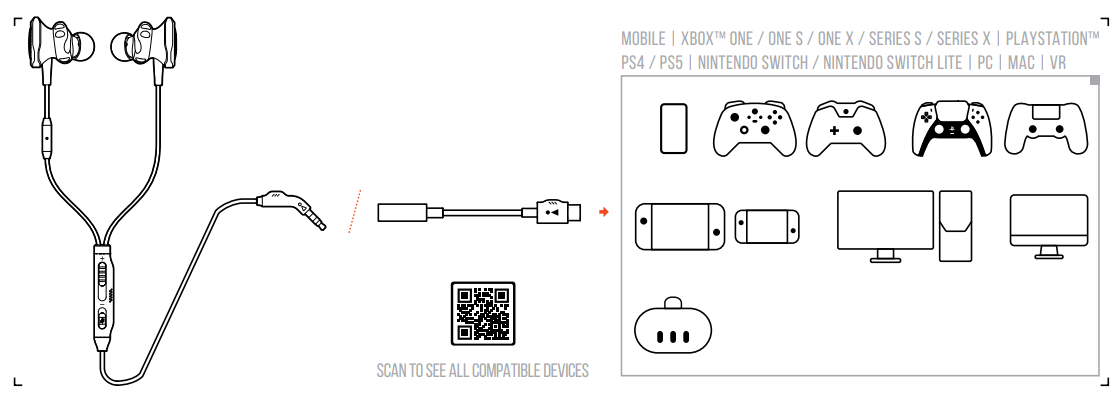
Targeted at mobile and PC gamers seeking a lightweight and durable headset, the Quantum 50C offers excellent comfort through its patented Twistlock™ technology combined with ultra-soft silicone ear tips available in three sizes (S, M, L). With a USB-C adapter, it guarantees broad compatibility,, including PC, Mac, Xbox Series X|S, PlayStation 4/5, Nintendo Switch, mobile devices, and VR platforms. Inline controls provide effortless volume adjustment, mic mute, and call management, enhancing user convenience during intense gaming sessions.
The headset is priced competitively, generally ranging from $40 to $60 depending on the retailer and region. It is widely available through official JBL outlets, authorized online stores, and major electronics retailers. The JBL Quantum 50C stands out as a value-for-money option for gamers who prioritize sound quality, comfort, and multi-platform versatility in a compact wired form factor.
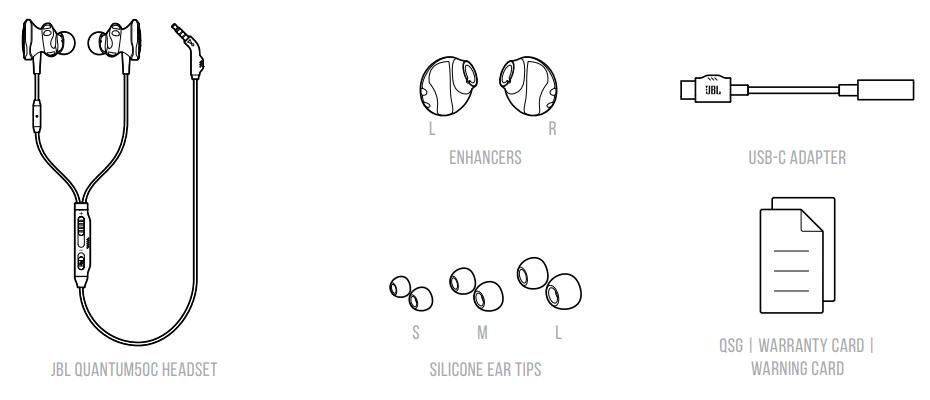
WHAT'S IN THE BOX
OVERVIEW
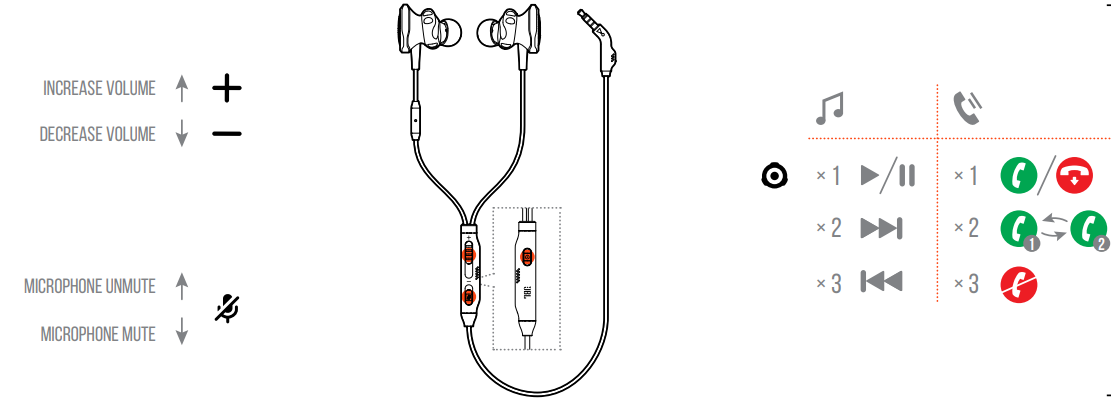
- Ear tip
- Microphone
- CABLE LENGTH ADJUSTER
- Volume Control
- Microphone Mute / unMute 06* Multi-Function button 07 CABLE MANAGEMENT CHANNEL
Controls available on the Multi-Function button may vary for different mobile phones.
Button Command
SETUP
HOW TO WEAR
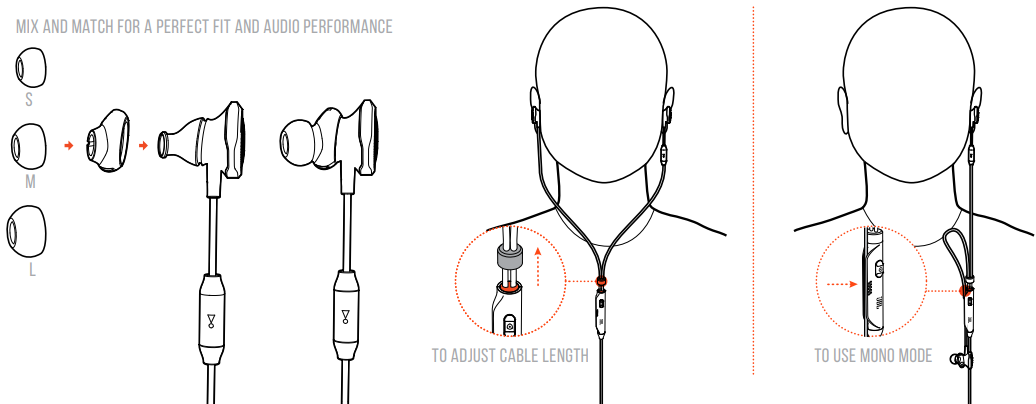
TECH SPEC
- Driver size: 8.6 mm / 0.3" Dynamic Drivers
- Weight: 21.5 g / 0.05 lbs
- Frequency response: 20 Hz - 40 kHz
- Microphone frequency response: 100 Hz - 10 kHz
- Max input power: 5 mW
- Impedance: 16 ohms
- Sensitivity: 97 dB SPL @ 1 kHz / 1 mW
- Microphone sensitivity: -41 dBV @ 1 kHz / Pa
Troubleshooting Common Issues with JBL Quantum 50C Headset
Despite its durable design, users may encounter occasional problems with the JBL Quantum 50C headset. Common issues include:
- No Sound or Low Audio Output: Ensure that the USB-C connection is fully inserted and compatible with your device. Check the device's audio settings to confirm the headset is selected as the output device.
- Microphone Not Working: Verify the inline mic mute switch is toggled off. Confirm permissions for microphone access on your gaming platform or PC.
- Distorted or Crackling Sound: Inspect cables and connectors for damage. Avoid excessive bending or pulling. Try different USB-C ports or use an adapter if necessary.
- Connectivity Issues: USB-C compatibility varies; check device firmware updates and ensure your device supports audio over USB-C.
There are no specific error codes associated with the headset, but persistent problems may be resolved by restarting your device or reinstalling audio drivers. Preventive care includes proper storage, avoiding water exposure, and gentle handling of cables.
The JBL Quantum 50C includes a limited warranty, typically covering manufacturing defects for one year. For support, users can contact JBL customer service via the official website or phone at HARMAN International Industries, 8500 Balboa Boulevard, Northridge, CA 91329, USA, or visit www.jbl.com for detailed help and warranty registration.
Pros & Cons of JBL Quantum 50C Wired Gaming Headset
- Pros:
- Exceptional sound quality with JBL QuantumSURROUND and Hi-Res certified QuantumSOUND Signature for immersive gaming audio.
- Comfortable, secure fit using Twistlock™ technology and multiple silicone ear tip sizes ideal for prolonged gaming sessions.
- Wide compatibility with USB-C devices across PC, consoles, and mobile platforms.
- Intuitive inline controls, including volume slider, mic mute, and multifunction button for seamless in-game and call management.
- Lightweight design (21.5g) enhances portability without sacrificing durability.
- Cons:
- USB-C connection limits compatibility with older devices lacking USB-C ports, unless additional adapters are used.
- Wired design may restrict movement compared to wireless headsets, which some users may find less convenient.
- Absence of active noise cancellation, which some competing models offer at a similar price.
- Inline mic sensitivity may pick up background noise in loud environments despite being Discord-certified for clarity.
Overall, the JBL Quantum 50C headset offers excellent value for money, especially for gamers who prioritize sound fidelity and comfort. Compared to alternatives like the HyperX Cloud Earbuds or Razer Hammerhead USB-C, the Quantum 50C excels in surround sound immersion and inline control features.
Customer Reviews and Feedback on JBL Quantum 50C Headset
The JBL Quantum 50C Headset generally receives positive reviews from users appreciating its immersive soundstage and comfortable fit. Many gamers highlight the clarity of the JBL QuantumSURROUND sound and how it enhances gameplay awareness, particularly in competitive titles.
Users frequently praise the inline volume and mic mute controls for ease of use during gaming sessions. The Twistlock™ technology and multiple ear tip sizes are also noted for providing a secure, fatigue-free fit over hours of use.
Common complaints focus on the wired USB-C connection, which some find restrictive or incompatible with certain devices without adapters. A few reviews mention minor microphone sensitivity issues in noisy environments, but generally acknowledge clear voice pickup for team communication.
Star ratings typically average between 4 and 4.5 out of 5 stars, with recommendations for mobile gamers, streamers, and multi-platform users looking for a reliable, affordable gaming headset with excellent sound quality.
Faqs
How do I set up the JBL Quantum 50C Headset with my PC or mobile device?
What should I do if my JBL Quantum 50C Headset microphone is not picking up my voice clearly?
Can the JBL Quantum 50C Headset be used with PlayStation 5 and Nintendo Switch?
What are the main features that enhance comfort during long gaming sessions with the JBL Quantum 50C Headset?
How do I optimize sound performance on the JBL Quantum 50C Headset for competitive gaming?
How do I clean and maintain my JBL Quantum 50C Headset to ensure longevity?
What troubleshooting steps should I follow if the JBL Quantum 50C Headset is not recognized by my device?
Does the JBL Quantum 50C Headset support inline controls for volume and mic mute?
More jbl manuals
- Pairing & Setup: Jbl Tour Pro 3 Earphones User Guide
- Usage & Pairing: Jbl Live Buds 3 Instruction Guide
- Pairing & Setup: Jbl Tune Beam 2 Earphones User Guide
- Usage & Pairing: Jbl Live Beam 3 Earphones Usage Guide
- Pairing & Setup: Jbl Tune Buds 2 Earphones Pairing Instructions
- Pairing & Setup: Jbl Junior 470NC Headphones User Guide
Leave a Comment