
Usage & Pairing: Jbl Live Buds 3 Instruction Guide
Content
JBL Live Buds 3
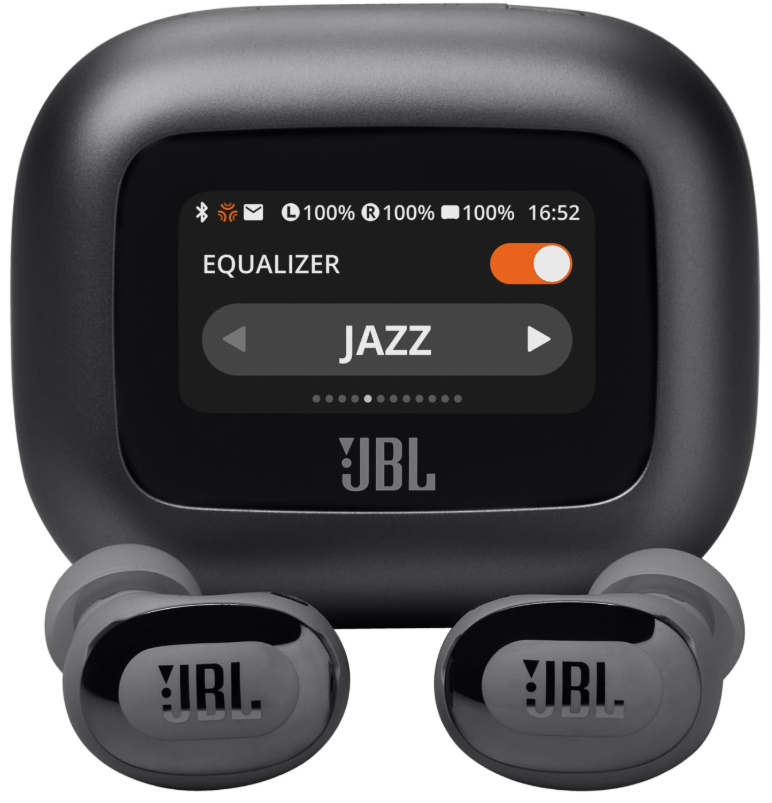
Introduction: Discover True Wireless Freedom with JBL Live Buds 3
Welcome to the world of immersive audio with the JBL Live Buds 3, true wireless noise-canceling earbuds that deliver Hi-Res Audio and JBL’s legendary signature sound. Designed for music lovers, commuters, and fitness enthusiasts alike, these premium earbuds combine cutting-edge technology with intuitive features for a seamless listening experience.
The JBL Live Buds 3 stand out with their true adaptive noise cancellation, which dynamically adjusts to your environment, ensuring distraction-free listening whether you’re on a busy train, at the gym, or working from home. With up to 40 hours of total playback (10 hours in the buds, 30 in the case) and wireless charging support, these earbuds keep you connected all day without constant recharging. The IP55 rating means they’re water and dust-resistant, making them ideal for workouts and outdoor use..
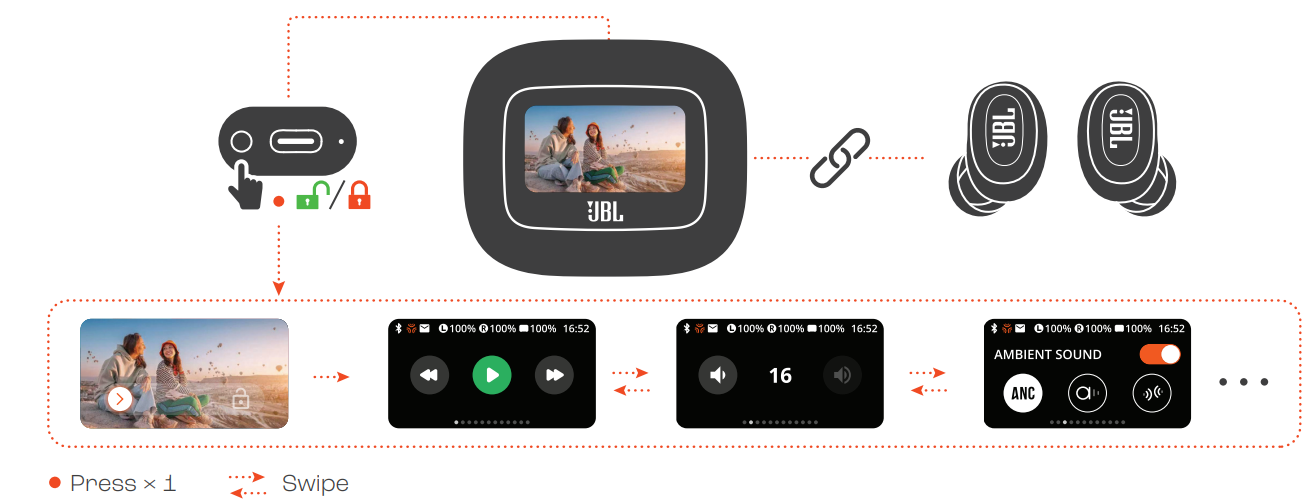
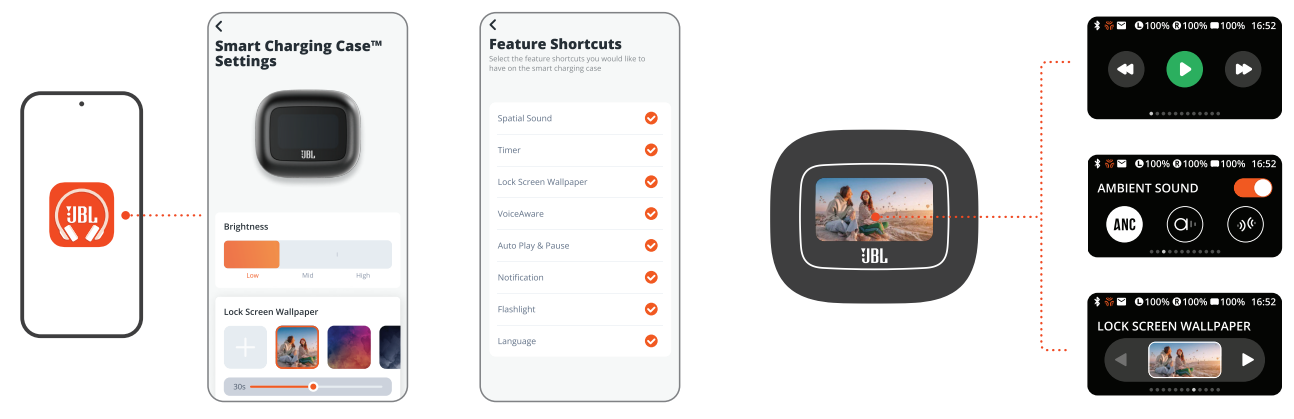
One of the most unique features is the Smart Charging Case™ with a built-in touchscreen, allowing you to adjust volume, EQ, take calls, and even customize the screensaver—all without opening your phone or the JBL app.p. The case also supports Qi wireless charging and includes a lanyard loop for portability. Multi-point Bluetooth 5.3 connectivity lets you pair with two devices at once, and Google Fast Pair ensures quick setup with Android devices. Six built-in microphones with customizable settings ensure crystal-clear calls, even in noisy environments.
Targeted at users seeking premium sound, robust features, and convenience, the JBL Live Buds 3 are priced around $199–$230, positioning them as a competitive choice in the true wireless earbuds market[5][8]. Available through major electronics retailers and the official JBL website, they offer a compelling blend of style, functionality, and value.
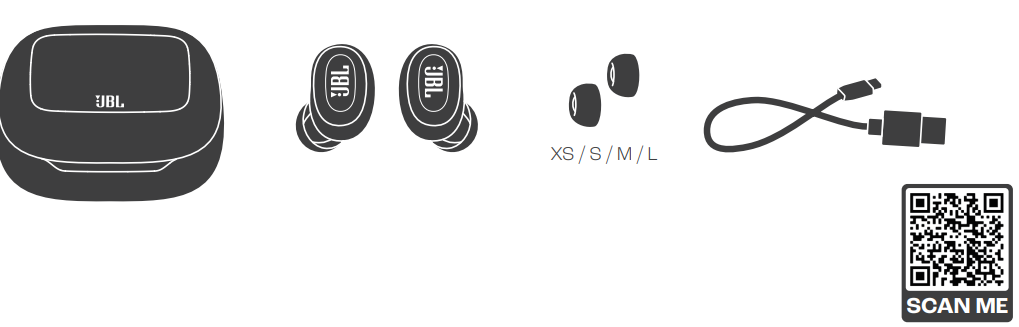
WHAT’S IN THE BOX
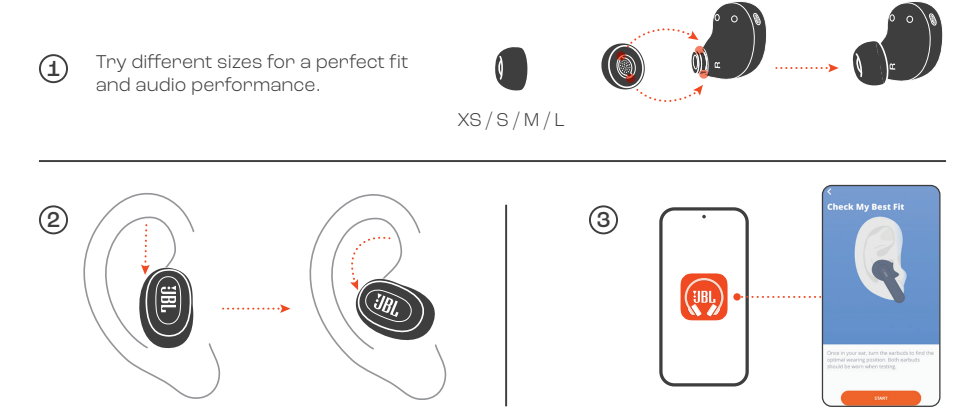
HOW TO WEAR
FIRST TIME USE
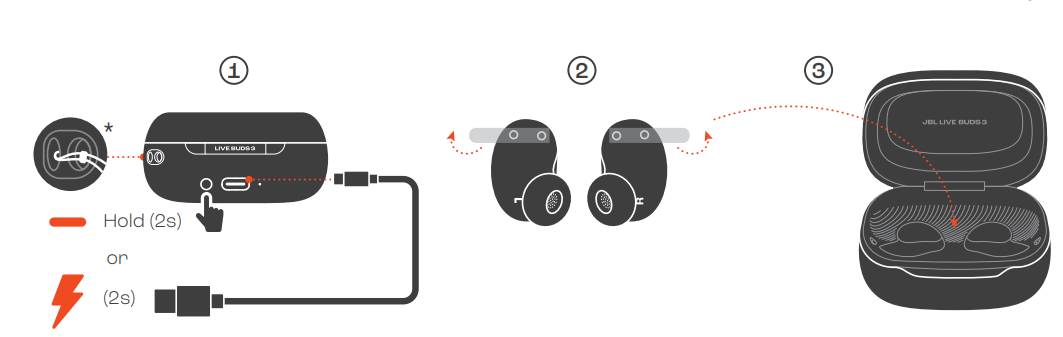
POWER ON & CONNECT
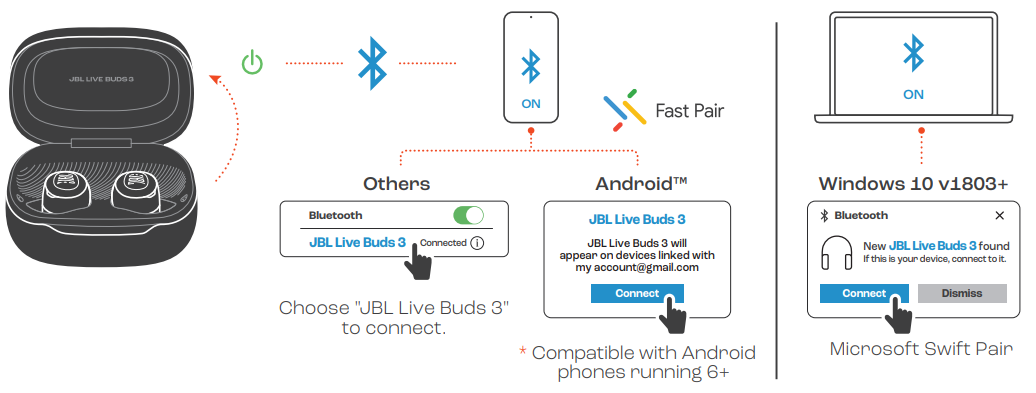
DUAL CONNECT + SYNC
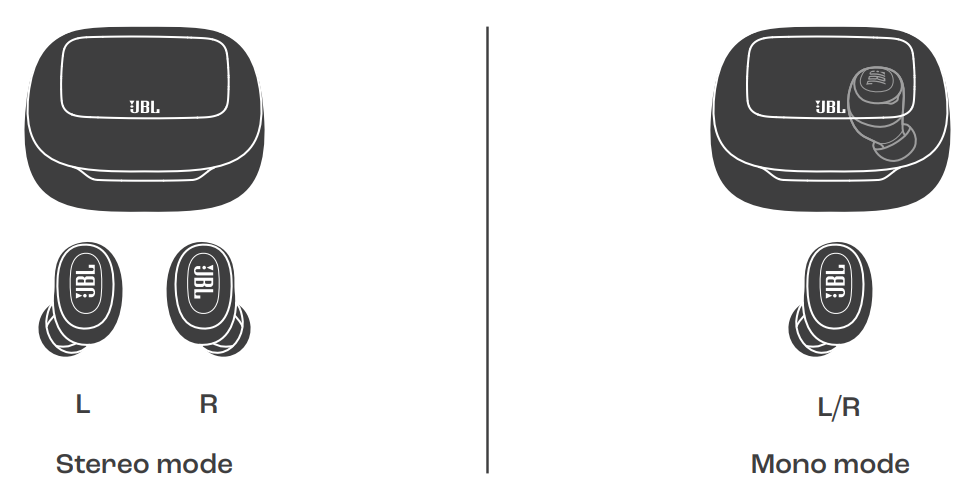
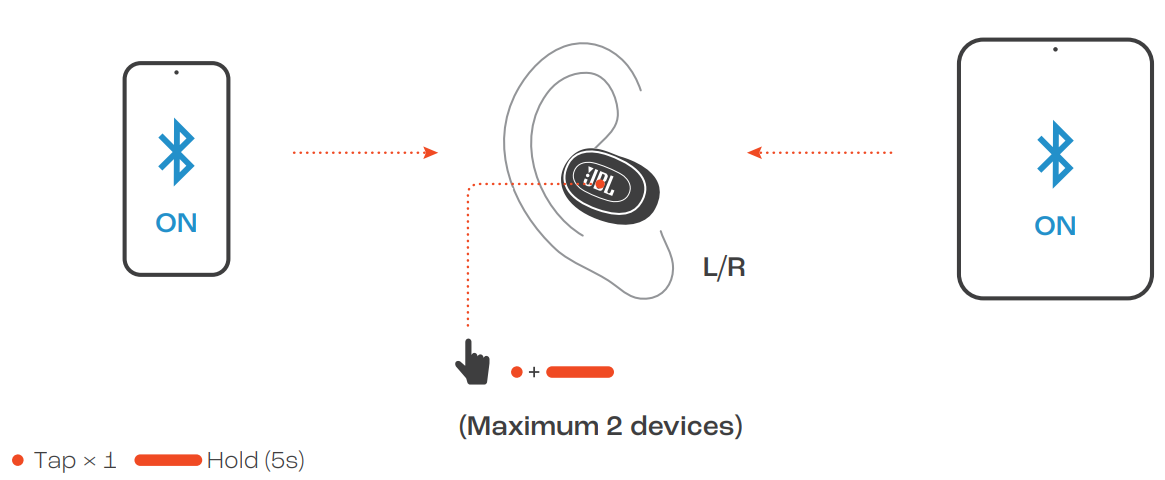
MULTI-POINT CONNECTION
CONTROLS
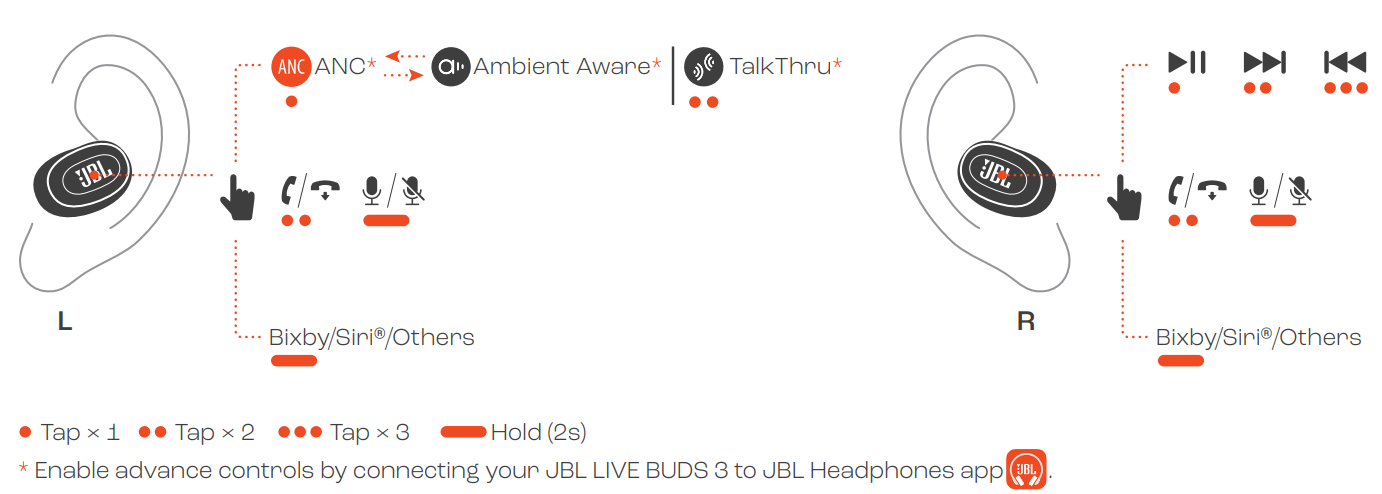
CONTROLS
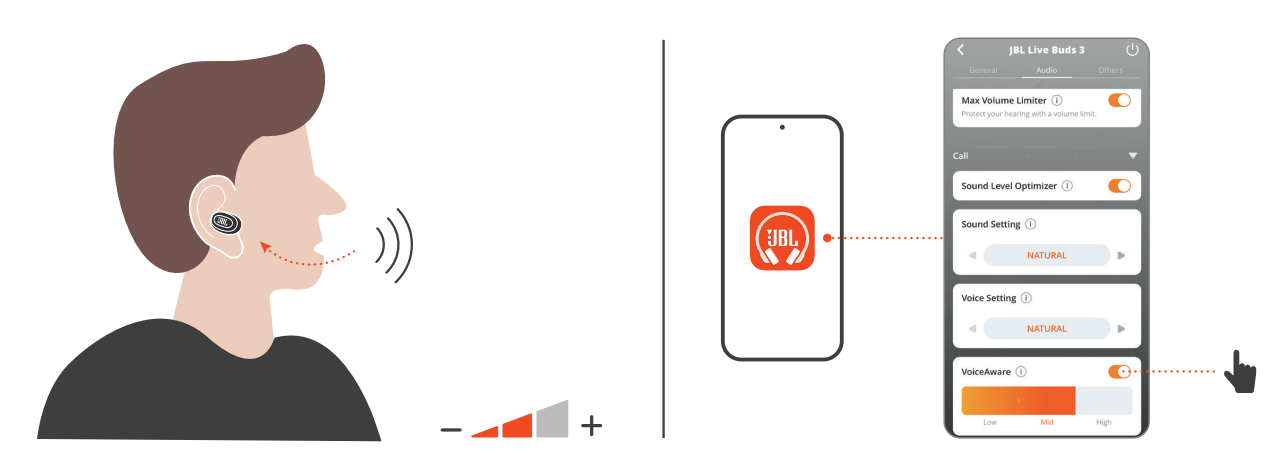
VOICEAWARE
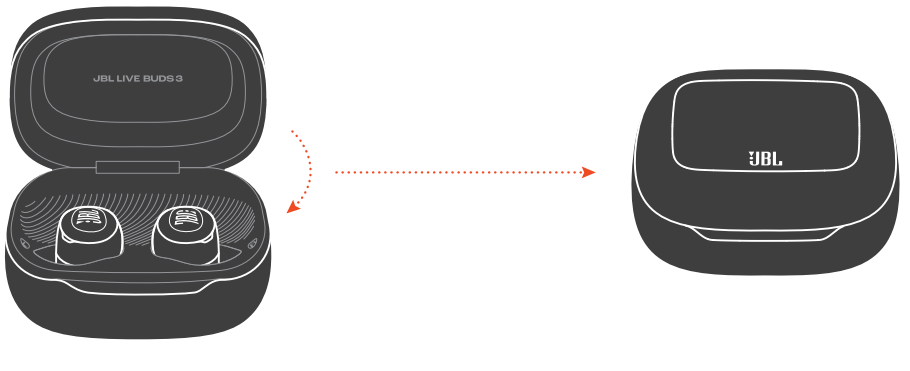
POWER OFF
SMART CHARGING CASETM SETTINGS
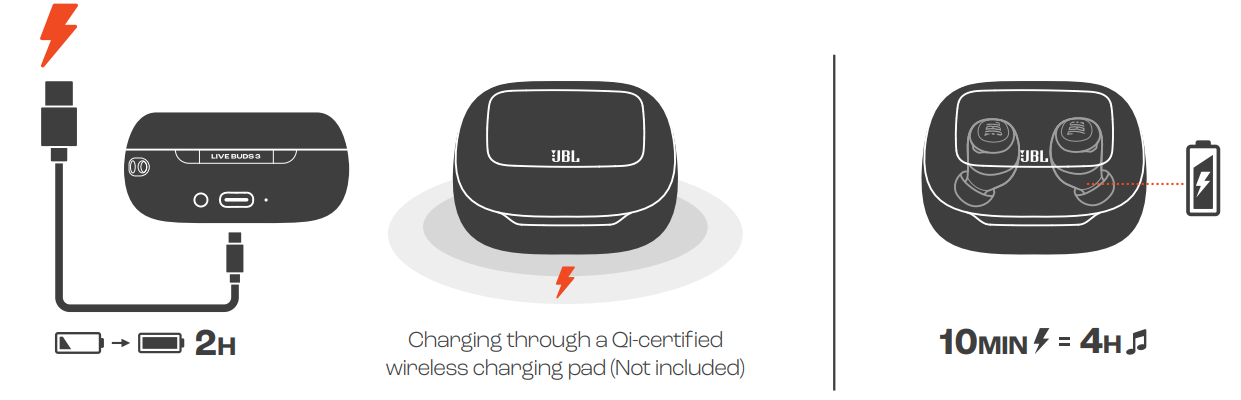
CHARGING
LED BEHAVIORS

TECH SPEC
- Model (Earbud): LIVE BUDS 3
- (Charging case): LIVE BUDS 3C
- Driver size: 10 mm/ 0.39" Dynamic Driver
- Power supply: 5V 1A
- Earbud: 4.8 g per pc (9.6 g combined)/0.01 lbs per pc (0.02 lbs combined)
- Charging case: 69.8 g/ 0.15 lbs
- Earbud battery type: Lithium-ion battery (60 mAh/ 3.85 V)
- Charging case battery type: Lithium-ion battery (620 mAh/ 3.8 V)
- Charging time: 2 hrs from em.pty. Music playtime with BT on and
- ANC off: Up to 10 hrs Music playtime with BT on and
- ANC on: Up to 8 hrs Music playtime with BT on and
- True Adaptive ANC on: Up to 7 hrs
- Talk time with ANC off: Up to 4.5 hrs
- Talk time with ANC on: Up to 5.5 hrs
- Frequency response: 20 Hz – 40 kHz
- Impedance: 16 ohms
- Sensitivity: 106 dB SPL@1 kHz
- Maximum SPL: 96 dBA (EN50332)
- Microphone sensitivity: -38 dBV/Pa@1 kHzBluetooth version (Earbud): 5.3Bluetooth version (Charging case): 5.1
- Bluetooth profile version: A2DP V1.4, AVRCP V1.6.2, HFP V1.8 Bluetooth transmitter frequency range: 2.4 GHz - 2.4835 GHz Bluetooth transmitter power
- (Earbud): <10 dBm (EIRP)
- Bluetooth transmitter power (Charging case): <7 dBm (EIRP)
- Bluetooth transmitter modulation
- (Earbud): GFSK, π/4-DQPSK, 8DPSK Bluetooth transmitter modulation
- (Charging case): GFSK
- Maximum operation temperature: 45 °C
Troubleshooting: Quick Fixes for Common JBL Live Buds 3 Issues
Even the best earbuds can encounter hiccups. Here are solutions to common JBL Live Buds 3 problems, along with preventive tips and support options.
Common Problems & Solutions
- Earbuds Not Pairing: Ensure Bluetooth is enabled on your device. Reset the earbuds by placing them in the case, closing the lid, and holding the case button for 10 seconds. Try Google Fast Pair for Android devices[3].
- Poor Call Quality: Check that all six microphones are clean and unobstructed. Adjust mic settings in the JBL Headphones app for optimal performance[1].
- Battery Drains Quickly: Disable active noise cancellation (ANC) when not needed. Ensure the case is fully charged and store earbuds in the case when not in use for optimal battery life[1].
- Audio Dropouts: Keep your paired device within 10 meters. Avoid interference from other wireless devices and update the earbuds’ firmware via the JBL app.
- Touch Controls Unresponsive: Clean the earbuds’ touch surfaces. Restart the earbuds by placing them in the case and removing them again.
Error Codes & Fixes
While specific error codes are rare, most issues can be resolved by resetting the earbuds or updating the firmware. Refer to the JBL Headphones app for diagnostic messages or consult the manual included in the box[3].
Preventive Measures
- Regularly clean earbuds and charging contacts with a dry, soft cloth.
- Avoid exposing the earbuds to extreme temperatures or moisture beyond the IP55 rating.
- Keep firmware updated for the latest features and bug fixes.
Warranty & Support
The JBL Live Buds 3 come with a standard manufacturer’s warranty. For technical support, visit the JBL website or contact customer service via the contact information provided in your product packaging. Always keep your proof of purchase for warranty claims.
For additional help, consult the JBL Headphones app, available on iOS and Android, or reach out to JBL customer support directly for personalized assistance.
Pros & Cons: Balanced Assessment of JBL Live Buds 3
Strengths
- Superior Sound Quality: Hi-Res Audio and 10mm dynamic drivers deliver rich, clear sound with powerful bass and crisp highs, a hallmark of JBL’s signature sound[3][4].
- Advanced Noise Cancellation: True adaptive ANC effectively blocks ambient noise, enhancing immersion in music, calls, and movies[1][4].
- Innovative Smart Case: The touchscreen charging case offers app-free control over music, calls, and settings, a standout feature in the market[1][5].
- Long Battery Life: Up to 40 hours total playback with wireless charging support ensures all-day use without frequent recharging[1][2].
- Durability: IP55 water and dust resistance make these earbuds suitable for workouts and outdoor activities[3].
- Multi-Point Connectivity: Seamlessly switch between two devices, ideal for users juggling work and personal gadgets[3].
Weaknesses
- Soundstage: While imaging is accurate, the soundstage is somewhat narrow compared to some competitors[4].
- Case Bulk: The touchscreen case adds slight bulk compared to more compact alternatives.
- Price: Positioned at a premium price point, which may be a consideration for budget-conscious buyers[5][8].
- Ambient Sound Bleed: Some ambient noise may still be audible in very loud environments despite ANC[4].
Value for Money
The JBL Live Buds 3 offer excellent value for users seeking top-tier features, durability, and innovative controls. While pricier than entry-level options, their performance and unique case functionality justify the investment for audiophiles and tech enthusiasts. Compared to alternatives like the Sony WF-1000XM4 or Apple AirPods Pro, the Live Buds 3 stand out for their smart case and customizable sound, though soundstage and brand ecosystem may vary.
Customer Reviews: Real User Experiences with JBL Live Buds 3
User feedback for the JBL Live Buds 3 highlights several consistent themes. Many praise the earbuds for their “clean, crisp, and vibrant” sound, noting a significant improvement over previous JBL models[4]. The active noise cancellation receives positive remarks for effectively blocking out distractions, though a few users mention minor ambient sound bleed in extremely noisy settings[4].
The innovative touchscreen case is frequently cited as a major selling point, with users enjoying the convenience of controlling music, calls, and settings without reaching for their phone[5]. Battery life and wireless charging are also well-received, with many noting the earbuds easily last through long commutes or workdays[1][2].
Common complaints include the slightly bulky case and a soundstage that could be wider for immersive listening. A few users have experienced occasional connectivity hiccups, though these are generally resolved with firmware updates or resets.
Overall, the JBL Live Buds 3 earn strong ratings (often 4 to 4.5 stars out of 5) for their combination of sound quality, features, and durability. They are recommended for users who value innovation, robust ANC, and all-day battery life, especially if the unique case features appeal to you. For those prioritizing a wider soundstage or tighter integration with a specific brand ecosystem, it’s worth comparing alternatives.
Faqs
How do I enter pairing mode on my jbl Live Buds 3 to connect to a new device?
Can I use jbl Live Buds 3 with both Android and iOS devices, and are there any special setup steps?
How do I reset my jbl Live Buds 3 to factory settings if I’m experiencing connectivity issues?
What should I do if one earbud of my jbl Live Buds 3 is not working or has no sound?
How can I customize the touch controls and sound profiles on my jbl Live Buds 3?
Are jbl Live Buds 3 sweat or water-resistant, and how should I clean and maintain them?
How does the Multi-Point connection feature work on jbl Live Buds 3, and how do I set it up?
What is Adaptive Noise Cancelling on jbl Live Buds 3, and how can I adjust it for my environment?
More jbl manuals
- Setup: Jbl Quantum 50C Headset User Manual
- Usage & Pairing: Jbl Live Beam 3 Earphones Usage Guide
- Pairing & Setup: Jbl Tour Pro 3 Earphones User Guide
- Pairing & Setup: Jbl Junior 470NC Headphones User Guide
- Pairing & Setup: Jbl Tune Beam 2 Earphones User Guide
- Setup & Usage: Jbl Junior 320BT Headphones Usage Guide
Leave a Comment