
Pairing & Setup: Jbl Junior 470NC Headphones User Guide
Content
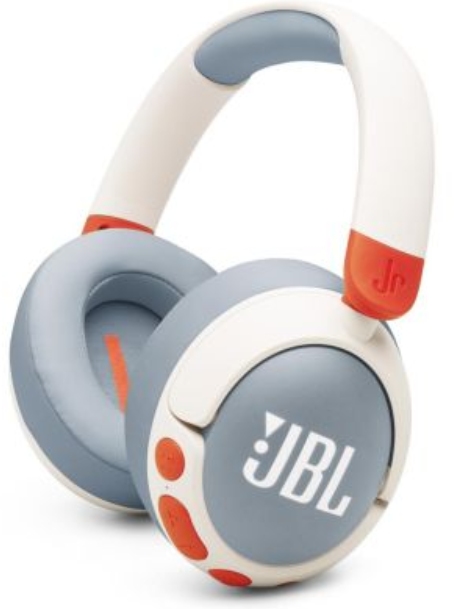
JBL Junior 470NC Headphones
Introduction
The JBL Junior 470NC Headphones are wireless, over-ear headphones specifically engineered for children, combining superior sound quality with safety features that protect young ears. These headphones deliver JBL's signature Pure Bass sound but are designed never to exceed 85dB, ensuring a safe listening volume ideal for kids. They feature advanced Active Noise Cancelling (ANC) technology, which minimizes distracting ambient noise so children can enjoy clear audio in noisy environments without turning up the volume.
These headphones come with a built-in microphone for seamless communication, long-lasting battery life of up to 50 hours (with ANC off), and fast charging capabilities. Designed with kids in mind, they offer a comfortable fit with soft padding and durable, oversized controls that are easy for small hands to operate. The JBL Junior 470NC is available in multiple vibrant color options and includes a fun sticker set for personalization. With parental control features accessible via the JBL Headphones app, parents can set volume limits and monitor listening time to promote healthier audio habits.
Perfect for school, travel, gaming, or casual listening, the JBL Junior 470NC headphones provide a balanced blend of safety, comfort, and high-quality audio for children aged 6 and above. They are priced approximately between $65 to $90 USD and widely available through major retailers such as Target, Best Buy, and JBL's official online stores.
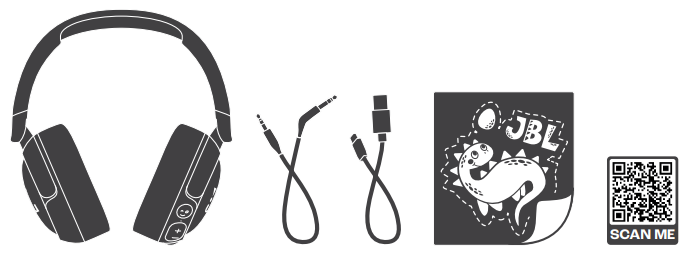
WHAT’S IN THE BOX
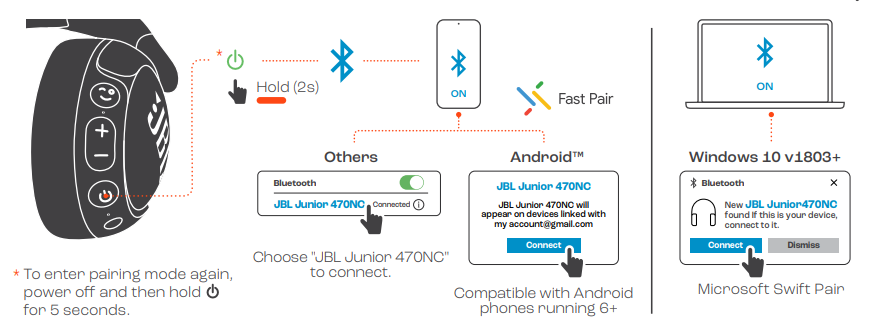
POWER ON & CONNECT
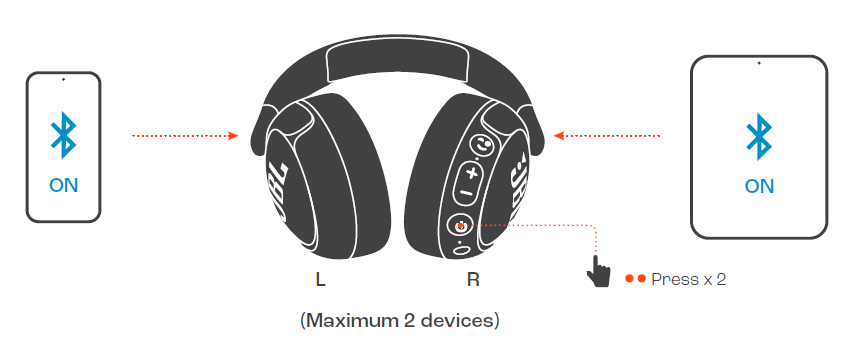
MULTI-POINT CONNECTION
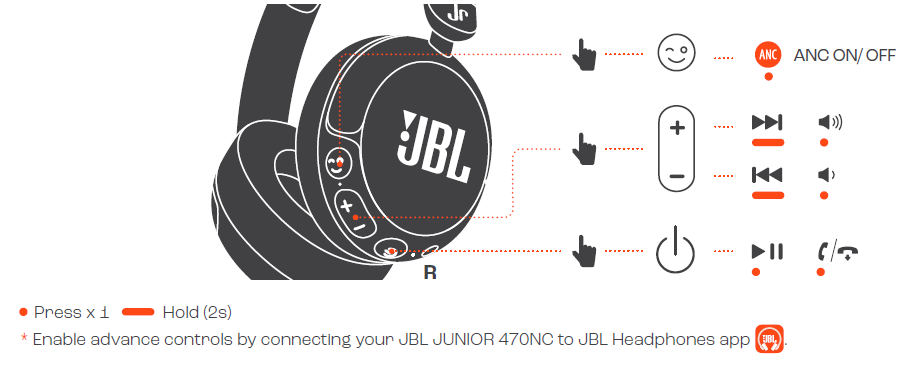
CONTROLS
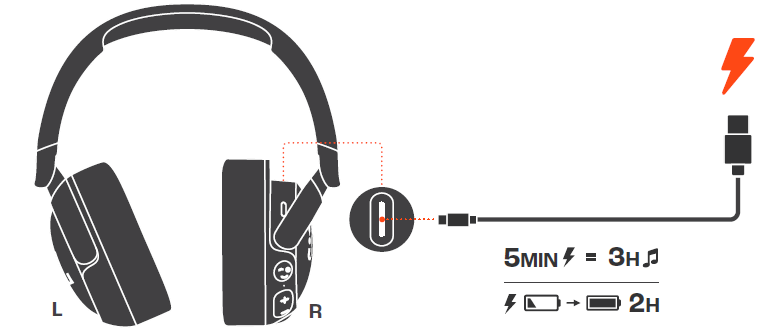
CHARGING
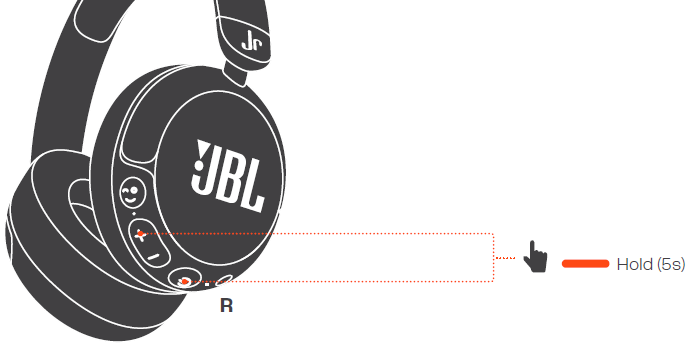
FACTORY RESET
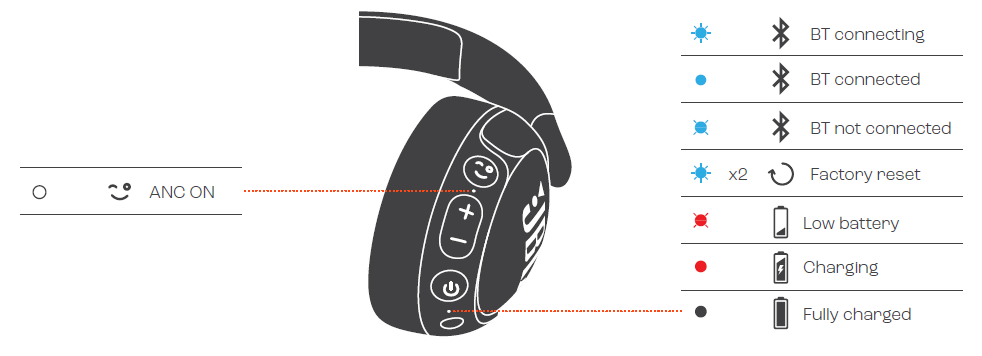
LED BEHAVIORS
TECH SPEC
- Model: JUNIOR 470NC
- Driver size: 32 mm/1.26" Dynamic Driver
- Power supply: 5.0 V 1.0 A
- Weight: 196 g/ 0.432 lbs
- Battery type: Lithium-ion battery (500 mAh / 3.7 V)
- Charging time: < 2 hrs from empty
- Music playtime with BT on and ANC off: Up to 50 hrs
- Music playtime with BT on and ANC on: Up to 34 hrs
- Talk time with ANC off: Up to 34 hrs
- Talk time with ANC on: Up to 25 hrs
- Frequency response (Passive): 20 Hz - 20 kHz
- Frequency response (Active): 20 Hz - 20 kHz
- Impedance: 35 ohms
- Sensitivity: 81 dB SPL@1 kHz
- Maximum SPL: 81 dB
- Microphone sensitivity: -37 dBFS/Pa@1 kHz
- Bluetooth version: 5.3
- Bluetooth profile version: A2DP V1.4, AVRCP V1.6.2, HFP V1.8
- Bluetooth transmitter frequency range: 2.4 GHz – 2.4835 GHz
- Bluetooth transmitter power: < 15 dBm (EIRP)
- Bluetooth transmitter modulation: GFSK, π/4 DQPSK
- Maximum operation temperature: 45°C
Troubleshooting for JBL Junior 470NC Headphones
If you encounter issues with your JBL Junior 470NC headphones, here are common problems and solutions to consider:
- No Sound or Low Volume: Ensure the volume limit is not set too low in the JBL Headphones app; check Bluetooth connection and pairing status. Restart the headphones and device.
- Active Noise Cancelling Not Working: Confirm ANC is enabled via the control buttons or app. Charge the headphones fully as ANC requires sufficient battery power.
- Bluetooth Pairing Issues: Reset Bluetooth on your device and headphones by turning them off and on. Clear previous pairings in the device Bluetooth settings and try reconnecting.
- Mic Not Working: Verify the mic is unmuted and test with another device. Check if app permissions for microphone access are granted.
- Error Codes: If you receive error codes or blinking LEDs, refer to the user manual for specific meanings. Typically, blinking red indicates low battery—charge immediately.
To prevent issues, avoid exposing the headphones to extreme temperatures above 45°C, moisture, or rough handling. Always use the provided USB-C cable for charging and do not attempt to disassemble the device.
The JBL Junior 470NC headphones come with a limited warranty covering manufacturing defects. For support, contact JBL customer service via their official website or consult the included user manual for detailed troubleshooting guidance.
Pros & Cons of JBL Junior 470NC Headphones
Pros
- Safe Volume Limiting: Maximum 85dB sound level protects children’s hearing without compromising sound quality.
- Active Noise Cancelling: Reduces background noise effectively, allowing quieter listening in noisy environments.
- Long Battery Life: Up to 50 hours of playback with ANC off, and fast charging provides extended use without frequent recharging.
- Parental Controls: Customizable volume and playtime settings with real-time monitoring via the JBL Headphones app.
- Durable and Comfortable Design: Lightweight with soft padding and kid-friendly controls that are easy to use.
Cons
- Price: Slightly higher than some competing kids’ headphones, but justified by advanced features.
- ANC Reduces Battery Life: Active Noise Cancelling lowers playback time to about 28 hours.
- Limited Adult Use: Volume limiting and design specifically target children, which may not suit adult listeners.
- No Foldable Design: Bulkier compared to some portable headphones, reducing pocketability.
Compared to alternatives like the Puro Sound Labs BT2200 or LilGadgets Untangled Pro, the JBL Junior 470NC stands out for noise cancellation and app-based parental controls, offering excellent value for families prioritizing hearing safety and tech features.
Customer Reviews of JBL Junior 470NC Headphones
Users generally praise the JBL Junior 470NC headphones for their safe volume limits and comfortable fit. Many parents appreciate the effective noise cancelling, which helps kids focus on school or entertainment without distractions. The long battery life and fast charging receive positive feedback as well.
Common complaints include occasional Bluetooth connectivity drops and the headphones feeling slightly bulky for younger kids. Some users mention that the app interface could be more intuitive, especially for setting parental controls. Despite these minor issues, overall star ratings hover around 4.5 out of 5, with strong recommendations for families seeking a reliable, safe headphone option for children.
Many reviewers highlight the value for money,y given the extensive safety features and JBL sound quality. The included sticker set and colorful design are frequently mentioned as fun additions that kids enjoy.
Faqs
How do I set up my JBL Junior 470NC Headphones for the first time?
What should I do if my JBL Junior 470NC Headphones are not pairing with Bluetooth?
How does the Active Noise Cancelling feature work on JBL Junior 470NC Headphones?
Are JBL Junior 470NC Headphones compatible with tablets and smartphones?
How can I optimize battery life on my JBL Junior 470NC Headphones?
What maintenance is recommended to keep my JBL Junior 470NC Headphones in good condition?
How can I use the parental control features on JBL Junior 470NC Headphones?
What should I do if the built-in microphone on JBL Junior 470NC Headphones is not working?
More jbl manuals
- Usage & Pairing: Jbl Live Beam 3 Earphones Usage Guide
- Setup & Usage: Jbl Junior 320BT Headphones Usage Guide
- Usage & Pairing: Jbl Live Buds 3 Instruction Guide
- Pairing & Setup: Jbl Control 1 Pro Loudspeaker Step by Step Guide
- Setup: Jbl Quantum 50C Headset User Manual
- Pairing & Usage: Jbl Tour One M3 Smart Tx Headphones User Guide
Leave a Comment