
Pairing & Usage: Jbl Tour One M3 Smart Tx Headphones User Guide
Content
JBL Tour One M3 Smart Tx Headphones

Introduction
The JBL Tour One M3 Smart Tx Headphones represent the pinnacle of over-ear wireless audio technology, combining advanced noise cancellation, immersive sound, and innovative connectivity options. Designed for discerning audiophiles, frequent travelers, and professionals seeking crystal-clear calls and immersive media experiences, these headphones deliver JBL’s legendary Pro Sound through newly developed 40mm Mica Dome drivers capable of Hi-Res Audio both wired and wirelessly.
Key benefits include True Adaptive Noise Cancelling 2.0 with an advanced eight-microphone array that dynamically adjusts ambient noise filtration, and the exclusive JBL Smart Tx transmitter. This transmitter, featuring a touch display, provides a proprietary low-latency wireless connection to the headphones and allows seamless streaming from USB-C or analog audio sources such as in-flight entertainment systems, PCs, and tablets. Additionally, JBL Spatial 360 with head tracking brings movies and mobile games to life with immersive soundstage effects.
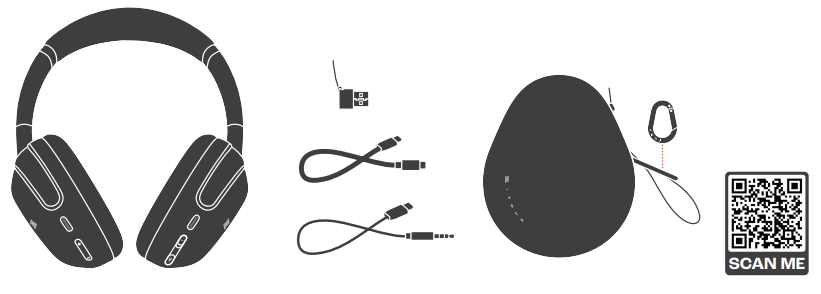
With Bluetooth 5.3 supporting multi-point device pairing, up to 70 hours of playback (and quick charge providing 5 hours of use in just 5 minutes), these headphones are crafted for long listening sessions and professional use. They also include a hard-shell zippered carrying case and cables for USB-C and analog connections for versatile use.
Available globally with an estimated price range of $350 to $400 USD, the JBL Tour One M3 Smart Tx headphones blend premium audio fidelity, intelligent noise control, and groundbreaking connectivity innovations for customers valuing sound quality, comfort, and multi-device convenience.
WHAT’S IN THE BOX
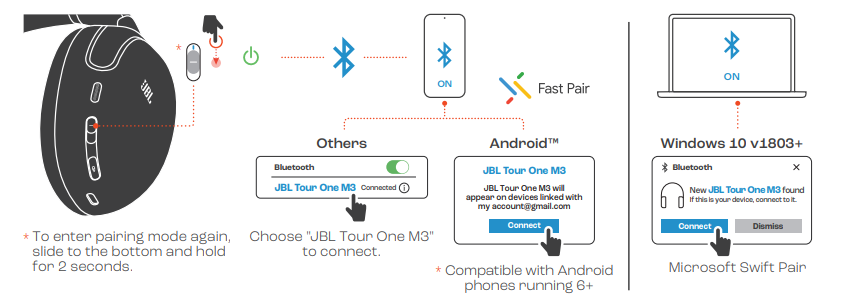
POWER ON & CONNECT
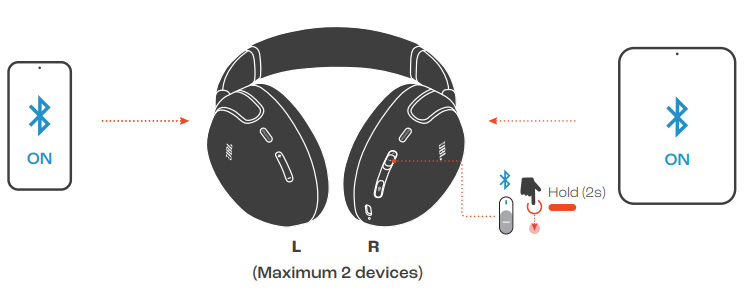
MULTI-POINT CONNECTION
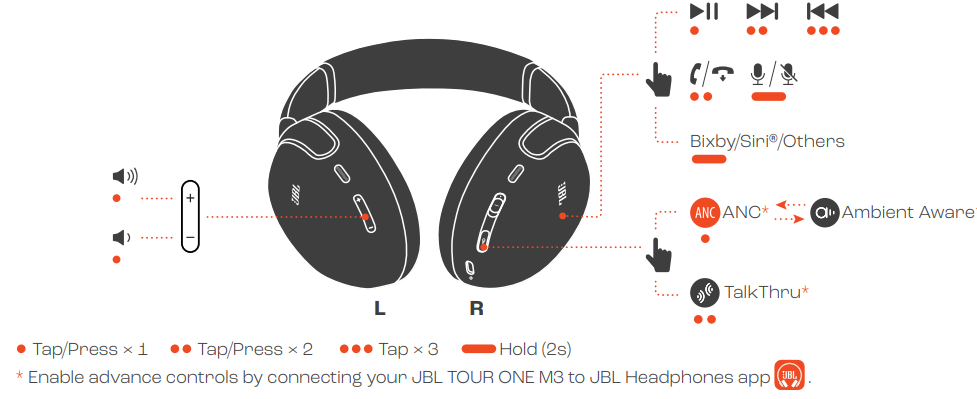
CONTROLS
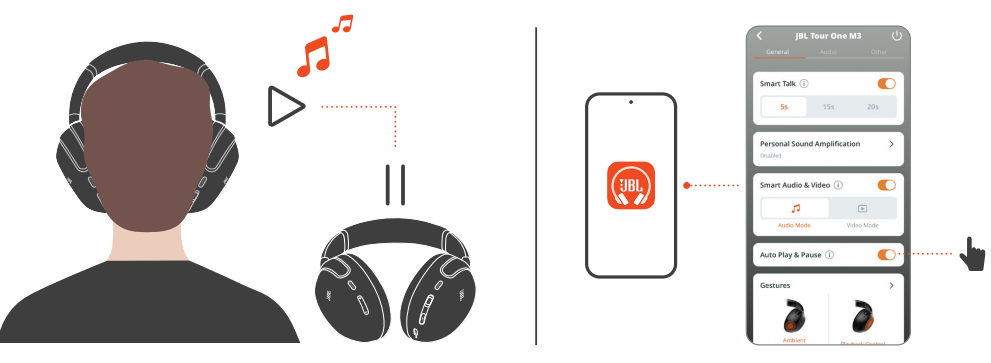
AUTO PLAY/PAUSE
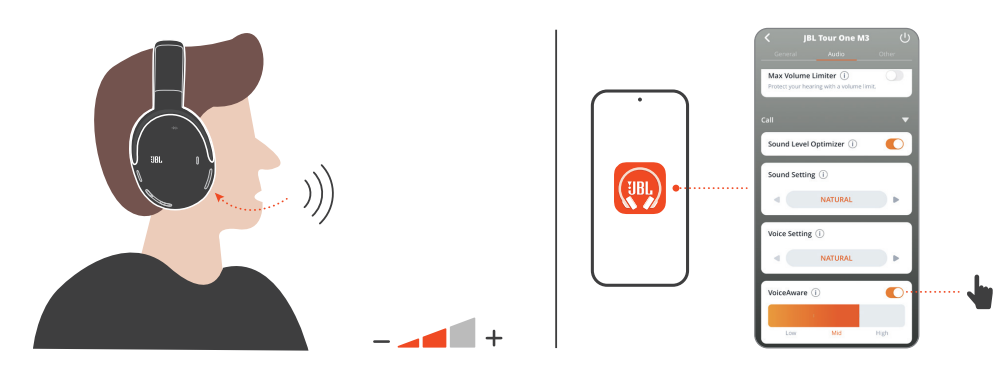
VOICEAWARE
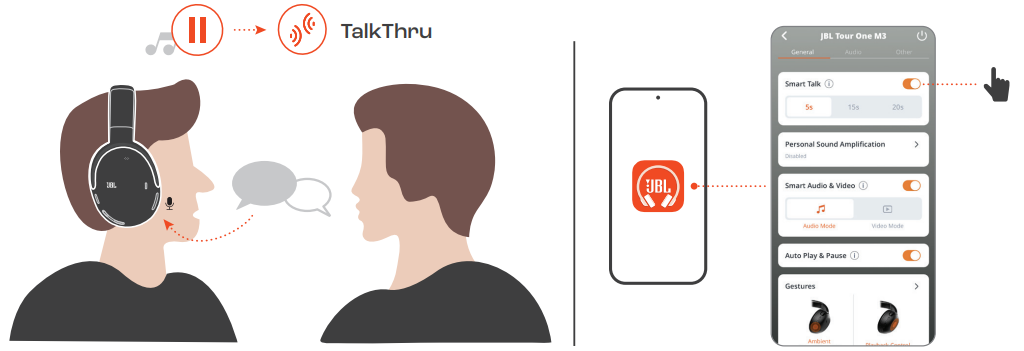
SMART TALK
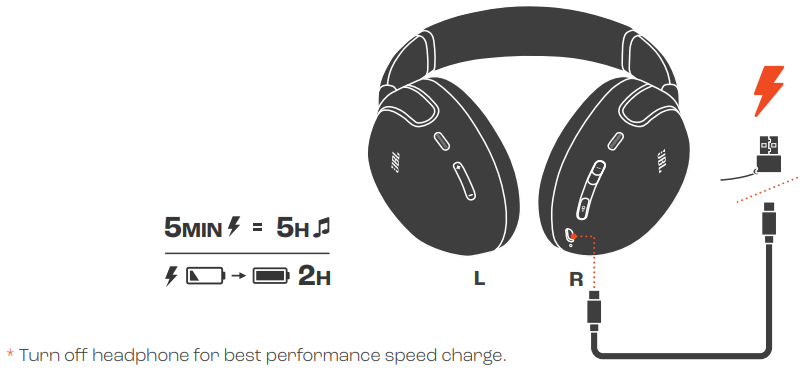
CHARGING
FACTORY RESET
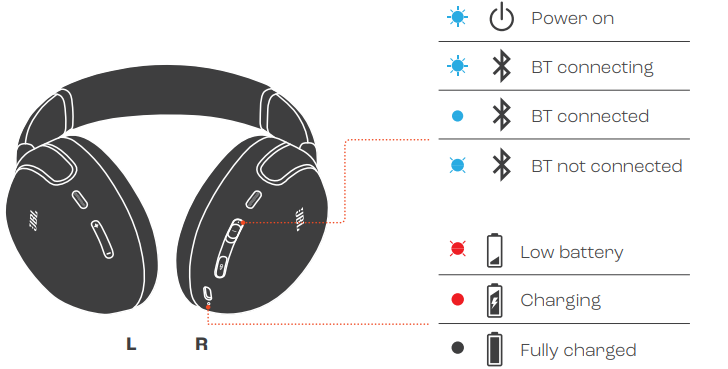
LED BEHAVIORS
TETECH SPECH SPECC
- Model: TOUR ONE M3Driver size: 40 mm / 1.57'' Dynamic Driver
- Power supply: 5 V 1 A
- Weight: 278 g / 0.6 lbs
- Battery type: Li-ion battery (850 mAh / 3.85 V)
- Charging time: 2 hrs from empty
- Music playtime with BT on and ANC off: up to 70 hrs
- Music playtime with BT on and ANC on: up to 40 hrs
- Talk time with ANC off: Up to 38 hrs
- Talk time with ANC on: Up to 34 hrs
- Frequency response: 10 Hz - 40 kHz
- Impedance: 18 ohm
- Sensitivity: 122 dB SPL@1 kHz
- Maximum SPL: 94 dB
- Call Microphone sensitivity: -38 dBV/Pa@1 kHz
- Bluetooth version: 5.3
- Bluetooth profile version: A2DP V1.4, AVRCP V1.6.2, HFP V1.8
- Bluetooth transmitter frequency range: 2.4 GHz - 2.4835 GHz
- Bluetooth transmitter power: <10 dBm (EIRP)
- Bluetooth transmitter modulation: GFSK, π/4-DQPSK, 8DPSK
- Codecs: SBC, AAC, LC3, LDAC
- Maximum operation temperature: 45 °C
Troubleshooting JBL Tour One M3 Smart Tx Headphones
Common issues with the JBL Tour One M3 Smart Tx Headphones include:
- No sound or audio dropouts: Ensure the Smart Tx transmitter is properly paired and connected via USB-C or analog source. Restart both devices and check the Bluetooth 5.3 connection status.
- Noise Cancelling not activating: Verify ANC is enabled through the JBL Headphones app or headphone controls. Update firmware regularly to maintain True Adaptive Noise Cancelling 2.0 performance.
- Call quality issues: Clean microphone meshes and avoid obstructions. If the voice sounds muffled, reset the headphones and check adaptive beamforming mic array is unobstructed.
- Charging problems: Use the included USB-C cable and charger. Inspect charging ports for debris. Avoid third-party chargers without USB-C PD support.
Preventive measures include regular firmware updates via the JBL app, storing headphones in the provided hard-shell case to avoid damage, and avoiding exposure to extreme temperatures or moisture.
The JBL Tour One M3 comes with a standard manufacturer’s warranty covering defects. For assistance, contact JBL support via their official website or customer service hotline. Most issues can be resolved through firmware updates or device resets.
Pros & Cons of JBL Tour One M3 Smart Tx Headphones
Pros
- Exceptional sound quality: 40mm Mica Dome drivers deliver clear, detailed Pro Sound and Hi-Res Audio support.
- Advanced noise cancellation: True Adaptive Noise Cancelling 2.0 with eight microphones effectively suppresses ambient noise in real time.
- Innovative Smart Tx transmitter: Enables stable, low-latency wireless streaming from USB-C or analog sources, ideal for travel and public entertainment systems.
- Long battery life: Up to 70 hours of playback with ANC off; fast charging provides hours of use within minutes.
- Immersive JBL Spatial 360 sound: Head tracking enriches movies and gaming experiences.
- Comfort and portability: Lightweight design with fold-flat earcups and a slim hard-shell carrying case.
Cons
- Price point: Positioned at the premium end of the market, which may be a consideration for budget-conscious buyers.
- Smart Tx transmitter bulk: While innovative, the transmitter adds an extra device to carry compared to traditional Bluetooth headphones.
- Learning curve: Advanced features and app controls may require time to fully utilize.
Compared to alternatives like Sony WH-1000XM5 or Bose 700, the JBL Tour One M3 offers a unique Smart Tx feature and superior multi-source wireless connectivity, but at a similar or slightly higher price range, making it ideal for users prioritizing travel and multi-device flexibility.
Customer Reviews of JBL Tour One M3 Smart Tx Headphones
Users consistently praise the JBL Tour One M3 Smart Tx Headphones for outstanding noise cancellation and rich, balanced sound quality that enhances both music and calls. Many highlight the convenience of the Smart Tx transmitter when connecting to in-flight entertainment and non-Bluetooth audio sources, emphasizing its stable, low-latency performance.
Common compliments include the long battery life, intuitive touch controls on the right earcup, and the comfortable fit suitable for extended wear. The JBL Headphones app integration is also noted as a valuable tool for personalizing EQ and ANC settings.
Some users mention the initial setup complexity and the slight bulk added by the Smart Tx device as minor drawbacks. A few reports note occasional app connectivity issues that firmware updates have addressed.
Overall, the product maintains a strong average rating of around 4.5 stars, with many recommending the JBL Tour One M3 as a top choice for travelers and professionals seeking premium wireless noise-cancelling headphones with versatile connectivity options.
Faqs
How do I set up my JBL Tour One M3 Smart Tx Headphones for the first time?
What should I do if my JBL Tour One M3 Smart Tx Headphones won’t pair with my device?
Can I use the JBL Smart Tx transmitter to connect my JBL Tour One M3 Smart Tx Headphones to non-Bluetooth devices?
How do I enable multipoint connection on the JBL Tour One M3 Smart Tx Headphones?
What are the key noise control features on the JBL Tour One M3 Smart Tx Headphones and how do I use them?
How can I maintain and clean my JBL Tour One M3 Smart Tx Headphones to ensure long-lasting performance?
Are the JBL Tour One M3 Smart Tx Headphones compatible with voice assistants like Siri or Google Assistant?
Why does my JBL Tour One M3 Smart Tx Headphones audio sometimes lag, and how can I optimize performance?
More jbl manuals
- Pairing & Setup: Jbl Control 1 Pro Loudspeaker Step by Step Guide
- Jbl Two-Way Loudspeaker Control 1 Pro Instruction Manual
- Setup & Usage: Jbl Junior 320BT Headphones Usage Guide
- Jbl Harman Quantum 81O Wireless Headphone User Manual
- Pairing & Setup: Jbl Junior 470NC Headphones User Guide
- Jbl Harman In-Earphone System T210 User Manual
Leave a Comment