
Usage & Pairing: Jbl Live Beam 3 Earphones Usage Guide
Content
JBL Live Beam 3 Earphones
Introduction
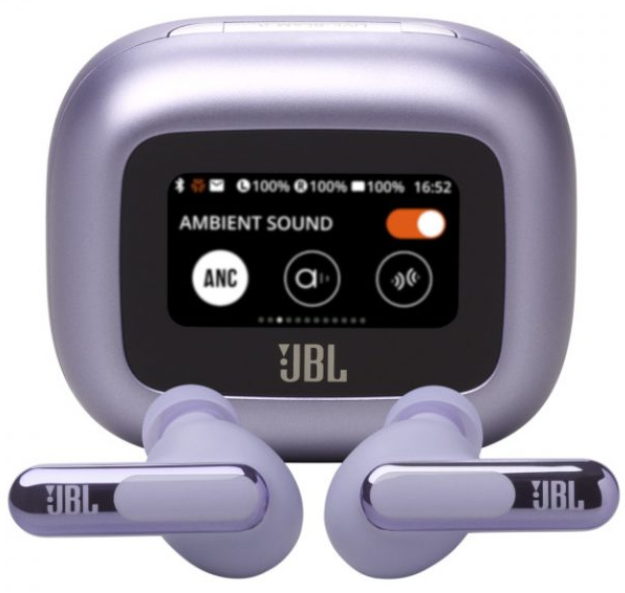
The JBL Live Beam 3 Earphones are true wireless, noise-cancelling earbuds designed for music lovers, commuters, and professionals seeking premium audio and smart features. These earbuds stand out with JBL’s signature sound profile—delivering deep bass, crystal-clear mids, and refined highs—all powered by 10mm dynamic drivers. With True Adaptive Noise Cancelling (ANC), four noise-sensing mics automatically adjust to your environment in real time, while JBL Spatial Sound creates an immersive, concert-like listening experience.
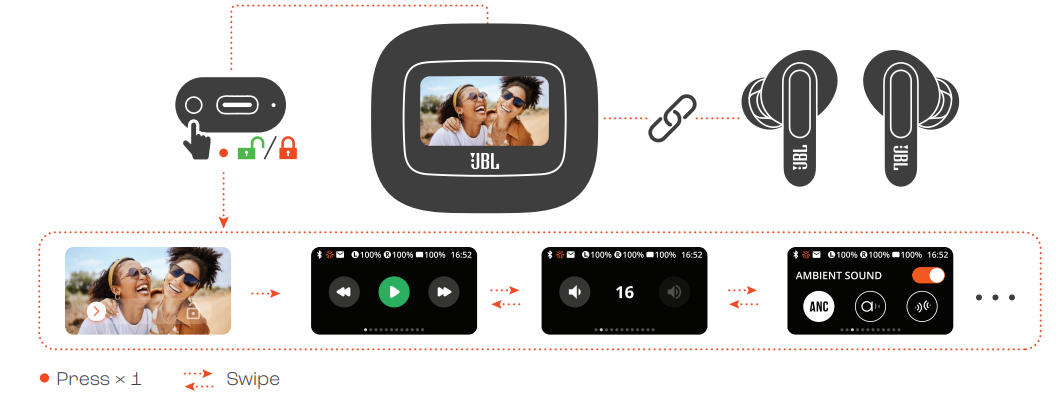
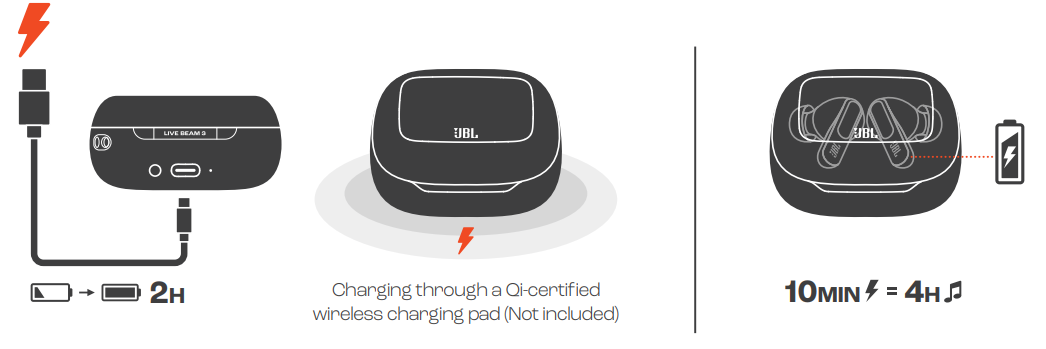
What truly sets the JBL Live Beam 3 Earphones apart is the 1.45-inch touchscreen Smart Charging Case™, allowing full customization of sound, EQ, and ANC without needing a smartphone app.p Features like LDAC Hi-Res Audio, Bluetooth 5.3 with LE Audio, multipoint connectivity, and wireless charging make these earbuds a top choice for audiophiles and tech enthusiasts. Up to 12 hours of battery life per charge (up to 48 hours total with the case) and fast-charging support (10 minutes for 4 hours) ensure you’re never without your music. ic.
Targeted at users who value both sound quality and convenience, the JBL Live Beam 3 Earphones are ideal for daily commutes, workouts (IP55 water resistance), and hands-free calls (six beamforming mics)[2][4]. With an estimated price range of $150–$200, these earbuds are competitively positioned against premium alternatives. Available globally through major electronics retailers and JBL’s official channels, the Live Beam 3 Earphones are a compelling blend of innovation, sound fidelity, and user-friendly design.
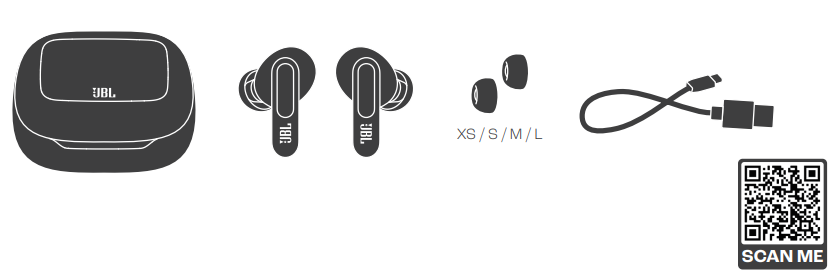
WHAT’S IN THE BOX
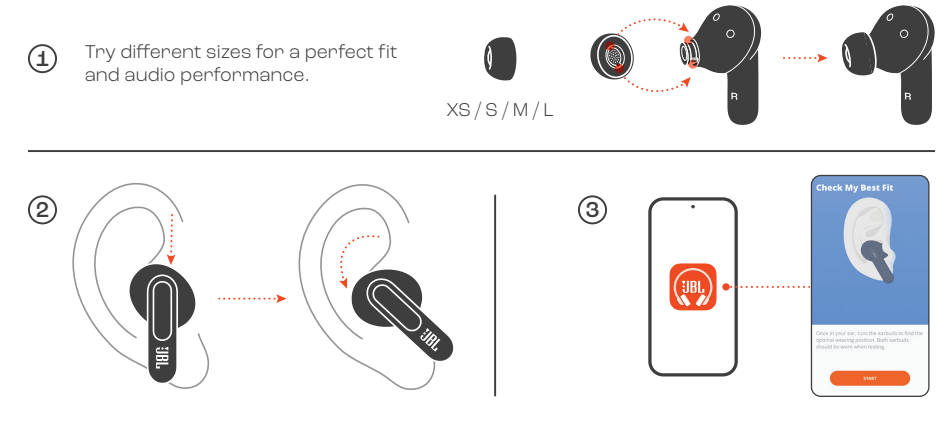
HOW TO WEAR
FIRST TIME USE
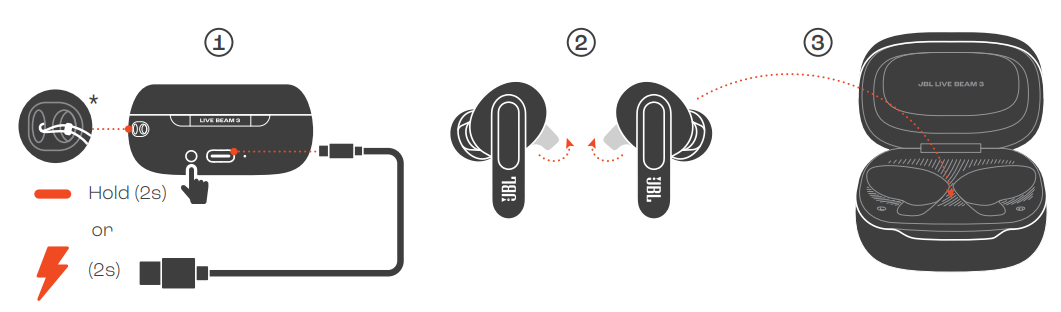
POWER ON & CONNECT
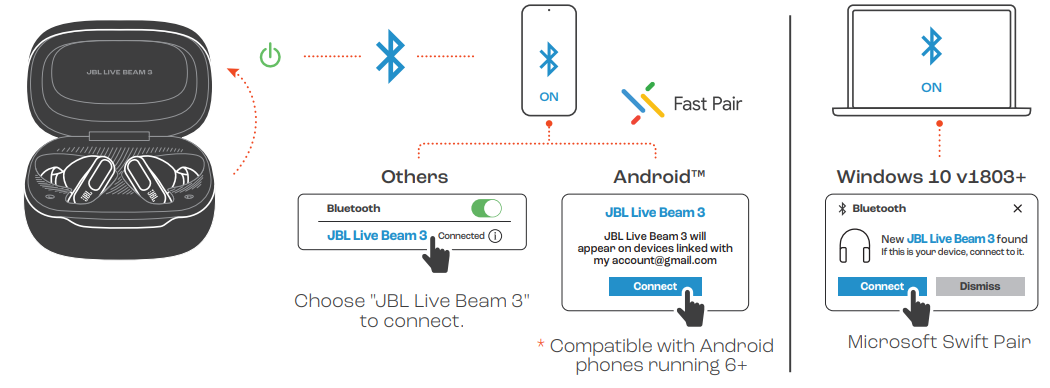
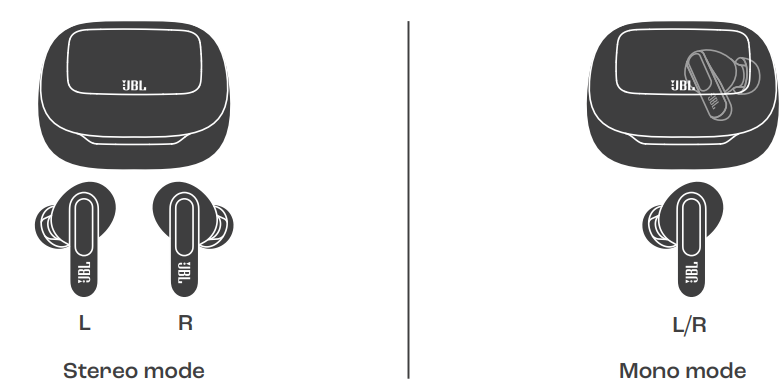
DUAL CONNECT + SYNC
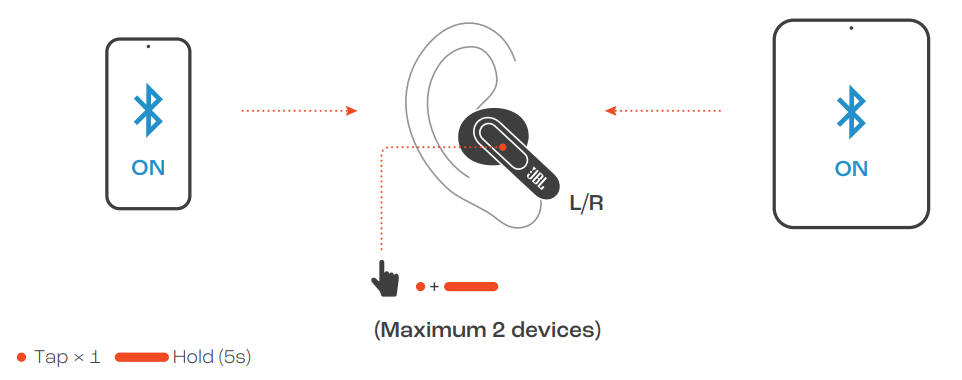
MULTI-POINT CONNECTION
CONTROLS
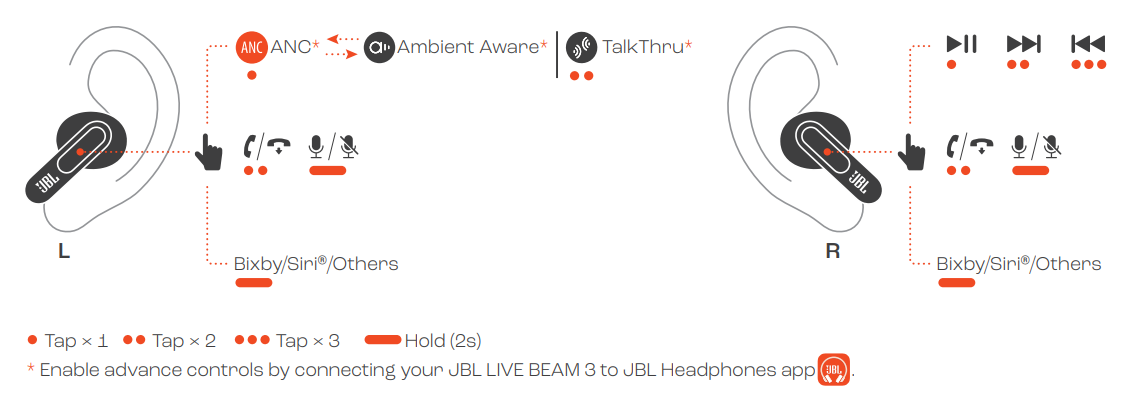
CONTROLS
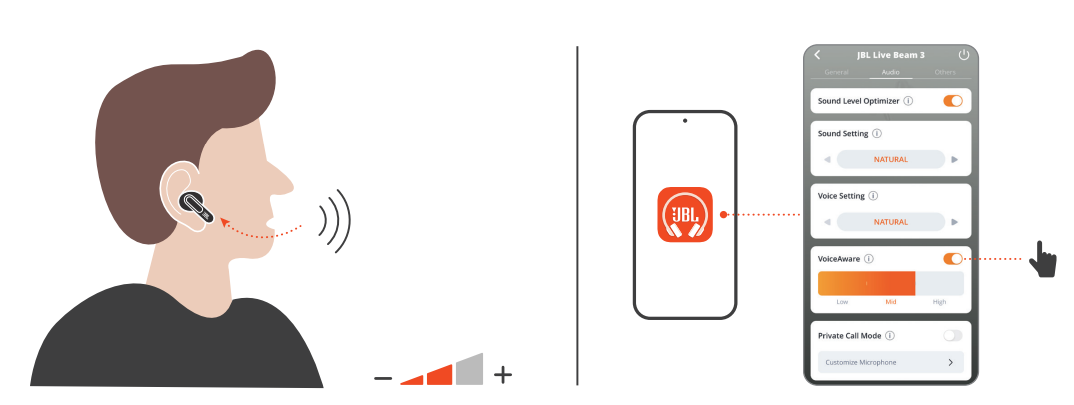
VOICEAWARE
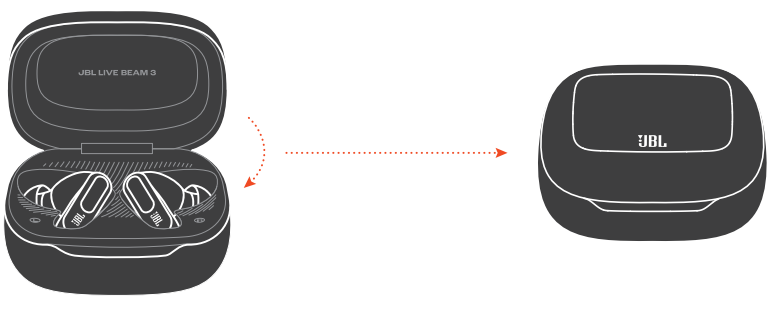
POWER OFF
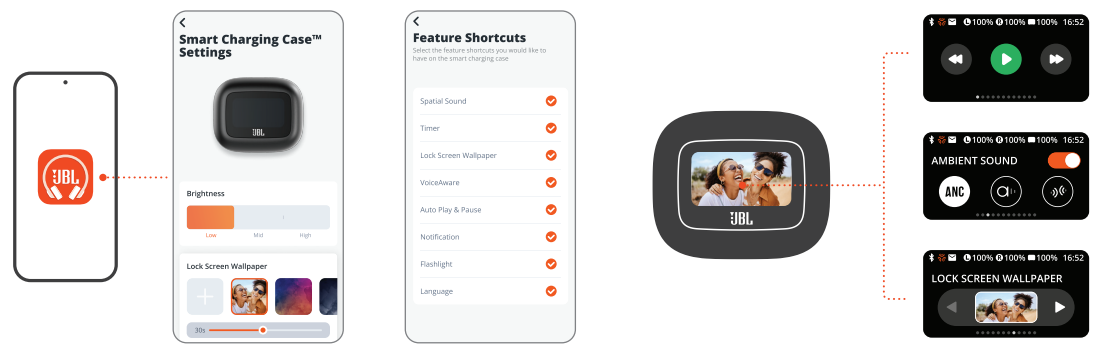
SMART CHARGING CASETM SETTINGS
CHARGING
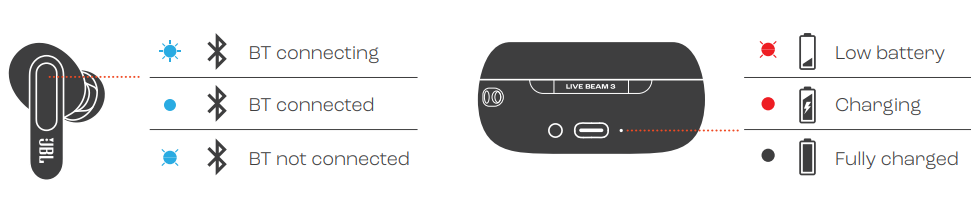
LED BEHAVIORS
TECH SPEC
- Model (Earbud): LIVE BEAM 3
- (Charging case): LIVE BEAM 3C
- Driver size: 10 mm/ 0.39" Dynamic DriverPower supply: 5V 1A
- Earbud: 5 g per pc (10 g combined
- 0.011 lbs per pc (0.022 lbs combined)
- Charging case: 72 g/ 0.1587 lbs
- Earbud battery type: Lithium-ion battery (68 mAh/ 3.85 V)
- Charging case battery type: Lithium-ion battery (680 mAh/ 3.8 V)
- Charging time: 2 hrs from empty
- Music playtime with BT on and
- ANC off: Up to 12 hrs
- Music playtime with BT on and
- ANC on: Up to 10 hrs
- Music playtime with BT on and
- True Adaptive ANC on: Up to 9 hrs
- Talk time with ANC off: Up to 6 hrs
- Talk time with ANC on: Up to 5 hrs
- Frequency response: 20 Hz - 40 kHz
- Impedance: 16 ohm
- Sensitivity: 98 dB SPL@1 kHz
- Maximum SPL: 96 dB
- Microphone sensitivity: -38 dBV/Pa@1 kHz
- Bluetooth version (Earbud): 5.3
- Bluetooth version (Charging case): 5.1
- Bluetooth profile version: A2DP V1.4, AVRCP V1.6.2, HFP V1. Bluetooth transmitter frequency
- range: 2.4 GHz - 2.48 GHZ Bluetooth transmitter power
- (Earbud): <12 dBm (EIRP) Bluetooth transmitter power
- (Charging case): <8 dBm (EIRP) Bluetooth transmitter modulation
- (Earbud): GFSK, π/4-DQPSK, 8DPSK Bluetooth transmitter modulation
- (Charging case): GFSK
- Maximum operation temperature: 45 °C
Troubleshooting: Common Issues and Solutions
Even with advanced features, users may occasionally encounter issues with their JBL Live Beam 3 Earphones. Below are common problems, solutions, and preventive tips:
Common Problems & Solutions
- Pairing Issues: If your earbuds won’t connect, reset them by holding the touch controls for 10 seconds. Ensure Bluetooth is enabled on your device and the earbuds are fully charged.
- Short Battery Life: Battery performance may drop if ANC is always on. For maximum playtime, use ANC selectively. Regularly update firmware via the JBL Headphones App for optimized battery management.
- Audio Dropouts: This can happen due to interference. Keep your connected device within 10 meters, and avoid crowded Wi-Fi/Bluetooth areas. Multipoint connectivity can sometimes cause latency—disconnect unused devices if experiencing lag.g
- Charging Problems: If the case or earbuds won’t charge, check the USB-C cable and power source. Clean the charging contacts with a dry cloth. Wireless charging requires compatible pads—ensure proper alignment[3].
- Microphone Issues: For call quality problems, ensure the earbuds fit snugly. Update the JBL Headphones App for the latest voice processing enhancements.
Preventive Measures
- Regularly clean your earbuds and case to prevent dirt buildup.
- Avoid exposing the earbuds to extreme temperatures (max 45°C)
- Use only the provided ear tips for optimal fit and sound isolation.
Warranty and Support
JBL offers a standard manufacturer’s warranty—check your local retailer for details. For additional support, visit the JBL website or contact customer service via the official support page. Keep your proof of purchase for warranty claims.
Pros & Cons: Balanced Assessment
Strengths
- Outstanding Sound Quality: JBL’s signature sound delivers powerful bass, clear mids, and detailed highs—consistently praised by users and reviewers
- Smart Charging Case: The 1.45-inch touchscreen allows full control of settings, music, and calls without a phone
- Effective Noise Cancelling: True Adaptive ANC with four mics provides excellent isolation, customizable via the app
- Long Battery Life: Up to 12 hours on a single charge (up to 48 hours with case), plus fast and wireless charging options
- Premium Features: LDAC Hi-Res Audio, Bluetooth 5.3, multipoint, IP55 water resistance, a and aix-mic array for clear calls
Weaknesses
- Fit May Vary: Some users report the earbuds can feel bulky during long sessions; experiment with the included ear tips for best comfort[6].
- Case Size: The smart case is larger than average, which may affect portability for some
- ANC Impact on Battery: Using ANC reduces playtime—manage settings for optimal battery life.
- Price: Positioned at the higher end of the market, though justified by features and performance
Value for Money
The JBL Live Beam 3 Earphones offer excellent value for users seeking premium sound, smart features, and robust ANC. Compared to alternatives like Sony WF-1000XM5 or Bose QuietComfort Earbuds, the Live Beam 3 stands out for its unique touchscreen case and JBL’s lively sound signature[4][5].
Customer Reviews: Real User Feedback
JBL Live Beam 3 Earphones have received strong praise for their sound quality, battery life, and comfort. Many users highlight the “spectacular sound” and “perfect audio experience,” with particular appreciation for the deep bass and crisp highs. The touchscreen charging case is frequently mentioned as a standout feature, offering convenience and control without needing a phone.e
Common complaints include the fit being less secure for some ear shapes and the case’s size being slightly bulky for pockets. A few users note that ANC, while effective, does reduce battery life. Star ratings consistently average 4.5 out of 5 across major retailers, with most recommending the JBL Live Beam 3 Earphones for music lovers and frequent travelers.
Testimonials often mention the earbuds’ reliability over months of daily use, with minimal connectivity or performance issues. For those prioritizing sound, smart features, and effective noise cancellation, the JBL Live Beam 3 Earphones are a top-tier choice—especially if the unique case and JBL’s audio signature appeal to you.
Faqs
How do I pair jbl Live Beam 3 Earphones with my phone for the first time?
Why is the active noise cancellation on my jbl Live Beam 3 Earphones not working as expected?
Can I use jbl Live Beam 3 Earphones with multiple devices simultaneously?
How do I customize sound settings and ANC levels on jbl Live Beam 3 Earphones?
What should I do if my jbl Live Beam 3 Earphones won’t charge or hold a charge?
Are jbl Live Beam 3 Earphones sweat and water resistant for workouts?
How do I update the firmware on my jbl Live Beam 3 Earphones?
What makes the audio quality of jbl Live Beam 3 Earphones stand out from competitors?
Tags
More jbl manuals
- Usage & Pairing: Jbl Live Buds 3 Instruction Guide
- Pairing & Setup: Jbl Junior 470NC Headphones User Guide
- Setup: Jbl Quantum 50C Headset User Manual
- Setup & Usage: Jbl Junior 320BT Headphones Usage Guide
- Pairing & Setup: Jbl Tour Pro 3 Earphones User Guide
- Pairing & Setup: Jbl Control 1 Pro Loudspeaker Step by Step Guide
Leave a Comment