
Pairing & Setup: Jbl Tour Pro 3 Earphones User Guide
Content
JBL Tour Pro 3 Earphones
Introduction
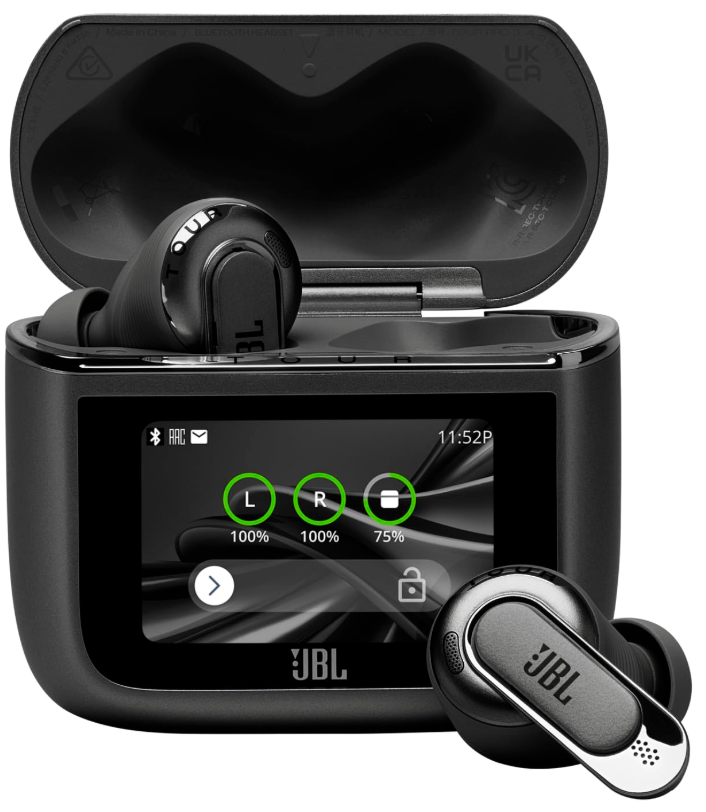
The JBL Tour Pro 3 Earphones represent a cutting-edge advancement in true wireless audio technology, combining premium sound quality with intelligent features designed for demanding users. These earbuds feature a next-generation Smart Charging Case that includes a touchscreen interface, enabling effortless control without needing to access your phone. They deliver immersive JBL Spatial 360 Sound with head tracking, offering a realistic and enveloping listening experience for music, movies, and gaming.
Equipped with True Adaptive Noise Cancelling 2.0 technology, the Tour Pro 3 adapts in real time to your environment, blocking unwanted noise while maintaining awareness of your surroundings as needed. The earbuds feature a hybrid dual-driver system that provides Hi-Res JBL Pro Sound with clear highs and deep bass, ideal for audiophiles and casual listeners alike. With up to 44 hours of total music playback from the earbuds and charging case combined, these earphones meet the needs of travelers, commuters, and remote workers.
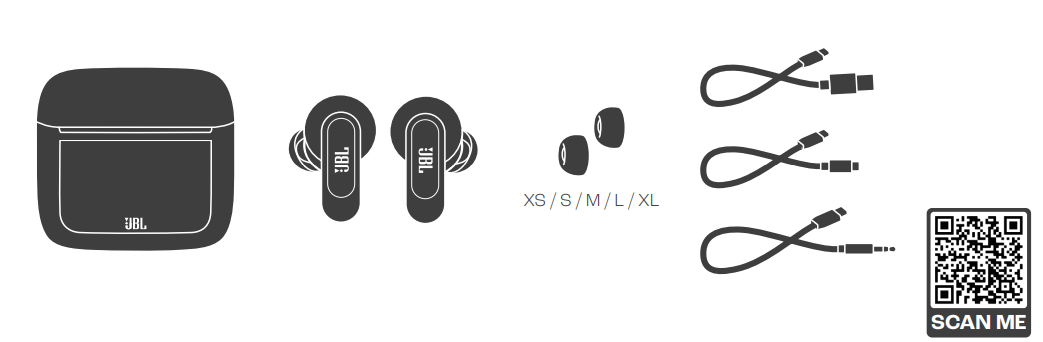
Additional highlights include six microphones with the JBL Crystal AI algorithm for crystal-clear voice calls and Zoom certification, multipoint Bluetooth 5.3 connectivity, and compatibility with Google and Microsoft Swift Pair for fast, seamless device connections. The earbuds also come with multiple ear tip options, including foam tips for enhanced passive noise isolation.
Priced around $250 to $330, the JBL Tour Pro 3 Earphones are widely available online and through major retailers, making them a premium yet accessible choice for those seeking high-quality wireless earbuds with advanced features and smart usability.
WHAT’S IN THE BOX
HOW TO WEAR
FIRST TIME USE
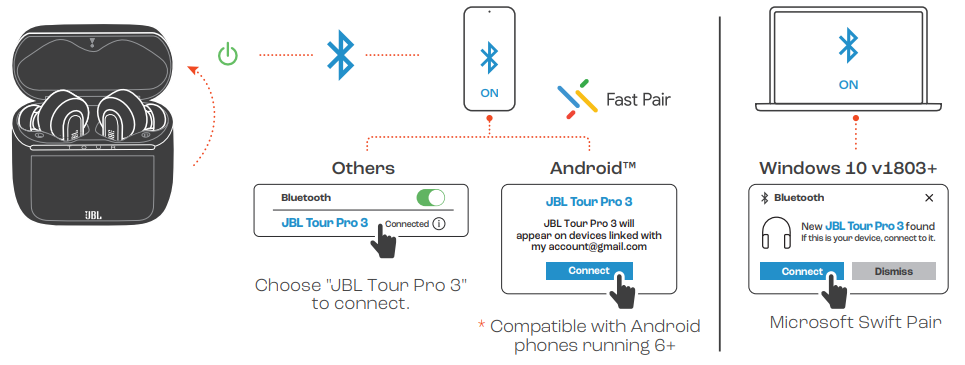
POWER ON & CONNECT
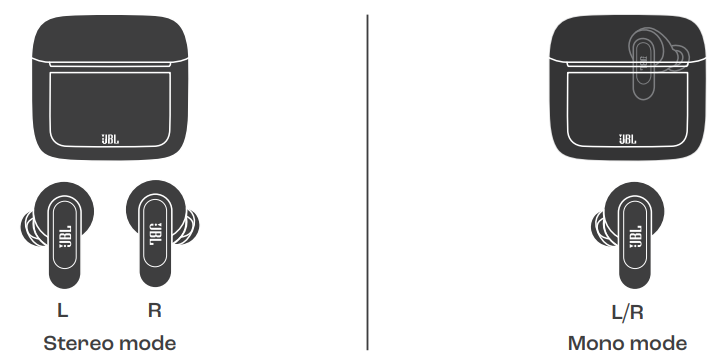
DUAL CONNECT + SYNC
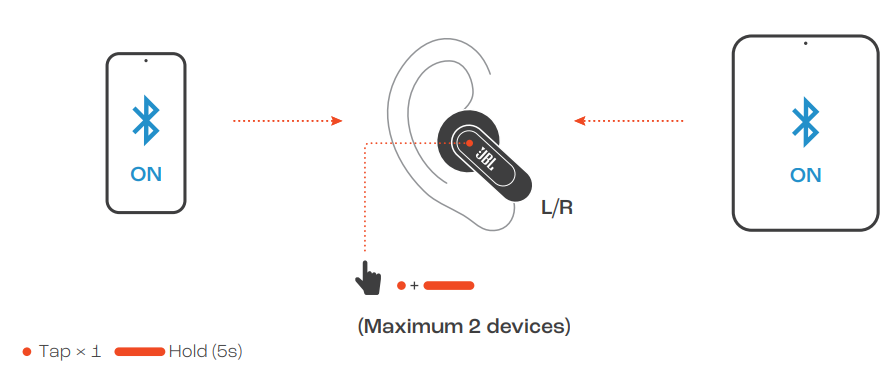
MULTI-POINT CONNECTION
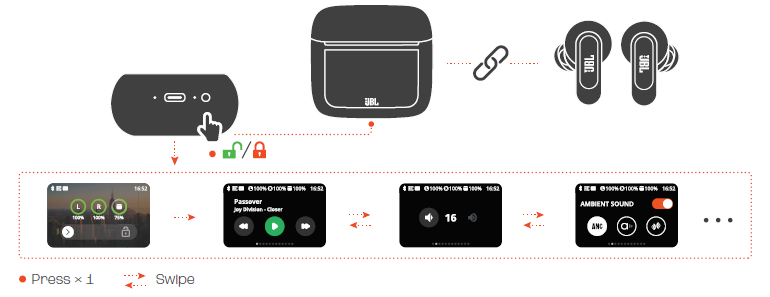
CONTROLS
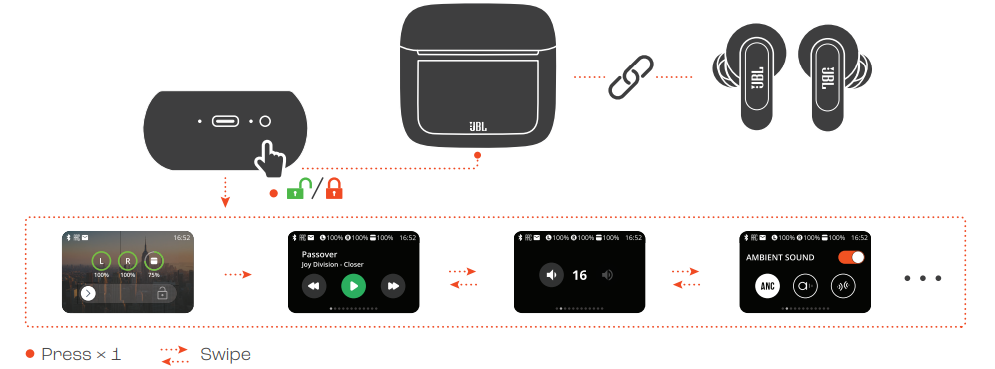
CONTROLS
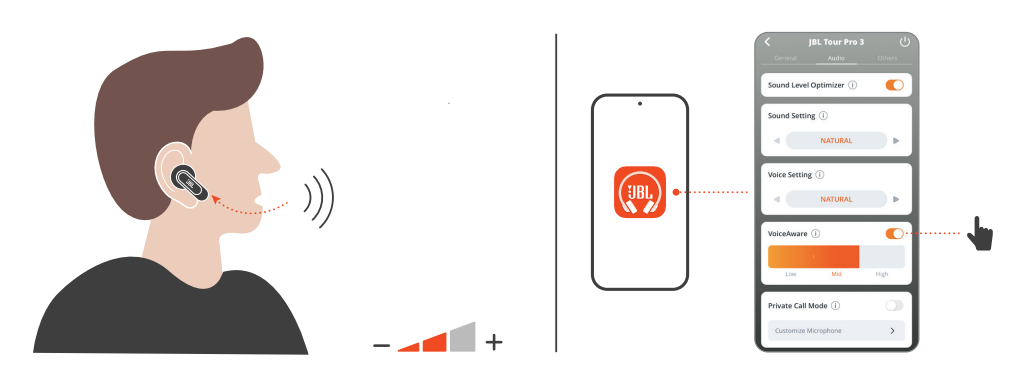
VOICEAWARE
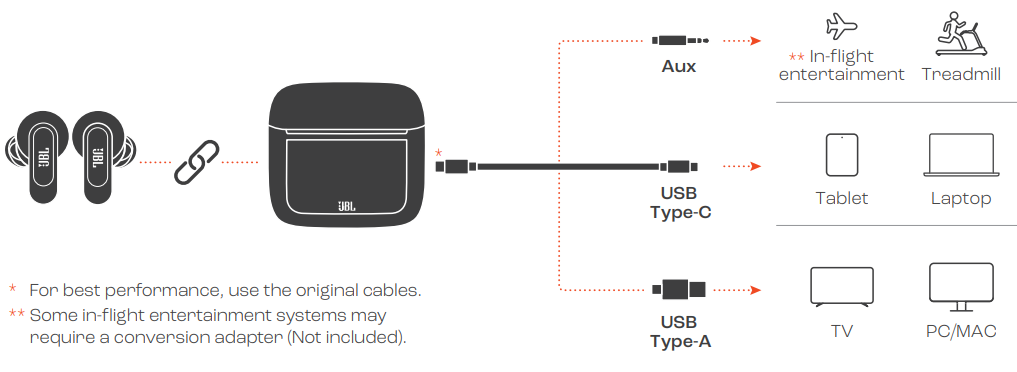
AUDIO TRANSMITTER
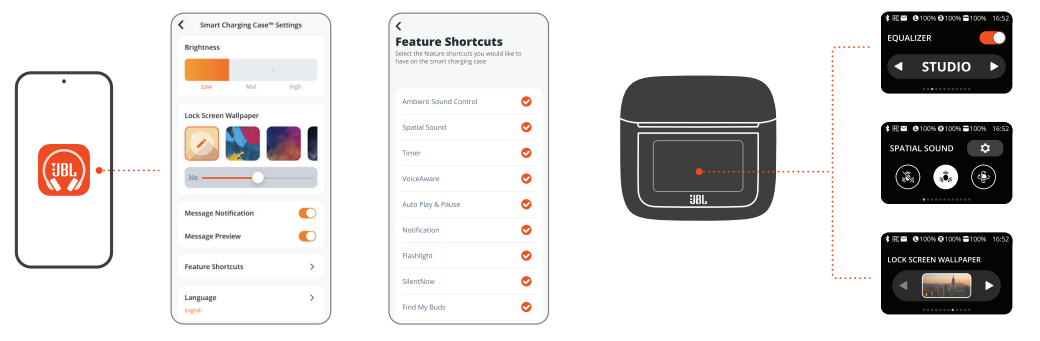
SMART CHARGING CASETM SETTINGS
CHARGING
LED BEHAVIORS

TECH SPEC
- Model (Earbud): TOUR PRO 3
- (Charging case): TOUR PRO 3C
- Driver size: 10.2 mm/ 0.402" Dynamic Driver + 5.1 mm x 2.8 mm Balanced Armature
- Power supply: 5V 1A
- Earbud: 5.6 g per pc (11.2 g combined) 0.01235 lbs per pc (0.02470 lbs combined)
- Charging case: 71.8 g/ 0.158 lbs
- Earbud battery type: Lithium-ion battery (65 mAh/ 3.85 V)
- Charging case battery type: Lithium-ion battery ( 850 mAh/ 3.8 V)
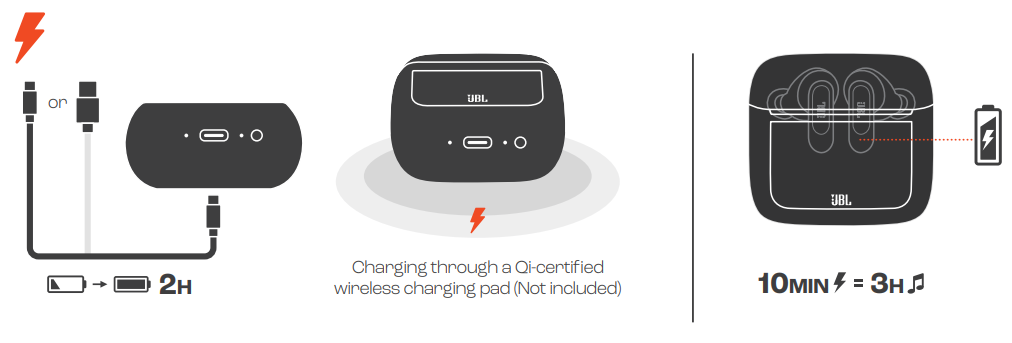
- Charging time: 2 hrs from empty
- Music playtime with BT on and ANC off: Up to 11 hrs
- Music playtime with BT on and ANC on: Up to 8 hrs
- Music playtime with BT on and
- True Adaptive ANC on: Up to 7 hrs
- Talk time with ANC off: Up to 5.5 hrs
- Talk time with ANC on: Up to 5.2 hrs
- Frequency response: 20 Hz - 40 kHz
- Impedance: 32 ohm
- Sensitivity: 104 dB SPL@1 kHz
- Maximum SPL: 95 dB
- Microphone sensitivity: -38 dBV/Pa@1 kHz
- Bluetooth version (Earbud): 5.3
- Bluetooth version (Charging case): 5.3
- Bluetooth profile version: A2DP V1.4, AVRCP V1.6.2, HFP V1.8
- Bluetooth transmitter frequency
- range: 2.4 GHz – 2.4835 GHz
- Bluetooth transmitter power
- (Earbud): <13 dBm (EIRP)
- Bluetooth transmitter power
- (Charging case): <10 dBm (EIRP)
- Bluetooth transmitter modulation
- (Earbud): GFSK, π/4-DQPSK, 8DPSKBluetooth transmitter modulation
- (Charging case): GFSK
- Maximum operation temperature: 45 °C
Troubleshooting JBL Tour Pro 3 Earphones
Users may encounter common issues such as connectivity drops, audio imbalance, or charging difficulties. Here are solutions for typical problems:
- Connectivity Issues: Ensure earbuds and device Bluetooth are updated and reset the earbuds via the Smart Charging Case touchscreen or by performing a factory reset (double-tap back + long-press on earbuds).
- Audio Distortion or Call Quality Problems: Clean the microphones and ear tips regularly to prevent blockages; enable the call equalizer in the JBL Headphones app for voice adjustments.
- Charging Case Not Charging: Check the USB-C cable and port for debris; try alternative power sources; avoid using damaged cables.
- Error Codes: The JBL app will notify you of firmware issues—update firmware promptly through the app.
Preventive measures include storing earbuds in the Smart Charging Case when not in use, avoiding exposure to excessive moisture beyond IP55-rated protection, and regularly updating the JBL Headphones app for feature optimizations.
The JBL Tour Pro 3 comes with a standard manufacturer's warranty covering defects. For further support, users can contact JBL customer service via their official website or call the customer care hotline listed in the product documentation.
Pros & Cons of JBL Tour Pro 3 Earphones
Pros
- Advanced Sound Quality: Hybrid dual-driver system delivers crisp highs and rich bass for Hi-Res audio enthusiasts.
- Innovative Smart Charging Case: Touchscreen interface allows direct control and acts as an audio transmitter for airplane entertainment systems or computers.
- True Adaptive Noise Cancelling 2.0: Real-time environment calibration for optimal noise suppression without losing situational awareness.
- Excellent Call Quality: Six mics with AI-powered noise reduction ensure clear voice calls, even in windy conditions.
- Long Battery Life: Up to 44 hours total playback with charging case and fast charging capability.
- Multipoint Connectivity: Connects to two devices simultaneously, enhancing multitasking capabilities.
- IP55 Rating: Dust and water resistant for durability in active use.
Cons
- Price Point: At $250-$330, the Tour Pro 3 is a premium investment that may be above average budget earbuds.
- Charging Case Size: Slightly bulkier due to Smart Charging Case features compared to minimalistic competitors.
- Latency Concerns: Some users report ~150–175 ms latency when streaming LDAC audio, which may affect gaming or video syncing.
- Find My Case Feature Missing: While earbuds can be pinged via the app, the case itself cannot be tracked if misplaced.
Customer Reviews of JBL Tour Pro 3 Earphones
Customers generally praise the JBL Tour Pro 3 Earphones for their impressive sound clarity, effective noise cancellation, and the innovative Smart Charging Case. Many highlight the convenience of controlling earbuds directly from the case's touchscreen and the superior call quality enabled by the six-microphone setup. Star ratings often range from 4 to 5 stars, with users recommending these earbuds for frequent travelers and professionals needing dependable audio and communication tools.
Common complaints include the premium price and occasional latency issues during high-resolution audio streaming. Some users mention the larger size of the charging case as a minor inconvenience. Despite these, the majority recommend the earbuds for their feature-rich design, durability, and overall audio experience.
Faqs
How do I set up the JBL Tour Pro 3 Earphones for the first time?
What steps can I take if my JBL Tour Pro 3 Earphones are not charging properly?
How does True Adaptive Noise Cancelling 2.0 work on JBL Tour Pro 3 Earphones?
Are JBL Tour Pro 3 Earphones compatible with both Android and iOS devices?
How can I optimize call quality using my JBL Tour Pro 3 Earphones?
What maintenance tips should I follow to keep my JBL Tour Pro 3 Earphones in good condition?
How do I use the Smart Charging Case touchscreen on the JBL Tour Pro 3 Earphones?
Can I connect JBL Tour Pro 3 Earphones to two devices simultaneously?
More jbl manuals
- Pairing & Setup: Jbl Tune Beam 2 Earphones User Guide
- Setup: Jbl Quantum 50C Headset User Manual
- Pairing & Setup: Jbl Tune Buds 2 Earphones Pairing Instructions
- Usage & Pairing: Jbl Live Buds 3 Instruction Guide
- Setup & Usage: Jbl Tune Flex 2 Earphones Step by Step Guide
- Usage & Pairing: Jbl Live Beam 3 Earphones Usage Guide
Leave a Comment