
Pairing & Setup: Jbl Tune Beam 2 Earphones User Guide
Content
JBL Tune Beam 2 Earphones
Introduction
The JBL Tune Beam 2 Earphones are true wireless earbuds designed to deliver exceptional audio performance with advanced noise-cancelling technology. Featuring powerful 10mm dynamic drivers, these earbuds provide JBL Pure Bass Sound combined with immersive JBL Spatial Sound to enhance every musical detail from 20 Hz to 20 kHz frequency range. Equipped with Adaptive Noise Cancelling and Smart Ambient modes, they allow users to either block out surrounding noise or stay aware of their environment as needed, making them ideal for commuters, fitness enthusiasts, and casual listeners alike.
Built for comfort and durability, the JBL Tune Beam 2 sports an ergonomic design with an IP54 rating, ensuring resistance to dust and water — perfect for use in various weather conditions or during workouts. Its six-microphone array delivers crystal-clear calls by reducing ambient noise and wind interference, complemented by beamforming technology and echo suppression. Users can personalise sound profiles via the JBL Headphones app, incorporating Personi-Fi 3.0, tailoring audio to their preferences.
Offering a remarkable battery life of up to 48 hours,s including the charging case, these earphones support multi-point Bluetooth 5.3 connectivity with Fast Pair enabled by Google, ensuring seamless device switching and quick pairing. The JBL Tune Beam 2 is competitively priced in the mid-range segment, typically between $80 and $120 depending on the retailer, and is widely available through JBL’s official stores, online marketplaces, and authorised dealers. Experience your audio with clarity, comfort, and control using JBL Tune Beam 2 true wireless earbuds.
WHAT’S IN THE BOX
HOW TO WEAR
FIRST TIME USE
POWER ON & CONNECT
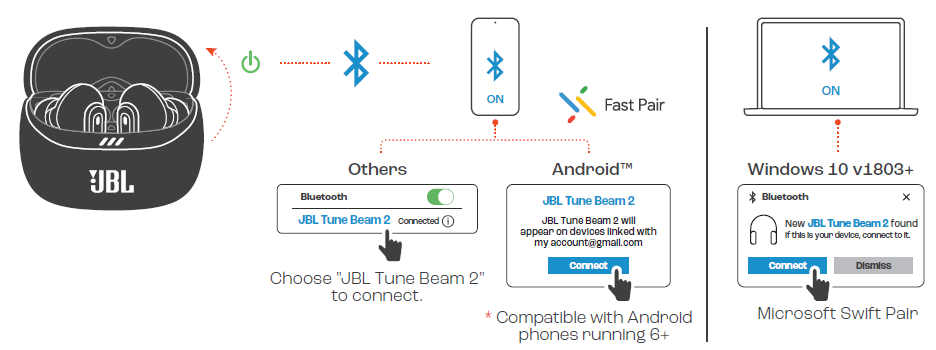
DUAL CONNECT + SYNC
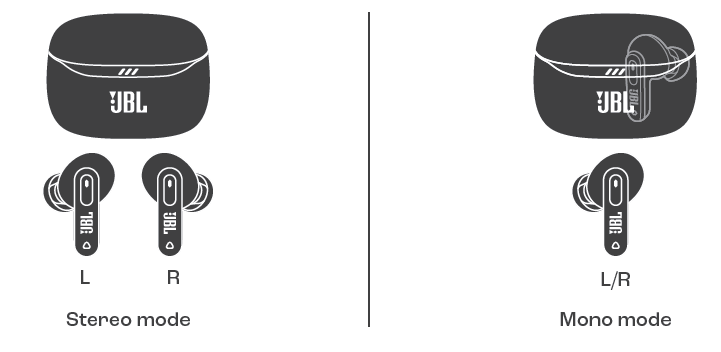
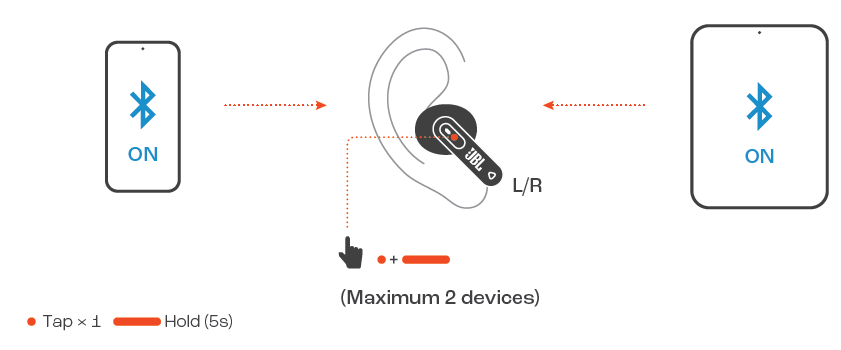
MULTI-POINT CONNECTION
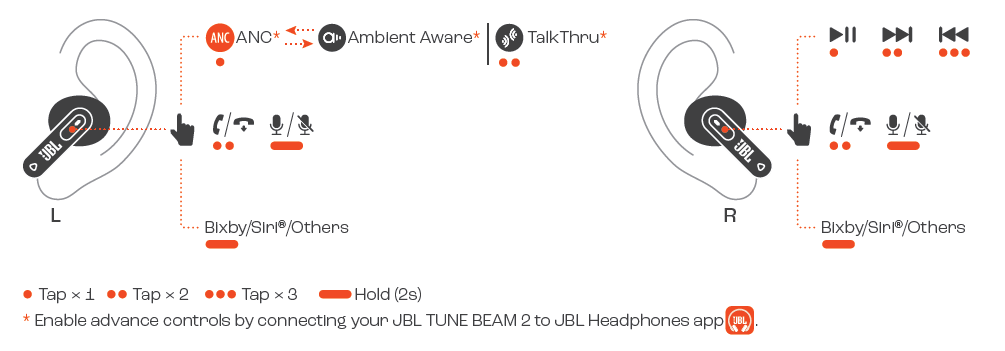
CONTROLS
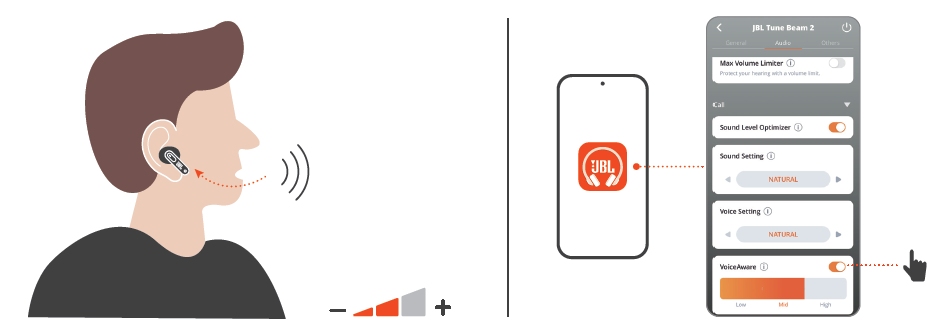
VOICEAWARE
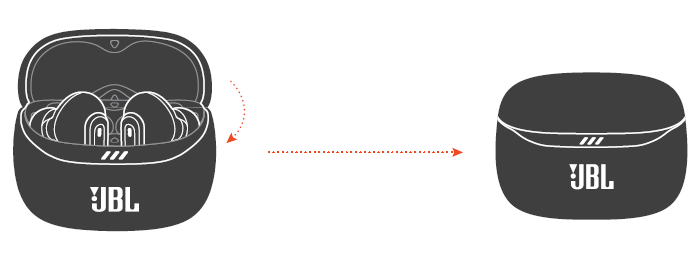
POWER OFF
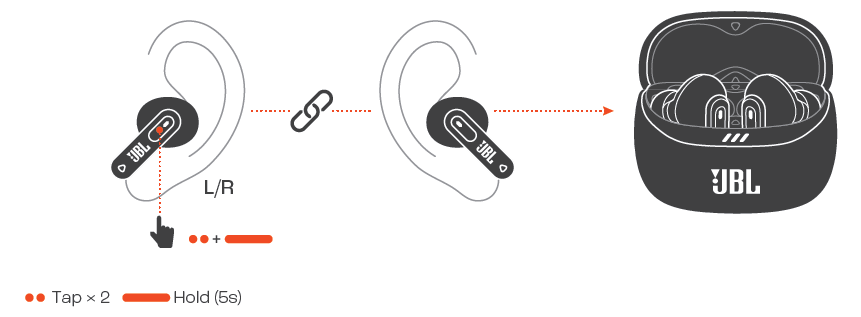
FACTORY RESET
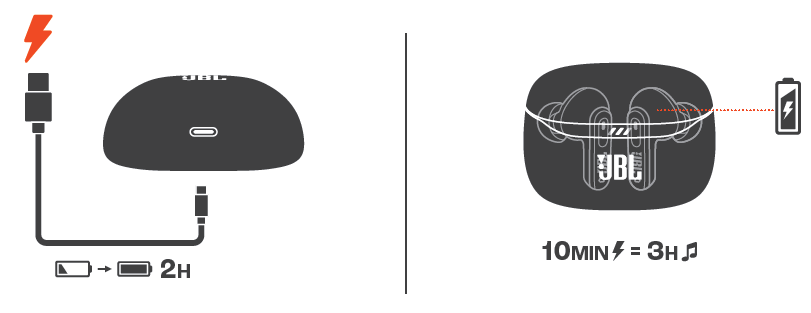
CHARGING
LED BEHAVIORS

TECH SPEC
- Model: TUNE BEAM 2
- Driver size: 10mm / 0.39* Dynamic DriverPower supply: SV = 1A
- Eartud:5.2 g per pc (10.4 g combined) / 0.0115 Ibs per pc (0.0229 Ibs combined)
- Charging case: 42g/ 0.0926 IbsEartud battery type: Lithium-ion battery (65 mAh / 3.85 V)Charging case battery type: Lithium-ion battery (590 mAh / 3.8 V)
- Charging time: 2 hrs from empty. Music playtime with BT on and
- ANC off:
- Up to 12 hrs Music playtime with BT on and ANC on: Up to 10 hrs
- Talk time with ANC off: Up to 6 has
- Talk time with ANC on: Up to 5 hrs
- Frequency response: 20 Hz - 20 kHz
- Impedance:
- Sensitivity: 1C0 dB SPL@1 kHz
- Maximum SPL: 95 dB
- Microphone sensitivity:
- Bluetooth version: 53
- Bluetooth profile version: A2DP V1.4, AVRCP V1.6.2, HFP V1.8bluetoot transmater wreauenc
- range: 2.4 GHz - 2.4835 GHz
- Bluetooth transmitter power:≤ 13 dBm (EIRP)
- Bluetooth transmitter modulation: GFSK, #/4-DQPSK, 8DPSK
- Maximum operation temperature: 45 °C
Troubleshooting JBL Tune Beam 2 Earphones
Despite their advanced features, users may occasionally encounter issues with the JBL Tune Beam 2 Earphones. Common problems include:
- No Sound or One Earbud Not Working: Ensure earbuds are charged and properly seated in the ears. Reset the earbuds by placing them in the case and holding the touch controls for 10 seconds.
- Bluetooth Connection Issues: Clear pairing list on your device and earbuds, then reconnect. Ensure Bluetooth 5.3 compatibility and proximity to the source device.
- Adaptive Noise Cancelling Not Activating: Check ANC settings in the JBL Headphones app. Update firmware if available.
- Poor Call Quality or Microphone Issues: Clean microphone openings and confirm environmental noise cancellation is enabled in the app.
No specific error codes are displayed on the earbuds, but the JBL Headphones app provides status notifications and firmware update alerts. To prevent issues, keep earbuds charged, regularly update firmware via the app, and avoid exposing them to excessive moisture despite IP54 resistance.
The JBL Tune Beam 2 comes with a standard warranty covering manufacturing defects, typically for one year. For support, users can register their product on the official JBL website, access FAQs, or contact JBL customer service via email or phone as listed on the JBL support page.
Pros & Cons of JBL Tune Beam 2 Earphones
- Pros:
- Excellent JBL Pure Bass Sound with spatial audio effects for immersive listening.
- Adaptive Noise Cancelling with Smart Ambient allows flexible sound control.
- Long battery life providing up to 48 hours of playback including charging case.
- IP54 rated for dust and water resistance, suitable for varied environments.
- Six-mic system with beamforming and noise suppression for crystal-clear calls.
- Customizable sound profiles via JBL Headphones app with Personi-Fi 3.0.
- Multi-point Bluetooth 5.3 connection and Fast Pair for quick device switching.
- Cons:
- ANC performance is effective for everyday noise but not on par with flagship-level noise cancelling earbuds.
- Touch controls can be sensitive and occasionally register unintended commands.
- No dedicated app-based equalizer presets; customization requires manual tuning.
- Charging case is compact but lacks wireless charging capability.
Overall, the JBL Tune Beam 2 offers strong value for money in its category, especially for users seeking robust bass, effective noise cancellation, and reliable call quality. Compared to alternatives like Sony WF-C500 or Anker Soundcore Liberty Air 2, the Tune Beam 2 stands out for its spatial sound and six-mic array but may lag slightly in ANC sophistication.
Customer Reviews and Feedback on JBL Tune Beam 2
Users frequently praise the JBL Tune Beam 2 Earphones for their deep bass and long battery life, highlighting the convenience of up to 48 hours playback and comfortable all-day fit. The six-microphone system receives positive remarks for call clarity, effectively reducing ambient noise even in windy outdoor conditions.
Common complaints focus on the noise cancelling being less effective in very loud environments and occasional touch control sensitivity issues. Some users note that the earbuds fit snugly but may require different ear tip sizes for optimal comfort.
Average ratings across popular retail platforms range from 4 to 4.5 stars out of 5. Many recommend the earbuds for casual listening, workouts, and remote work calls due to their balanced sound and excellent microphone performance.
Overall, the JBL Tune Beam 2 is considered a reliable choice for mid-range true wireless earbuds with adaptive noise cancelling, offering a satisfying listening experience with user-friendly features and strong value.
Faqs
How do I set up my JBL Tune Beam 2 Earphones for the first time?
What should I do if the JBL Tune Beam 2 Earphones are not connecting to my smartphone?
How does Adaptive Noise Cancelling work on the JBL Tune Beam 2 Earphones?
Are JBL Tune Beam 2 Earphones compatible with all Bluetooth devices and operating systems?
How can I optimize battery life on my JBL Tune Beam 2 Earphones?
What maintenance steps are recommended to keep JBL Tune Beam 2 Earphones in good condition?
Why is the call quality on my JBL Tune Beam 2 Earphones sometimes unclear, and how can I improve it?
How do I use the touch controls on the JBL Tune Beam 2 Earphones effectively?
More jbl manuals
- Pairing & Setup: Jbl Tune Buds 2 Earphones Pairing Instructions
- Pairing & Setup: Jbl Tour Pro 3 Earphones User Guide
- Setup & Usage: Jbl Tune Flex 2 Earphones Step by Step Guide
- Setup: Jbl Quantum 50C Headset User Manual
- Pairing & Setup: Jbl Wave Buds 2 Earphones User Guide
- Usage & Pairing: Jbl Live Buds 3 Instruction Guide
Leave a Comment