
Setup: Kodak Slide n Scan Digital Film Scanner User Manual
Content
Kodak Slide N Scan Digital Film Scanner
Introduction
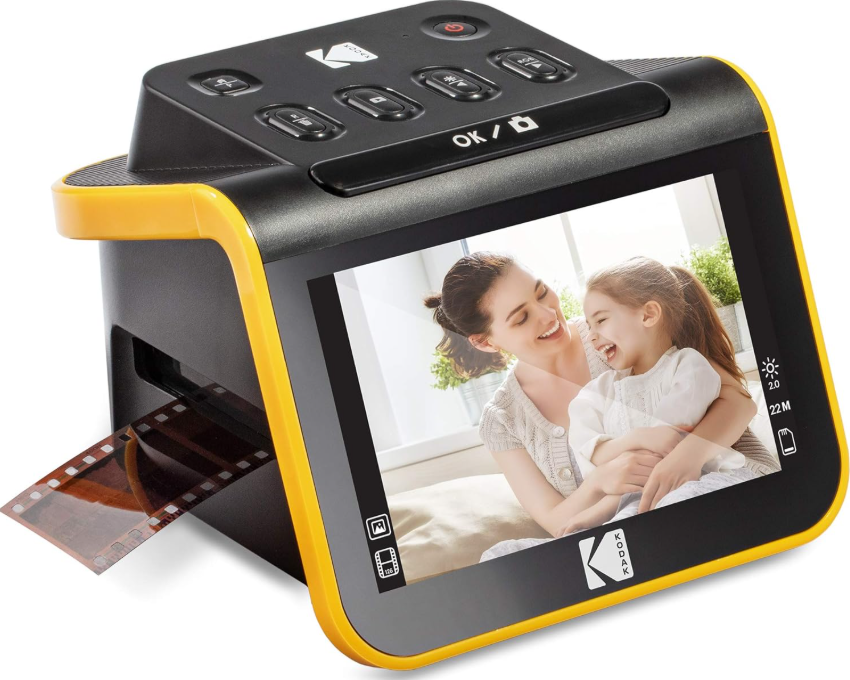
The Kodak Slide n Scan Digital Film Scanner is a versatile and user-friendly device designed to breathe new life into your old film negatives and slides. Equipped with a 7-inch adjustable all-angle color LCD, this scanner allows you to easily preview, edit, and convert 50mm slides and various film negatives—including 135, 110, and 126 formats in both color and black & white—into high-resolution digital images. With a powerful 14-megapixel CMOS sensor offering up to 22MP interpolated resolution, it delivers crisp, vivid results suitable for archiving or sharing.
Key benefits include its one-touch scanning feature, continuous feeding with easy-load film holders, and multiple power options,, including USB computer power or a power bank, making it both convenient and portable. The scanner supports SD cards up to 32GB for direct-to-card saving, allowing independent operation without a PC, while USB 2.0 connectivity enables fast image transfers. Ideal for photography enthusiasts, archival professionals, or anyone wishing to preserve treasured memories, the Kodak Slide n Scan simplifies digitizing decades-old film with minimal technical hassle.
The estimated price range for this scanner is approximately $150 to $200 USD, with availability through major electronics retailers and online stores. It is important to note that the device requires an SD card and d HDMI cable, which are sold separately. With its balance of affordability, high-quality imaging, and ease of use, the Kodak Slide n Scan Digital Film Scanner stands out as a practical solution for film digitization needs.
SPECIFICATIONS
- Image Sensor:
- 14.0 megapixels (4320 x 3252)
- 1/2.33″ CMOS sensor
- Display: 5" All Angle Color LCD
- Lens Specification: F/No. 3.5, 5 elements lens
- Color Balance: Automatic
- Exposure Control: Automatic/Manual
- Supported Film Sizes, Auto Cropping 135 Negative & Slide (3:2):
- 110 Negative & Slide (4:3)
- 126 Negative & Slide (1:1)
- Supported Film Types Auto Converting:
- Slide (135, 110, & 126)
- Color Negative Film (135, 110, & 126) Black & White Negative Film (135, 110, & 126)
- Scannable Picture Formats: B&W, Slides, Negatives
- Focusing: Fixed Focus
- EV Adjustment: Yes, + - 2.0 EV
- RGB Color Adjustment: Yes
- PC Interface: USB 2.0
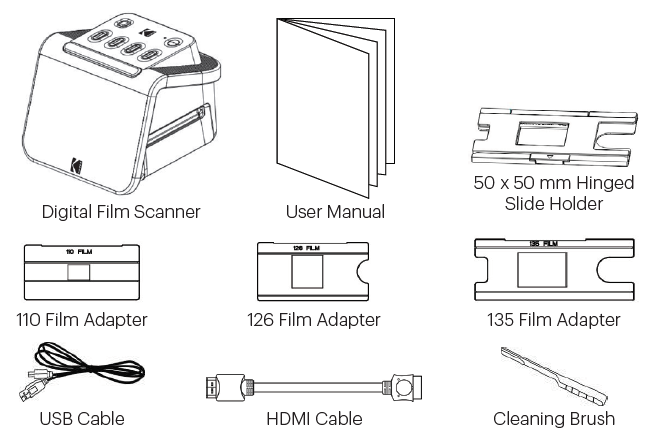
BOX CONTENTS
SAFETY PRECAUTIONS
- IMPORTANT: Do not expose this product to liquids or high humidity.
- Do not handle this product with wet hands. Risk of electric shock.
- WARNING: DO NOT ATTEMPT TO DISASSEMBLE OR ALTER THIS UNIT. THIS DEVICE CONTAINS NO USER-SERVICEABLE PARTS.
- Do not block any ventilation openings.
- Do not operate this device near heat sources such as radiators or stoves.
- When connecting the KODAK SLIDE N SCAN Digital Scanner directly to your computer, be careful not to overload the USB connections. If you have too many devices connected to your computer, such as a wireless mouse, media player, mobile phone,, or other USB-powered devices, there may not be enough power for the product to function properly.
- Do not move or disconnect the device from the computer while the device is reading/writing data. This may cause damage to the data and/or the device.
- The proper adapter tray must be inserted into the slide holder, and then inserted into the product before attempting to insert film. Failure to do so may result in losing media inside the unit and will void the warranty. Resultant media loss is NOT covered under warranty.
- Always turn off and unplug the device when it is not in use. Unplug the USB cable from your computer and unplug the AC adapter from the socket.
- WARNING: CHOKING HAZARD – Small parts. This product contains small parts and is not suitable for children under 3 years old.
- Remove all packaging before using this device. Please keep all packaging materials out of reach of children and pets.
- Properly dispose of all packing materials immediately after unpacking the product, as the bags used for packaging could present a suffocation or choking hazard.
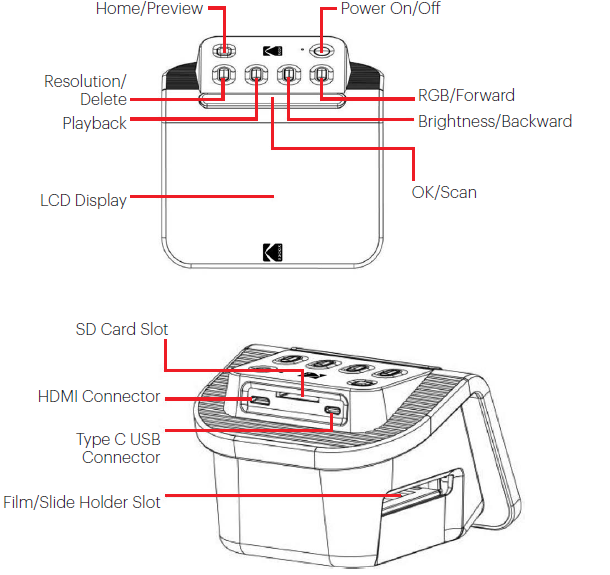
GET TO KNOW YOUR SCANNER
USING YOUR SCANNER
Loading Your Film
Note: your scanner supports transparent slides, color negatives, and black and white negatives for film sizes 135, 110, and 126.
For all scans:
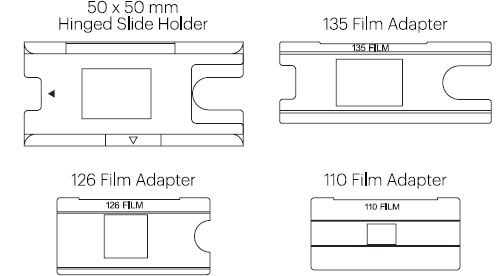
- The 50 x 50 mm Hinged Slide Holder is used for all formats. Use it alone for slide sizes 135, 110, and 126, or with one of the three special adapters for 135, 126, or 110 film. The film size printed on the adapter should be visible. Make sure the 4 pins of your adapter are aligned and fully inserted into the 4 holes of the Slide Holder. It should lie flat.
- Close the Slide Holder until it clicks shut. If it doesn’t close properly, do not force. Reposition the adapter and try again.
To scan transparent slides:
Insert the 50 x 50 mm Hinged Slide Holder into the Film/Slide Holder Slot, using the triangular arrow marks on the holder and the scanner for reference until it stops.
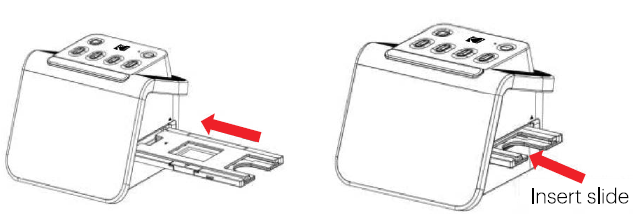
- Insert slides one at a time into the opening in the slide holder. The slides will push each other through. You can center the slide by manually adjusting it to the left or right.
- With the slide centered in place, make color and brightness adjustments as necessary. Instructions for this step are located on page 15.
- When the image is in place on the LCD screen, you can press the OK/Scan button to scan.
- The image will then automatically be saved on the SD card.
To scan 135, 110, and 126 negatives:
- Open the 50 x 50 mm Hinged Slide Holder, and insert the appropriate Film Adapter for the size of your negatives.
- Make sure the 4 pins of your adapter are aligned and fully inserted into the 4 holes of the Slide Holder. It should lie flat.
- Close the Slide Holder until it clicks shut. If it doesn’t close properly, do not force. Reposition the adapter and try again.
- Insert the 135 Film Adapter into the Film/Slide Holder Slot, using the triangular arrow marks on the holder and the scanner for reference.
Insert film one at a time into the opening in the film adapter. The negatives will push each other through. You can center the image by manually adjusting it to the left or right.
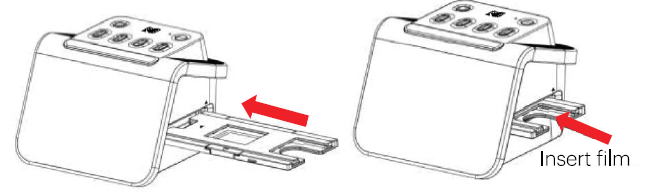
- When the image is in place on the LCD screen, you can press the OK/Scan button to scan.
- The image will then automatically be saved on the SD card.
Troubleshooting Kodak Slide N Scan Digital Film Scanner
Users may occasionally encounter common issues such as failure to power on, scanning errors, or image quality inconsistencies. If the scanner does not power up, ensure it is connected to a reliable 5V/1A power source via USB or power adapter. Use only compatible SD cards (up to 32GB) formatted correctly to avoid saving errors.
In cases of scanning errors or incorrect image orientation, verify that the film or slide is correctly loaded into the appropriate holders (50mm slide holder or 135/110/126 film adapters) and that the scanner is set to the correct film type mode. Error codes are rare, but consult the user manual for specific diagnostics.
Preventive measures include handling film holders gently to avoid breakage, regularly cleaning the scanner lens with the provided brush, and avoiding exposure to extreme temperatures or direct sunlight that may warp plastic parts. For software or firmware issues, reconnect the device or try scanning with a different SD card.
This product comes with a limited one-year warranty covering manufacturing defects. For technical support or warranty claims, users can contact Kodak customer service or authorized retailers. Support contact details are provided in the user manual and on Kodak’s official website.
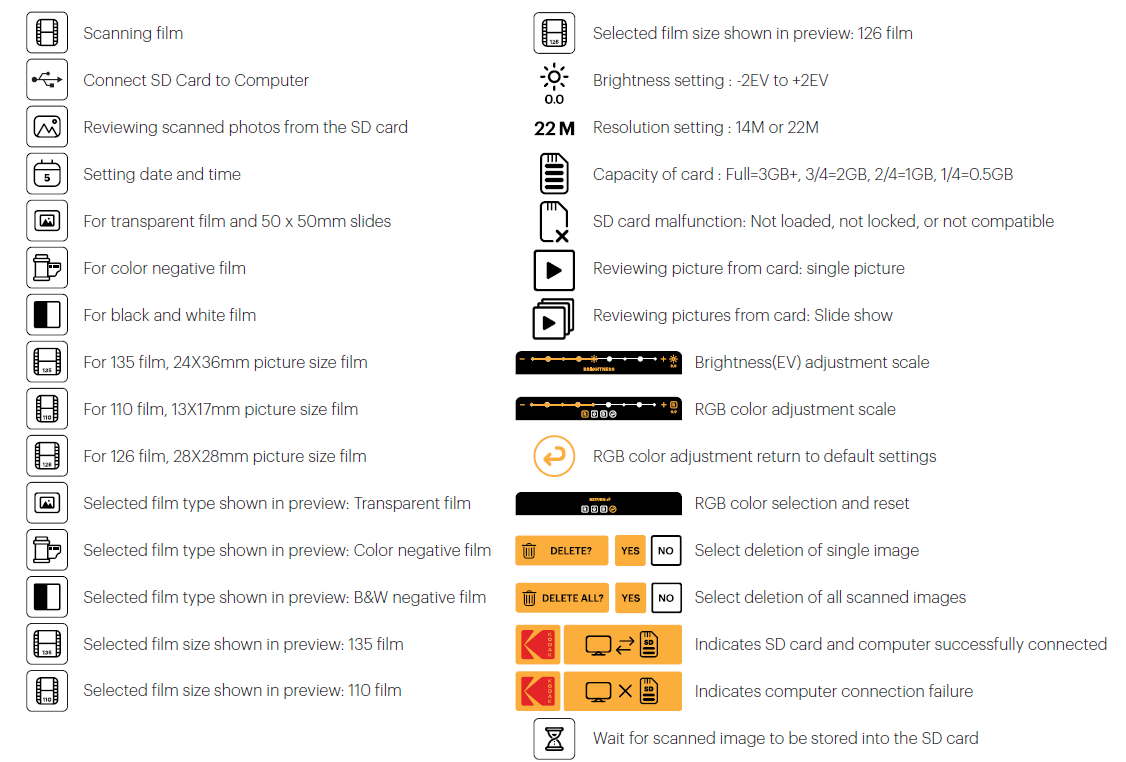
ICONS AND THEIR FUNCTIONS
WARRANTY INFORMATION
LIMITED WARRANTY ON KODAK SLIDE N SCAN DIGITAL FILM SCANNER
THIS LIMITED WARRANTY GIVES YOU SPECIFIC LEGAL RIGHTS,, AND YOU MAY ALSO HAVE OTHER RIGHTS, WHICH VARY FROM STATE TO STATE.
WE WARRANT THAT DURING THE WARRANTY PERIOD, THE PRODUCT WILL BE FREE FROM DEFECTS IN MATERIALS AND WORKMANSHIP.
LIMITATION OF LIABILITY
TO THE EXTENT NOT PROHIBITED BY LAW, THIS WARRANTY IS EXCLUSIVE AND INSTEAD OF ALL OTHER WARRANTIES, ORAL, WRITTEN, STATUTORY, EXPRESS, OR IMPLIED. EXCEPT FOR THE EXPRESS WARRANTIES CONTAINED IN THIS LIMITED WARRANTY STATEMENT AND TO THE EXTENT NOT PROHIBITED BY LAW, WE DISCLAIM ALL OTHER WARRANTIES, EXPRESSED OR IMPLIED, STATUTORY OR OTHERWISE, INCLUDING WITHOUT LIMITATION, THE WARRANTIES OF MERCHANTABILITY AND FITNESS FOR A PARTICULAR PURPOSE. SOME STATES DO NOT ALLOW DISCLAIMERS OF IMPLIED WARRANTIES, SO THIS DISCLAIMER MAY NOT APPLY TO YOU. TO THE EXTENT SUCH WARRANTIES CANNOT BE DISCLAIMED UNDER THE LAWS OF YOUR JURISDICTION, WE LIMIT THE DURATION AND REMEDIES OF SUCH WARRANTIES TO THE DURATION OF THIS EXPRESS LIMITED WARRANTY.
OUR RESPONSIBILITY FOR DEFECTIVE GOODS IS LIMITED TO REPAIR, REPLACEMENT,, OR REFUND AS DESCRIBED BELOW IN THIS WARRANTY STATEMENT.
- WHO MAY USE THIS WARRANTY?
C&A Marketing, Inc., located at 114 Tived Lane East, Edison, NJ (“we”),, extends this limited warranty only to the consumer who originally purchased the product (“you”). It does not extend to any subsequent owner or other transferee of the product. - WHAT DOES THIS WARRANTY COVER?
This limited warranty covers defects in materials and workmanship of the KODAK SLIDE N SCAN Digital Film Scanner (the “product”) for the Warranty Period as defined below. - WHAT DOES THIS WARRANTY NOT COVER?
This limited warranty does not cover any damage due to: (a) transportation; (b) storage; (c) improper use; (d) failure to follow the product instructions or to perform any preventive maintenance; (e) modifications; (f) unauthorized repair; (g) normal wear and tear; or (h) external causes such as accidents, abuse, or other actions or events beyond our reasonable control. - WHAT IS THE PERIOD OF COVERAGE?
This limited warranty starts on the date of your purchase and lasts for one year (the “Warranty Period”). The Warranty Period is not extended if we repair or replace the product. We may change the availability of this limited warranty at our discretion, but any changes will not be retroactive. - WHAT ARE YOUR REMEDIES UNDER THIS WARRANTY?
With respect to any defective product during the Warranty Period, we will, at our sole discretion, either: (a) repair or replace such product (or the defective part) free of charge or (b) refund the purchase price of such product if an exchange unit cannot be provided. - HOW DO YOU OBTAIN WARRANTY SERVICE?
To obtain warranty service, you must contact us at 1-844-516-1539 or by email at kodak@camarketing.com during the Warranty Period to obtain a Defective Merchandise Authorization (“DMA”) number. No warranty service will be provided without a DMA number,, and return shipping costs to our facilities shall be assumed by you, the purchaser. Shipping costs of the replacement unit to you shall be assumed by us.
Pros & Cons of the Kodak Slide n Scan Digital Film Scanner
- Pros:
- High resolution scanning with a 14MP sensor and up to 22MP interpolation for detailed images.
- Supports multiple film formats: 50mm slides and color/black & white negatives in 135, 110, and 126 sizes.
- Large 7-inch adjustable LCD screen offers a clear preview and easy navigation.
- Portable power options via USB port or power bank for flexible use.
- Direct SD card saving enables independent scanning without a computer.
- One-touch operation simplifies the scanning process for beginners.
- Cons:
- Film adapters are plastic and may feel fragile, requiring careful handling.
- Requires the purchase of an SD card and an HDMI cable separately, adding to the overall cost.
- Limited control buttons can be confusing due to multifunctional use.
- USB 2.0 interface means slower data transfer compared to newer USB standards.
- Does not include an internal battery, relying on external power sources.
Compared to alternatives like high-end flatbed scanners or professional film scanners, the Kodak Slide n Scan trades some advanced features and builds robustness for affordability and ease of use, making it a strong value choice for casual users and hobbyists.
Customer Reviews of Kodak SlidN n Scan Digital Film Scanner
Customers commonly praise the Kodak Slide n Scan Digital Film Scanner for its simplicity and the quality of scanned images, especially highlighting the sharpness from the 14MP sensor and the convenience of the large LCD screen. Users appreciate the straightforward one-button scanning and the ability to scan directly to SD cards without needing a computer.
Common complaints include fragile film holders, occasional confusion with the multifunction buttons, and the need to buy accessories separately, such as SD cards. Some users mention the USB 2.0 speed as a bottleneck for large batches,,s but recognize it as acceptable for home use.
Star ratings generally range from 4 to 4.5 out of 5 stars, with recommendations for anyone looking to digitize slides and negatives without complex software. Customers often recommend this scanner for personal archives, small collections, and ease of use rather than for professional-grade scanning.
More kodak manuals
Leave a Comment