
Usage: Koss BTS1 Wireless Bluetooth Speaker User Manual
Content
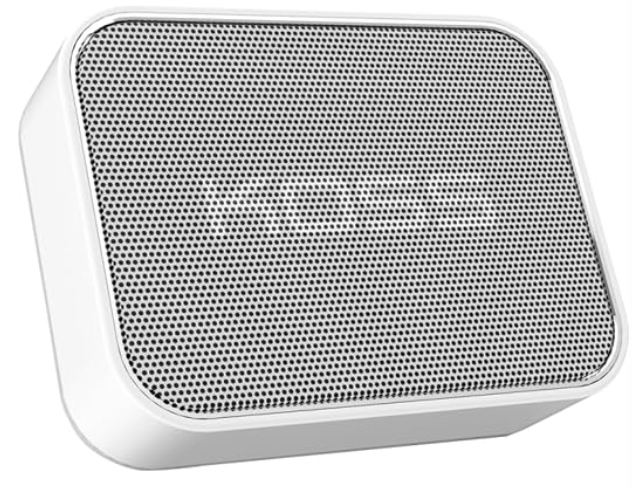
Koss BTS1 Wireless Bluetooth Speaker
Introduction
The Koss BTS1 Wireless Bluetooth Speaker offers a compact, portable audio solution designed for music lovers who value convenience and high-quality sound on the go. With its unique kickstand design, the BTS1 allows users to switch between omni-directional and directional listening modes, delivering versatile sound projection in a remarkably small footprint. This speaker is ideal for outdoor enthusiasts, commuters, students, and anyone seeking wireless audio from a reliable and stylish device.
Weighing only 0.36 lbs and small enough to fit in a pocket, the BTS1 combines portability with robust performance. It supports Bluetooth wireless connectivity and also offers wired listening options via a 3.5mm audio input, making it compatible with a wide range of devices including smartphones, tablets, and laptops. The speaker’s battery life enables extended usage, perfect for day trips, work breaks, or casual home listening.
Available in white and other color variants, the Koss BTS1 Wireless Bluetooth Speaker typically retails within the affordable price range of $40 to $60, making it accessible to budget-conscious buyers looking for quality sound without bulk. It is widely available through online retailers and electronics stores, offering a great blend of convenience and performance for everyday wireless audio needs.
Specifications of Koss BTS1 Wireless Bluetooth Speaker
- Dimensions: Approximately 4” W x 3” H x 1” D
- Weight: 0.36 lbs (5.8 ounces)
- Connectivity: Bluetooth wireless pairing (up to 10 meters), 3.5mm audio input and output jacks
- Battery: Rechargeable via USB (5V input voltage); typical playtime up to 8-10 hours depending on volume
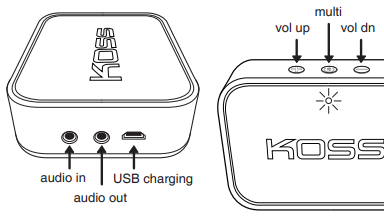
- Controls: Multi-function power/pairing button, volume up/down buttons
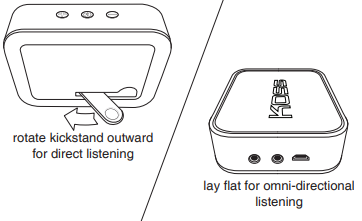
- Audio Modes: Omni-directional and directional sound via adjustable kickstand
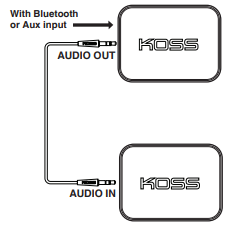
- Pass-through Audio: Allows audio routing from Bluetooth or wired input to an external device through audio output jack
- Performance: Crisp midrange and balanced sound quality for its size; suitable for small to medium listening environments
- Charging: USB charging port with included cable
Compared to similar portable Bluetooth speakers, the Koss BTS1 stands out with its unique kickstand feature and pass-through audio capability, offering flexibility not commonly found in competing models at this price point.
Bluetooth Discovery
Select "BTSI " on transmitting device
Connected
Ports / Controls
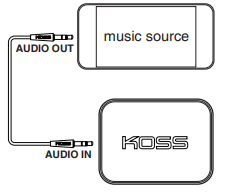
Wired Listening
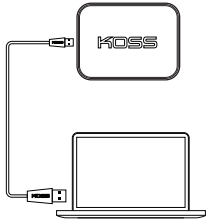
Charging
Pass-Through Listening
Listening Modes
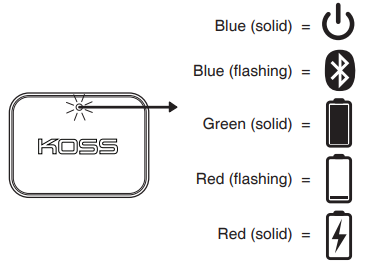
Light Language
Setup Guide for Koss BTS1 Wireless Bluetooth Speaker
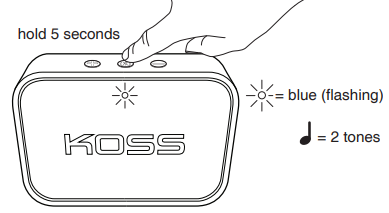
- Power On: Press and hold the multi-function button for 5 seconds until the indicator light flashes blue, signaling Bluetooth discovery mode.
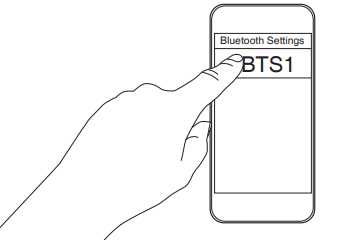
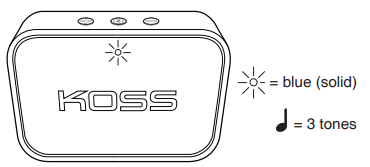
- Pairing: On your smartphone, tablet, or computer, enable Bluetooth and select "BTS1" from the list of available devices. The speaker will emit confirmation tones and the indicator will turn solid blue once connected.
- Wired Connection: Use a 3.5mm audio cable to connect your device to the BTS1’s audio input port for wired listening.
- Charging: Connect the USB charging cable to the speaker and a power source. Charging indicator lights may vary; allow full charge before first use.
- Listening Modes: Adjust the kickstand to orient the speaker for either focused directional sound or omnidirectional sound dispersion.
Troubleshooting Tips: If pairing fails, ensure the speaker is in discovery mode and restart Bluetooth on your device. Keep devices within 10 meters without physical obstructions for optimal connection. For audio dropout or distortion, reduce distance or check battery level.
Safety Precautions: Avoid exposing the speaker to moisture or extreme temperatures. Do not disassemble the device. Use only the included USB cable for charging to prevent damage.
Troubleshooting for Koss BTS1 Wireless Bluetooth Speaker
- No Power: Ensure the speaker is charged by connecting to a USB power source. If unresponsive, try a different cable or power adapter.
- Bluetooth Not Connecting: Turn off Bluetooth on both devices, restart, and try pairing again. Clear previous pairings from your device's Bluetooth list if necessary.
- Audio Issues (Distortion or Dropouts): Move closer to the speaker, remove obstacles, and ensure the battery is sufficiently charged.
- Error Codes: The BTS1 uses tone signals rather than numeric codes; listen for 2 tones for discovery mode, 3 tones for successful connection.
- Preventive Measures: Regularly charge the battery, keep firmware updated if applicable, and avoid exposure to liquids or extreme conditions.
The Koss BTS1 comes with a standard manufacturer warranty (typically one year) covering defects. For support, contact Koss customer service through their official website or authorized retailers.
Pros & Cons of the Koss BTS1 Wireless Bluetooth Speaker
Pros
- Compact and lightweight design perfect for portability and pocket-sized convenience.
- Unique kickstand offers switchable listening modes (directional and omnidirectional sound).
- Multiple connectivity options: Bluetooth wireless plus wired 3.5mm audio input and output.
- Pass-through audio capability enables flexible audio routing setups.
- Affordable price point delivering solid audio quality for casual listeners.
Cons
- Battery life, while decent, may be shorter than some premium competitors (around 8-10 hours).
- Sound output is limited by the small size, less suitable for large or noisy environments.
- Absence of advanced features like waterproofing, voice assistant integration, or app controls.
- Build quality is adequate but uses lightweight plastic that may feel less durable compared to metal-bodied alternatives.
Customer Reviews of Koss BTS1 Wireless Bluetooth Speaker
Users commonly praise the Koss BTS1 Wireless Bluetooth Speaker for its portability and the innovative kickstand design that enhances listening flexibility. The compact size and ease of pairing via Bluetooth are highlighted as major benefits, making it a favorite for casual, everyday music listening.
Some reviewers note occasional connectivity hiccups or limited bass response given its size but generally agree the speaker offers excellent value for money. The pass-through audio feature receives positive remarks for versatility. The average customer rating often falls around 4 out of 5 stars, with recommendations focused on those needing a lightweight, affordable Bluetooth speaker for personal use rather than high-powered audio output.
Common complaints include battery life being shorter than expected and the plastic build feeling somewhat fragile under heavy use. Overall, the BTS1 is considered a reliable entry-level wireless speaker suitable for on-the-go users and budget-conscious buyers.
Faqs
How do I set up the koss BTS1 Wireless Bluetooth Speaker for the first time?
What should I do if my koss BTS1 Wireless Bluetooth Speaker is not connecting to Bluetooth devices?
Can I connect multiple koss BTS1 Wireless Bluetooth Speakers together for enhanced sound?
How do I use the unique kickstand feature on the koss BTS1 Wireless Bluetooth Speaker?
What devices are compatible with the koss BTS1 Wireless Bluetooth Speaker?
How long does the battery last on the koss BTS1 Wireless Bluetooth Speaker, and how do I charge it?
What troubleshooting steps can I take if the volume controls on my koss BTS1 Wireless Bluetooth Speaker are unresponsive?
How should I maintain and clean my koss BTS1 Wireless Bluetooth Speaker to ensure optimal performance?
More koss manuals
- How to Use: Koss KPH7 Wireless Bluetooth Headphones User Manual
- Setup: Koss KSC35 Wireless Headphones User Manual
- Setup & Connection: Koss Porta Pro Wireless Headphones User Manual
- Usage & Connection: Koss TWS150i True Wireless Earbuds User Manual
- Setup: Koss TWS250i True Wireless Earbuds User Manual
- Setup: Koss BT330i Wireless Headphones User Manual
Leave a Comment