
Setup: Koss KSC35 Wireless Headphones User Manual
Content
Koss KSC35 Wireless Headphones: Complete User Manual and Guide
Introduction to Koss KSC35 Wireless Bluetooth Headphones
The Koss KSC35 Wireless Headphones represent an innovative solution for active listeners who demand both comfort and audio quality without the constraints of traditional over-ear designs. These lightweight ear-clip headphones deliver exceptional sound performance through dynamic drivers with an impressively wide frequency response, making them ideal for music enthusiasts, travelers, and professionals who need reliable audio on the move.
Featuring Bluetooth 5.2 connectivity and up to 18+ hours of battery life with USB-C charging, the KSC35 Wireless model combines modern wireless technology with Koss's renowned acoustic engineering. The open hear-through design allows you to remain aware of your surroundings while enjoying your audio, making these headphones perfect for outdoor activities, commuting, gaming, and everyday listening. The integrated in-line microphone and remote control provide convenient access to music playback, volume adjustments, and call management without reaching for your device.
The Koss KSC35 Wireless Headphones are designed for users who prioritize portability, comfort, and sound quality. Whether you're a fitness enthusiast, remote worker, or casual listener, these headphones adapt to your lifestyle. Available at approximately $50-70 USD, they offer exceptional value for premium Bluetooth audio performance. The package includes a protective carrying case and cable management clip, ensuring your investment remains protected during travel and storage.
Technical Specifications and Features
Understanding the technical capabilities of your Koss KSC35 Wireless Headphones helps you maximize their performance and compatibility with your devices.
Connectivity and Audio Performance:
- Bluetooth Version: 5.2
- Frequency Range: 15 Hz - 25 kHz
- Impedance: 60 Ohm
- Driver Type: Dynamic elements for wide frequency response
- Audio Jack: Not applicable (wireless only)
Battery and Power:
- Battery Life: Up to 18+ hours of continuous playback
- Charging Time: Approximately 6 hours
- Charging Port: USB-C
- Battery Type: Built-in rechargeable lithium-ion
Physical Design and Build:
- Model Name: KSC35
- Weight: 3.8 ounces (lightweight and portable)
- Earpiece Shape: On-ear, ear-clip design with pivoting ear plates
- Ear Cushion Material: Soft foam padding
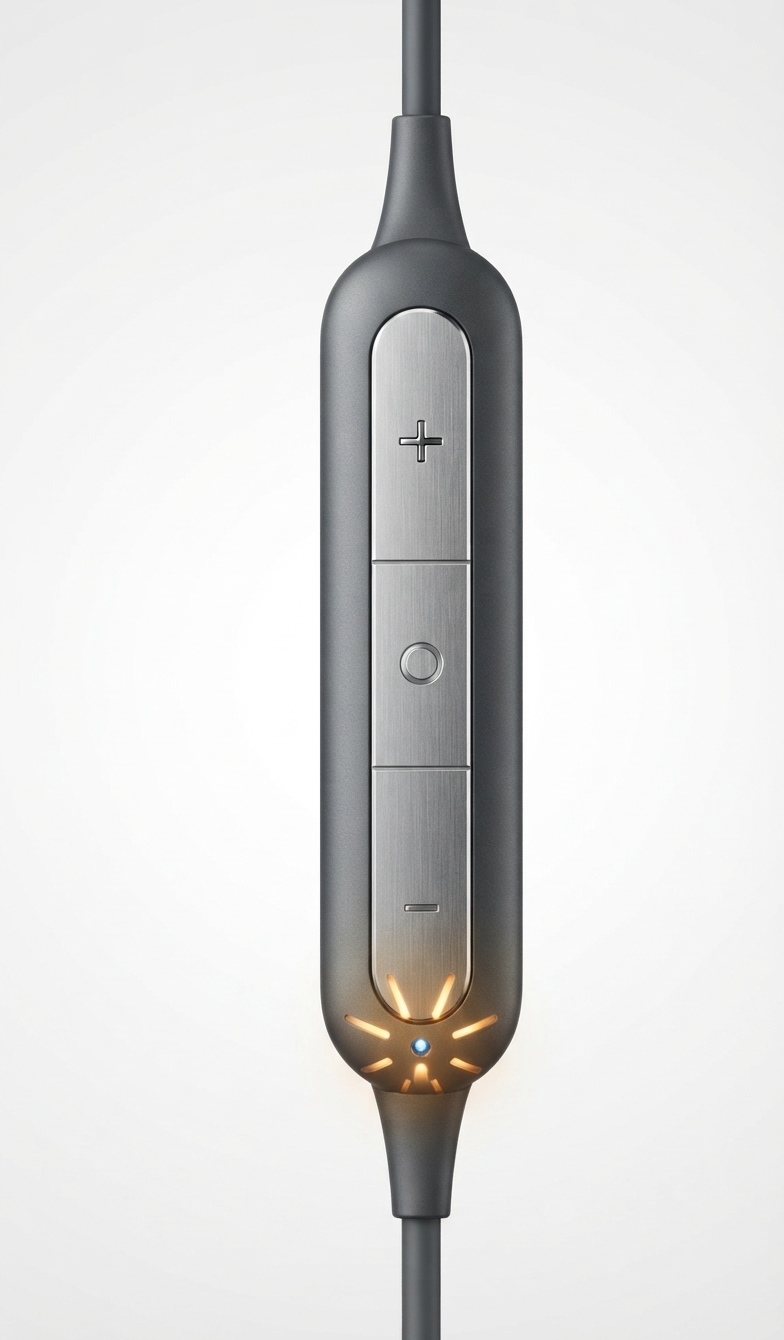
- Control Type: In-line remote with integrated microphone
- Water Resistance: Not water resistant
- Accessories Included: Protective carrying case, cable management clip
The Koss KSC35 Wireless Headphones deliver exceptional audio clarity across the entire frequency spectrum, from deep lows to crisp highs, making them versatile for all music genres and audio content.
Step-by-Step Setup Guide for Koss KSC35 Wireless
Properly setting up your Koss KSC35 Wireless Headphones ensures optimal performance and seamless connectivity with your Bluetooth devices.
Initial Charging and Power-On:
Before using your headphones for the first time, charge them completely using the included USB-C cable. Connect the charging port to a USB power adapter or computer and allow approximately 6 hours for a full charge. Once charged, press and hold the multi-function button on the in-line remote for 2-3 seconds until you see the Bluetooth indicator light activate, indicating the headphones are powered on and ready for pairing.
Bluetooth Pairing Instructions:
To connect your KSC35 Wireless Headphones to a Bluetooth-enabled device, ensure the headphones are powered on. On your smartphone, tablet, or computer, navigate to Bluetooth settings and scan for available devices. Select "KSC35 Wireless" from the discovered devices list. Once selected, the pairing process completes automatically, and you'll hear a confirmation tone through the headphones. The device will remember this pairing for future connections, allowing automatic connection when both devices are in range.
Fitting and Comfort Adjustment:
Position the ear-clip design over your ear, ensuring the pivoting ear plate rests comfortably against the side of your head. The soft foam ear cushions conform to your ear shape for personalized comfort. Adjust the ear clips as needed to achieve a secure fit without excessive pressure. The cable should route behind your neck for optimal comfort during extended wear sessions.
Troubleshooting Connection Issues:
If your headphones fail to pair with a device, ensure Bluetooth is enabled on both the headphones and your device. Power off both devices, then power them back on to reset the connection. If the headphones don't appear in your device's Bluetooth list, perform a factory reset by holding the multi-function button for 10 seconds until the indicator light flashes rapidly. For persistent connectivity problems, consult the warranty support resources available through Koss.
Troubleshooting Common Issues with Koss KSC35 Wireless Headphones
Encountering issues with your Koss KSC35 Wireless Headphones? This troubleshooting guide addresses the most common problems and provides practical solutions.
Audio Not Playing or Low Volume:
If you hear no sound or extremely low volume, first verify that your headphones are properly connected to your device and not muted. Check the volume level using the '+' button on the in-line remote, holding it for 2-3 seconds to increase volume incrementally. Ensure your source device's volume is also set to an appropriate level. If audio remains absent, disconnect and re-pair the headphones with your device.
Bluetooth Connectivity Problems:
Weak or unstable Bluetooth connections typically result from interference or devices being outside the effective range. Keep your KSC35 Wireless Headphones within 33 feet (10 meters) of your connected device. Minimize interference by moving away from microwave ovens, wireless routers, or other Bluetooth devices. If connectivity remains poor after relocating, power cycle both the headphones and your device, then re-establish the Bluetooth connection.
Battery Not Charging or Rapid Discharge:
Verify that the USB-C charging cable is properly inserted into the headphones' charging port and connected to a functioning power adapter. Allow a full 6-hour charging cycle before using the headphones. If the battery drains rapidly during use, reduce volume levels and disable unnecessary features. Extreme temperatures can affect battery performance, so charge and store your headphones in moderate environments.
Microphone Not Working During Calls:
Ensure your device's microphone permissions are enabled for calling applications. Test the microphone by recording a voice memo on your device. If the microphone remains non-functional, check that the in-line remote is properly seated and not damaged. Perform a factory reset and re-pair your headphones with your device.
Warranty and Support:
All Koss KSC35 Wireless Headphones are covered by a Limited Lifetime Warranty against manufacturing defects. For support inquiries, visit Koss.com or contact their customer service team. Register your headphones through the Koss website to activate warranty coverage and receive exclusive support benefits.
Advantages and Disadvantages of Koss KSC35 Wireless Headphones
Key Advantages:
- Exceptional Sound Quality: Dynamic drivers deliver impressive audio fidelity across the 15-25 kHz frequency range, rivaling headphones at significantly higher price points
- Extended Battery Life: 18+ hours of continuous playback ensures all-day listening without frequent charging interruptions
- Lightweight and Portable: At just 3.8 ounces, these headphones add minimal weight to your daily carry, with an included protective case for travel
- Open Hear-Through Design: Remain aware of your surroundings while enjoying audio, ideal for outdoor activities and commuting
- Convenient Controls: In-line remote provides easy access to volume, playback, and call management without reaching for your device
- Affordable Pricing: Delivers premium audio performance at an accessible $50-70 price point, offering exceptional value
- Modern Connectivity: Bluetooth 5.2 ensures stable, fast connections with minimal latency across compatible devices
Notable Disadvantages:
- Ear Clip Comfort: Some users report discomfort during extended wear sessions, particularly around the back of the ears; the clips are firmer than comparable models like the KSC75
- Not Water Resistant: Unsuitable for water sports, swimming, or heavy perspiration environments; not designed for intense workout conditions
- Attachment Durability: User reviews indicate the ear clip attachment points may be prone to breaking with heavy use, requiring potential repair or replacement
- Limited Comfort for Extended Sessions: Extended wear beyond 4-5 hours may result in ear fatigue or soreness due to the clip-on design
- Cable Management: The behind-neck cable routing occasionally shifts during movement, requiring readjustment
Value Assessment:
The Koss KSC35 Wireless Headphones represent outstanding value for budget-conscious listeners prioritizing sound quality and battery life over maximum comfort for extended sessions. They excel for commuting, casual listening, gaming, and outdoor activities where awareness of surroundings enhances the experience. If you require maximum comfort for professional use or intensive training environments, premium models with superior ear clip design may warrant consideration.
Authentic Customer Reviews and User Feedback
Real users consistently praise the Koss KSC35 Wireless Headphones for their exceptional audio quality relative to price. Multiple reviewers describe the sound as "amazing" and comparable to significantly more expensive alternatives, with particular appreciation for the balanced bass response and clarity across music genres including ambient, acoustic, and bass-heavy tracks.
Users highlight the convenience of the in-line remote control, noting that track navigation and volume adjustment work smoothly during everyday activities like sleeping or working. The lightweight design receives consistent praise, with reviewers emphasizing how the headphones remain unobtrusive during extended wear periods.
Common user complaints center on ear clip comfort during prolonged use sessions, with several reviewers noting that the clips become uncomfortable after 2-4 hours of continuous wear. Some users compare the comfort unfavorably to the KSC75 model, though several mention that the clips relax somewhat with extended use. A minority of reviewers report durability concerns with the ear clip attachment points, noting potential for breaking with heavy use.
Overall, customers recommend the Koss KSC35 Wireless Headphones for travelers, commuters, and casual listeners seeking high-quality audio in a portable, affordable package. The consistent recommendation is to consider comfort requirements and use cases before purchasing, particularly for extended professional use where maximum comfort proves essential.
Operating Instructions and Control Guide
Master your Koss KSC35 Wireless Headphones with this comprehensive control reference guide.
In-Line Remote Control Functions:
| Function | Action | Button |
|---|---|---|
| Power On/Off | Press and hold for 2-3 seconds | Multi-function button |
| Play/Pause Music | Press once | Multi-function button |
| Volume Up | Press '+' button | + |
| Volume Down | Press '-' button | - |
| Next Track | Press and hold '+' button for 1-2 seconds | + |
| Previous Track | Press and hold '-' button for 1-2 seconds | - |
| Answer Call | Press multi-function button once | Multi-function button |
| End Call | Press multi-function button once | Multi-function button |
| Reject Call | Press and hold multi-function button | Multi-function button |
| Activate Voice Assistant | Double-press multi-function button | Multi-function button |
Optimal Performance Tips:
Maintain your Bluetooth-enabled device within the effective range of 33 feet (10 meters) for optimal connectivity. Keep volume at comfortable levels to prevent ear fatigue and extend battery life. Periodically clean the ear cushions and remote buttons with a soft, dry cloth to maintain functionality and hygiene. Store your headphones in the provided protective case when not in use to prevent damage and extend lifespan.
Conclusion: Why Choose Koss KSC35 Wireless Headphones
The Koss KSC35 Wireless Headphones deliver an exceptional combination of audio quality, battery life, portability, and affordability that appeals to diverse listener profiles. Whether you're a commuter seeking reliable daily companions, a traveler prioritizing lightweight portability, or a casual listener valuing sound quality over premium comfort features, these headphones provide measurable value and performance.
With 18+ hours of battery life, modern Bluetooth 5.2 connectivity, and dynamic drivers producing impressive sound across the full audio spectrum, the KSC35 Wireless model represents a thoughtful investment in personal audio equipment. The included carrying case and cable management clip enhance portability and protection, while the integrated microphone and in-line remote provide convenient control during daily activities.
For users prioritizing maximum comfort during extended professional use or water-resistant durability for intense athletic environments, alternative models may warrant consideration. However, for mainstream users seeking quality audio in a portable, affordable package, the Koss KSC35 Wireless Headphones stand as an excellent choice backed by Koss's Limited Lifetime Warranty and proven reputation for acoustic excellence.
```
Faqs
How do I set up my koss KSC35 Wireless Headphones for the first time?
What should I do if my koss KSC35 Wireless Headphones are not connecting to Bluetooth?
Can I use koss KSC35 Wireless Headphones with my smartphone to answer calls?
What is the battery life of the koss KSC35 Wireless Headphones and how do I charge them?
How do I control music playback and volume on the koss KSC35 Wireless Headphones?
Are koss KSC35 Wireless Headphones compatible with gaming consoles or PCs?
How do I clean and maintain my koss KSC35 Wireless Headphones?
What should I do if the ear clips on my koss KSC35 Wireless Headphones feel uncomfortable?
More koss manuals
- How to Use: Koss KPH7 Wireless Bluetooth Headphones User Manual
- Setup & Connection: Koss Porta Pro Wireless Headphones User Manual
- Usage: Koss BTS1 Wireless Bluetooth Speaker User Manual
- Usage & Connection: Koss TWS150i True Wireless Earbuds User Manual
- Setup: Koss TWS250i True Wireless Earbuds User Manual
- Setup: Koss BT330i Wireless Headphones User Manual
Leave a Comment