
Setup: Koss BT330i Wireless Headphones User Manual
Content
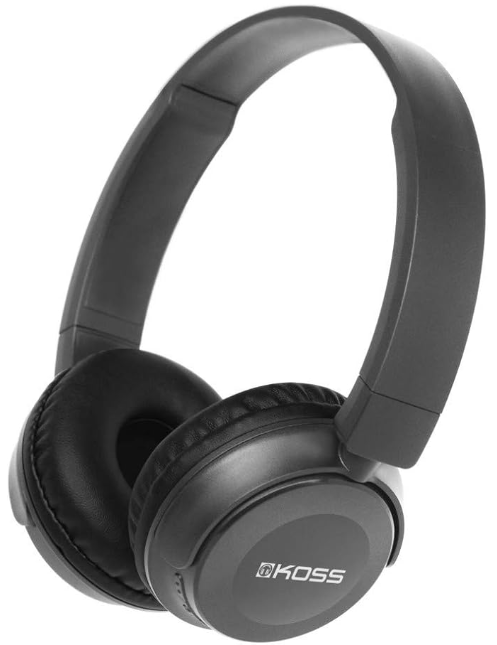
Koss BT330i Wireless Headphones
Introduction
The Koss BT330i Wireless Headphones provide an exceptional blend of affordability, portability, and sound quality, making them an ideal choice for everyday music lovers and casual listeners. Designed with Bluetooth 5.0 technology, these on-ear headphones offer a stable wireless connection and ease of use, allowing users to enjoy music and calls without the hassle of cables. Their lightweight and compact design enhances comfort during extended wear, perfect for commuters, students, and remote workers who need reliable audio on the go.
Key benefits include over 10 hours of continuous play and talk time, a wireless range of up to 10 meters, and an impressive standby time of approximately 200 hours, ensuring the headphones are ready whenever you are. The 30mm audio drivers deliver clear and balanced sound quality suitable for a variety of genres. Additionally, the inclusion of smart voice alerts enhances user convenience.
Targeted at budget-conscious users who demand solid wireless performance without breaking the bank, the Koss BT330i is available globally through online retailers and specialty audio stores. The estimated price range is around $50-$70 USD, positioning it competitively against other entry-level wireless headphones. Whether for casual music playback, video streaming, or hands-free calls, these headphones provide a reliable solution with a trusted legacy brand behind them.
Specifications of Koss BT330i Wireless Headphones
- Bluetooth Version: 5.0 for efficient and stable wireless connectivity
- Play and Talk Time: Over 10 hours per charge
- Standby Time: Approximately 200 hours
- Wireless Range: Up to 10 meters (33 feet)
- Driver Size: 30mm dynamic drivers for clear audio output
- Headphone Type: On-ear, lightweight and portable design
- Battery Charging: USB charging with reasonable recharge times
- Cable: Removable cable option for wired use
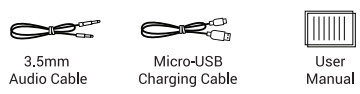
- Additional Features: Smart voice alerts, volume control on earcups
Overview
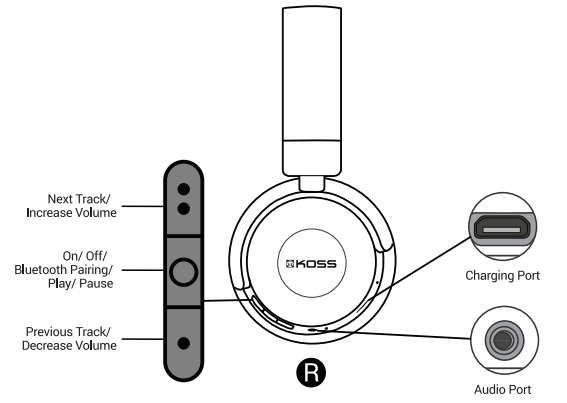
The following items are included:
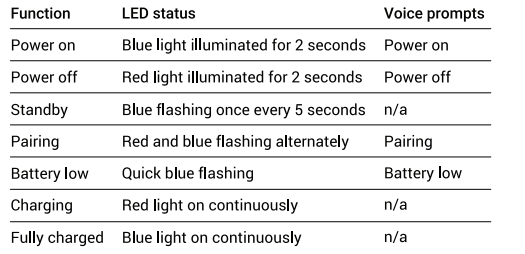
Status Indicator
When the distance between the headphones and device is beyond the effective range, the headphones will disconnect from the device. The headphones will power off automatically once no activity has occurred for 1 5 minutes.
Charging
Compared to similar budget wireless headphones, the Koss BT330i stands out with a longer standby time and reliable Bluetooth 5.0 technology, providing improved connection stability over older Bluetooth versions found in some competitors.
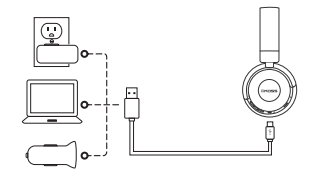
It takes 2 hours to fully charge the headphones. While charging, the battery indicator light will be red. Charging is complete when the indicator light flashes blue.
Note: The lifetime of the battery will be significantly reduced if your headphones are left uncharged for a long period of time. We recommend that you recharge your headphones at least once a month.
Setup Guide for Koss BT330i Wireless Headphones
- Charge your headphones fully before first use using the supplied USB cable.
- Turn on the headphones by pressing the power button until the indicator light flashes.
- Activate Bluetooth on your device (smartphone, tablet, or PC).
- Search for “Koss BT330i” in the list of available Bluetooth devices and select it to pair.
- Wait for the confirmation tone or voice alert indicating successful pairing.
- Adjust volume and playback using the on-ear controls as needed.
Troubleshooting tips: If pairing fails, restart both devices and retry. Reset headphones by powering off, then holding the power button for 10 seconds.
Safety Precautions: Avoid using headphones at high volumes for extended periods to protect hearing. Do not expose the device to water or extreme temperatures.
Troubleshooting for Koss BT330i Wireless Headphones
- No sound: Ensure headphones are charged and properly paired. Check device volume and Bluetooth connection.
- Intermittent connection: Stay within 10-meter wireless range and remove obstacles between devices.
- Pairing issues: Delete “Koss BT330i” from your device’s Bluetooth history and re-pair.
- Battery not charging: Use the original USB cable and charger. Inspect charging port for debris.
- Audio distortion: Restart headphones and your audio device; ensure firmware is up to date if applicable.
Preventive measures: Store headphones in a dry, safe place; charge regularly to maintain battery health.
Warranty & Support: Koss offers a limited lifetime warranty on their headphones. For assistance, contact Koss Customer Support at 1-800-USA-KOSS (1-800-872-5677) or email customersupport@koss.com.
Pros & Cons of Koss BT330i Wireless Headphones
Pros
- Affordable price: Competitive pricing around $50-$70 offers excellent value.
- Long battery life: Over 10 hours of playtime and 200 hours of standby.
- Stable Bluetooth 5.0: Reliable wireless connection with low latency.
- Comfortable fit: Lightweight on-ear design suitable for prolonged use.
- Removable cable: Versatile wired option when battery is low.
Cons
- Basic sound profile: May lack advanced audio tuning for audiophiles.
- Limited wireless range: Effective up to 10 meters; not ideal for larger spaces.
- Build quality: Budget materials may feel less premium compared to high-end models.
Overall, the Koss BT330i offers a solid balance of performance and price, especially suitable for users seeking practical wireless headphones without premium features.
Customer Reviews for Koss BT330i Wireless Headphones
Users praise the Koss BT330i Wireless Headphones for their lightweight design, strong battery life, and clear sound quality at an affordable price point. Many highlight the convenience of the Bluetooth 5.0 connection and the flexibility to switch between wireless and wired modes. Typical star ratings average around 4 out of 5 stars.
Common compliments focus on comfort during extended wear and the reliable connection within the 10-meter range. Some users note minor concerns with build robustness and the sound profile being more suited to casual listening rather than audiophile-grade experiences. Frequent recommendations include these headphones for students, commuters, or anyone needing an affordable wireless audio solution.
Faqs
How do I set up koss BT330i Wireless Headphones for the first time?
What should I do if my koss BT330i Wireless Headphones are not connecting to my smartphone?
Can I use koss BT330i Wireless Headphones with non-Bluetooth devices?
How long does the battery last on koss BT330i Wireless Headphones and how do I optimize battery life?
What are the key features of the koss BT330i Wireless Headphones that enhance audio quality?
How do I maintain and clean my koss BT330i Wireless Headphones to ensure longevity?
What should I do if my koss BT330i Wireless Headphones have low or no sound output?
Are koss BT330i Wireless Headphones compatible with iOS and Android devices?
More koss manuals
- Setup: Koss TWS250i True Wireless Earbuds User Manual
- Usage & Setup: Koss BT232i Wireless Bluetooth FitClips Headphones User Manual
- Usage & Connection: Koss TWS150i True Wireless Earbuds User Manual
- Usage: Koss BT221i Wireless Bluetooth Ear-Clip Headphones User Manual
- Setup & Connection: Koss Porta Pro Wireless Headphones User Manual
- Setup: Koss CS340BT QZ Communication Headset User Manual
Leave a Comment