
Setup: Koss TWS250i True Wireless Earbuds User Manual
Content
Koss TWS250i True Wireless Earbuds
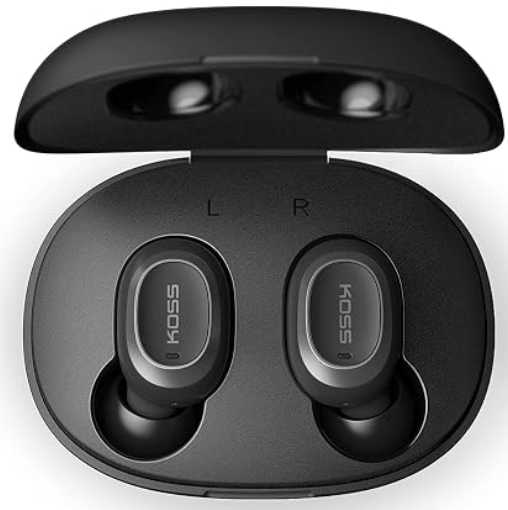
Introduction
The Koss TWS250i True Wireless Earbuds offer a premium sound experience with deep bass and crisp highs, delivering the signature quality of Koss in a truly wireless design. Engineered for music lovers and on-the-go users who value convenience, these earbuds combine advanced Bluetooth 5.0 connectivity, intuitive full surface touch controls, and a compact USB-C charging case to ensure extended usage without interruptions.
Targeted at commuters, fitness enthusiasts, and casual listeners, the TWS250i are designed to fit comfortably with three sizes of silicone ear cushions (S, M, L) for a secure seal and optimal audio clarity. Whether taking calls, streaming music, or activating voice assistants, these earbuds provide a seamless hands-free experience. With up to 4.5 hours of continuous playtime on a single charge and an additional 11+ hours via the charging case, they balance performance with portability.
Available at an estimated price range of $50-$70, the koss TWS250i True Wireless Earbuds are widely accessible through online and retail stores, offering excellent value for users seeking durable, well-performing true wireless earbuds without breaking the bank.
Specifications and Key Features of koss TWS250i True Wireless Earbuds
- Sound Quality: Dynamic drivers delivering balanced sound with deep bass and crisp highs
- Battery Life: 4.5+ hours talk/play time per charge; 11+ hours total with USB-C charging case
- Controls: Full surface touch controls to play/pause, skip tracks, answer/end calls, and activate voice assistant
- Microphones: Built-in microphones in each earbud for clear calls and voice commands
- Fit and Comfort: Removable silicone ear cushions in three sizes (S, M, L)
- Charging: Compact case with USB-C charging port supporting multiple recharges on the go
- Weight: Approximately 10g per earbud; light and nearly imperceptible when worn
Compared to similar budget true wireless earbuds, the Koss TWS250i stand out for their refined touch controls, balanced sound profile, and strong call quality, making them competitive alternatives to models in the $50-$80 price segment.
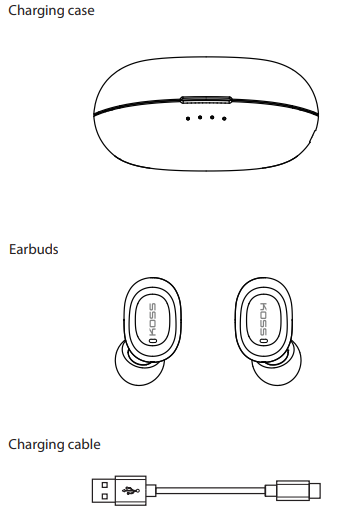
In the Box
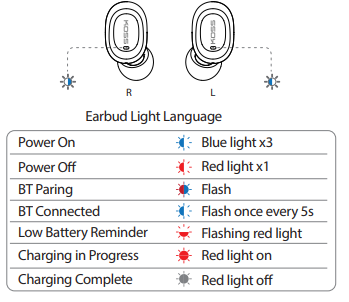
Light Language
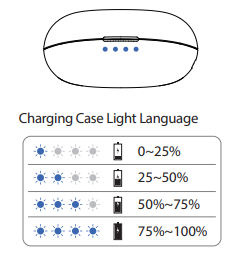
Charging
Plug the charging case into a power source with the supplied cable
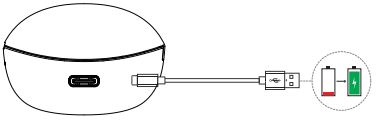
When earbuds are in the charging case, the light indicates that charging is in progress. The red light turns off when charging is complete.
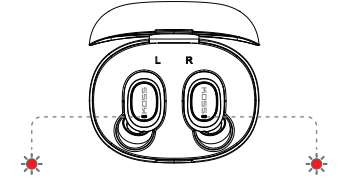
Setup Guide for koss TWS250i True Wireless Earbuds
- Initial Charging: Fully charge the earbuds in the USB-C charging case until the indicator lights show a complete charge.
- Power On: Open the charging case to automatically power on the earbuds.
- Bluetooth Pairing: On your device, enable Bluetooth and select “koss TWS250i” from the available devices list. The earbuds pair instantly once the case lid opens.
- Fit Adjustment: Choose the correct size silicone ear cushions (S, M, or L) for a secure and comfortable fit, ensuring optimal sound isolation.
- Using Touch Controls: Use tap gestures on earbud surfaces to play/pause music, skip tracks, answer/end calls, or activate your voice assistant.
Troubleshooting tips: If pairing fails, reset earbuds by placing them back into the case, close the lid, then reopen and retry pairing. Ensure your device’s Bluetooth is on and within 30 feet range.
Safety Precautions: Avoid exposure to extreme temperatures and moisture. Do not use at high volume for prolonged periods to protect hearing. Keep earbuds and charging case away from children’s reach.
Troubleshooting Common Issues with koss TWS250i True Wireless Earbuds
- No Sound or One Earbud Not Working: Place earbuds back in the charging case for 10 seconds, then remove and reconnect via Bluetooth.
- Connectivity Problems: Ensure Bluetooth 5.0-compatible device; turn Bluetooth off and on; reset earbuds by charging case cycle.
- Touch Controls Not Responding: Clean earbud surfaces gently; restart earbuds by placing them in the case and reopening.
- Battery Draining Quickly: Fully charge earbuds and case; avoid leaving earbuds out of case when not in use.
Warranty & Support: koss offers a limited warranty covering manufacturing defects. For assistance, contact koss customer support via their official website or authorized retailers.
Pros & Cons of koss TWS250i True Wireless Earbuds
Pros
- Excellent sound quality with balanced bass and clear highs for the price range
- Intuitive full surface touch controls simplify music and call handling
- Lightweight, comfortable fit with multiple ear tip sizes included
- Reliable Bluetooth 5.0 connectivity with up to 30+ feet wireless range
- USB-C charging case offers extended battery life and fast recharge
Cons
- No dedicated app or EQ customization options for personalized sound tuning
- Lacks auto pause/play sensors when earbuds are removed from ears
- Battery life is good but not class-leading compared to premium true wireless models
- Touch controls may have a learning curve for some users
Overall, the koss TWS250i True Wireless Earbuds provide solid value for money, especially for users prioritizing sound quality and convenience over extra features such as app support or advanced sensors.
Customer Reviews and Feedback on koss TWS250i True Wireless Earbuds
Users praise the koss TWS250i True Wireless Earbuds for their comfortable fit, clear call quality, and crisp sound performance at an affordable price point. Many highlight the effective touch controls and stable Bluetooth 5.0 connection as key positives. A common theme among reviews is appreciation for the lightweight design, making these earbuds suitable for extended wear.
Some customers note minor issues with touch sensitivity and the absence of an app for sound customization. Battery life receives generally positive feedback but is occasionally mentioned as an area for improvement. Star ratings typically average around 4 out of 5, with recommendations for casual listeners and budget-conscious buyers seeking reliable true wireless earbuds.
Faqs
How do I set up the koss TWS250i True Wireless Earbuds for the first time?
What should I do if my koss TWS250i True Wireless Earbuds are not pairing with my device?
Can I use the koss TWS250i True Wireless Earbuds with both Android and iOS devices?
How do the touch controls on the koss TWS250i True Wireless Earbuds work?
What is the battery life and charging process for the koss TWS250i True Wireless Earbuds?
How can I optimize the sound performance of my koss TWS250i True Wireless Earbuds?
What maintenance tips should I follow to keep my koss TWS250i True Wireless Earbuds in good condition?
How do I troubleshoot call quality issues with the koss TWS250i True Wireless Earbuds?
More koss manuals
- Usage & Connection: Koss TWS150i True Wireless Earbuds User Manual
- Setup: Koss BT330i Wireless Headphones User Manual
- Setup & Connection: Koss Porta Pro Wireless Headphones User Manual
- Usage & Setup: Koss BT232i Wireless Bluetooth FitClips Headphones User Manual
- Setup: Koss KSC35 Wireless Headphones User Manual
- Usage: Koss BT221i Wireless Bluetooth Ear-Clip Headphones User Manual
Leave a Comment