
Usage & Connection: Koss TWS150i True Wireless Earbuds User Manual
Content
Koss TWS150i True Wireless Earbuds
Introduction
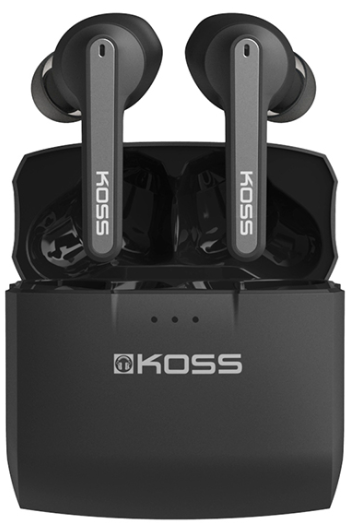
The Koss TWS150i True Wireless Earbuds offer a premium listening experience with a sleek design and advanced Bluetooth 5.0 connectivity. These earbuds provide true wireless freedom without tangled cables, making them ideal for music lovers, commuters, fitness enthusiasts, and professionals who demand convenience and quality sound on the go. Featuring intuitive touch control, integrated microphones for clear calls, and a comfortable fit with multiple silicone earpad sizes, the TWS150i earbuds are designed to keep up with active lifestyles.
Key benefits include a robust battery life of over 5 hours per charge, extended up to 25+ hours using the portable charging case, and IPX5-rated sweat resistance ensuring durability during workouts or outdoor activities. Their lightweight design and smart voice alerts enhance usability, while compatibility with both iOS and Android devices broadens their appeal. Priced competitively in the mid-range wireless earbud market, these earbuds offer excellent value and are widely available through online retailers and select electronics stores.
Specifications of koss TWS150i True Wireless Earbuds
- Model: TW150i
- Connectivity: Bluetooth 5.0 with SBC codec support
- Battery Life: 5+ hours continuous playback per charge; 25+ hours total with charging case
- Charging Time: Less than 2 hours via USB cable
- Weight: Approximately 44 grams (total with case)
- Dimensions: 5 x 5 x 2 cm (earbuds and case)
- Audio Range: Frequency response 20Hz - 20,000Hz
- Water Resistance: IPX5 sweat- and water-resistant
- Controls: Touch-sensitive controls for playback, volume, and calls
- Microphone: Built-in stereo microphone for calls and voice assistant
- Special Features: Smart voice alerts, volume control, iOS battery level display
Compared to similar models like the Koss TWS earbuds line, the TWS150i stands out with a longer battery life and IPX5 rating, providing enhanced durability for active users. Its touch control interface offers more customization than basic button controls found in some competing earbuds.
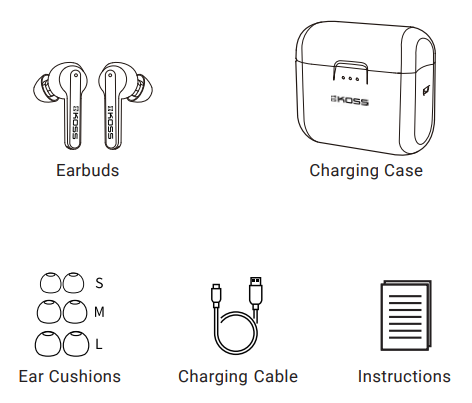
Start Included
Product Overview
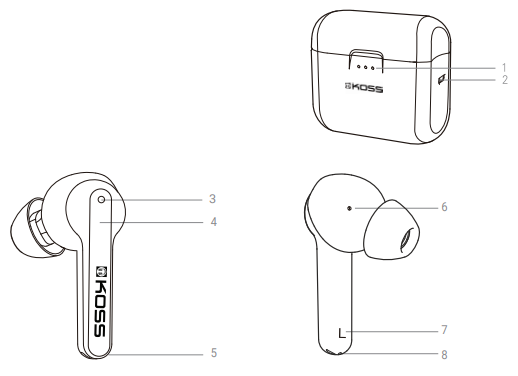
- Charging case with battery life status lights
- USB charging port
- Earbud status light
- Touch strip
- Voice mic
- Acoustical vent hole
- L/R indicator
- Magnetic charging contacts
Setup Guide for koss TWS150i True Wireless Earbuds
- Charge the earbuds and case: Use the included USB cable to fully charge the case and earbuds before first use (approximately 2 hours).
- Power on earbuds: Remove earbuds from the case; they will automatically power on and enter connection mode if not previously paired.
- Pair with device: Open your smartphone or Bluetooth-enabled device's settings, find and select "KOSS TW150i" from the Bluetooth list to connect.
- Confirm pairing: Once connected, the earbuds emit a confirmation tone or LED indicator.
- Configure controls: Use the touch-sensitive panels to control play/pause (single tap), track navigation (double/triple tap), volume adjustment (press and hold), and call management.
- Troubleshoot connectivity: If pairing fails, reset earbuds by placing them in the case and pressing the touch controls on both earbuds simultaneously for 5 seconds to enter pairing mode again.
Safety Precautions: Avoid exposing earbuds and case to excessive moisture. Do not use earbuds at high volumes for extended periods to prevent hearing damage. Keep charging cables away from heat sources.
Charging
Earbuds Charging
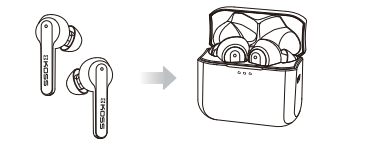
Place the earbuds in the charging case.
Charging: The left and right lights of the charging case will flash
Fully charged: No charging case lights are illuminated
Troubleshooting koss TWS150i True Wireless Earbuds
- Issue: Earbuds not pairing with device
Solution: Ensure Bluetooth is enabled on your device; reset earbuds by holding both touch controls for 5 seconds; try reconnecting. - Issue: One earbud not producing sound
Solution: Check battery level for both earbuds; charge fully; re-pair the earbuds. - Issue: Audio drops or connectivity issues
Solution: Move closer to the paired device; avoid obstacles; update device Bluetooth drivers if possible. - Issue: Touch controls unresponsive
Solution: Clean touch surfaces; restart earbuds by placing them in the case and removing them again. - Preventive Measures: Keep firmware updated; store earbuds in the charging case when not in use; avoid exposure to extreme temperatures.
The Koss TWS150i earbuds come with a limited warranty covering manufacturing defects. For further assistance, contact Koss customer support through their official website or authorized retailers.
Pros & Cons of Koss TWS150i True Wireless Earbuds
- Pros:
- Long battery life with 5+ hours per charge and 25+ hours total using the charging case.
- Reliable Bluetooth 5.0 connection with quick pairing and stable audio streaming.
- IPX5 sweat resistance suitable for workouts and outdoor use.
- Comfortable fit with three silicone earpad sizes included.
- Intuitive touch controls covering playback, calls, and voice assistant activation.
- Integrated microphone delivers clear voice quality for calls.
- Cons:
- Touch control surface is small and may require precision to operate effectively.
- No dedicated app for firmware updates or sound customization.
- SBC codec support only, which may limit high-resolution audio streaming.
- Micro-USB charging instead of USB-C may feel outdated to some users.
Overall, the koss TWS150i earbuds offer strong value for users seeking wireless convenience and solid sound quality at a competitive price point, especially compared to premium alternatives with higher costs.
Customer Reviews of koss TWS150i True Wireless Earbuds
Users frequently praise the koss TWS150i True Wireless Earbuds for their impressive battery life and comfortable fit during extended use. Many reviewers highlight the clarity of call quality and the ease of Bluetooth pairing as standout features. The IPX5 sweat resistance receives positive mentions from fitness users.
Common complaints include the small touch control area, which some find challenging to operate precisely, and the lack of advanced codec support that audiophiles might miss. Some users also note the absence of a companion app for sound customization.
Average star ratings hover around 4 out of 5, with recommendations often emphasizing the earbuds’ great price-to-performance ratio, especially for casual listeners and active users.
Faqs
How do I set up my koss TWS150i True Wireless Earbuds for the first time?
What should I do if my koss TWS150i True Wireless Earbuds are not connecting to my phone?
How can I use the touch controls on the koss TWS150i True Wireless Earbuds to manage music and calls?
Are koss TWS150i True Wireless Earbuds compatible with both Android and iOS devices?
What is the battery life of the koss TWS150i True Wireless Earbuds, and how can I maximize usage time?
How do I clean and maintain my koss TWS150i True Wireless Earbuds for optimal performance?
What should I do if only one earbud of my koss TWS150i True Wireless Earbuds is working?
Are the koss TWS150i True Wireless Earbuds sweat-resistant and suitable for workouts?
More koss manuals
- Setup & Connection: Koss Porta Pro Wireless Headphones User Manual
- Setup: Koss TWS250i True Wireless Earbuds User Manual
- Setup: Koss KSC35 Wireless Headphones User Manual
- Setup: Koss BT330i Wireless Headphones User Manual
- How to Use: Koss KPH7 Wireless Bluetooth Headphones User Manual
- Usage & Setup: Koss BT232i Wireless Bluetooth FitClips Headphones User Manual
Leave a Comment