
Setup & Connection: Koss Porta Pro Wireless Headphones User Manual
Content
Koss Porta Pro Wireless Headphones
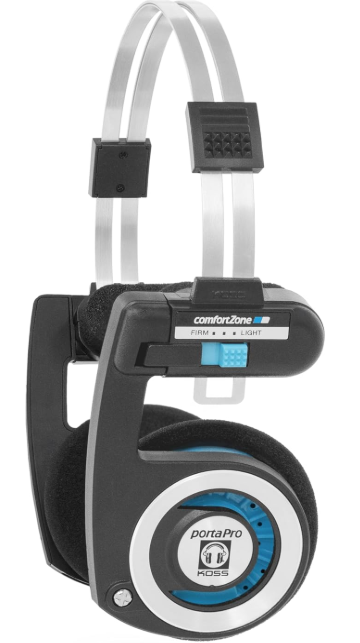
The Koss Porta Pro Wireless Headphones are a modern take on the iconic Porta Pro design, combining vintage style with contemporary wireless technology. Renowned for their lightweight, foldable design and semi-open on-ear acoustic structure, these headphones offer exceptional comfort and spatial sound quality. With a frequency response ranging from 15Hz to 25kHz and 40mm dynamic drivers, they deliver deep bass, crisp highs, and clear mids, making them ideal for a wide variety of music genres and everyday listening.
These headphones are perfect for users seeking a balance between classic audio quality and modern convenience. Whether you’re a commuter, student, or casual listener, the Porta Pro Wireless suits all-day wear with its featherlight 60-gram weight and Comfort Zone adjustable fit system. Bluetooth 5.2 connectivity ensures stable wireless performance up to 10 meters, while physical on-ear controls and a built-in microphone enhance usability for calls and voice assistants. The battery life extends up to 20 hours, allowing uninterrupted music playback throughout the day.
Available in multiple color options including Arctic White and Rhythm Beige, these headphones retail in the mid-range price segment, typically between $70 and $100, offering excellent value for wireless audiophiles. They are widely available online and through select retailers.
Specifications of Koss Porta Pro Wireless Headphones
- Driver Size: 40mm dynamic transducers
- Frequency Response: 15Hz – 25kHz for wide, detailed sound
- Impedance: 60 ohms, suitable for portable devices
- Sensitivity: 101 dB for efficient sound output
- Bluetooth Version: 5.2 with up to 10 meters wireless range
- Battery Life: Approximately 20+ hours of continuous playback
- Weight: Ultra-light at 60 grams for extended comfort
- Design: Semi-open, on-ear with foldable, compact form
- Controls: On-ear physical buttons for volume, playback, calls
- Microphone: Built-in for calls and voice assistant integration
Compared to similar wireless on-ear headphones, the Porta Pro Wireless stands out for its semi-open design and lightweight build, delivering a spacious soundstage uncommon in this category. While it lacks advanced features like the aptX HD codec or multipoint pairing, its audio clarity and comfort make it a compelling choice against competitors in the $70-$100 range.
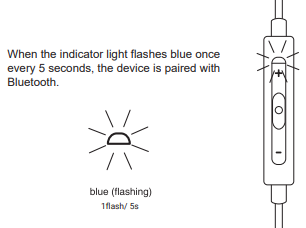
Bluetooth Paired
Charging
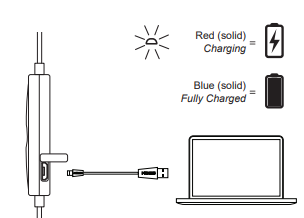
Charging
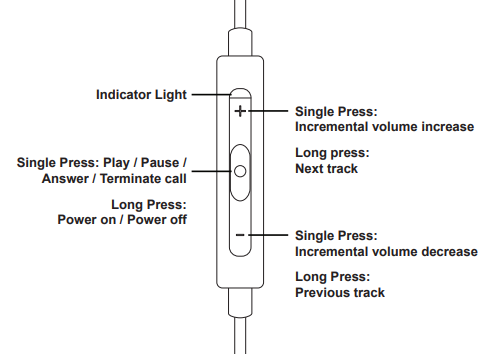
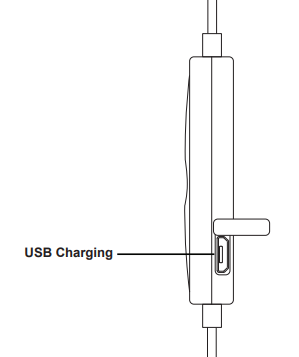
Ports
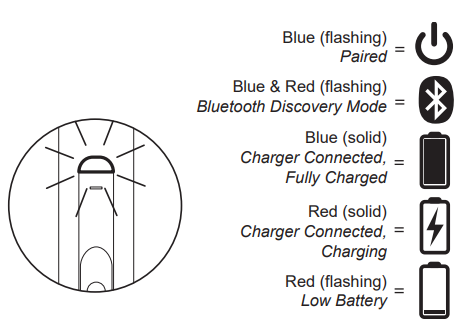
Light Language
Setup Guide for Koss Porta Pro Wireless Headphones
- Charge the Headphones: Connect the included USB-C cable to a power source; a full charge takes about 3 hours.
- Power On: Press and hold the power button until the LED indicator flashes, signaling activation.
- Pairing Mode: When powered on for the first time, the headphones enter pairing mode automatically. If not, press and hold the power button until the LED flashes blue and red alternately.
- Connect to Device: On your smartphone, tablet, or computer, enable Bluetooth and select “Koss Porta Pro Wireless” from the list of available devices.
- Confirm Connection: A beep and steady LED light confirm successful pairing.
- Use Physical Controls: Adjust volume, play/pause music, and answer calls via the on-ear buttons for convenient control.
Troubleshooting Tips: If pairing fails, make sure the headphones are in pairing mode and your device's Bluetooth is active. Reset the headphones by turning them off and on again. For connection drops, keep within the 10-meter range and avoid obstructions.
Safety Precautions: Avoid exposure to excessive moisture or extreme temperatures. Do not attempt to open or repair the headphones yourself. Use only the supplied USB-C cable for charging.
Troubleshooting Koss Porta Pro Wireless Headphones
- No Sound or Low Volume: Ensure the headphones are connected properly; check device volume and headphone battery level.
- Bluetooth Not Pairing: Restart both headphones and device; clear Bluetooth cache or “forget” the device and re-pair.
- Audio Latency When Watching Videos: Wireless connection may introduce slight delay; use wired mode if latency is critical.
- Intermittent Connection Drops: Stay within 10 meters of the source and avoid interference from other wireless devices.
- Error Codes: No specific error codes; LED indicator patterns provide status signals (refer to manual).
Preventive Measures: Regularly charge your headphones, store in the included case to protect from damage, and avoid dropping them to prolong lifespan.
Warranty and Support: Koss offers a Limited Lifetime Warranty on these headphones. For technical support, contact Koss customer service via their official website or authorized retailers.
Pros & Cons of Koss Porta Pro Wireless Headphones
- Pros:
- Lightweight and extremely comfortable for long listening sessions.
- Classic semi-open design offers spacious, natural sound with excellent imaging.
- Bluetooth 5.2 ensures a stable wireless connection and decent range.
- Up to 20 hours of battery life supports full-day use without frequent charging.
- Physical on-ear controls and integrated microphone add convenience.
- Foldable and compact for easy portability.
- Cons:
- Does not support advanced Bluetooth codecs like aptX HD, limiting high-resolution audio quality.
- Some audio latency observed in video playback due to wireless transmission delay.
- No multipoint pairing, so connection to multiple devices simultaneously is unavailable.
- Bass can be slightly boomy and less tight compared to wired variants.
- Bluetooth amp quality can limit full potential compared to wired Porta Pro headphones.
Customer Reviews of Koss Porta Pro Wireless Headphones
Users consistently praise the Koss Porta Pro Wireless Headphones for their exceptional comfort, lightweight feel, and vintage-inspired aesthetic. Many appreciate the spacious soundstage and clear mids suitable for various music genres, especially rock. The physical controls and built-in microphone receive positive feedback for ease of use during calls and voice commands.
Common complaints focus on occasional Bluetooth latency when watching videos and the lack of higher-end wireless codecs, which audiophiles note can affect sound fidelity. However, most reviewers agree that for the price range of $70-$100, these headphones deliver outstanding value with a unique sound signature and nostalgic design.
Average star ratings hover around 4 to 4.5 stars out of 5, with recommendations for casual listeners who desire wireless convenience without sacrificing classic audio qualities. Some users also highlight the durability and foldability as bonuses for daily commuters.
Faqs
How do I set up my koss Porta Pro Wireless Headphones for the first time?
What should I do if my koss Porta Pro Wireless Headphones have Bluetooth connection drops?
Can I use koss Porta Pro Wireless Headphones for watching videos without audio delay?
Are koss Porta Pro Wireless Headphones compatible with all Bluetooth devices?
How long does the battery last on koss Porta Pro Wireless Headphones and how do I charge them?
What are the unique sound features of koss Porta Pro Wireless Headphones?
How do I clean and maintain my koss Porta Pro Wireless Headphones to ensure longevity?
What physical controls are available on koss Porta Pro Wireless Headphones for managing playback and calls?
More koss manuals
- Setup: Koss KSC35 Wireless Headphones User Manual
- Usage & Connection: Koss TWS150i True Wireless Earbuds User Manual
- How to Use: Koss KPH7 Wireless Bluetooth Headphones User Manual
- Setup: Koss TWS250i True Wireless Earbuds User Manual
- Usage: Koss BTS1 Wireless Bluetooth Speaker User Manual
- Setup: Koss BT330i Wireless Headphones User Manual
Leave a Comment