
Usage & Setup: Koss BT232i Wireless Bluetooth FitClips Headphones User Manual
Content
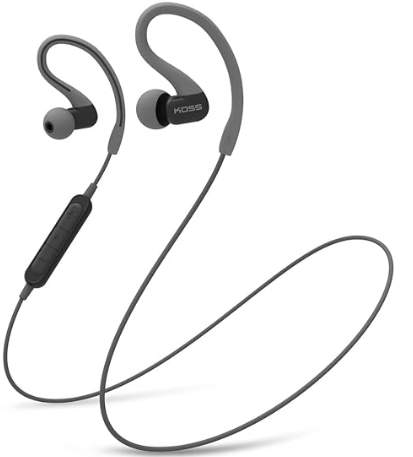
Koss BT232i Wireless Bluetooth FitClips Headphones
Introduction
The Koss BT232i Wireless Bluetooth FitClips Headphones are designed to deliver a superior wireless audio experience with an emphasis on comfort, durability, and sporty functionality. Featuring a unique SportClip® design, these headphones securely fit around your ears, making them ideal for active users including runners, gym enthusiasts, and commuters who demand both style and performance.
Key benefits include a sweat-resistant build and an ergonomic fit that ensures the earbuds stay in place during vigorous activities. The in-line microphone and remote enable seamless hands-free calling and media control, enhancing convenience on the go. Equipped with Bluetooth 4.2 technology, they provide reliable wireless connectivity and freedom from tangled wires.
With an estimated price range around $50-$70, these headphones offer excellent value for budget-conscious consumers looking for a quality sport-oriented Bluetooth audio solution. They are widely available through online retailers including Amazon and official Koss outlets. The Koss BT232i is perfectly suited for active lifestyles, casual music enjoyment, and combining mobility with crystal-clear sound quality.
Specifications of Koss BT232i Wireless Bluetooth FitClips Headphones
- Bluetooth Version: 4.2 for stable wireless connectivity
- Battery Life: 6+ hours of continuous playback on a single charge
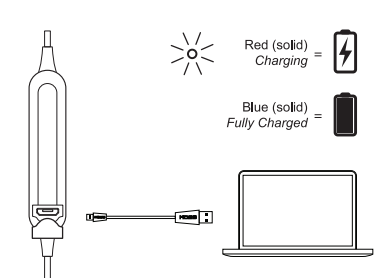
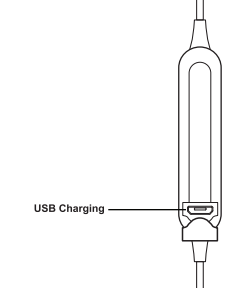
- Charging Time: Approximately 6 hours via USB-C port
- Frequency Response: 18 Hz – 20,000 Hz for balanced sound output
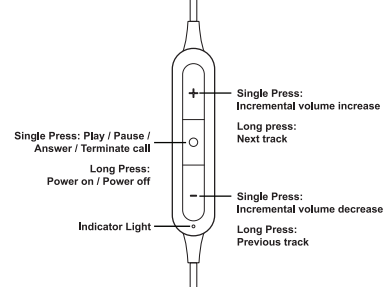
- Microphone & Remote: In-line, three-button remote for play/pause, volume, calls
- Design: SportClip® ear clips with three cushion sizes (small, medium, large) for customized fit
- Durability: Sweat-resistant construction ideal for sports and outdoor use
- Weight & Portability: Lightweight design optimized for active wear
Compared to similar sport Bluetooth headphones, the Koss BT232i stands out with its secure ear clip fit and extended battery life, offering more comfort and reliability for workouts than many traditional in-ear models.
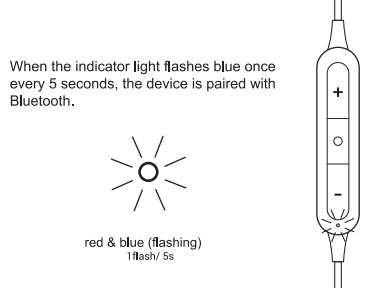
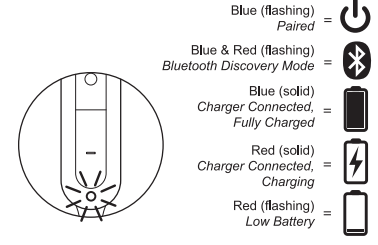
Bluetooth Paired
Charging
Controls
Ports
Light Language
Setup Guide for Koss BT232i Wireless Bluetooth FitClips Headphones
- Charge the headphones fully using the included USB-C cable before first use (about 6 hours).
- Turn on the headphones by pressing and holding the power button until the LED indicator flashes.
- Activate Bluetooth on your smartphone or device and search for available devices.
- Select “Koss BT232i” from the list to pair. Once connected, the LED will show a steady light.
- Use the in-line remote to play/pause music, adjust volume, or answer calls.
- To disconnect, turn off the headphones or disconnect via your device’s Bluetooth settings.
Troubleshooting tips: If pairing fails, reset the headphones by turning them off and on, then repeat the pairing process. Keep the headphones within 10 meters of the device for optimal performance.
Safety Precautions: Avoid exposure to excessive moisture beyond sweat resistance and do not disassemble the unit. Use at moderate volumes to protect hearing.
Troubleshooting for Koss BT232i Wireless Bluetooth FitClips Headphones
- Problem: Headphones not pairing.
Solution: Ensure headphones are in pairing mode (LED flashing), turn Bluetooth off and on on your device, and try again. - Problem: No sound or distorted audio.
Solution: Check battery level; recharge if low. Ensure proper fit of ear clips. Restart device and headphones. - Problem: Microphone not working.
Solution: Verify microphone permissions on your device and that the remote buttons are not stuck. - Preventive Measures: Keep firmware updated if applicable, avoid extreme temperatures, and store in a dry place.
The Koss BT232i comes with a limited lifetime warranty on wired components and customer support via the official Koss website and authorized retailers.
Pros & Cons of Koss BT232i Wireless Bluetooth FitClips Headphones
- Pros:
- Comfortable and secure SportClip® design prevents slipping during exercise.
- Clear, balanced sound with a wide frequency response range.
- 6+ hour battery life supports extended use without frequent charging.
- Easy-to-use in-line microphone and remote enhance usability.
- Affordable price point with durable build quality.
- Cons:
- Charging time of about 6 hours is relatively long compared to some competitors.
- Bluetooth 4.2 is slightly outdated versus newer versions offering improved range and power efficiency.
- Not fully waterproof—only sweat-resistant, limiting use in heavy rain or swimming.
Compared to alternatives like Jaybird or Bose sport headphones, the Koss BT232i balances cost and functionality but lacks some advanced features like active noise cancellation or ultra-fast charging.
Customer Reviews of Koss BT232i Wireless Bluetooth FitClips Headphones
Users often praise the Koss BT232i Wireless Bluetooth FitClips Headphones for their secure fit and reliable wireless connection during workouts. Common positive feedback highlights the comfortable ear clips and solid in-line controls, with an average rating around 4.5 stars out of 5.
Some reviewers mention the lengthy charging time as a minor drawback and desire a longer battery life, but overall satisfaction remains high for the price point. Frequent recommendations include these headphones for fitness enthusiasts and daily commuters who want a no-fuss, effective Bluetooth audio solution.
Typical user comments:
- "Fits perfectly and stays put even during intense runs."
- "Good sound quality and easy to switch between calls and music."
- "Battery lasts for a full gym session, which is great."
- "Wish charging was quicker, but otherwise excellent value."
Faqs
How do I set up my koss BT232i Wireless Bluetooth FitClips Headphones for the first time?
What should I do if my koss BT232i Wireless Bluetooth FitClips Headphones are not pairing with my phone?
Can I use koss BT232i Wireless Bluetooth FitClips Headphones with both Android and iOS devices?
How long does the battery last on the koss BT232i Wireless Bluetooth FitClips Headphones, and how do I charge them?
What are the key features of the koss BT232i Wireless Bluetooth FitClips Headphones that enhance sports or active use?
How can I optimize the sound quality and fit of my koss BT232i Wireless Bluetooth FitClips Headphones?
How should I clean and maintain my koss BT232i Wireless Bluetooth FitClips Headphones to ensure longevity?
Why is the microphone on my koss BT232i Wireless Bluetooth FitClips Headphones not working during calls?
Tags
More koss manuals
- Setup: Koss BT330i Wireless Headphones User Manual
- Usage: Koss BT221i Wireless Bluetooth Ear-Clip Headphones User Manual
- Setup: Koss TWS250i True Wireless Earbuds User Manual
- Setup: Koss CS340BT QZ Communication Headset User Manual
- Usage & Connection: Koss TWS150i True Wireless Earbuds User Manual
- Setup: Koss BT115i Bluetooth Wireless Headphones User Manual
Leave a Comment