
Setup: Koss CS340BT QZ Communication Headset User Manual
Content
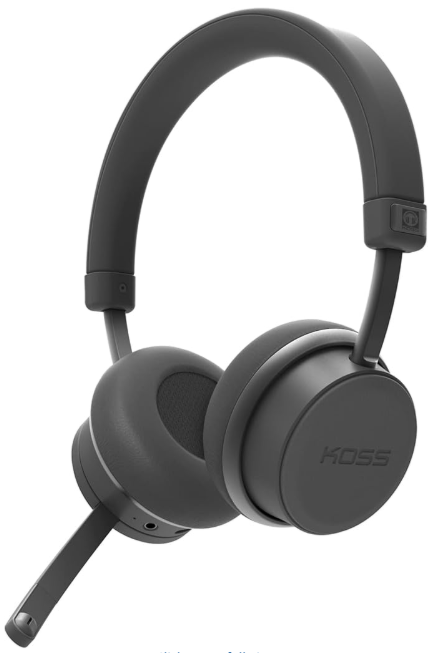
Koss CS340BT QZ Communication Headset
Introduction
The Koss CS340BT QZ Communication Headset is a premium wireless on-ear headset designed for crystal-clear communication and immersive audio experiences. Featuring state-of-the-art Active Noise Cancellation (ANC), this headset significantly reduces unwanted background noise, allowing users to focus on high-fidelity sound whether in busy office environments, remote work setups, or on-the-go calls.
Equipped with dual-microphone CVC 8.0 noise reduction technology, the CS340BT QZ ensures exceptional voice clarity for calls, meetings, and voice chats. Onboard controls provide seamless management of volume, ANC, music playback, and call handling without reaching for your device. Its robust Bluetooth 5.0 connectivity supports a wireless range of up to 10 meters, catering to users seeking flexibility and convenience.
Ideal for professionals, remote workers, gamers, and anyone requiring reliable communication tools, this headset balances quality sound with user-friendly features. With an impressive battery life offering up to 22 hours of use with ANC activated and up to 30 hours with Bluetooth alone, it supports long workdays and extended calls without frequent recharging.
Available at an estimated price range of around $215, the koss CS340BT QZ combines advanced features with competitive value, accessible through major online retailers and select electronics stores.
Specifications of the kKossCS340BT QZ Communication Headset
- Model Name: CS340BT QZ
- Connectivity Technology: Wireless Bluetooth 5.0
- Wireless Range: Approximately 10 meters (33 feet)
- Noise Control: Active Noise Cancellation (ANC) and environmental noise reduction
- Microphone Technology: Dual microphone with CVC 8.0 for background noise elimination
- Battery Life: Up to 22 hours with ANC + Bluetooth; up to 30 hours with Bluetooth only
- Frequency Response: 20 Hz – 20,000 Hz
- Impedance: 36 Ohms
- Audio Controls: On-board physical buttons for ANC, volume, track control, call handling
- Additional Features: 3.5mm audio jack (cable not included), flexible boom microphone for optimal voice clarity
- Weight and Comfort: Lightweight on-ear design for extended wear
Compared to similar communication headsets in its class, the CS340BT QZ stands out for integrating advanced ANC with long battery life and dual microphones, providing a competitive edge for professional and personal use.
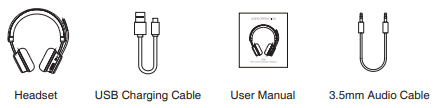
In the Box
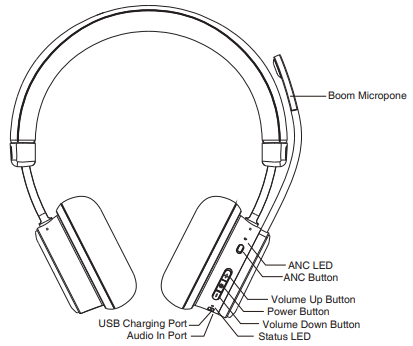
Controls & Features
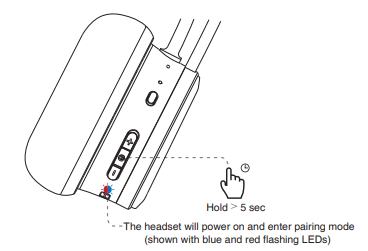
Pairing
For first use, press and hold the power button for 5 seconds or more
Choose “KOSS CS340BT QZ” to connect
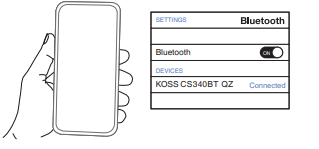
Note: The headset will automatically connect to your device after the initial connection as long as Bluetooth is on.
Controls
LED Light Language
Charging
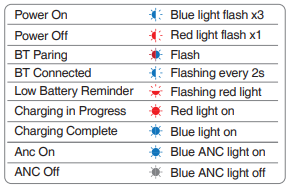
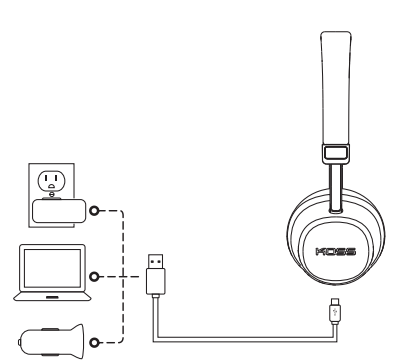
It takes 3 hours to fully charge the headset. While charging, the status LED illuminates red. Once charging is complete, the status LED illuminates blue.
Setup Guide for the Koss CS340BT QZ Communication Headset
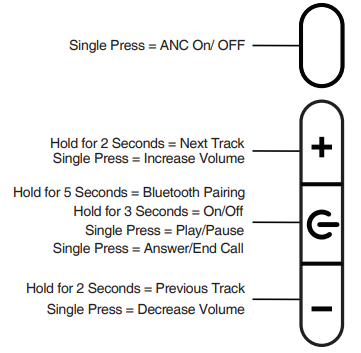
- Power On/Off: Press and hold the power button for 3 seconds to turn the headset on or off.
- Bluetooth Pairing: Press and hold the power button for 5 seconds to enter pairing mode. On your device, enable Bluetooth and select "CS340BT QZ" from the list of available devices.
- Using ANC: Toggle the ANC button to activate or deactivate Active Noise Cancellation as desired.
- Volume and Track Control: Use the volume up button to increase volume or press and hold to skip to the next track. Volume down works similarly for decreasing volume.
- Call Management: Press the power/play button briefly to answer or end calls.
- Microphone Adjustment: Position the flexible boom microphone close to your mouth for best voice clarity.
Troubleshooting Tips: If pairing fails, restart your device and headset, and ensure Bluetooth is enabled. Keep devices within 10 meters for a stable connection. Charge the headset fully if it does not power on or experiences audio dropouts.
Safety Precautions: Avoid listening at high volumes for prolonged periods to protect hearing. Use only the supplied charger or compatible power sources (5V DC, 250mA).
Troubleshooting Common Issues with the koss CS340BT QZ Communication Headset
- Bluetooth Not Pairing: Ensure the headset is in pairing mode (power button held for 5 seconds). Restart devices and remove old pairings if necessary.
- No Sound or Low Volume: Check volume settings on both headset and connected device. Confirm ANC is toggled correctly.
- Microphone Not Picking Up Voice Clearly: Adjust the flexible boom mic closer to your mouth and ensure dual mic noise cancellation is active.
- Battery Drains Quickly: Disable ANC to extend battery life; fully charge the headset before use.
- Error Codes: No specific error codes; unresponsive behavior typically resolved by restarting the headset.
To prevent issues, keep firmware updated if updates are available, store the headset in a dry place, and avoid exposing it to extreme temperatures.
Warranty & Support: The koss CS340BT QZ comes with a one-year limited warranty. For assistance, contact Koss customer support via their official website or reach out to the seller from whom you purchased the device.
Pros & Cons of the Koss CS340BT QZ Communication Headset
Pros
- Advanced Active Noise Cancellation: Effectively reduces environmental noise for clear audio focus.
- Dual Microphone CVC 8.0: Superior voice clarity during calls, minimizing background disruption.
- Long Battery Life: Up to 30 hours without ANC and 22 hours with ANC enabled, suitable for extended use.
- Convenient On-Board Controls: Easy management of calls, music, and ANC without device interaction.
- Comfortable On-Ear Design: Lightweight and adjustable for prolonged wear.
Cons
- Price Point: At around $215, it is a moderate investment compared to some entry-level headsets.
- 3.5mm Cable Not Included: Requires separate purchase if wired use is desired.
- Limited Customization: No companion app for advanced audio or firmware settings.
Overall, the koss CS340BT QZ offers excellent value for professionals needing reliable noise cancellation and communication clarity, standing out against many competitor models lacking combined ANC and dual mic technology.
Customer Reviews of the koss CS340BT QZ Communication Headset
Users consistently praise the koss CS340BT QZ Communication Headset for its effective noise cancellation and clear voice quality, especially appreciating the dual microphone setup that minimizes background noise during calls. The long battery life and comfortable fit are commonly highlighted as major strengths.
Some users note minor issues like the absence of a bundled 3.5mm audio cable and occasional Bluetooth connectivity hiccups, which are mostly resolved with firmware updates or device resets. The intuitive on-board controls receive favorable feedback for ease of use.
Rated an average of 4.7 out of 5 stars by early adopters, many recommend it for remote workers, gamers, and professionals seeking dependable wireless communication headsets with active noise cancellation.
Faqs
How do I set up the koss CS340BT QZ Communication Headset for the first time?
What should I do if the koss CS340BT QZ Communication Headset microphone is not picking up my voice clearly?
Can I use the koss CS340BT QZ Communication Headset with multiple devices simultaneously?
How do I activate and control Active Noise Cancellation on the koss CS340BT QZ Communication Headset?
What is the expected battery life of the koss CS340BT QZ Communication Headset, and how can I optimize it?
Is the koss CS340BT QZ Communication Headset compatible with devices that have a 3.5mm audio jack?
How do I clean and maintain my koss CS340BT QZ Communication Headset for long-term performance?
What troubleshooting steps can I take if the koss CS340BT QZ Communication Headset is not pairing with my device?
Tags
More koss manuals
- Usage: Koss BT221i Wireless Bluetooth Ear-Clip Headphones User Manual
- Setup: Koss BT115i Bluetooth Wireless Headphones User Manual
- Usage & Setup: Koss BT232i Wireless Bluetooth FitClips Headphones User Manual
- Setup & Connection: Koss BT539i Bluetooth Wireless Headphones User Manual
- Setup: Koss BT330i Wireless Headphones User Manual
- Setup: Koss BT540i Bluetooth Headphones User Manual
Leave a Comment