
Setup: Koss BT540i Bluetooth Headphones User Manual
Content
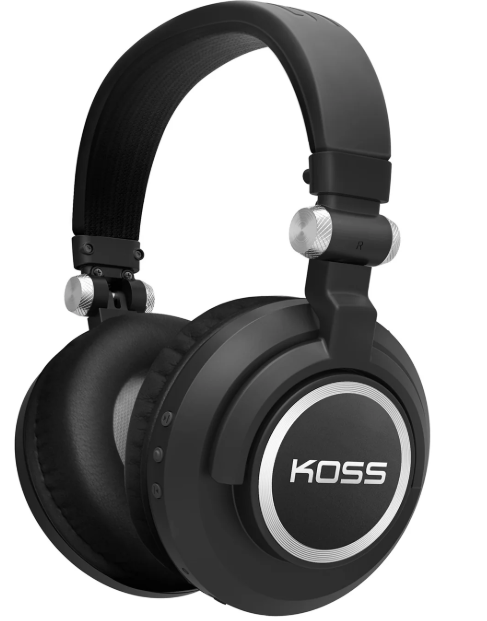
Koss BT540i Bluetooth Headphones
Introduction
The Koss BT540i Bluetooth Headphones deliver a harmonious blend of wireless convenience, comfort, and high-quality sound tailored for everyday listeners and audiophiles alike. Equipped with advanced aptX and NFC technologies, these headphones ensure superior audio clarity and effortless pairing with Bluetooth-enabled devices. Their lightweight design, weighing approximately 7.2 ounces, alongside memory foam ear cushions wrapped in authentic leather, make them ideal for prolonged listening sessions without fatigue.
These headphones are perfect for music lovers, commuters, remote workers, and anyone seeking a portable audio solution with reliable wireless performance. The BT540i supports seamless hands-free calling through an integrated microphone and offers intuitive onboard controls for music playback and volume adjustment. With a price range typically around $100 to $130, they present an attractive option balancing affordability and premium features. Widely available online and in select electronics retailers, the Koss BT540i is celebrated for combining classic sound tuning with modern Bluetooth wireless freedom.
Specifications of Koss BT540i Bluetooth Headphones
- Driver Type: Dynamic, Koss PLX40 elements tuned for personal listening
- Frequency Response: Approximately 25 Hz to 25 kHz for balanced sound reproduction
- Impedance: 38 ohms, optimized for mobile devices and portable use
- Sound Pressure Level: Around 100 dB SPL, delivering clear and rich audio output
- Connectivity: Bluetooth with aptX codec for enhanced wireless sound quality; NFC for quick pairing
- Wired Option: 3.5mm auxiliary input for wired listening flexibility
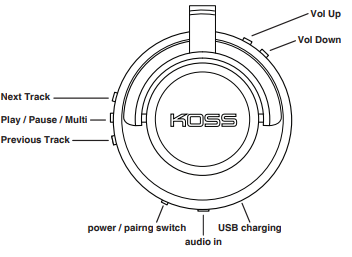
- Controls: Onboard buttons for play/pause, volume up/down, call answering, and power
- Microphone: Built-in microphone for hands-free calls and voice commands
- Battery Life: Up to 10 hours of wireless playback on a full charge
- Weight: Approximately 204 grams (7.2 oz), among the lightest in its category
- Included Accessories: Carry case, micro USB charging cable, auxiliary cable
Compared to similar wireless headphones like the Sony MDR-1RBT, the BT540i offers comparable comfort with slightly lighter design and equally good wireless sound quality, but with a more accessible price point and premium materials like genuine leather ear pads.
Wired Listening
Charging
Controls / Ports
Light Language
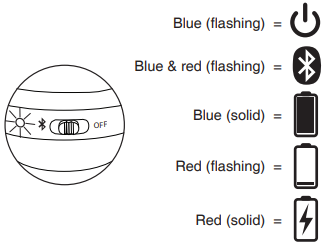
Setup Guide for Koss BT540i Bluetooth Headphones
- Power On: Press and hold the power button until the LED indicator flashes blue, indicating the headphones are on and ready to pair.
- Bluetooth Pairing: On your smartphone or Bluetooth-enabled device, enable Bluetooth and select “Koss BT540i” from the list of available devices. For quick pairing, tap your NFC-enabled device on the right earcup where the NFC logo is located.
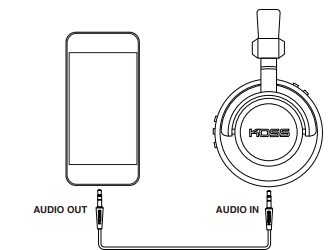
- Wired Mode: Connect the supplied 3.5mm aux cable to the headphone jack and your device if you prefer wired listening or if the battery is low.
- Onboard Controls: Use the multifunction button to play/pause music or answer/end calls. Volume controls are located on the right earcup for easy adjustment.
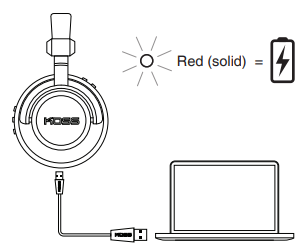
- Charging: Connect the micro USB cable to the charging port; a full charge takes approximately 3 hours.
Troubleshooting Tips: If pairing fails, ensure the headphones are in pairing mode (LED flashes rapidly), restart your device’s Bluetooth, or reset the headphones by turning them off and on again. Avoid exposing the headphones to excessive moisture or extreme temperatures to preserve functionality.
Safety Precautions: Use volume levels that prevent hearing damage and avoid prolonged exposure to high volumes. Disconnect charging when fully charged and keep the device away from water.
Troubleshooting Common Issues with Koss BT540i Bluetooth Headphones
- No Sound or Low Volume: Check device volume settings and headphone connection. Verify the aux cable is properly inserted if using wired mode.
- Bluetooth Not Pairing: Make sure the headphones are in pairing mode (LED blinking blue). Restart Bluetooth on your device and try reconnecting. Clear previously paired devices if too many are paired.
- Mic Not Working: Ensure the microphone is not muted on the device. Test calls on different devices to isolate the issue.
- Battery Not Charging: Use the original micro USB cable and charger. Inspect for debris in the charging port and try different power sources.
- Static or Interference: Move away from other wireless devices or Wi-Fi routers causing signal interference.
Preventive Measures: Regularly clean ear cushions and charging ports, avoid dropping the headphones, and store them in the included carry case when not in use.
Warranty & Support: The Koss BT540i comes with a 1-year limited warranty covering manufacturing defects. For support, contact Koss customer service via their official website or authorized retailers.
Pros & Cons of Koss BT540i Bluetooth Headphones
Pros:
- Comfortable Design: Lightweight at 7.2 oz with memory foam and authentic leather ear pads for long listening sessions.
- High-Quality Wireless Audio: aptX codec and NFC technology provide clear sound and quick pairing.
- Versatile Connectivity: Bluetooth wireless and 3.5mm wired option for flexible usage.
- Integrated Controls and Microphone: Easy control of music and calls without reaching for your device.
- Good Battery Life: Up to 10 hours per charge supports all-day use.
Cons:
- Sound Quality: While balanced, some users find bass less pronounced compared to higher-end models.
- Charging Port: Uses micro USB rather than USB-C, which is less common in modern devices.
- Build Size: Slightly bulkier than some competing models, which may impact portability.
- Limited Advanced Features: Lacks active noise cancellation found in premium headphones.
Overall, these headphones offer excellent value by combining comfort, reliable wireless performance, and solid sound quality, making them competitive against alternatives like Sony MDR-1RBT and JBL Tune 500BT.
Customer Reviews of Koss BT540i Bluetooth Headphones
Users commonly praise the Koss BT540i Bluetooth Headphones for their comfortable fit and lightweight design, highlighting the soft memory foam pads and leather finish as standout features. Many reviewers appreciate the easy NFC pairing and stable Bluetooth connection, along with clear call quality through the built-in microphone. The headphones receive an average rating of around 4 out of 5 stars, with positive notes on battery life and sound clarity.
Some complaints mention the sound profile being a bit flat or lacking deep bass, and a few users express a wish for USB-C charging and active noise cancellation. However, the overall sentiment recommends the BT540i for users seeking a reliable, affordable wireless headphone for casual music listening and calls, especially for commuting and home office use.
Faqs
How do I set up my koss BT540i Bluetooth Headphones for the first time?
What should I do if my koss BT540i Bluetooth Headphones are not connecting to my device?
Can I use koss BT540i Bluetooth Headphones with devices that don’t support Bluetooth?
What are the main audio features of the koss BT540i Bluetooth Headphones that affect sound quality?
How long does the battery last on the koss BT540i Bluetooth Headphones and how can I optimize it?
What troubleshooting steps can I take if the koss BT540i Bluetooth Headphones have poor sound quality or distortion?
How do I properly clean and maintain the koss BT540i Bluetooth Headphones?
Are the koss BT540i Bluetooth Headphones compatible with both Android and iOS devices?
Tags
More koss manuals
- Setup & Connection: Koss BT539i Bluetooth Wireless Headphones User Manual
- Usage & Setup: Koss BT740IQZ Bluetooth Wireless Headset User Manual
- Setup: Koss BT115i Bluetooth Wireless Headphones User Manual
- Setup: Koss CS340BT QZ Communication Headset User Manual
- Usage: Koss BT221i Wireless Bluetooth Ear-Clip Headphones User Manual
- Usage & Setup: Koss BT232i Wireless Bluetooth FitClips Headphones User Manual
Leave a Comment