
Setup & Connection: Koss BT539i Bluetooth Wireless Headphones User Manual
Content
Koss BT539i Bluetooth Wireless Headphones
Introduction
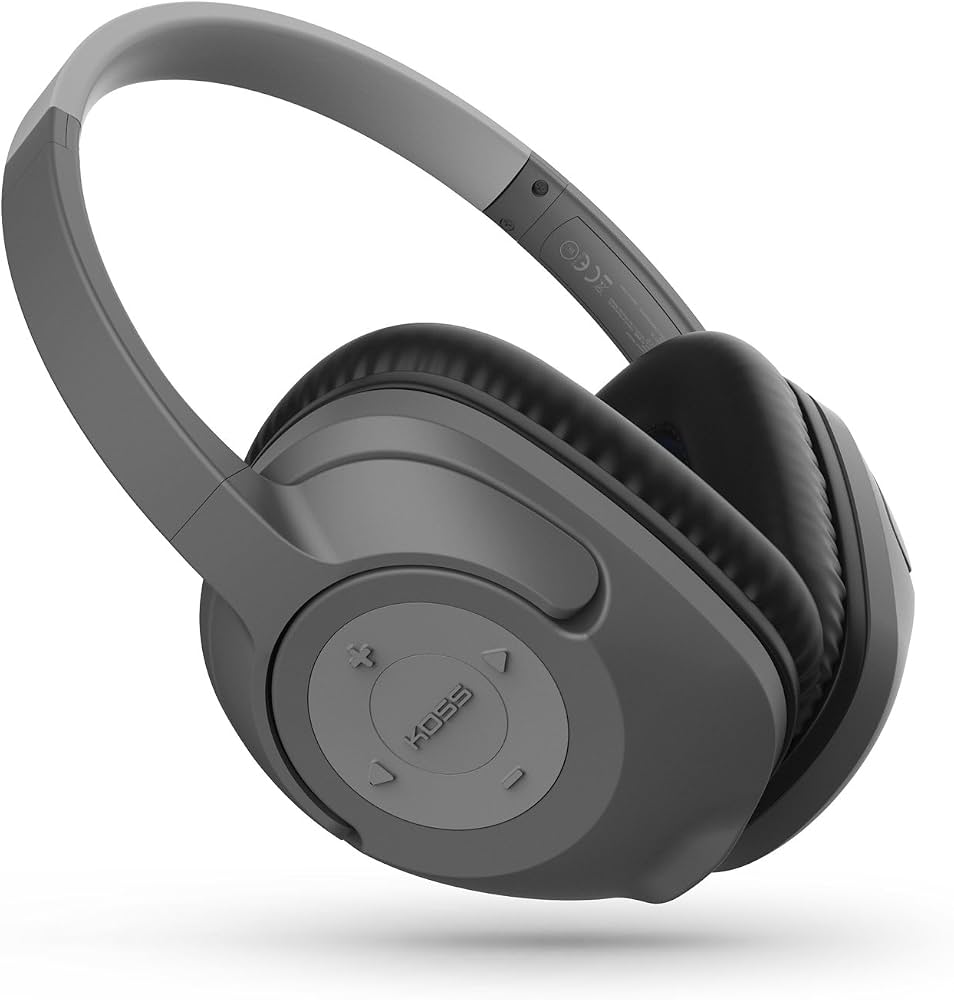
The koss BT539i Bluetooth Wireless Headphones deliver exceptional sound quality combined with wireless convenience, making them an excellent choice for audiophiles and everyday users alike. These over-ear headphones feature a sleek design with fold-flat functionality, ideal for on-the-go lifestyles including commuting, travel, and casual listening at home or work. Equipped with Bluetooth 4.0 technology, the BT539i offers a seamless wireless connection to any Bluetooth-enabled device, enhancing user mobility and comfort.
One of the key benefits of the Koss BT539i headphones is their Hi-Res Dynamic Audio Driver, which ensures clear, balanced sound across a wide frequency range, suitable for music, podcasts, and calls. With up to 12 hours of continuous playback and 9 hours of call time on a single charge, these headphones provide reliable performance for extended use without frequent recharging. Additionally, the inclusion of an audio cable allows wired use when battery life is low or Bluetooth is unavailable.
Targeted towards budget-conscious consumers seeking quality wireless audio, these headphones are competitively priced under $100, positioning them as an affordable alternative to premium models. The Koss BT539i is widely available through online retailers and specialty audio stores.
Specifications of Koss BT539i Bluetooth Wireless Headphones
- Type: Over-ear wireless headphones with fold-flat design
- Connectivity: Bluetooth 4.0 for stable wireless connection
- Audio Driver: Hi-Res Dynamic Audio Driver delivering rich sound quality
- Battery Life: Up to 12 hours of music playback and 9 hours of talk time per full charge
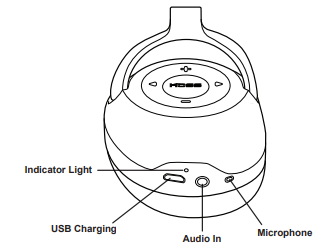
- Built-in Microphone: Enables clear hands-free calls
- Wired Option: Includes audio cable for wired listening
- Weight and Comfort: Lightweight design with padded ear cups for extended comfort
- Foldability: Folds flat for easy storage and portability
- Performance Benchmarks: Stable Bluetooth connectivity within 33 feet (10 meters), low latency suitable for video and gaming
- Comparison: Offers comparable sound quality and battery life to other wireless headphones in the $80-$120 price range, outperforming many budget models in comfort and build quality
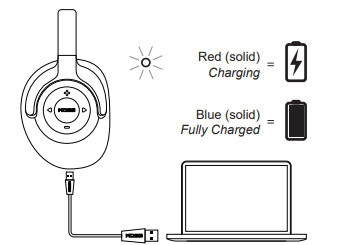
Charging
Controls
Ports
Light Language
Setup Guide for Koss BT539i Bluetooth Wireless Headphones
- Charge the Headphones: Connect the included USB charging cable to a power source and charge the headphones fully before first use (approx. 2 hours).
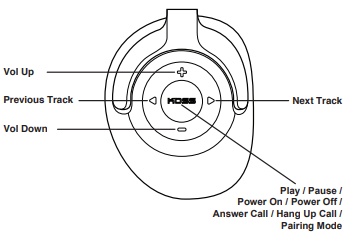
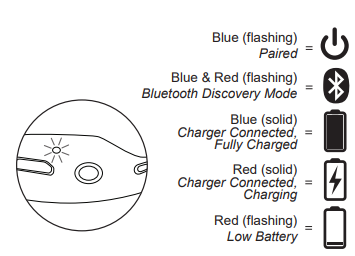
- Power On: Press and hold the power button until the LED indicator flashes, signaling the headphones are powered on and in pairing mode.
- Pair with Device: Enable Bluetooth on your smartphone, tablet, or computer. Select “Koss BT539i” from the list of available devices to pair.
- Confirm Connection: Once paired, the LED will stop flashing and stay lit briefly. Audio playback can now stream wirelessly.
- Adjust Settings: Use your device’s audio settings to adjust volume and equalizer preferences. The headphones’ on-ear controls allow volume adjustment and call management.
Troubleshooting Tips: If pairing fails, turn off Bluetooth on your device and headphones, then retry. Reset the headphones by powering off, then holding the power button for 10 seconds.
Safety Precautions: Avoid exposure to excessive moisture or heat. Use moderate volume levels to prevent hearing damage. Disconnect and power off when not in use to preserve battery life.
Troubleshooting Common Issues with Koss BT539i Bluetooth Wireless Headphones
- No Sound or Audio Dropouts: Ensure the headphones are fully charged and within range (maximum 33 feet). Re-pair device if connection is unstable.
- Bluetooth Not Pairing: Delete previous pairings on your device, restart both device and headphones, then attempt pairing again.
- Microphone Not Working: Check device settings to ensure microphone permissions are enabled. Test with another device to isolate the issue.
- Battery Drains Quickly: Fully charge headphones before use. Avoid keeping headphones powered on when idle.
- Error Codes: No specific error codes reported; follow standard reset procedures if unresponsive.
Preventive Measures: Store headphones in a protective case to avoid physical damage; keep firmware updated if applicable through the manufacturer’s app.
Warranty & Support: Koss provides a limited 1-year warranty for manufacturing defects. For support, contact Koss customer service via their official website or authorized dealers.
Pros and Cons of Koss BT539i Bluetooth Wireless Headphones
- Pros:
- Excellent sound quality with Hi-Res Dynamic Audio Driver at an affordable price.
- Long battery life supporting up to 12 hours of wireless playback.
- Comfortable over-ear design with fold-flat portability.
- Includes both wireless Bluetooth and wired audio options for versatility.
- Reliable Bluetooth 4.0 connectivity with minimal latency.
- Cons:
- Bluetooth version 4.0 is not the latest; it lacks some advanced features like the aptX codec.
- Build materials are primarily plastic, which may feel less premium compared to higher-end models.
- Limited color options compared to competitors.
- Microphone quality adequate but not studio-grade for professional calls.
Customer Reviews of Koss BT539i Bluetooth Wireless Headphones
Users consistently praise the Koss BT539i Bluetooth Wireless Headphones for their impressive sound clarity and value for money, often highlighting the comfortable fit during extended listening sessions. Many reviewers appreciate the solid battery life that supports long commutes and travel without interruption. The fold-flat design is frequently mentioned as a practical feature for portability.
Common complaints include occasional Bluetooth connectivity drops, particularly in environments with multiple wireless devices, and the basic microphone performance during calls. Star ratings typically range between 4 to 4.5 out of 5, reflecting strong overall satisfaction.
Most customers recommend the BT539i as a budget-friendly option for users seeking reliable wireless headphones with good audio quality, especially for casual music listening and phone calls.
Faqs
How do I set up the koss BT539i Bluetooth Wireless Headphones for first-time use?
What should I do if my koss BT539i Bluetooth Wireless Headphones won’t pair with my phone?
Can I use koss BT539i Bluetooth Wireless Headphones with non-Bluetooth devices?
How long does the battery of koss BT539i Bluetooth Wireless Headphones last and how can I optimize it?
What are the main features of the koss BT539i Bluetooth Wireless Headphones that enhance user experience?
Why does my koss BT539i Bluetooth Wireless Headphones have low sound or distorted audio and how can I fix it?
How do I clean and maintain my koss BT539i Bluetooth Wireless Headphones properly?
Are the koss BT539i Bluetooth Wireless Headphones compatible with voice assistants like Siri or Google Assistant?
More koss manuals
- Setup: Koss BT115i Bluetooth Wireless Headphones User Manual
- Setup: Koss BT540i Bluetooth Headphones User Manual
- Setup: Koss CS340BT QZ Communication Headset User Manual
- Usage & Setup: Koss BT740IQZ Bluetooth Wireless Headset User Manual
- Usage: Koss BT221i Wireless Bluetooth Ear-Clip Headphones User Manual
- Usage & Setup: Koss BT232i Wireless Bluetooth FitClips Headphones User Manual
Leave a Comment