
Setup: Koss BT115i Bluetooth Wireless Headphones User Manual
Content
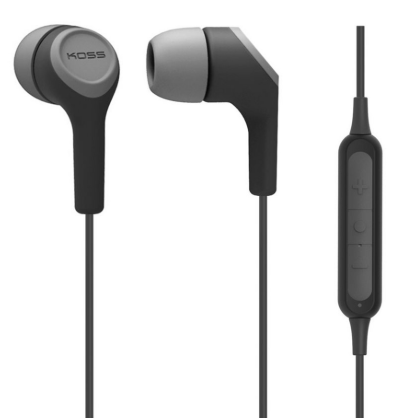
Koss BT115i Bluetooth Wireless Headphones
Introduction
The Koss BT115i Bluetooth Wireless Headphones offer an exceptional blend of convenience, comfort, and sound quality for users seeking reliable wireless audio solutions. Designed with in-ear buds and a lightweight build, these headphones provide a secure fit ideal for daily commutes, workouts, or casual listening. Equipped with an integrated in-line microphone and remote control, users can effortlessly manage calls and media playback without reaching for their devices.
One of the standout features of the Koss BT115i is its impressive battery life, delivering over 6 hours of continuous playback on a single charge, making it suitable for extended use throughout the day. The headphones support Bluetooth version 4.2 technology, ensuring stable connections within a 10-meter range. These earbuds also include sweat-resistant materials, enhancing durability for active users.
Targeted at music enthusiasts, fitness aficionados, and professionals who need hands-free communication, the Koss BT115i combines essential features with user-friendly controls. Priced competitively within the entry-level wireless headphone segment, these earbuds typically range around an affordable mid-tier price point and are widely available through online retailers and specialty audio stores.
Specifications of Koss BT115i Bluetooth Wireless Headphones
- Bluetooth Version: 4.2 for reliable wireless connectivity
- Battery Life: Over 6 hours of playback with rechargeable lithium-ion battery
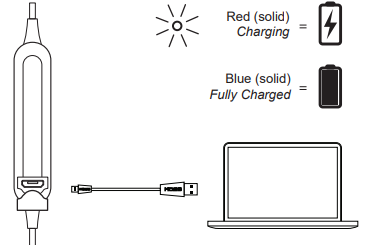
- Charging Time: Approximately 2 hours via USB-C charging
- Wireless Range: Up to 10 meters (33 feet)
- Frequency Range: 2402–2480 MHz
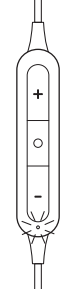
- In-Line Microphone & Remote: Controls for play/pause, volume, answer/end calls
- Weight: Lightweight design for comfortable extended wear
- Sweat-Resistance: Suitable for workouts and outdoor use
- Modulation: GFSK, π/4 DQPSK, 8DPSK for clear audio transmission
- Battery Type: 3.7V, 100mAh Li-Ion Polymer battery
Compared to similar wireless earbuds in its class, the koss BT115i stands out with its integrated remote and microphone functionality, slightly longer battery life, and competitive pricing, making it a strong contender against brands like JBL and Sony in entry-level wireless headphones.
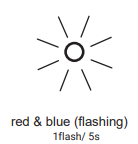
Bluetooth Paired
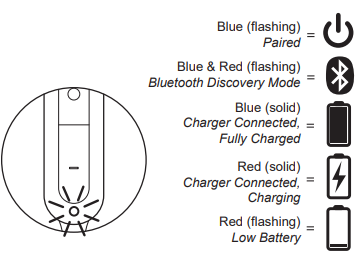
When the indicator light flashes blue once every 5 seconds, the device is paired with Bluetooth.
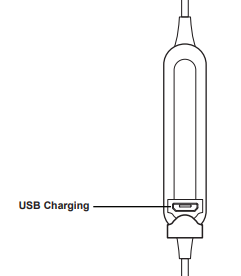
Charging
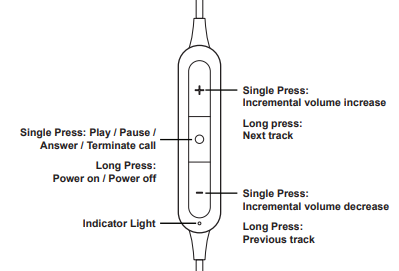
Controls
Ports
Light Language
Setup Guide for Koss BT115i Bluetooth Wireless Headphones
- Charge the Headphones: Connect the earbuds to a USB-C charger using the included cable. Charge fully (approximately 2 hours) before first use.
- Power On: Press and hold the power button on the in-line remote until the LED indicator flashes, indicating the headphones are on and in pairing mode.
- Pairing: On your Bluetooth-enabled device (smartphone, tablet, PC), enable Bluetooth and select “Koss BT115i” from the list of available devices.
- Confirmation: Once connected, the LED will stop flashing rapidly and remain steady, signaling successful pairing.
- Use the In-Line Remote: Control media playback and calls via the buttons (play/pause, volume up/down, answer/end calls).
Troubleshooting Tips: If pairing fails, ensure the headphones are not connected to another device, reset Bluetooth on your device, or power cycle the headphones by turning them off and on again.
Safety Precautions: Avoid charging in damp environments or extreme temperatures. Do not place headphones or accessories near airbags in vehicles, as this may cause injury.
Troubleshooting for Koss BT115i Bluetooth Wireless Headphones
- Problem: Headphones not turning on
Solution: Ensure the battery is charged. Connect to charger and wait at least 30 minutes before attempting to power on. - Problem: Unable to pair with device
Solution: Turn off Bluetooth on all other devices, reset headphones by holding the power button for 10 seconds, then retry pairing. - Problem: Audio distortion or dropouts
Solution: Keep device within 10 meters of headphones and avoid physical obstructions. Restart headphones and device if problem persists. - Error Codes: No specific error codes, but the LED indicator flashes red for low battery—charge immediately.
- Preventive Measures: Regularly charge the headphones, avoid water exposure beyond sweat-resistant levels, and store in a dry place.
- Warranty & Support: Koss offers a limited lifetime warranty on wired headphones; verify specific coverage for BT115i wireless. Contact Koss customer support via their official website for assistance.
Pros & Cons of Koss BT115i Bluetooth Wireless Headphones
- Pros:
- Long battery life (6+ hours) supports extended use
- Bluetooth 4.2 ensures reliable wireless connection
- In-line microphone and remote offer convenient hands-free control
- Sweat-resistant for active lifestyles
- Lightweight and comfortable for all-day wear
- Affordable price point compared to competitors
- Cons:
- Bluetooth version 4.2 is slightly outdated compared to newer standards (e.g., 5.0+)
- Limited wireless range of 10 meters
- No active noise cancellation or advanced sound features
- Charging time (~2 hours) could be improved
- Build materials are mostly plastic, less premium feel
Overall, the Koss BT115i Bluetooth Wireless Headphones provide solid value for money, especially for users prioritizing basic wireless functionality, comfort, and battery life over high-end features.
Customer Reviews of Koss BT115i Bluetooth Wireless Headphones
Users generally praise the Koss BT115i Bluetooth Wireless Headphones for their comfortable fit and dependable battery performance. Many highlight the convenience of the in-line remote and microphone for call handling. Common compliments note clear sound quality for the price range and effective sweat resistance during workouts.
Some customers mention occasional connectivity drops and wish for a more modern Bluetooth version for enhanced range and stability. A few reviews note the absence of advanced features such as noise cancellation, but acknowledge this aligns with the headphones’ budget-friendly positioning.
Star ratings typically cluster around 4 out of 5, reflecting solid user satisfaction with value and functionality. Several users recommend these headphones to those seeking affordable, reliable wireless earbuds suitable for everyday use and light active scenarios.
Faqs
How do I set up my koss BT115i Bluetooth Wireless Headphones for the first time?
What can I do if my koss BT115i Bluetooth Wireless Headphones are not connecting to my device?
Can I use the koss BT115i Bluetooth Wireless Headphones with both Android and iOS devices?
How long does the battery last on the koss BT115i Bluetooth Wireless Headphones and how do I charge them?
What features make the koss BT115i Bluetooth Wireless Headphones sweat resistant and suitable for workouts?
How do I optimize sound quality and fit with the koss BT115i Bluetooth Wireless Headphones?
What should I do if the inline microphone or remote on my koss BT115i Bluetooth Wireless Headphones stops working?
How should I maintain and care for my koss BT115i Bluetooth Wireless Headphones to ensure durability?
More koss manuals
- Setup: Koss CS340BT QZ Communication Headset User Manual
- Setup & Connection: Koss BT539i Bluetooth Wireless Headphones User Manual
- Usage: Koss BT221i Wireless Bluetooth Ear-Clip Headphones User Manual
- Setup: Koss BT540i Bluetooth Headphones User Manual
- Usage & Setup: Koss BT232i Wireless Bluetooth FitClips Headphones User Manual
- Usage & Setup: Koss BT740IQZ Bluetooth Wireless Headset User Manual
Leave a Comment