
Usage: Koss BT221i Wireless Bluetooth Ear-Clip Headphones User Manual
Content
Koss BT221i Wireless Bluetooth Ear-Clip Headphones
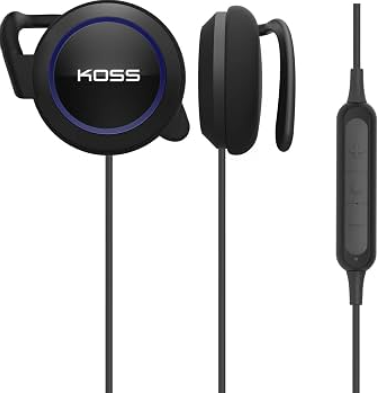
Introduction
The Koss BT221i Wireless Bluetooth Ear-Clip Headphones offer a unique blend of comfort, convenience, and quality audio designed for active users and everyday listeners alike. These lightweight ear-clip headphones provide a secure fit without the discomfort of earbuds or bulky over-ear models, making them ideal for workouts, outdoor activities, and casual listening. Their open-ear design allows users to stay aware of their surroundings while enjoying clear sound, which is perfect for runners, cyclists, and those who need situational awareness.
With an impressive battery life exceeding 18 hours and easy USB-C charging, these headphones ensure long usage without frequent recharging. The built-in in-line microphone and remote control enable hands-free calling and easy media management, enhancing user convenience. The Koss BT221i headphones combine affordability and functionality, targeting fitness enthusiasts, commuters, and anyone seeking a wireless audio solution that balances sound quality with ergonomic design.
Available at an estimated price range of $30 to $50, these headphones are widely accessible through online retailers and select physical stores. Their competitive pricing paired with dependable Koss audio heritage makes them an attractive option for budget-conscious buyers aiming for reliable Bluetooth ear-clip headphones.
Specifications and Key Features of Koss BT221i Wireless Bluetooth Ear-Clip Headphones
- Bluetooth Version: 5.0 for stable wireless connectivity
- Battery Life: 18+ hours of continuous playback on a single charge
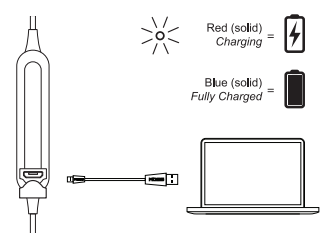
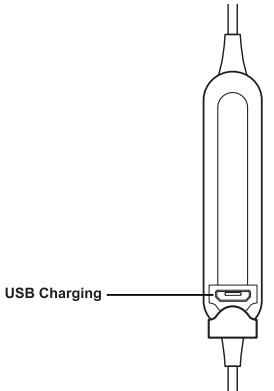
- Charging: USB-C fast charging port for convenience
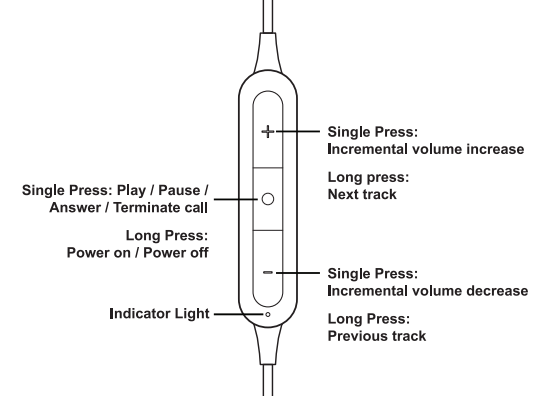
- Microphone & Remote: In-line microphone and remote for hands-free calls and media control
- Design: Lightweight, ergonomic ear-clip style that fits securely without earbuds
- Sound Profile: Clear midrange and balanced sound suitable for casual listening and workouts
- Weight: Extremely light, minimizing ear fatigue during extended use
- Compatibility: Compatible with smartphones, tablets, smartwatches, and any Bluetooth-enabled device
- Additional Features: Open-ear design allows ambient sound awareness for safety during outdoor activities
Compared to similar models like the Koss Porta Pro Wireless or KPH30i On-Ear Headphones, the BT221i emphasizes portability and an active lifestyle fit, trading some bass depth for lighter weight and better airflow around the ears.
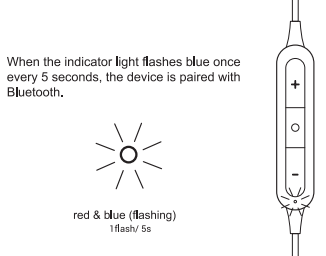
Bluetooth Paired
Charging
Controls
Ports
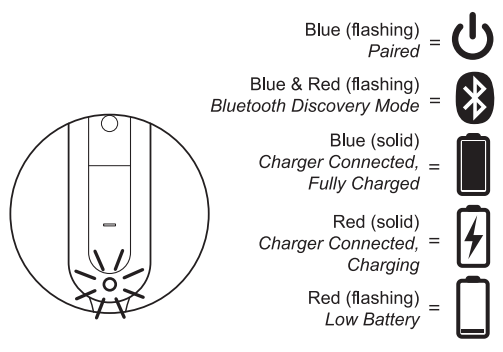
Light Language
Setup Guide for Koss BT221i Wireless Bluetooth Ear-Clip Headphones
Follow these steps to set up your Koss BT221i Wireless Bluetooth Ear-Clip Headphones efficiently:
- Charge the headphones fully using the included USB-C cable before first use.
- Press and hold the power button until the LED indicator flashes, indicating pairing mode.
- On your Bluetooth-enabled device (smartphone, tablet, or smartwatch), open Bluetooth settings and select “Koss BT221i” from the list of available devices.
- Once connected, the LED will show a steady light, and you can start playing audio.
- Use the in-line remote to adjust volume, skip tracks, or answer calls.
For configuration options, adjust volume and playback directly on the device or paired device. To disconnect, power off the headphones by holding the power button until the LED turns off. For troubleshooting pairing issues, ensure the headphones are not connected to another device and reset by powering off and on again.
Safety Tips: Avoid using at high volume levels to protect hearing. Do not expose to excessive moisture or extreme temperatures.
Troubleshooting Common Issues with Koss BT221i Wireless Bluetooth Ear-Clip Headphones
- No Sound / Audio Dropouts: Ensure the device is within Bluetooth range (approximately 33 feet). Restart both headphones and device. Reset pairing if needed.
- Pairing Problems: Delete previous pairing records from your device’s Bluetooth settings and re-initiate pairing mode.
- Microphone Not Working: Check device permissions for microphone access. Ensure the in-line mic is not muted or blocked.
- Battery Issues: Use the supplied USB-C cable for charging. If charging fails, try different power sources. Battery life may decrease over time.
Preventive measures include regular cleaning of ear clips, avoiding drops or impacts, and keeping firmware updated if applicable. The Koss BT221i comes with a limited warranty; contact Koss Customer Support for repairs or replacements via 1-800-USA-KOSS or their official email[5].
Pros & Cons of Koss BT221i Wireless Bluetooth Ear-Clip Headphones
Pros
- Lightweight and comfortable ear-clip design, ideal for active users
- Long battery life (18+ hours) with convenient USB-C charging
- Clear sound quality suitable for workouts and casual listening
- In-line microphone and remote provide hands-free communication and media control
- Open-ear design allows situational awareness, enhancing outdoor safety
- Affordable price point offers strong value for money
Cons
- Lacks deep bass compared to over-ear wireless headphones
- Open-ear design may allow ambient noise to interfere in very loud environments
- Not fully waterproof, so sweat resistance is limited
- Limited advanced audio codec support compared to premium models
For users prioritizing portability and comfort over audiophile-grade sound, the Koss BT221i is an excellent choice. Compared to alternatives like bulky over-ear wireless headphones, it offers a unique balance of usability and price.
Customer Reviews of Koss BT221i Wireless Bluetooth Ear-Clip Headphones
Customers praise the Koss BT221i Wireless Bluetooth Ear-Clip Headphones for their comfortable fit and reliable battery life. Many highlight their suitability for cardio workouts and outdoor activities, appreciating that the ear clips stay secure without causing ear fatigue. Positive reviews often mention the good sound quality for the price and the convenience of hands-free calls using the in-line microphone.
Common complaints include occasional pairing difficulties and limited bass response. However, users frequently note the excellent value for money and responsive customer service. Star ratings typically range from 4 to 4.5 stars out of 5, recommending these headphones for anyone needing a lightweight, affordable, and dependable Bluetooth solution for active use.
Faqs
How do I set up the koss BT221i Wireless Bluetooth Ear-Clip Headphones for the first time?
What should I do if my koss BT221i Wireless Bluetooth Ear-Clip Headphones won’t pair with my smartphone?
Can I use koss BT221i Wireless Bluetooth Ear-Clip Headphones with all Bluetooth-enabled devices?
How can I optimize sound quality on my koss BT221i Wireless Bluetooth Ear-Clip Headphones?
What are the key features of the koss BT221i Wireless Bluetooth Ear-Clip Headphones?
How do I troubleshoot audio fading or connection drop issues with koss BT221i Wireless Bluetooth Ear-Clip Headphones?
How do I care for and maintain my koss BT221i Wireless Bluetooth Ear-Clip Headphones?
Is there a PIN code required to pair the koss BT221i Wireless Bluetooth Ear-Clip Headphones?
Tags
More koss manuals
- Usage & Setup: Koss BT232i Wireless Bluetooth FitClips Headphones User Manual
- Setup: Koss CS340BT QZ Communication Headset User Manual
- Setup: Koss BT330i Wireless Headphones User Manual
- Setup: Koss BT115i Bluetooth Wireless Headphones User Manual
- Setup: Koss TWS250i True Wireless Earbuds User Manual
- Setup & Connection: Koss BT539i Bluetooth Wireless Headphones User Manual
Leave a Comment