
Usage & Setup: Koss BT740IQZ Bluetooth Wireless Headset User Manual
Content
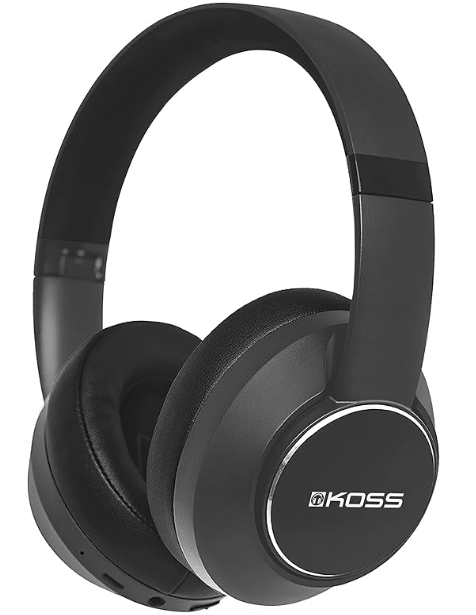
Koss BT740IQZ Bluetooth Wireless Headset
Introduction
The Koss BT740IQZ Bluetooth Wireless Headset is a premium over-ear headphone designed to deliver superior sound quality combined with active noise cancellation (ANC) technology. Ideal for audiophiles, commuters, and remote workers alike, this headset offers a seamless wireless listening experience with enhanced noise isolation, making it perfect for use at home, in busy public spaces, or during travel. Its ergonomic over-ear design with plush cushions ensures long-lasting comfort even during extended listening sessions.
This headset supports Bluetooth 5.0 for reliable and stable wireless connectivity with a range of up to 10 meters, making device pairing and connection effortless. The built-in microphone allows for clear hands-free calling, while the on-board controls enable easy management of music playback, volume adjustments, calls, and noise-cancellation settings without needing to access a phone or other device.
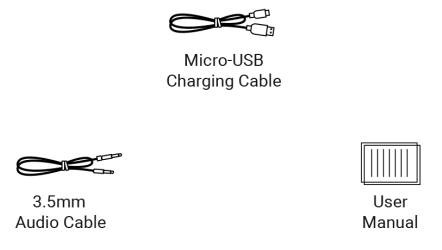
With an estimated price range of approximately €89 to €150, depending on availability and retailer, the Koss BT740IQZ offers excellent value for consumers seeking a feature-rich ANC headset that balances sound quality, comfort, and portability. It typically includes accessories such as a detachable 3.5mm audio cable, a micro-USB charging cable, and a carrying pouch for convenient storage.
Specifications and Features of the Koss BT740IQZ Bluetooth Wireless Headset
- Headphone Type: Over-ear, closed-back, foldable design for portability
- Drivers: 40 mm dynamic drivers delivering clear audio from 10 Hz to 20 kHz frequency range
- Bluetooth Version: 5.0 with multi-point connectivity allowing pairing with multiple devices simultaneously
- Noise Cancellation: Advanced dual-microphone Active Noise Cancellation with adjustable settings (Off, Low, High), and Ambient Sound Mode to allow some external noise through
- Battery Life: Up to 12 hours of wireless playback with ANC active; up to 30+ hours without ANC enabled
- Controls: Onboard buttons for play/pause, track skipping, volume control, call answering, power on/off, ANC toggling, and voice assistant activation
- Connectivity: Wireless Bluetooth and wired via detachable 3.5mm audio cable
- Weight: Approximately 280 grams for comfortable all-day use
- Charging: Micro-USB port with included charging cable
Compared to similar Bluetooth ANC headphones in its price range, the Koss BT740IQZ stands out with its multi-point Bluetooth 5.0 support, foldable design, and competitive battery life. While some competitors offer faster charging or USB-C ports, the BT740IQZ delivers excellent sound clarity and effective noise cancellation for mid-range users.
In box
Product Overview
Status Indicator
Basic Operation
Charging
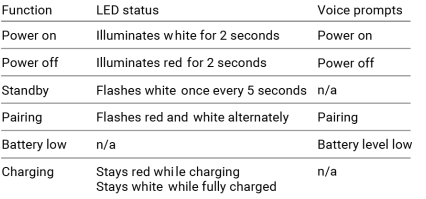
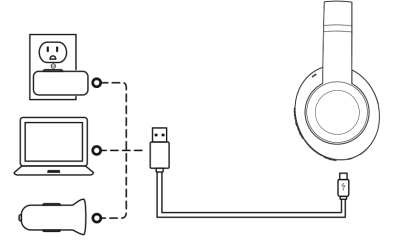
It takes 2.5 hours to fully charge the headphones. The red indicator light is always on during charging; The red light will go out immediately after unplugging the charging cable; When fully charged, the red light goes out, and the white light stays on.
Note: The lifetime of the battery will be significantly reduced if your headphones are left uncharged for a long period of time. We recommend that you recharge your headphones at least once a month.
Active Noise Cancellation (ANC)
When powered on and/ or connected to device via audio cable
- ANC LOW: Long press the ANC button for 2 seconds
- ANC HIGH: Long press the ANC button again for 2 seconds
- ANC OFF: Long press ANC button again for 2 second s
Ambient Sound
When ANC is ON
- AMBIENT SOUND ON: Short press the ANC button
- AMBIENT SOUND OFF: Short press the ANC button again
Setup Guide for Koss BT740IQZ Bluetooth Wireless Headset
- Charging: Before first use, fully charge the headset using the provided micro-USB cable. A full charge usually takes 2-3 hours.
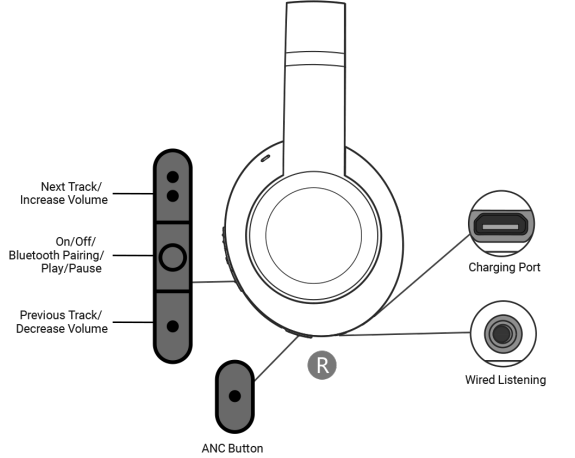
- Power On/Off: Press and hold the multi-function button on the right earcup to power on or off the headset.
- Pairing: When powered on, hold the multi-function button for several seconds until the LED indicator flashes, signaling pairing mode. On your device, enable Bluetooth and select “Koss BT740IQZ” from the list of available devices.
- Multi-Point Connectivity: To pair with multiple devices, repeat the pairing process on each device. The headset will switch between connected devices automatically.
- Wired Mode: Connect the detachable 3.5 mm audio cable to the headset and your audio source if you prefer wired listening or if the battery is low.
- Noise Cancellation: Use the dedicated ANC button to toggle between ANC off, low, high, and ambient sound modes to suit your environment.
Troubleshooting Tips: If connectivity issues occur, turn off Bluetooth on paired devices and re-pair the headset. Reset the headphones by powering off and holding the power button for an extended duration (around 10 seconds) if unresponsive. Avoid using the headset near strong wireless interference. Use only the provided charging cable for best battery performance.
Safety Precautions: Avoid exposure to water or extreme moisture, and do not use the headset at high volume levels for extended periods to prevent hearing damage.
Troubleshooting for Koss BT740IQZ Bluetooth Wireless Headset
- No Sound or Low Volume: Check volume levels on both the headset and the connected device. Ensure ANC mode is correctly set.
- Bluetooth Not Pairing: Make sure the headset is in pairing mode and remove old Bluetooth connections on your device to avoid conflicts.
- Audio Dropouts or Interference: Stay within 10 meters of the paired device and avoid obstructions or other wireless devices causing interference.
- Battery Won't Charge: Confirm the charging cable is properly connected and functional. Try a different power source or cable to isolate the issue.
- Buttons Not Responding: Reset the device by holding the power button for 10 seconds or until the LED indicator blinks.
The Koss BT740IQZ typically includes a warranty covering manufacturing defects; consult the retailer or official Koss support for specific warranty details and repair services. For further assistance, customers can contact Koss customer support through their official website.
Pros and Cons of the Koss BT740IQZ Bluetooth Wireless Headset
Pros
- Effective active noise cancellation with adjustable levels and ambient sound mode
- Comfortable over-ear design with plush cushions for extended use
- Bluetooth 5.0 with multi-point connectivity supports seamless device switching
- Long battery life—up to 12 hours with ANC and over 30 hours without ANC
- Includes detachable wired option and convenient carrying pouch
Cons
- Uses micro-USB charging rather than faster USB-C
- ANC performance is good but may not match premium high-end models
- Some users report minor audio latency when using wired mode
- Limited fast charging support
- Price may vary and sometimes approach the higher end of mid-range options
Overall, the Koss BT740IQZ offers solid value for money with features often found in pricier headsets. It is a strong contender for users seeking noise cancellation and wireless convenience without premium pricing.
Customer Reviews of Koss BT740IQZ Bluetooth Wireless Headset
Users commonly praise the Koss BT740IQZ Bluetooth Wireless Headset for its clear and balanced sound quality, effective noise cancellation, and comfortable fit suitable for long listening sessions. Many reviewers highlight the convenience of multi-point Bluetooth connectivity and the usefulness of onboard controls for managing calls and playback.
Some customers mention the slightly outdated micro-USB charging port as a drawback and note that while ANC is effective, it is not as strong as some flagship models. Battery life and build quality receive generally positive feedback. The included carrying pouch and foldable design are appreciated for portability.
Star ratings typically range between 4 and 4.5 out of 5, with frequent recommendations for users seeking a mid-range wireless headset with ANC features. Common suggestions include improving charging speed and adding USB-C support in future models.
Faqs
How do I set up the koss BT740IQZ Bluetooth Wireless Headset for the first time?
What should I do if the koss BT740IQZ Bluetooth Wireless Headset is not connecting to my device?
How does the Active Noise Cancellation (ANC) feature work on the koss BT740IQZ Bluetooth Wireless Headset?
Can I use the koss BT740IQZ Bluetooth Wireless Headset with wired devices?
What is the battery life of the koss BT740IQZ Bluetooth Wireless Headset and how do I charge it?
How do I maintain and clean my koss BT740IQZ Bluetooth Wireless Headset to ensure longevity?
What devices are compatible with the koss BT740IQZ Bluetooth Wireless Headset?
How can I optimize sound performance and reduce latency with the koss BT740IQZ Bluetooth Wireless Headset?
More koss manuals
- Setup: Koss BT540i Bluetooth Headphones User Manual
- Setup & Connection: Koss BT539i Bluetooth Wireless Headphones User Manual
- Setup: Koss BT115i Bluetooth Wireless Headphones User Manual
- Setup: Koss CS340BT QZ Communication Headset User Manual
- Usage: Koss BT221i Wireless Bluetooth Ear-Clip Headphones User Manual
- Usage & Setup: Koss BT232i Wireless Bluetooth FitClips Headphones User Manual
Leave a Comment