
Lenovo V110 Ideapad User Guide | Specifications
Content
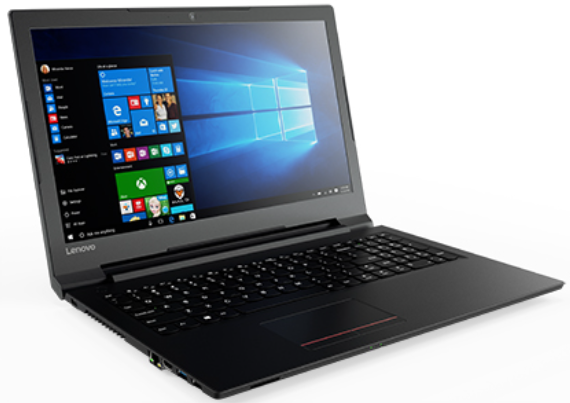
Lenovo V110 Ideapad
Introduction
The Lenovo V110 Ideapad is a versatile laptop designed for everyday use. With its powerful performance and sleek design, it is perfect for both work and play.
Specifications
- Processor: Intel Core i5-7200U
- Memory: 8GB DDR4 RAM
- Storage: 1TB HDD
- Display: 15.6-inch HD LED
- Graphics: Integrated Intel HD Graphics
- Operating System: Windows 10 Home
- Wireless Connectivity: Wi-Fi 802.11ac, Bluetooth 4.1
- Ports: 1 x USB 3.0, 1 x USB 2.0, HDMI, VGA, RJ-45 Ethernet, Audio Jack
- Battery: Up to 5 hours
Instructions
- Unbox the Lenovo V110 Ideapad.
- Connect the power adapter to the laptop and plug it into a power outlet.
- Press the power button to turn on the laptop.
- Follow the on-screen instructions to set up Windows 10.
- Once the setup is complete, you can start using the laptop.
MAINTENANCE GUIDE
SYSTEM CARE (Windows Health)
Keep Windows and drivers up-to-date:
- Press Start → Settings → Windows Update → Check for updates.
- Use Lenovo Vantage:
- Download from the Microsoft Store.
- Open it → System Update → Scan for updates.
- Install BIOS, chipset, audio, graphics, and touchpad drivers.
PERFORMANCE MAINTENANCE
To keep your V110 running smoothly:
- Clean startup apps:
- Press Ctrl + Shift + Esc → Startup tab → Disable unnecessary apps.
- Defragment HDD (if not SSD):
- Search Defragment and Optimize Drives → Optimize your drive weekly.
- Use Disk Cleanup:
- Right-click C: → Properties → Disk Cleanup.
- Scan for malware:
- Use Windows Defender or a trusted antivirus.
- Keep at least 15–20% of your disk free.
PHYSICAL CLEANING & DUST REMOVAL
Every 3–6 months:
- Power off, unplug the charger, and remove the battery (if removable).
- Use compressed air to blow dust from vents and the keyboard.
- Wipe surfaces with a soft, lint-free cloth slightly dampened with water or 70% isopropyl alcohol.
- Avoid spraying liquid directly on the laptop.
Cooling fan noise or heat buildup?
- Clean air vents thoroughly.
- Consider replacing thermal paste (recommended every 1–2 years if used heavily).
BATTERY MAINTENANCE
- Avoid full discharge often — keep charge between 20–80% for longevity.
- If you use it plugged in most of the time, enable Battery Conservation Mode via Lenovo Vantage:
- It keeps a charge around 55–60% to extend lifespan.
- Don’t expose to high heat or cold.
- Replace the battery if the runtime drops below 1 hour.
MEMORY (RAM) & STORAGE UPGRADE
Your Lenovo V110 supports:
- RAM: Up to 12 GB (4 GB soldered + 1 slot for 8 GB DDR4-2133)
- Storage: 2.5" SATA HDD/SSD (up to 1 TB HDD or 512 GB SSD)
Upgrade tips:
- Turn off the laptop and unplug the charger.
- Remove the back cover carefully.
- Add or replace RAM/SSD.
- Reassemble and boot → BIOS should detect new hardware automatically.
BIOS & FIRMWARE
To update BIOS safely:
- Open Lenovo Vantage → System Update.
- Only update BIOS when the laptop is plugged into AC power.
- Don’t interrupt the process.
Access BIOS/Boot Menu:
- Press F2 (BIOS) or F12 (Boot Menu) repeatedly after powering on
Troubleshooting
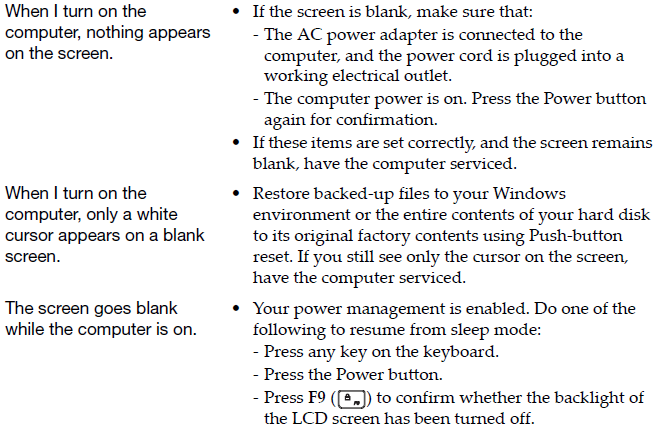
Display problems
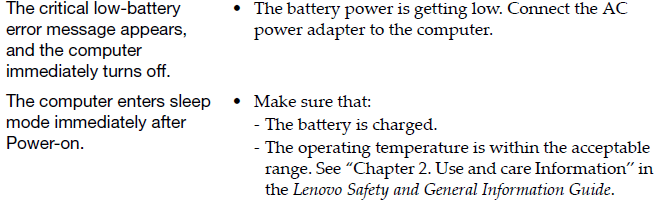
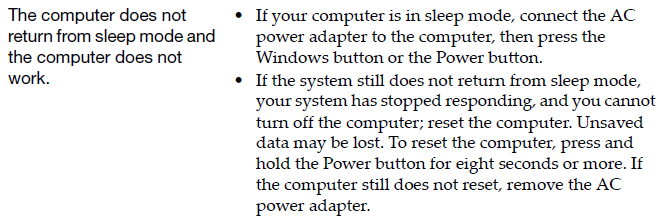
Sleep problems
Display panel problems
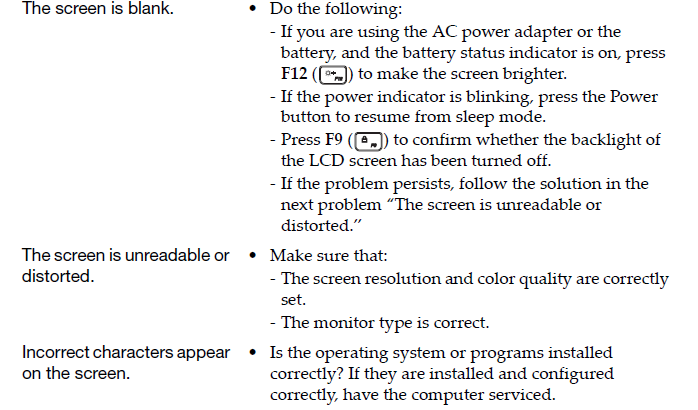
Sound problems

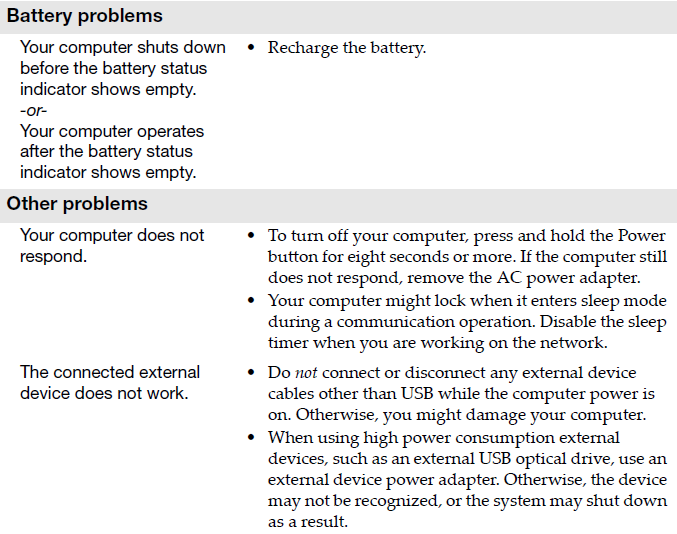
Faqs
Can I upgrade the RAM on the Lenovo V110 Ideapad?
Yes, the Lenovo V110 Ideapad supports up to 16GB of RAM. You can easily upgrade the RAM by opening the back panel of the laptop.
Does the Lenovo V110 Ideapad have a built-in webcam?
Yes, the Lenovo V110 Ideapad comes with a built-in webcam, allowing you to make video calls and take pictures.
What is the battery life of the Lenovo V110 Ideapad?
The Lenovo V110 Ideapad has a battery life of up to 5 hours, depending on usage.
Does the laptop come with a pre-installed operating system?
Yes, the Lenovo V110 Ideapad comes with Windows 10 Home pre-installed.
Can I connect an external monitor to the Lenovo V110 Ideapad?
Yes, the Lenovo V110 Ideapad has an HDMI and VGA port, allowing you to connect an external monitor.
Is the keyboard backlit?
No, the keyboard of the Lenovo V110 Ideapad is not backlit.
Does the laptop have a DVD drive?
No, the Lenovo V110 Ideapad does not have a built-in DVD drive.
Is the laptop compatible with gaming?
While the Lenovo V110 Ideapad is not specifically designed for gaming, it can handle some light gaming thanks to its integrated Intel HD Graphics.
What is the weight of the laptop?
The Lenovo V110 Ideapad weighs approximately 4.85 lbs (2.2 kg).
Does the laptop have a fingerprint scanner?
No, the Lenovo V110 Ideapad does not have a fingerprint scanner.
More lenovo manuals
- Lenovo IdeaPad Slim 5 14IRL8 User Guide | Connectivity
- Lenovo Chromebook C330 and S330 User Guide | Settings
- Lenovo Legion T5 26AMR5 User Guide | Specifications
- How to Use : Lenovo Tab3 7 Essential TB3-710F User Guide
- How to Use : Lenovo YOGA BOOK YB1-X90F User Guide
- Lenovo K8 Note Smartphone User Guide | Settings & Usage
Leave a Comment