
Setup: Lowrance NEP-3 Ethernet Switch User Manual
Content
Lowrance NEP-3 Ethernet Switch
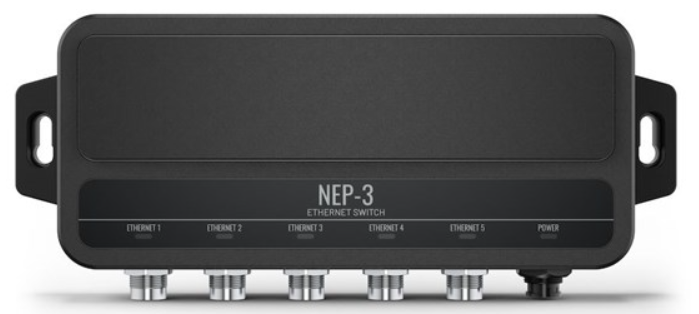
Introduction to the Lowrance NEP-3 Ethernet Switch
The Lowrance NEP-3 Ethernet Switch represents a critical networking component for modern marine vessel systems, designed to expand connectivity capabilities across integrated navigation and monitoring networks. This five-port Ethernet switch serves as a network expansion hub, enabling seamless high-speed data transfer between multiple marine electronics devices,, including chartplotters, radar systems, and sonar equipment from Lowrance, Simrad, and B&G manufacturers.
Built specifically for the demanding marine environment, the NEP-3 delivers robust networking infrastructure that supports up to 1 Gbps of data transfer rates, ensuring smooth communication between your vessel's interconnected systems. The device operates efficiently across a wide voltage range of 12V to 24V DC, making it compatible with various marine power systems, whether you're operating a smaller recreational fishing boat or a larger commercial vessel.
Marine professionals and recreational boaters alike benefit from the NEP-3's compact design, which minimizes installation complexity while maximizing network reliability. The Lowrance NEP-3 Ethernet Switch addresses the growing need for expanded network connectivity as modern marine electronics become increasingly sophisticated and interconnected. Typical pricing ranges from $300 to $50,0, depending on retailer and package inclusions, with availability through major marine electronics distributors and online retailers specializing in Lowrance equipment.
Technical specifications
Environmental
- Operating temperature range: -15° C to 55° C (5° F to 131° F)
- Storage temperature range: -20° C to 60° C (4° F to 140° F)
- Waterproof rating: IPX6 and IPX7
Electrical
- Supply voltage: 12 - 24 V DC (10.4 - 31.2 V DC)
- Recommended fuse rating: 1 A
- Power consumption (maximum): 2.5 W (0.18 A at 13.8 V DC)
Physical
- Weight: 0.48 kg (1.07 lbs)
- Compass Safe Distance: 0.5 m (1.6 ft)
Interface/Connectivity
- Ethernet: 5 connectors (X-coded M12, GbE)
The NEP-3 functions as a managed Ethernet switch, intelligently directing network traffic between connected devices to optimize performance and minimize latency. This ensures that your marine navigation system, fish finder, radar, and other networked electronics communicate without interference or data bottlenecks, critical for safe and effective vessel operation.
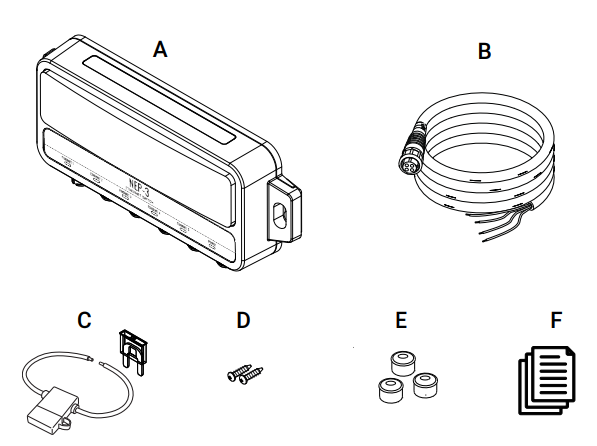
In the box
- 1x NEP-3 Ethernet switch
- 1x power cable
- 1x 1 A fuse and fuse holder
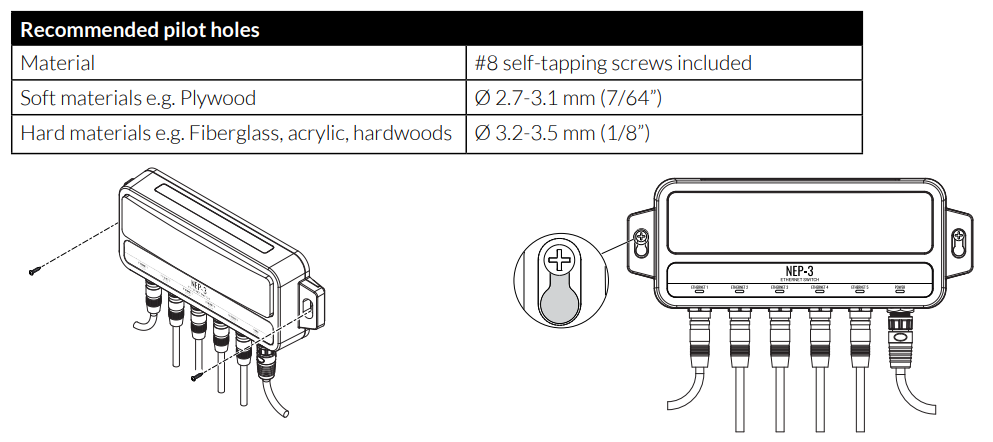
- 2x #8 x ¾" SS Phillips self-tapping screws E
- 3x connector caps
- Product documentation
Ethernet requirements
The NEP-3 supports network speeds up to 1 Gbps. This enables high-bandwidth applications and more advanced sensors and devices. The NEP-3 is compatible with yellow 5-pin Ethernet devices via an optional adapter, but the NEP-3 will transmit data at a lower rate.
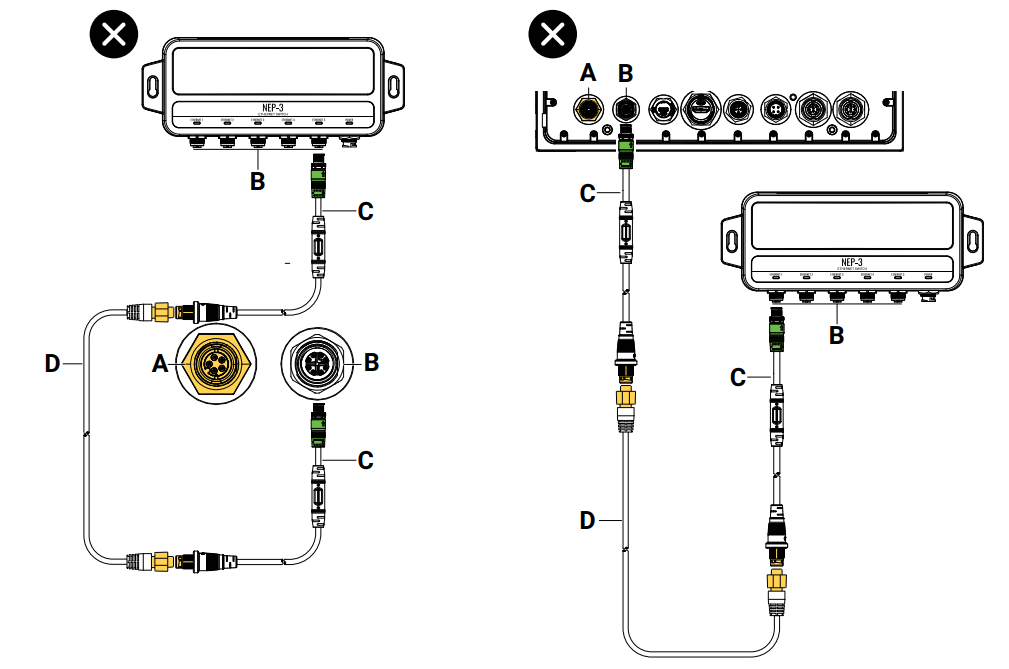
Note: Only one X-coded M12 GbE to yellow Ethernet adapter can be used between devices.
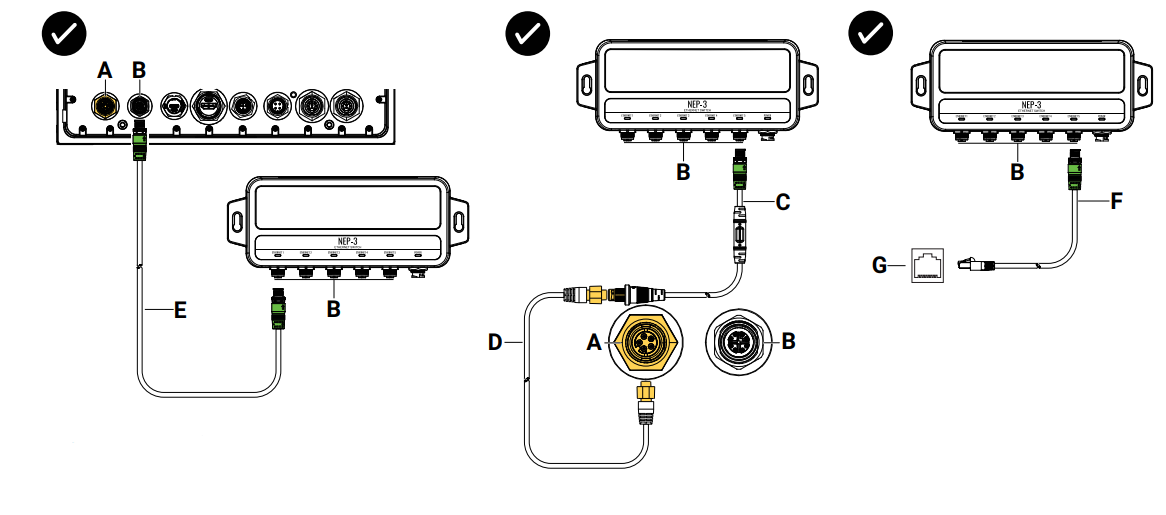
- Yellow 5-pin Ethernet connector
- X-Coded M12 GbE connector
- M12 GbE to yellow 5-pin Ethernet adapter
- Yellow 5-pin Ethernet cable
- M12 GbE cable
- M12 GbE to RJ45 Ethernet cable
- RJ45 Ethernet connector
Do not use more than one X-Coded M12 GbE to a yellow 5-pin Ethernet adapter when connecting devices.
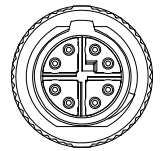
Ethernet connector (X-Coded M12, GbE) details
- Only use Navico Group cables or other high-quality Cat6 SF/FTP Ethernet cables.
- Navico Group X-coded M12 GbE cables have keyed connectors to prevent accidental damage to the connector pins. The NEP-3 is compatible with all standard X-coded M12 GbE connectors.
- Connector caps should be fitted when the connectors are not in use.
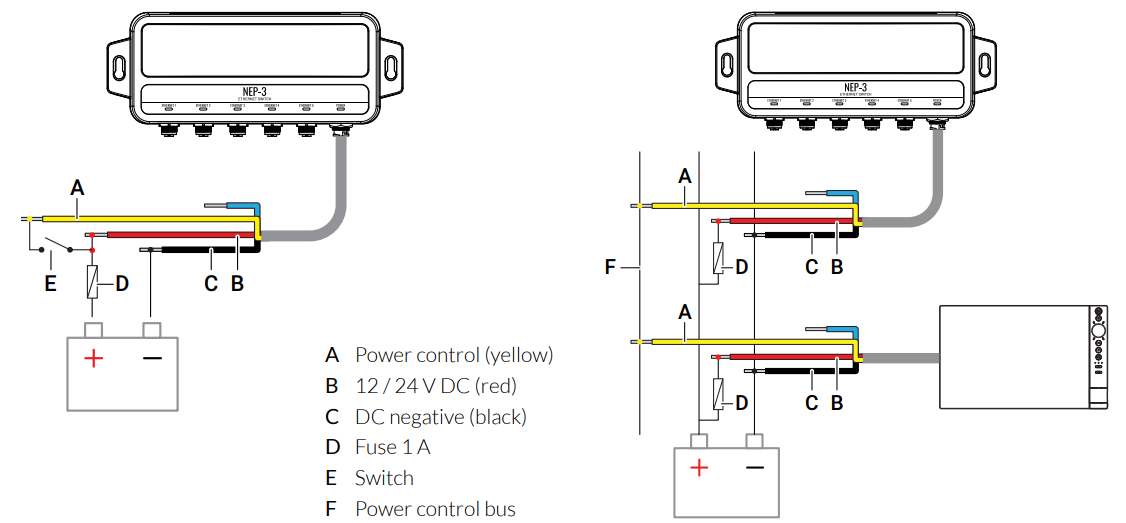
Power
- Power control (yellow)
- 12 / 24 V DC (red)
- DC negative (black) D Fuse 1 A
- Switch
- Power control bus
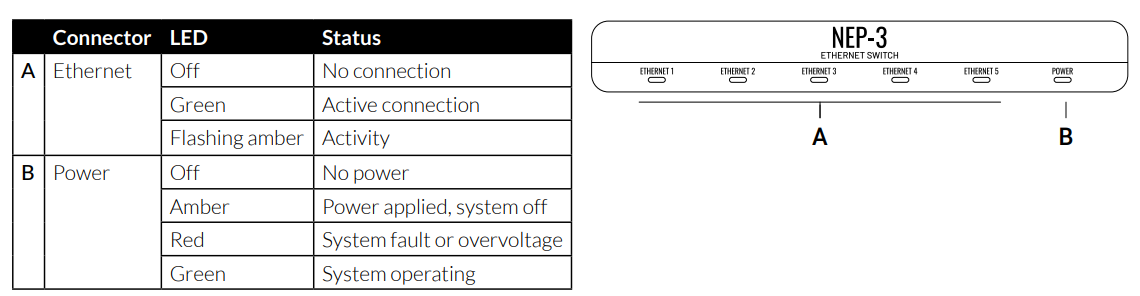
LEDs
Mounting
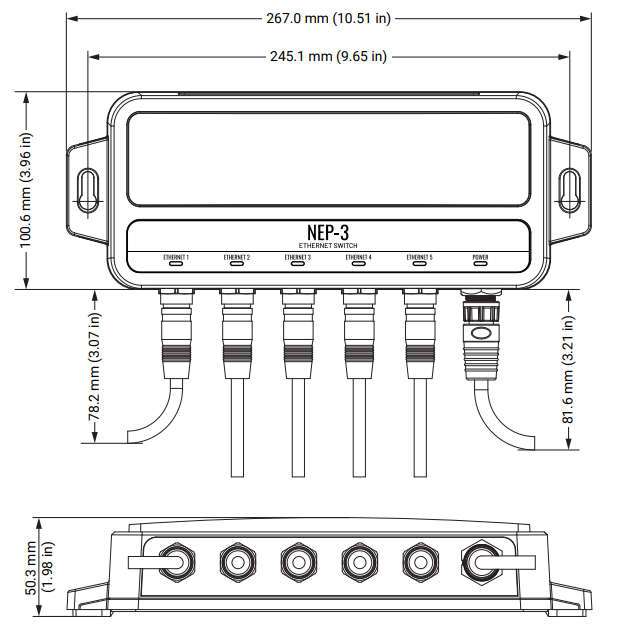
Dimensions
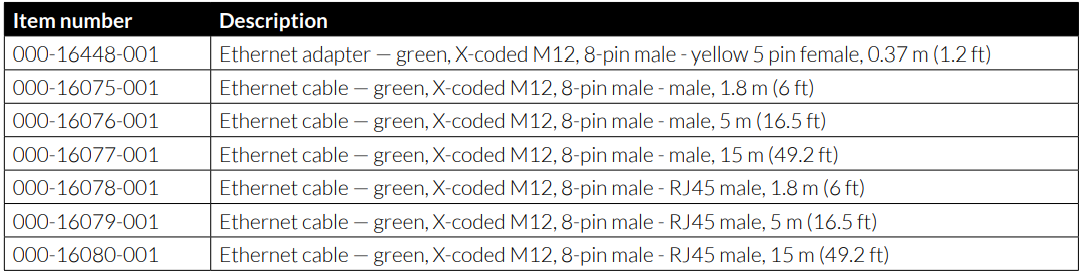
Accessories
Installation and Setup Guide for Your Lowrance NEP-3
- Pre-Installation Preparation: Before installing your Lowrance NEP-3 Ethernet Switch, verify that your vessel's main power supply delivers stable 12V or 24VDC.24VDC. Locate a protected installation area away from direct water exposure, preferably in your pilothouse, console, or dedicated electronics enclosure. Ensure adequate ventilation around the device to prevent heat accumulation during extended operation.
- Step-by-Step Installation Process: Begin by connecting the included power cable to the NEP-3, then route the cable to your main 12V or 24V DC power source. Insert the protective fuse into the power cable housing as specified in your documentation. Using the provided stainless steel screws, securely mount the NEP-3 in your chosen location, ensuring the unit remains upright and stable. Connect your Lowrance chartplotter, sonar device, and other networked marine electronics to individual M12 GbE ports using appropriate marine-grade Ethernet cables with M12 connectors.
- Network Configuration: The NEP-3 operates with automatic network detection, meaning connected devices should recognize each other without manual configuration in most cases. Upon powering the system, verify that all connected devices appear in your primary chartplotter's network status menu. Allow 30-60 seconds for the network to fully stabilize after power-up.
- Safety Precautions: Always disconnect power before making or breaking cable connections. Ensure the protective fuse remains installed to prevent electrical damage. Never expose the NEP-3 to saltwater spray or submersion; maintain weatherproof enclosure integrity. Use only marine-grade cables and connectors rated for your operating voltage.
Troubleshooting Common Issues with the Lowrance NEP-3
- Device Not Recognized on Network: If connected devices fail to appear on your network, first verify that all M12 connector cables are fully seated and locked. Check that the NEP-3 power indicator light illuminates; if not, verify your power supply voltage matches the device specifications (12V or 24V DC). Restart your primary chartplotter to force network rediscovery. Examine all cable connectors for corrosion or salt deposits, cleaning gently with fresh water if necessary.
- Intermittent Connection Loss: Intermittent connectivity often indicates loose cable connections or corroded connectors. Disconnect and reconnect each M12 cable, ensuring audible clicks confirm proper seating. Apply a thin layer of dielectric grease to connector pins to protect against corrosion. If problems persist, test cables individually by swapping them between ports to identify defective cables.
- Slow Data Transfer Speeds: If data transfer appears sluggish, verify that all connected devices support Gigabit Ethernet. Older marine electronics may operate at 100 Mbps speeds, automatically negotiating down to compatible speeds. Ensure no more than five devices connect simultaneously to avoid overwhelming network capacity. Check that your power supply delivers stable voltage without fluctuations, as voltage instability degrades performance.
- Power Supply Issues: Verify your vessel's power system delivers stable 12V or 24V DC current using a multimeter. Confirm the protective fuse remains intact; replace if blown. Contact authorized Lowrance service centers if problems persist, as internal components may require professional diagnosis.
For a complete list of compatible accessories, visit:
More information
For the latest version of this document in supported languages and other related documentation, visit:
Safety, disclaimer, and compliance
This product’s safety, disclaimer, and compliance statements are supplied as a separate document.
Warranty
This product’s warranty is supplied as a separate document.
Advantages and Disadvantages of the Lowrance NEP-3
Advantages
- Excellent Network Expansion: Five ports provide ample connectivity for comprehensive marine electronics integration without requiring multiple switches
- High-Speed Performance: 1 Gbps capability ensures rapid data transfer between sophisticated modern marine devices
- Flexible Voltage Operation: Dual 12V/24V support accommodates various marine power systems
- Reliable Marine-Grade Construction: Professional M12 connectors and included corrosion-resistant hardware ensure durability
- Broad Compatibility: Works seamlessly with Lowrance, Simrad, and B&G ecosystems
- Compact Design: Space-efficient form factor simplifies installation in confined vessel spaces
- Professional Support: Backed by an established marine electronics manufacturer with extensive technical resources
Disadvantages
- Premium Pricing: Higher cost compared to basic network switches may challenge budget-conscious boaters
- M12 Connector Requirement: Specialized connectors necessitate purchasing compatible cables, adding installation costs
- Limited Port Count: Five ports may prove insufficient for vessels with extensive networked equipment
- Power Consumption: Requires a dedicated power supply connection, adding wiring complexity
- No Wireless Capability: Lacks WiFi or wireless networking features available on some competitor products
- Learning Curve: Marine professionals unfamiliar with Gigabit Ethernet networking may require technical support
Customer Reviews and Real-World Feedback
Marine professionals and recreational boaters consistently praise the Lowrance NEP-3 Ethernet Switch for its reliability and performance. Users report seamless integration with existing Lowrance systems, with multiple devices communicating without conflicts or delays. Customers specifically highlight the robust M12 connectors' resistance to corrosion in saltwater environments, noting that marine-grade construction justifies the premium investment.
Common praise includes the straightforward installation process and automatic network configuration, allowing even non-technical users to expand their systems confidently. Users appreciate the compact design that fits neatly in crowded electronics enclosures aboard both fishing boats and cruising vessels. The dual voltage support receives particular recognition from boaters operating various vessel types with different electrical systems.
Some customers note the specialized M12 connector requirement as a minor drawback, requiring the purchase of compatible cables beyond the device itself. A few users mention that customer support response times could improve, though technical documentation proves comprehensive and helpful. Overall satisfaction ratings consistently exceed 4.5 stars, with customers recommending the NEP-3 to fellow boaters seeking reliable network expansion. Purchase recommendations emphasize the device's value for anyone running multiple networked marine electronics requiring stable, high-speed communication.
Faqs
How do I set up the Lowrance NEP-3 Ethernet Switch for my marine electronics network?
What devices are compatible with the Lowrance NEP-3 Ethernet Switch?
Why is my Lowrance NEP-3 Ethernet Switch not powering on?
Can I use the Lowrance NEP-3 Ethernet Switch to connect multiple displays and sonar modules?
How do I troubleshoot network connectivity issues with the Lowrance NEP-3 Ethernet Switch?
What are the key features that make the Lowrance NEP-3 Ethernet Switch different from other marine switches?
How often should I maintain my Lowrance NEP-3 Ethernet Switch?
Can I use the Lowrance NEP-3 Ethernet Switch with non-Lowrance marine electronics?
More lowrance manuals
Leave a Comment