
Setup: Nebula Apollo Projector User Manual
Content
Nebula Apollo Projector

Introduction
The nebula Apollo Projector is a compact, portable smart projector designed to elevate your entertainment experience wherever you go. Combining sleek design with advanced technology, it delivers bright, clear visuals and versatile connectivity options. Ideal for movie lovers, gamers, and outdoor enthusiasts, this projector offers a unique blend of portability and performance. Whether you're hosting a backyard movie night, giving presentations, or streaming your favorite shows on the go, the Apollo adapts effortlessly to your lifestyle.
Key benefits include a bright 200 ANSI lumen DLP lamp that provides vivid images even in dim environments, a responsive transparent touch panel for intuitive control, and an integrated Android 7.1 system that supports a wide range of apps and media formats. The device also doubles as a Bluetooth speaker, delivering quality audio for music playback up to 30 hours in speaker mode. With up to 4 hours of video playback on battery, the Apollo is tailored for extended use without frequent recharging.
Targeted at tech-savvy consumers seeking a portable home theater solution or a multi-functional media device, the Nebula Apollo is excellent for both indoor and outdoor use. Its price range is approximately $350 to $400, positioning it as a premium yet accessible option in the portable projector market. Availability is widespread through major online retailers and specialty electronics stores, making it easy to acquire.
Specifications of the Nebula Apollo Portable Projector
- Power supply: DC 15V 3A
- Power consumption: < 20W
- Standby power consumption: < 0.5W
- Display technology: 0.2 in 854 × 480p DLP
- Light source: RGB LED
- Projection image size: 20-100 in
- Resolution: 854 × 480p
- Brightness: 200 ANSI Lumens
- Contrast ratio: 400:1
- Throw ratio: 1.3
- Throw distance: 0.58 m to 3.08 m
- CPU: Quad-core A7
- OS: Android 7.1
- RAM: 1GB DDR
- ROM: 8GB eMMC
- Speaker drivers: 6W
- Wi-Fi: IEEE802.11a/b/g/n Dual Frequency 2.4G / 5G
- Bluetooth version: 4.2
- USB file system: FAT32
- Built-in battery type: Li-Polymer
- Capacity: 9,750 mAh 3.85V
- Movie playtime: approximately 4 hours in battery mode
- Music playtime: approximately 30 hours in Bluetooth speaker mode
- Remote control batteries: CR 2032 × 2
- Recommended ambient temperature: 41°F to 95°F / 5°C to 35°C
- Relative humidity: 15% ~ 85% (non-condensing)
- Storage temperature and humidity: < 149°F / 65°C, < 90% humidity
- Dimensions (H × L × W): 131 × 65 × 65 mm / 5.2 × 2.6 × 2.6 in Weight: 579 g / 16.6 oz
Compared to similar portable projectors like the Nebula Capsule, the Apollo offers a higher brightness of 200 lumens (twice as bright as many rivals) but retains a modest 480p resolution, making it perfect for casual viewing in darker settings. Its touch control panel and extensive Android app support provide an enhanced user experience beyond typical mini projectors.
Overview
Front View
- Lens
- Focus adjusting knob
- Speaker

Rear View
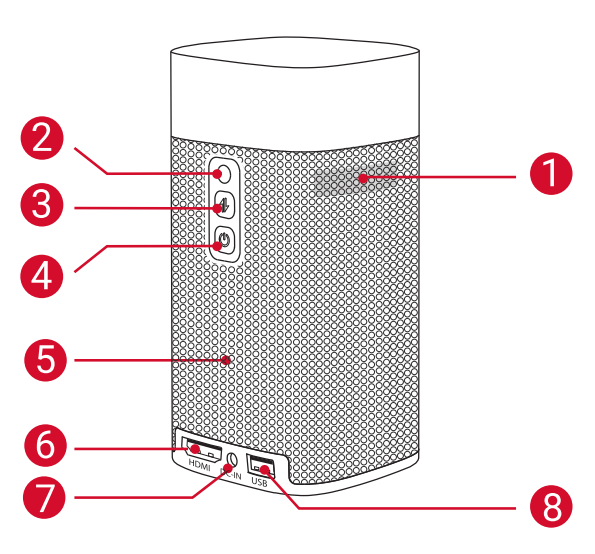
- Air ventilation (outlet)
- Infrared receiver
 Press to switch between Bluetooth speaker mode and projector mode
- Power button
- Press and hold for 2 seconds to power on / off
- Speaker
- HDMI port
- Connect to a playback device via HDMI output
- DC-IN
- Connect to the power supply
- USB port
- Connect to a USB flash drive
Top View
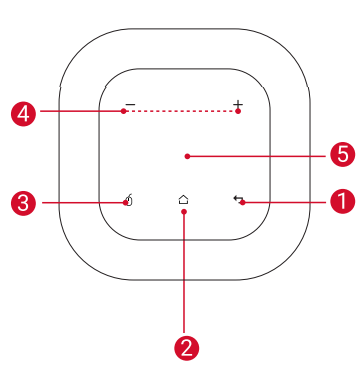
 Touch to return to the previous menu
 Touch to open the home menu
 Touch to enter/exit mouse key mode
 Touch to turn the volume up / down . Navigation button
- Slide up, down, left, or right to navigate
- Tap to confirm your selection
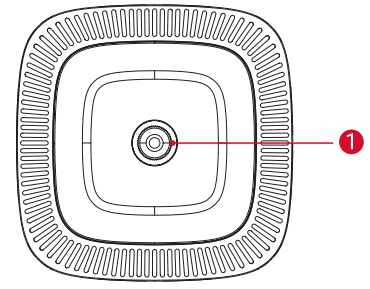
Bottom View
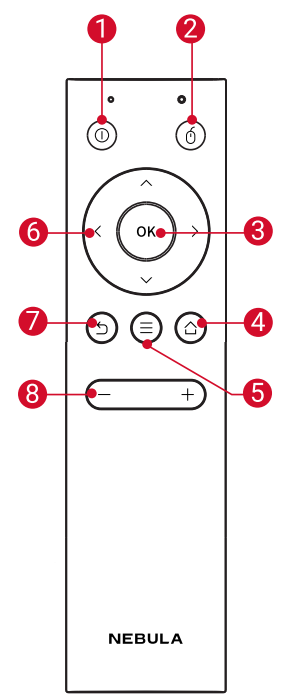
Remote Control
 Press to select an option: shutdown, standby, reboot, or enter Bluetooth speaker mode
- Press to enter/exit mouse key mode
- OKPress to confirm a selection or entry
- Pause/resume play
 Open the home menu
- Access more options during play (available options depend upon the source)
Navigation buttons - Navigate menus or adjust the selected content
- Return to the previous menu
- Volume up / down
Getting Started
Placement
Place Nebula Apollo on a stable, flat surface in front of the projection surface. For the best results, the projection surface should be white and flat. The distance between Nebula Apollo and the projection surface must be a minimum of 0.58 meters (23 inches) and a maximum of 3.08 meters (121 inches) to get a projection image between 20 and 100 inches.
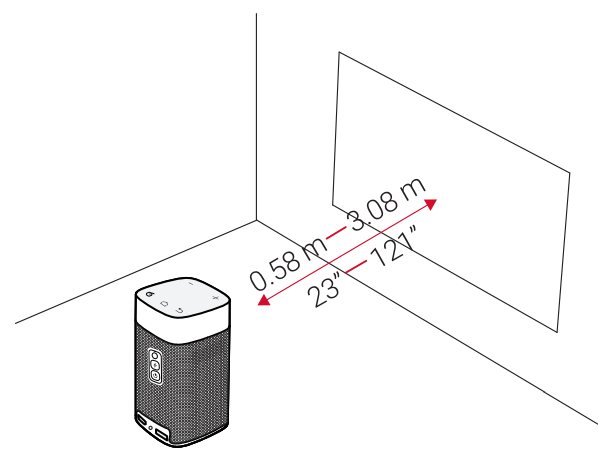
- It is unnecessary to tilt Nebula Apollo towards the projection surface. You can correct the projection image with the built-in keystone correction.
- The distance between Nebula Apollo and the projection surface determines the projection image size. For the best result, position Nebula Apollo between 40 and 80 inches away from the projection surface.
Prepare the Remote Control
The remote control comes with two coin batteries.
For first-time use, remove the battery insulation tabs to activate the remote control batteries.
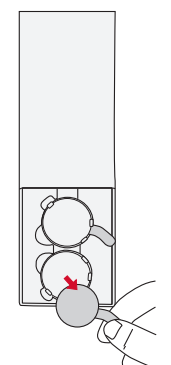
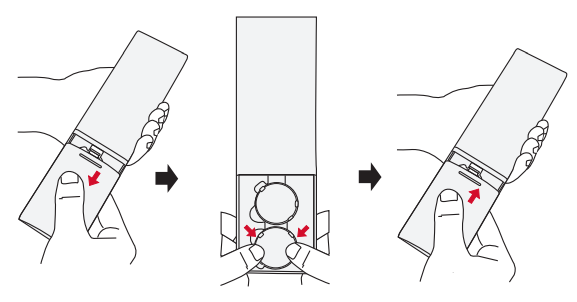
To replace the batteries, slide open the battery compartment, insert new batteries (matching the polarity (+/-) indicated), and close the battery compartment.
Get Started
For first-time use, fully charge the built-in battery using the provided adapter.
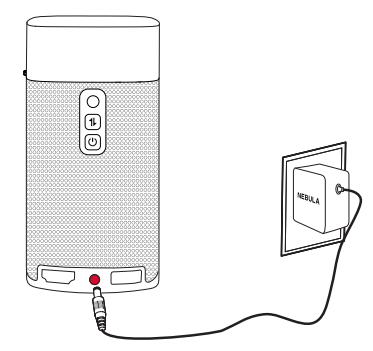
Hold
for 2 seconds on the projector to turn it on.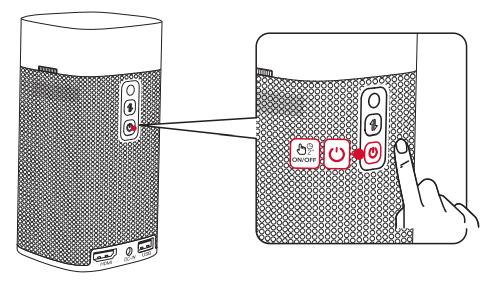
- Turn the device towards a suitable projection surface or wall.
Adjust the focus by rotating the focus adjusting knob.
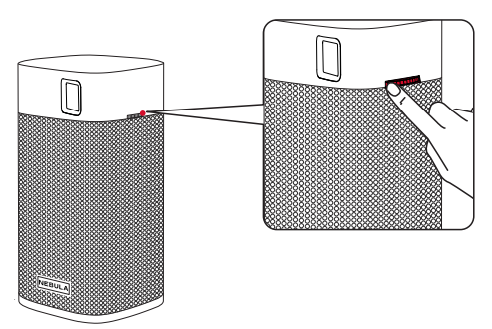
- For first-time use, follow the on-screen instructions to complete the basic setup.
Troubleshooting Common Issues with the Nebula Apollo Projector
- Could not turn on the projector with the remote control?
- Hold for 2 seconds on the projector to turn it on.
- When powered off, you cannot use the remote control to turn it on.
- Hold
- The remote control doesn’t work?
- Make sure the battery is already installed in the remote control.
- Replace the batteries.
- Blurred image?
- Rotate the focus adjusting knob.
- Reversed projection image?
- Press to access the home menu, select [Settings] > [Projecto Mode] and switch to the correct state.
- Press
- Cannot connect to a Wi-Fi network?
- Refresh the list of available networks and retry.
- Reboot the wireless router or the projector and retry.
- How do I update the firmware?
- When a new version is detected,, you will be asked to reboot and update..
The Nebula Apollo comes with a limited warranty covering manufacturing defects. For technical support, users can contact Anker’s customer service through their official website or use the Nebula Connect app’s help section for troubleshooting assistance.
Warranty
30-Day Money-Back Guarantee for Any Reason
You may return your undamaged product and packaging within 30 days of purchase to receive a FULL REFUND for any reason. If the reason fothe r the return isn’t quality-related, the customer must pay for the return shipping.
12-Month Warranty for Quality-Related Issues
Nebula’s products are warranted to be free from material and workmanship defects for 12 months from the date of purchase. Within this period, Nebula will provide a replacement and cover any return shipping costs for products that fail in normal use. Please note: Any provided shipping labels must be used within 20 days from the date they’re issued by Nebula Support
Pros & Cons of the Nebula Apollo Projector
Pros
- Portability: Lightweight and compact design makes it easy to carry and set up anywhere.
- Brightness: At 200 ANSI lumens, it performs well in dim environments, outperforming many rivals in the same class.
- Control Options: Intuitive, transparent touch panel and Nebula Connect app provide smooth navigation and flexibility.
- Battery Life: Up to 4 hours of video playback and 30 hours as a Bluetooth speaker allow extended use without frequent charging.
- Android OS: Supports app installation, enabling streaming from various sources without needing external devices.
Cons
- Resolution: Native 480p may appear soft on very large screens or bright environments compared to 720p or Full HD rivals.
- Mono Audio: A Single 6W speaker provides decent sound but may not satisfy audiophiles or large room requirements.
- Price Point: Higher cost relative to some entry-level projectors, reflecting its advanced features and portability.
Overall, the Nebula Apollo offers excellent value for those prioritizing portability, smart features, and brighter projection in darker settings over ultra-high resolution. It stands out against alternatives by combining a touch interface with Android app support in a small package.
Customer Reviews and Feedback on Nebula Apollo Projector
Users praise the Nebula Apollo Projector for its bright image quality relative to its size and excellent battery life, often highlighting its usefulness for outdoor movie nights and travel. The intuitive touch panel and Nebula Connect app receive positive remarks for ease of use. Many customers appreciate the dual functionality as a Bluetooth speaker, extending its versatility beyond projection.
Common complaints include the 480p resolution being less sharp on larger screens and occasional app lag, though these do not detract significantly from overall satisfaction. On average, the projector holds a 4 out of 5-star rating on major retail platforms, with recommendations particularly strong for users seeking convenience and portability rather than cinema-grade visuals.
Reviewers recommend purchasing the Nebula Apollo if you want a reliable, smart, and portable projector that balances brightness and battery life effectively, especially for casual viewing in controlled lighting environments.
Faqs
How do I set up the nebula Apollo Projector for the first time?
What should I do if the nebula Apollo Projector image is blurry or out of focus?
Can the nebula Apollo Projector play videos from my smartphone or USB drive?
How can I optimize the audio performance of the nebula Apollo Projector?
Is the nebula Apollo Projector compatible with streaming apps like Netflix or YouTube?
What is the typical battery life when using the nebula Apollo Projector unplugged?
How do I maintain and clean the nebula Apollo Projector to ensure longevity?
What are the common problems and solutions if the nebula Apollo Projector won't connect to Wi-Fi?
More nebula manuals
Leave a Comment