
Setup: Nebula Astro Projector User Manual
Content
Nebula Astro Projector
Introduction
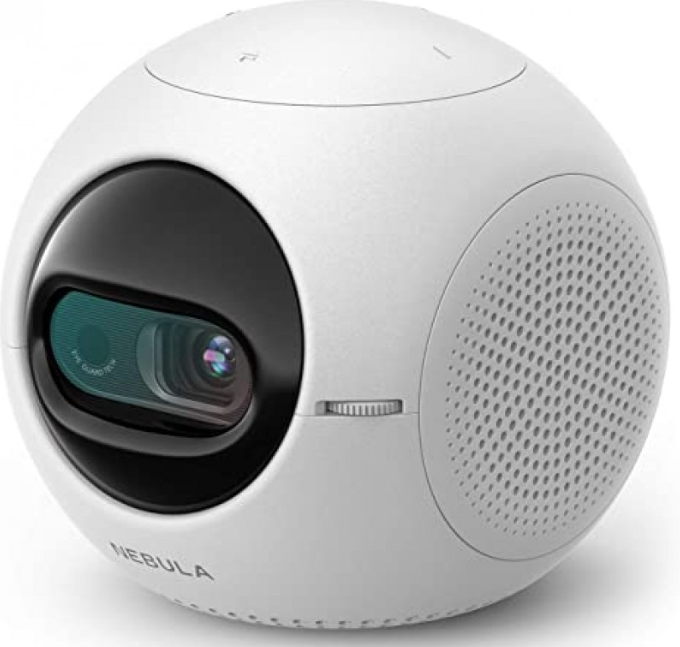
Transform any space into your personal cinema with the Nebula Astro Projector—a compact, smart entertainment hub designed for families, travelers, and tech enthusiasts seeking versatile, on-the-go viewing. The Astro stands out as a pocket-sized powerhouse, blending portability with kid-friendly features and Android-powered flexibility.
Ideal for movie nights at home, backyard gatherings, or travel, the Nebula Astro Projector delivers up to a 100-inch image from a device small enough to fit in your hand. Its unique Eye Guard Tech automatically shuts off the projection if someone gets too close, making it a safe choice for curious children. Parents will appreciate robust parental controls and a customizable interface, ensuring age-appropriate content is always just a tap away.
Powered by Android 7.1, the Astro lets you stream Netflix, Amazon Prime, YouTube Kids, and more—no extra devices required. With a built-in battery offering up to 2.5 hours of movie playback and 14 hours as a Bluetooth speaker, entertainment doesn’t stop when you’re on the move. The projector’s lightweight design (just 376g) and multiple connectivity options—including HDMI and USB-C—make setup effortless, whether you’re projecting onto a wall, ceiling, or portable screen.
Priced as an entry-level smart projector (typically under $300), the Nebula Astro Projector is widely available online and through electronics retailers. It’s perfect for first-time projector buyers, families with kids, and anyone who values convenience without sacrificing smart features. If you’re searching for an affordable, portable projector with built-in safety and streaming apps, the Nebula Astro Projector is a standout choice.
Specifications: Nebula Astro Projector
The Nebula Astro Projector packs impressive specs into its compact frame, balancing performance and portability for everyday use:
- Power supply: DC 5V 2A
- Power consumption: < 10W
- Standby power consumption: < 0.5W
- Display technology: 0.2 in 854 x 480p DLP
- Light source: RGB LED
- Projection image size: 20-100 in
- Resolution: 854 x 480p
- Brightness: 100 ANSI Lumens
- Contrast ratio: 400:1
- Throw ratio: 1.3
- Throw distance: 0.58 m to 3.08 m
- CPU: Quad-core A7
- OS: Android 7.1
- RAM: 1GB DDR
- ROM: 8GB eMMC
- Speaker drivers: 3W
- Wi-Fi: IEEE802.11a/b/g/n Dual Frequency 2.4G / 5G
- Bluetooth version: 4.2
- USB file system: FAT32
- Built-in battery type: Li-Polymer
- Capacity: 3250 mAh 3.63V
- Movie playtime: approximately 2.5 hours in battery mode
- Music playtime: approximately 14 hours in Bluetooth speaker mode. Remote control batteries: AAA x 2
- Recommended ambient temperature: 41°F to 95°F / 5°C to 35°C Relative humidity: 15% ~ 85% (non-condensing)
- Storage temperature and humidity: < 149°F / 65°C, < 90% humidity
- Dimensions (H × L × W): 91.2 x 82 x 89.2 mm / 3.6 x 3.2 x 3.5 in Weight: 370 g / 13.1 oz
Comparison: The Nebula Astro Projector offers a lower resolution than pricier models like the Nebula Capsule 3 Laser (720p/1080p), but it’s more affordable, easier to use, and includes unique child safety features not found in most portable projectors. For those seeking HD or 4K, consider stepping up to Nebula’s Capsule Max or Mars series, but for a budget-friendly, family-safe option, the Astro excels.
What’s Included
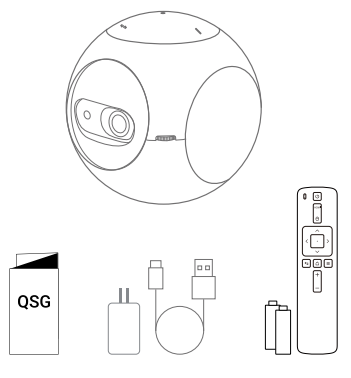
Overview
Front View
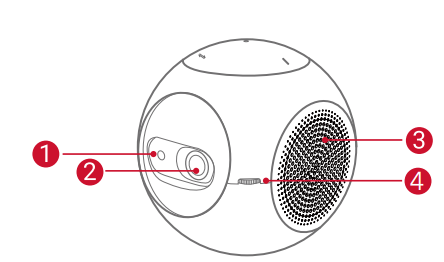
- TOF motion sensor
- The sensor will be triggered when the Eye
- The guard is activated
- Lens
- Ventilation outlet/inlet
- Focus adjusting knob
Rear View
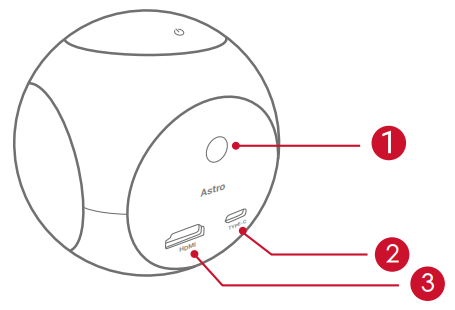
- Infrared receiver
- USB-C port
- Connect to the power supply
- HDMI
- Connect to a playback device via HDMI output
Top View
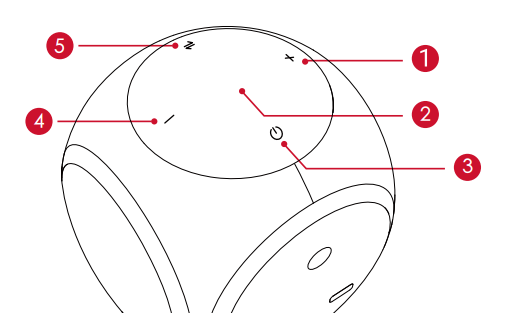
- Volume up
- Press to turn the volume up
- LED indicator
- Power button
- Press and hold for 2 seconds to power on / off
- Volume down
- Press to turn the volume down button
- Press to switch between Bluetooth speaker mode and projector mode
Bottom View
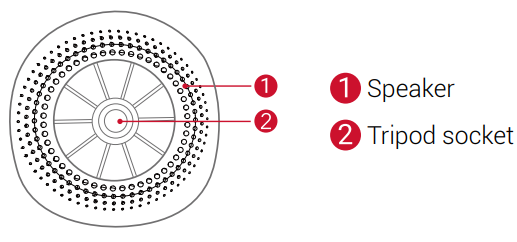
Remote Control
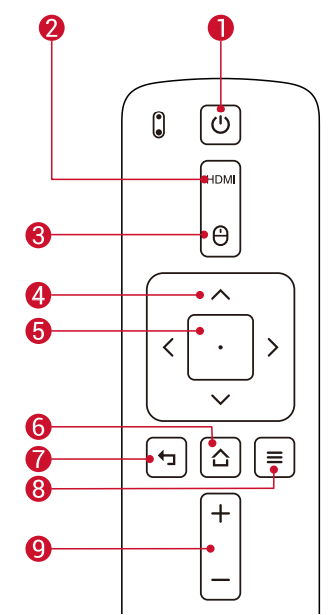
- Power on / off
- Switch to HDMI connection, Mouse mode
- Navigation
- Confirm the selected content Home
- Back
- View more options
- Volume up / down
Getting Started
Placement
Place Nebula Astro on a stable, flat surface in front of the projection surface. For the best results, the projection surface should be white and flat. The distance between Nebula Astro and the projection surface must be a minimum of 0.58 meters (23 inches) and a maximum of 3.08 meters (121 inches) to get a projection image between 20 and 100 inches.
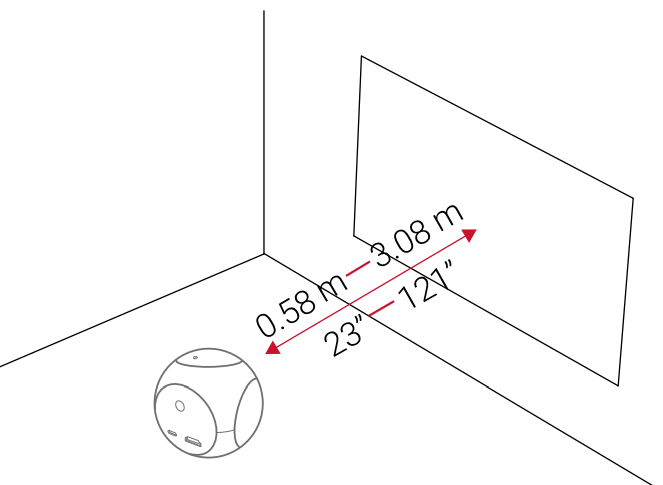
- It is unnecessary to tilt Nebula Astro towards the projection surface. You can correct the projection image with the built-in keystone correction.
- The distance between Nebula Astro and the projection surface determines the projection image size. For the best result, position it between 40 and 80 inches away from the projection surface.
Prepare the Remote Control
The remote control comes with two AAA batteries.
- Slide down to open the battery compartment.
- To replace the batteries, slide to open the battery compartment, insert new batteries (matching the polarity (+/-) indicated), and close the battery compartment.
Get Started
For first-time use, fully charge the built-in battery using the provided cable and adapter.
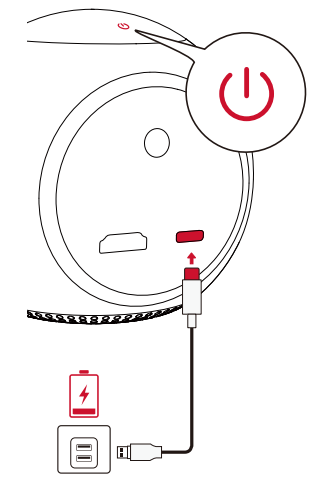
Hold for
 2 seconds on the projector to turn it on.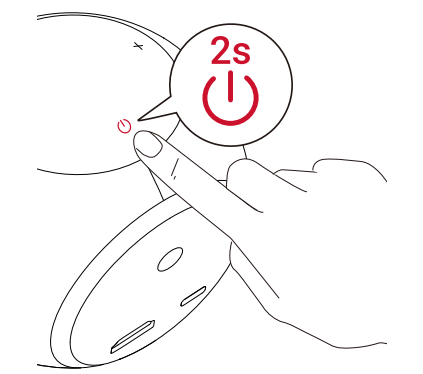
- Turn the device towards a suitable projection surface or wall.
- Rotate the knob to adjust the focus.
- For first-time use, follow the on-screen instructions to complete the basic setup.
Warranty
30-Day Money-Back Guarantee for Any Reason
You may return your undamaged product and packaging within 30 days of purchase to receive a FULL REFUND for any reason. If the reason for the return isn’t quality-related, the customer must pay for the return shipping.
12-Month Warranty for Quality-Related Issues
Nebula’s products are warranted to be free from material and workmanship defects for 12 months from the date of purchase. Within this period, Nebula will provide a replacement and cover any return shipping costs for products that fail in normal use.
Please note: Any provided shipping labels must be used within 20 days from the date they’re issued by Nebula Support.
Troubleshooting: Nebula Astro Projector
- Could not turn on the projector with the remote control?
- Hold
 for 2 seconds on the projector to turn it on.
 - When powered off, you cannot use the remote control to turn it on.
- Hold
- The remote control doesn’t work?
- Make sure the batteries are already installed in the remote control.
- Replace the batteries.
- Blurred image?
- Rotate the focus adjusting knob.
- Cannot connect to a Wi-Fi network?
- Refresh the list of available networks and retry.
- Reboot the wireless router or the projector and retry.
- How do I update the firmware?
- When a new version is detected, you will be asked to reboot and update.
Preventive Measures: Keep the projector clean, avoid exposure to extreme temperatures, and store it in a protective case when traveling. Regularly update the firmware for optimal performance and security.
Warranty & Support: The Nebula Astro Projector typically comes with a limited warranty—check your retailer for details. For further assistance, visit the official Nebula support website or contact customer service via the provided contact form or hotline. Always keep your proof of purchase for warranty claims.
Pros & Cons: Nebula Astro Projector
Pros
- Ultra-Portable: Fits in your pocket, ideal for travel and impromptu movie nights
- Kid-Friendly Safety: Eye Guard Tech protects children’s eyes with automatic shut-off
- Smart Features: Runs Android 7.1 with access to popular streaming apps and parental controls
- Easy Setup: Auto keystone correction and multiple projection modes (front, rear, ceiling)
- Budget-Friendly: One of the most affordable smart projectors with solid features for the price
Cons
- Low Resolution: 854 x 480 (480p) is below HD—fine for casual viewing, but not for cinephiles
- Limited Brightness: 100 lumens is suitable for dim rooms,s but struggles in well-lit environments
- Short Battery Life: 2–2.5 hours per charge may not cover feature-length movies without a power source
- Basic Audio: The built-in speaker is adequate for personal use, but external speakers are recommended for groups
- Entry-Level Performance: Not designed for professional presentations or large audiences
Value for Money: The Nebula Astro Projector delivers impressive portability and smart features at a competitive price, making it a great entry-level option for families and casual users. However, those seeking HD resolution, longer battery life, or brighter images should consider higher-end models like the Nebula Capsule Max or Mars series.
Customer Reviews: Nebula Astro Projector
User feedback for the Nebula Astro Projector highlights its strengths as a portable, family-friendly device. Many parents appreciate the Eye Guard Tech and parental controls, noting that the projector is easy for kids to use safely. The compact size and simple setup are frequently praised, with users enjoying movie nights in bedrooms, backyards, and even during camping trips.
Common complaints focus on the limited battery life (2–2.5 hours) and the projector’s struggle in brightly lit rooms due to its 100-lumen output. Some users wish for higher resolution or a brighter image, but acknowledge the Astro’s value given its price point. The Android interface is generally considered user-friendly, though a few mention occasional app crashes or sluggish performance.
Star ratings typically range from 3.5 to 4 out of 5, with most users recommending the Nebula Astro Projector for families with young children, travelers, and first-time projector buyers. If you prioritize portability, safety, and ease of use over cinematic quality, the Astro is a smart, affordable choice. For those needing HD or longer runtime, investing in a higher-tier Nebula model may be worthwhile.
More nebula manuals
Leave a Comment