
Setup: Nebula Solar Portable Projector User Manual
Content
Nebula Solar Portable Projector
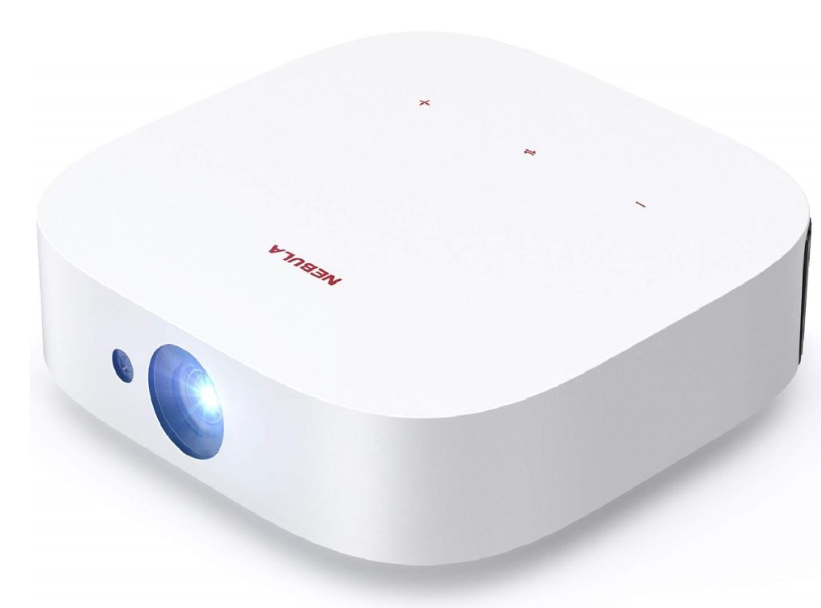
Introduction
The Nebula Solar Portable Projector is a compact, high-performance projector designed for on-the-go entertainment. With its sleek design and powerful features, this projector is perfect for movie nights, gaming, presentations, and outdoor adventures. The Nebula Solar Portable Projector delivers up to 120 inches of vibrant 1080p entertainment, making it ideal for users who want a big-screen experience anywhere. Its built-in battery, Android OS, and streaming apps offer unmatched convenience, while HDR10 support ensures rich colors and deep contrasts. Whether you're a traveler, student, or home entertainment enthusiast, the Nebula Solar Portable Projector is a versatile solution for all your projection needs. The estimated price range is $350–$400, and while it is currently discontinued, it remains available through select retailers and second-hand markets.
Specifications of the Nebula Solar Portable Projector
Nebula Solar:
- Power supply: 19V 3A
- Power consumption: < 57W
- Standby power consumption: < 0.5W Display technology: FHD 1920 × 1080p DLP
- Light source: RGB LED
- Projection image size: 30-120 inches Resolution: 1920 × 1080p
- Brightness: 400 ANSI Lumens Contrast ratio: 1000:1
- Throw ratio: 1.2
- Throw distance: 0.8m to 3.18m
- CPU: Quad-core ARM Cortex-A55
- OS: Android TV 9.0
- RAM: 2GB DDR
- ROM: 8GB eMMC
- Speaker drivers: 3W × 2
- Wi-Fi: IEEE802.11a/b/g/n/ac Dual Frequency 2.4G/5G
- Bluetooth version: V4.2
- USB file system: FAT32 / NTFS / exFAT Recommended ambient: 41°F to 95°F / 5°C to 35°C
- Relative humidity: 15% ~ 85% (non-condensing)
- Storage temperature and humidity: < 149°F / 65°C, < 90% humidity Dimensions (H*D): 192.25 × 192 × 58.65 mm / 7.6 × 7.6 × 2.3 inch
- Weight: 1 kg / 35.2 oz
Nebula Solar Portable:
- Power supply: 20V 3.25A
- Power consumption: < 65W
- Standby power consumption: < 0.5W Display technology: FHD 1920 × 1080p DLP
- Light source: RGB LED
- Projection image size: 30-120 inches Resolution: 1920 × 1080p
- Brightness: 400 ANSI Lumens Contrast ratio: 1000:1
- Throw ratio: 1.2
- Throw distance: 0.8m to 3.18m
- CPU: Quad-core ARM Cortex-A55
- OS: Android TV 9.0
- RAM: 2GB DDR
- ROM: 8GB eMMC
- Speaker drivers: 3W × 2
- Wi-Fi: IEEE802.11a/b/g/n/ac Dual Frequency 2.4G/5G
- Bluetooth version: V4.2
- USB file system: FAT32 / NTFS / exFAT Recommended ambient: 41°F to 95°F / 5°C to 35°C
- Relative humidity: 15% ~ 85% (non-condensing)
- Storage temperature and humidity: < 149°F / 65°C, < 90% humidity Dimensions (H*D): 192.25 × 192 × 58.65 mm / 7.6 × 7.6 × 2.3 inch
- Weight: 1.4 kg / 49.4 oz
Compared to similar models like the Wemax Dice, the Nebula Solar Portable Projector offers slightly lower brightness (400 ANSI lumens vs. 700 ANSI lumens) and less internal storage (8 GB vs. 16 GB), but it remains a strong contender for portability and ease of use.
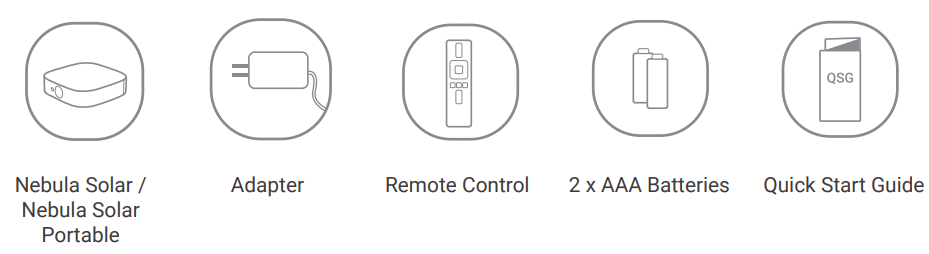
What’s Included
Overview
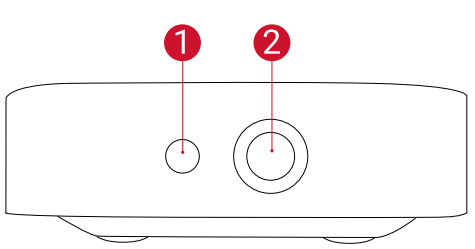
Front View
- Camera for Autofocus
- Lens
Rear View
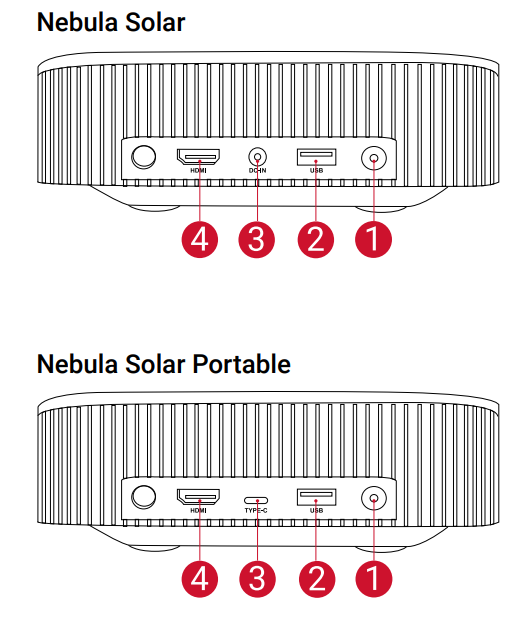
- Power Button
- Press to power on
- Press and hold to power off
- USB-A Port
- Connect to a USB flash drive
- DC Input (Nebula Solar)
- USB-C Charging Port (Nebula Solar Portable)
- HDMI Input Port
- Connect to a playback device
Bottom View
- Solar / Solar Portable nameplate
- Open to use it as a stand
- Tripod socket
- Speaker
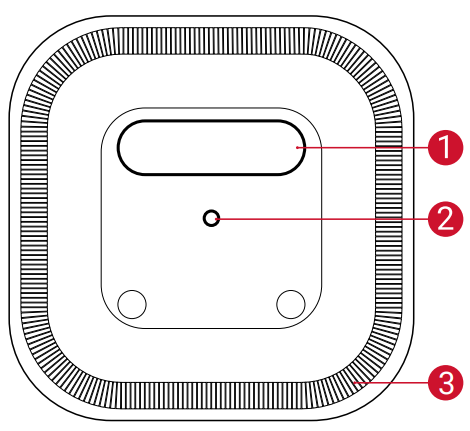
Bottom View
- Adjust Focus
- Navigation
- Back
- Power On / Off
- Press to activate Google Assistant
- Confirm the selected content
- Home
- System Settings
- Volume up / down
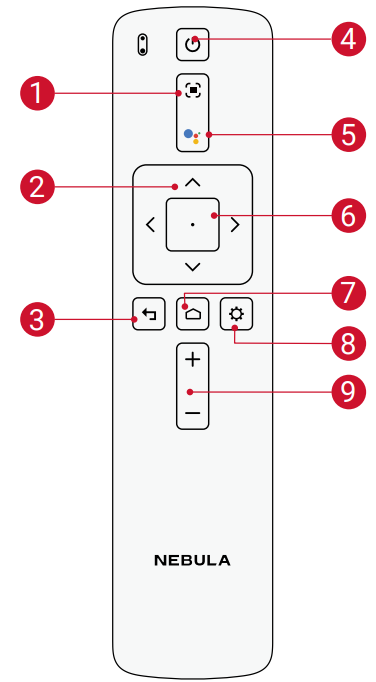
Getting Started
Placement
Place this device on a stable, flat surface, and squarely point it to face the projection surface. For best results, the projection surface should be white and flat. The distance between this device and the projection surface must be a minimum of 30 inches (0.8 meters) and a maximum of 120 inches (3.18 meters) to get a projection image from 30 to 120 inches.
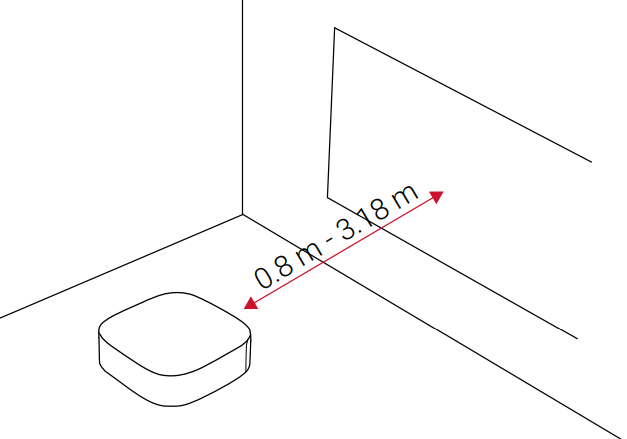
- It is unnecessary to tilt it towards the projection surface. You can correct the projection image with the built-in keystone correction.
- The distance between the device and the projection surface determines the projection image size. For the best result, set the projector between 63 and 104 inches away.
- You can also mount your projector on the ceiling.
There is a nameplate on the back panel of the Nebula Solar / Nebula Solar Portable. Open the nameplate to use it as a stand. After use, close the nameplate.
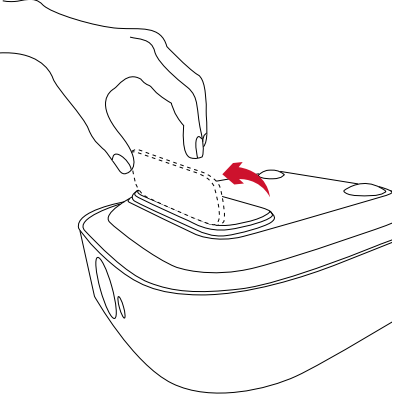
Prepare the Remote Control
The remote control comes with two AAA batteries.
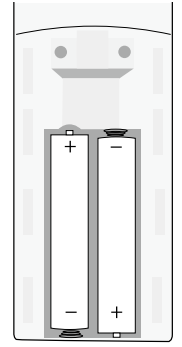
For first-time use, slide to open the battery compartment and install two AAA batteries.
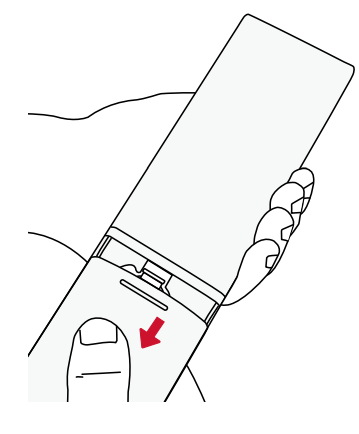
To replace the battery, unlock and open the battery compartment, insert a new battery matching the polarity (+/-) as indicated, and then close and lock the battery compartment.
Get Started
Connect the Nebula Solar / Nebula Solar Portable to the power outlet by using the provided power adapter.
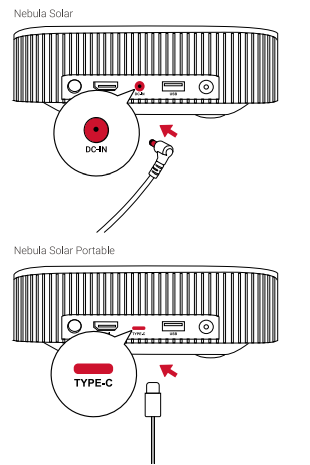
Nebula Solar: Press
 to turn it on.
Nebula Solar Portable: Pressand hold for 2s to turn it on.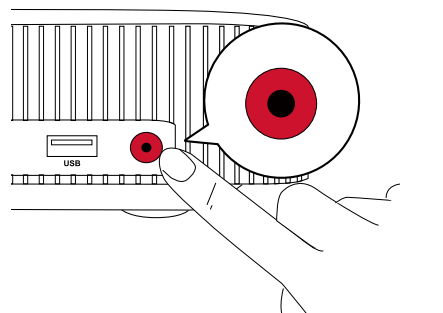
Angle the projector towards a suitable projection surface or wall. The built-in autofocus automatically adjusts the protector's image focus. Or you can press
 on the remote control to manually adjust the focus.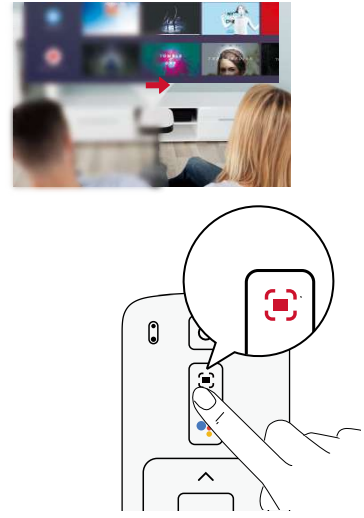
- When using for the first time, follow the on-screen instructions to complete the basic setup.
Troubleshooting the Nebula Solar Portable Projector
- Fail to turn on the projector with the remote control?
- Press on the projector to turn it on.
- Press
- The remote control doesn’t work?
- Make sure the battery is already installed in the remote control.
- Replace the batteries.
- Blurred image?
- Move the projector slightly.
- Press on the remote control. The projector will adjust the focus automatically.
- When the focus-adjusting icon shows on your projector, use the navigation button to manually adjust the focus.
- Cannot connect to a Wi-Fi network?
- Refresh the list of available networks and retry.
- Reboot the wireless router or the device and retry.
- How do I update the firmware?
- When a new version is detected, you will be asked to reboot and update.
Warranty
30-Day Money-Back Guarantee for Any Reason
You may return your undamaged product and packaging within 30 days of purchase to receive a FULL REFUND for any reason. If the reason for return isn’t quality-related, the customer must pay for the return shipping..
12-Month Warranty for Quality-Related Issues
Nebula’s products are warranted to be free from material and workmanship defects for 12 months from the date of purchase. Within this period, Nebula will provide a replacement and cover any return shipping costs for products that fail in normal use.
Please Note: Any provided shipping labels must be used within 20 days from the date they’re issued by Nebula Support.
Pros & Cons of the Nebula Solar Portable Projector
Pros
- Compact and lightweight design for easy portability
- Full HD 1080p resolution with HDR10 support
- Built-in battery for up to 3 hours of use
- Android OS with streaming apps and Google Assistant
- Auto focus and digital keystone for easy setup
Cons
- Lower brightness compared to some competitors
- Limited internal storage (8 GB)
- Discontinued, so availability may be limited
- Not suitable for very bright environments
The Nebula Solar Portable Projector offers excellent value for money, especially for users prioritizing portability and ease of use over maximum brightness and storage.
Customer Reviews of the Nebula Solar Portable Projector
Users consistently praise the Nebula Solar Portable Projector for its portability, ease of setup, and vibrant image quality. Many highlight the convenience of the built-in battery and Android OS, making it perfect for travel and outdoor use. Common complaints include the limited brightness in well-lit rooms and the relatively small internal storage. The average star rating is 4.2 out of 5, with users recommending it for casual entertainment and mobile presentations. Frequent mentions include the projector's reliability and the quality of the built-in speakers.
Faqs
How do I set up the nebula Solar Portable Projector for the first time?
Why is my nebula Solar Portable Projector not focusing properly?
Can I use the nebula Solar Portable Projector as a Bluetooth speaker?
Is the nebula Solar Portable Projector compatible with Netflix and other streaming apps?
How do I optimize image quality on the nebula Solar Portable Projector?
What should I do if the nebula Solar Portable Projector battery drains quickly?
How do I connect external devices to the nebula Solar Portable Projector?
How do I maintain and clean the nebula Solar Portable Projector?
More nebula manuals
Leave a Comment