
Setup: Nebula Mars Projector User Manual
Content
Nebula Mars Projector
Introduction
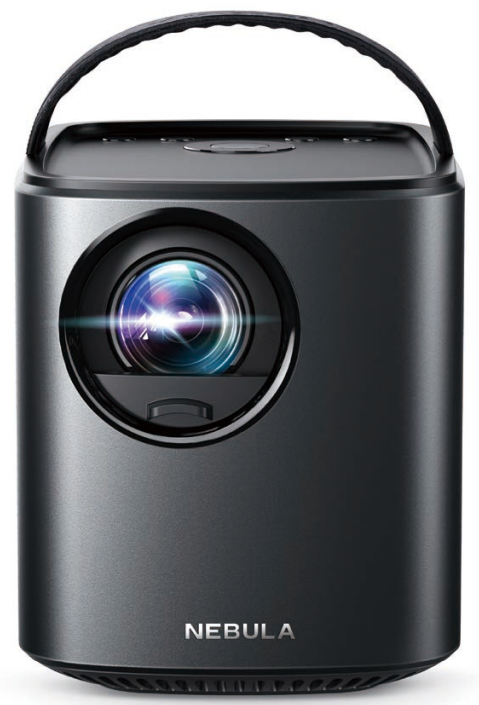
The Nebula Mars Projector by Anker redefines portable entertainment by delivering a powerful home theater experience wherever you go. Designed for outdoor enthusiasts, travelers, and casual movie lovers, this compact yet robust projector combines impressive brightness, long-lasting battery life, and smart features in a sleek, durable form. Its standout benefits include a crisp 1080p resolution, 1000 ANSI lumens brightness, and up to 5 hours of continuous playback on a single charge, making it ideal for backyard movie nights, camping trips, or impromptu presentations.
Equipped with Android TV 11, the Mars Projector offers seamless access to popular streaming apps and content, eliminating the need for external devices. Its water and dust resistance enhance usability in outdoor environments, while built-in premium speakers deliver immersive sound quality. The unit also doubles as a power bank, allowing users to charge smartphones and other devices on the go.
Typically priced around $1,100, the Nebula Mars Projector balances portability and performance, appealing to tech-savvy users seeking a versatile, all-in-one projector solution. Available through major electronics retailers and online stores, it caters to those who value convenience and quality in mobile projection technology.
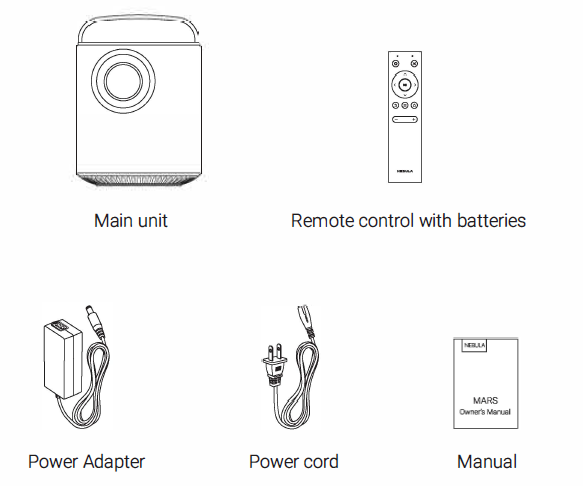
What's Included
Specifications and Key Features of the Nebula Mars Projector
- Power supply: DC 19V
- Power consumption: < 57W
- Standby power consumption:< 0.5W
- Display technology: 0.45-inch 1280 800p OLP
- Light source: RGB LED
- Projection image size: 19.7-118 inches
- Resolution: 1280 x 800 Pixel
- Brightness: 500 ANSI Lumens
- Contrast ratio: 1000:1
- Throw ratio: 1.2
- Throw distance: 0.5m to 3m
- Speaker drivers: 1 OW x 2
- Wi-Fi: IEEE802.11 b/g/n (2.4G/5G)
- Bluetooth version: V4.0
- Built-in battery type: Li-Polymer
- Capacity: 19500 mAh 3.8V
- Operating time: 3 hours
- Remote control batteries: CR2032 x 2
- Recommended ambient: 5° C to 35°C / 41 °F to 95 °F
- Relative humidity: 15% ~ 85% (non-condensing)
- Storage temperature and humidity: < 65°C / 149° F, < 90% humidity
- Dimensions (W H D): 122 138 178 mm/ 4.8 5.4 7 in
- Weight: 1,890 g / 66.7 oz
Compared to similar portable projectors like the Anker Nebula Mars (original model with 500 lumens and 1280x800 resolution), the Mars 3 offers substantial improvements in brightness, resolution, and battery capacity, positioning it as a leading option in the premium portable projector segment.
Overview
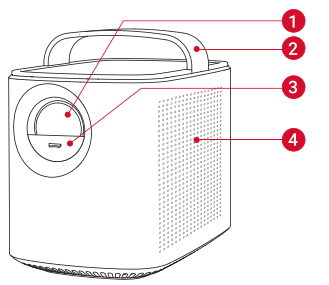
Front View
- Lens
- Handle
- Lens cover
Slide down/ up to power on/ off - Loudspeaker
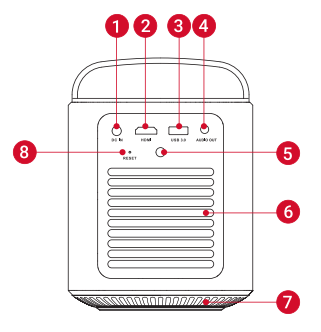
Rear View
- DC IN
Connect to the power supply - HDMI
Connect to a playback device with HDMI output - USB 3.0
Connect to a USB storage device
Charge a USB device as a power bank - AUDIO OUT
Connect to a headphone or an external speaker - Infrared Receiver
- Air ventilation (outlet)
- Air ventilation (inlet)
- RESET
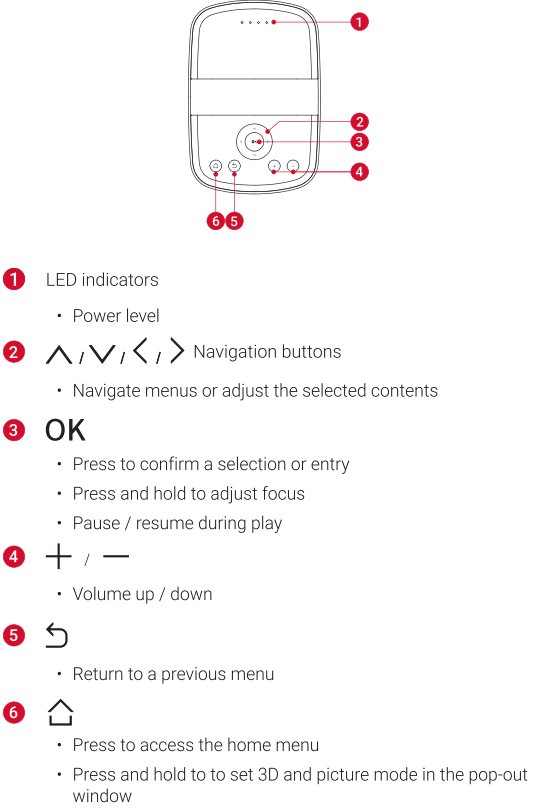
Top View
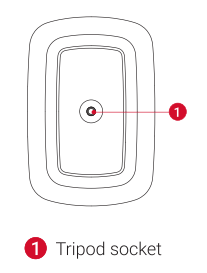
Bottom View
Enjoy
Connect to HDMI Playback Devices
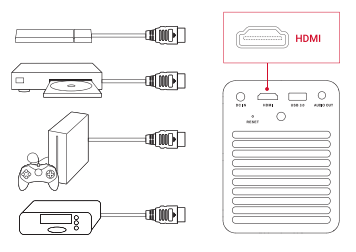
This device supports connections with various HDMI playback devices such as TV sticks, DVD players, set-top boxes (STB)a , game machines, or other devices.
- Connect this device to an HDMI playback device with an HDMI cable (not provided).
- Press
 to access the home menu, select [HDMI] and press OK.
Connect to USB Storage Device
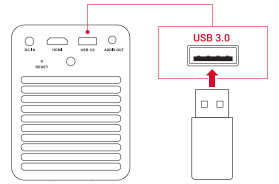
With this device, you can enjoy music, video, and pictures that are stored on a USB storage device.
- Plug the USB storage device to the USB 3.0 socket of the device.
- Select a file, then press OK
- To stop play, press
Connect Headphones
- Before connecting headphones, turn down the volume on this device.
- Connect the headphones (not provided) into the AUDIO OUT connector of the device to enjoy music through the headphones.
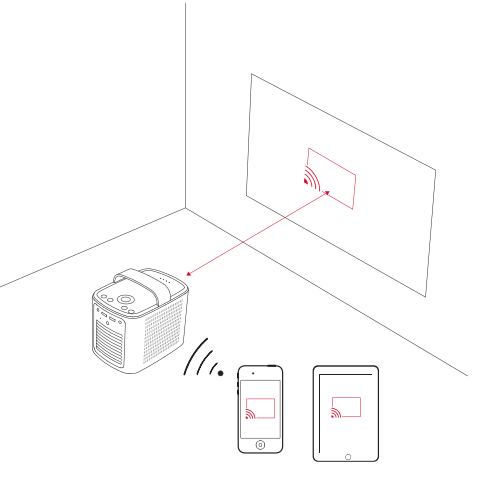
Screen Mirroring
You can mirror the screen of your smartphone or tablet onto the projection surface wirelessly.
- Make sure that both your smartphone or tablet and this device are connected to the same wireless (Wi-Fi) network.
- Activate screen mirroring on your smartphone or tablet and select this device to connect.
- Once connected, your mobile device's screen will be displayed on the projection surface.
Apps
Once connected to a wireless network, you can access online services, enjoy movies, music, and pictures, and browse the internet. Apart from the apps installed, you can also install any other apps.
- Press to access the home menu.
- Select an Internet service, and press OK.
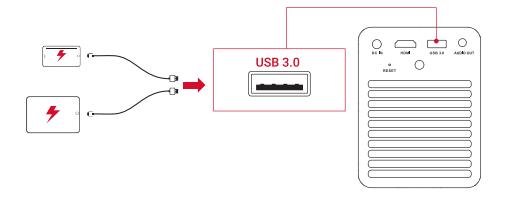
Charge Your Devices
This device can also be used as a power bank to charge your USB devices.
Troubleshooting Common Issues with the Nebula Mars Projector
Fail to power on with the remote control?
- Make sure that the device is connected to the power supply.
- Slide down the lens cover.
Fail to power on by sliding down the lens cover?
- Make sure that the device is connected to the power supply.
- Slide up the lens cover and wait for 10 seconds, then try again.
The remote control doesn't work?
- Remove the protective tab to activate the remote control batteries.
Blurred image?
- Press
 on the remote control (or press and hold 0K on the device) and then </> to focus the image.
No 3D effect?
- Wear a pair of DLP 3D glasses. Press and hold and select [3D Setting] > [Autol in the pop-out window.
Reversed projection image?
- Press to access the home menu, select [Project model and switch to a correct state.
Cannot connect to a Wi-Fi network?
- Refresh the list of available networks and retry.
- Reboot the wireless router or the device and retry.
Cannot pair with a smartphone via Bluetooth?
- This device cannot be used as a speaker. It can only pair with an external Bluetooth speaker or headphone.
Warranty
30-Day Money-Back Guarantee for Any Reason
You may return your undamaged product and packaging within 30 days of purchase to receive a FULL REFUND for any reason. If the reason for the return isn't quality-related, the customer must pay for the return shipping.
12-Month Warranty for Quality-Related Issues
Nebula's products are warranted to be free from material and workmanship defects for 12 months from the date of purchase. Within this period, Nebula will provide a replacement and cover any return shipping costs for products that fail in normal use.
Please Note: Any provided shipping labels must be used within 20 days from the date they're issued by Nebula Support.
Pros & Cons of the Nebula Mars Projector
Pros
- High-Quality 1080p Resolution: Provides sharp and vibrant images superior to many portable competitors.
- Long Battery Life: Up to 5 hours of playback allows for extended outdoor use without power.
- Durable and Portable: Water and dust resistance , plus a compact design, make it travel-friendly.
- All-in-One Smart System: Android TV 11 integration removes the need for additional devices.
- Power Bank Functionality: Charges smartphones and other devices in emergencies.
Cons
- Price Point: At around $1,100, it is more expensive than basic portable projectors.
- Interface Lag: Some users report slight sluggishness in the Android TV interface.
- No 4K Support: Limited to 1080p resolution, which may not satisfy users seeking ultra-high definition.
- Remote Control: Buttons are not backlit, which can be inconvenient in dark settings.
Compared with alternatives like entry-level portable projectors, the Nebula Mars offers superior brightness and battery life, but at a premium price, which balances value for money based on user needs.
Customer Reviews and Feedback on the Nebula Mars Projector
Users consistently praise the Nebula Mars Projector for its bright picture quality and robust sound system. Many highlight the ease of use and the convenience of Android TV integration. Outdoor enthusiasts appreciate its durability features and the long battery life for camping or backyard movie nights. Star ratings average around 4.5 out of 5, reflecting strong satisfaction.
Common complaints focus on occasional interface lag and the lack of a backlit remote control. Some users wish for 4K resolution support, but most agree that the 1080p output meets their expectations for a portable device. Purchase recommendations frequently emphasize its suitability for those valuing portability without sacrificing image quality or battery performance.
Faqs
How do I set up the nebula Mars Projector for the first time?
What should I do if my nebula Mars Projector is not connecting to Wi-Fi?
Can I use the nebula Mars Projector outdoors, and what features support outdoor use?
What devices and platforms are compatible with the nebula Mars Projector?
How can I optimize the picture quality on my nebula Mars Projector for different lighting conditions?
What maintenance is required to keep the nebula Mars Projector working efficiently?
Why is my nebula Mars Projector remote not responding, and how can I fix it?
How long does the nebula Mars Projector battery last, and can it charge other devices?
More nebula manuals
Leave a Comment