
Setup: Nebula Mars II Pro Projector User Manual
Content
Nebula Mars II Pro Projector
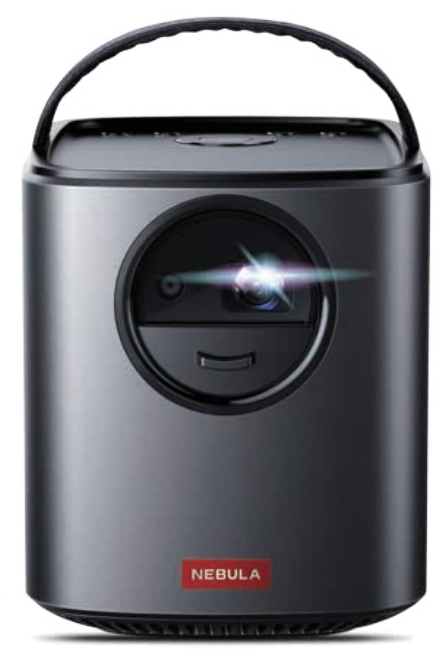
Introduction
The Nebula Mars II Pro Projector is a compact, portable smart projector designed for users who want a cinematic experience anywhere, anytime. With its 500 ANSI lumens brightness, 1280x720 HD resolution, and built-in Android 7.1 operating system, this projector delivers vibrant, sharp images and immersive sound, making it perfect for movie nights, outdoor gatherings, presentations, and travel. Its standout features include autofocus, horizontal and vertical keystone correction, dual 10W speakers, and a long-lasting battery, ensuring hassle-free setup and entertainment on the go.
Targeted at home users, travelers, and professionals, the Nebula Mars II Pro Projector is ideal for those seeking a versatile, all-in-one solution without the need for a laptop or external speakers. Whether you're watching Netflix, YouTube, or giving a presentation, this projector handles it all. The device is available for purchase online and in select electronics stores, with prices typically ranging from $500 to $600, depending on region and retailer. With a 30-day money-back guarantee and a 1-year warranty, buyers can enjoy peace of mind with their investment.
Specifications of the Nebula Mars II Pro Projector
- Power supply: DC 19V 3A
- Power consumption: < 57W
- Standby power consumption: < 0.5W
- Display technology: 0.3-inch 1280 × 720p DLP
- Light source: RGB LED
- Projection image size: 30 - 150 inches
- Resolution: 1280 × 720 pixels
- Brightness: 500 ANSI Lumens
- Contrast ratio: 1000:1
- Projection ratio: 1.2
- Speaker drivers: 10 w × 2
- Bluetooth: V4.2
- Built-in battery type: Li-Polymer
- Capacity: 3350 mAh 14.52V
- Video play duration: 3 hours
- Music play duration: 30 hours
- Remote control batteries: CR2032 × 2
- Operating temperature: 0°C to 35°C / 32°F to 95 °F
- Operating humidity: 15% ~ 85% (non-condensing)
- Storage temperature and humidity: < 65°C / 149°F, < 90% humidity Dimension (W × H × D): 122 × 138 × 178 mm / 4.8 × 5.4 × 7 in Weight: 1,483 g / 52.3 oz
Compared to similar portable projectors, the Nebula Mars II Pro offers superior brightness, battery life, and audio quality, making it a top choice for those prioritizing performance and convenience.
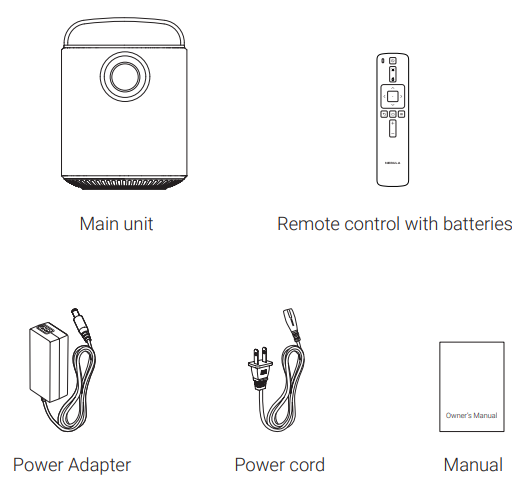
What’s Included
Overview
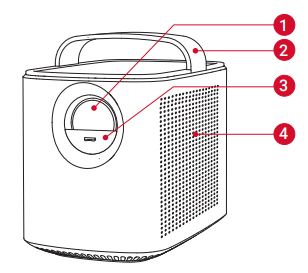
Front View
- Lens
- Handle
- Lens cover
Slide down to power on and automatically adjust focus
Slide up to power off - Loudspeaker
Rear View
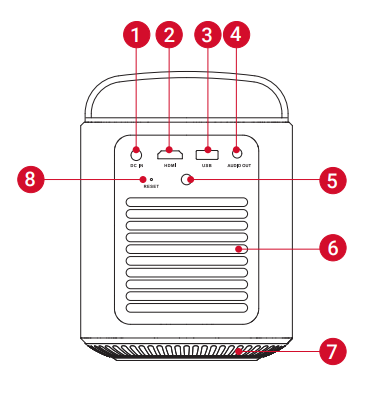
- DC IN
- Connect to the power supply
- HDMI
- Connect to a playback device with HDMI output
- USB
- Connect to a USB storage device
- Charge a USB device as a power bank
- AUDIO OUT
- Connect to a headphone or an external speaker
- Infrared Receiver
- Air ventilation (outlet)
- Air ventilation (inlet)
- RESET
- Press and hold for 3 seconds to reset
Top View
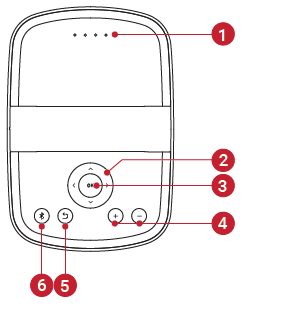
- LED indicators
- Power level
 Navigation buttons
- Navigate menus or adjust the selected contents
- OK
- Press to confirm a selection or entry
- Pause/resume play
- +/-
- Volume up / down

- Return to the previous menu

- Press to enter/exit Bluetooth mode
- In standby mode, press to wake up the projector
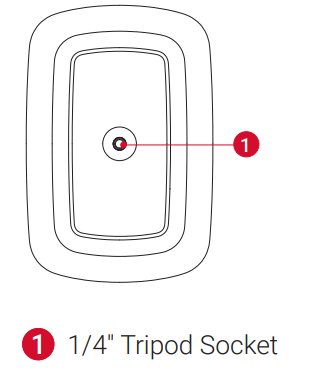
Bottom View
Remote Control
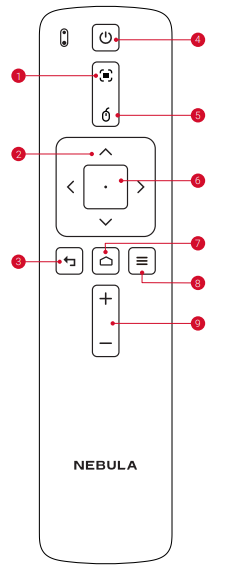
- Adjust Focus
- Navigation
- Back
- Power On / Off
- Mouse mode
- Confirm the selected content Home
- System Settings
- Volume Up / Down
Getting Started
Placement
Place Mars II Pro on a stable, flat foundation in front of the projection surface. For the best results, the projection surface should be white and flat. The distance between the projector and the projection surface must be a minimum of 1 meter (39.4 inches) and a maximum of 3 meters (118 inches).
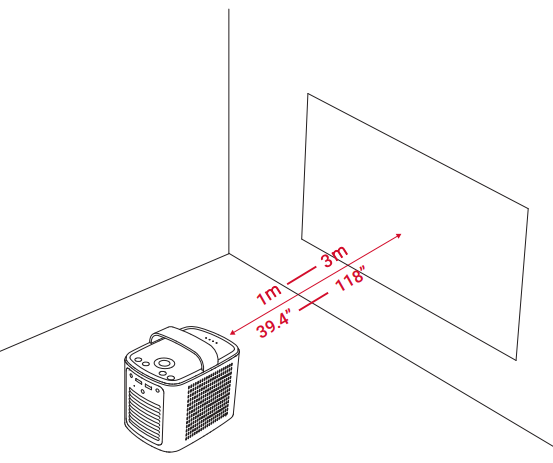
- It is unnecessary to tilt the projector towards the projection surface. You can correct the projection image with the built-in keystone correction.
- The distance between the projector and the projection surface determines the image size.
Prepare the Remote Control
- For first-time use, remove the plastic battery insulation tab to activate the remote control batteries.
- To replace the battery, slide off the battery compartment backplate to open the battery compartment, insert new batteries (matching the polarity (+/-) indicated), and close the battery compartment.
Get Started
- Fully charge the built-in battery before using it for the first time.
Connect the projector to the outlet by using the provided power adapter and power cord. The built-in battery will be charged, and the LED indicators will light on.
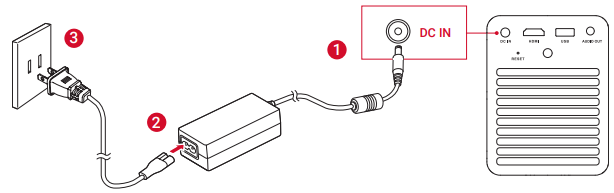
- Slide down the lens cover, and the projector will automatically turn on. When the projector is in standby mode, you can also press he remote control to turn it on.
- Angle the projector towards a suitable projection surface or wall.
- To focus the image, slightly move the projector to engage auto-focus or press and hold the button on the remote control to manually adjust.
For first-time use, follow the on-screen instructions to complete the basic setup.
Troubleshooting
- Fail to power on with the remote control?
- Make sure that the device is connected to the power supply.
- Slide down the lens cover.
- Fail to power on by sliding down the lens cover?
- Make sure that the device is connected to the power supply.
- Slide up the lens cover and wait for 10 seconds, then try again.
- The remote control doesn’t work?
- Remove the battery insulation tab to activate the remote control batteries.
- Replace new batteries.
- Blurred image?
- You can either slightly move the projector or press the navigation buttons to focus on the image.
- Reversed projection image?
- On the home menu, select [Settings] > [Projector mode] and switch to the correct state.
Warranty
30-Day Money-Back Guarantee for Any Reason
You may return your undamaged product and packaging within 30 days of purchase to receive a FULL REFUND for any reason. If the reason for the return isn’t quality-related, the customer must pay for the return shipping.
12-Month Warranty for Quality-Related Issues
Nebula’s products are warranted to be free from material and workmanship defects for 12 months from the date of purchase. Within this period, Nebula will provide a replacement and cover any return shipping costs for products that fail in normal use.
Please Note: Any provided shipping labels must be used within 20 days from the date they’re issued by Nebula Support.
Anker Innovations Limited
Room 1318-19, Hollywood Plaza, 610 Nathan Road, Mongkok, Kowloon, Hong Kong
Pros & Cons of the Nebula Mars II Pro Projector
Pros
- Compact and portable design
- Bright, vivid images even in low ambient light
- Excellent built-in speakers for immersive sound
- Long battery life and fast charging
- Easy setup with autofocus and keystone correction
- Runs Android apps for versatile entertainment
Cons
- Pricier than many 720p projectors
- 720p resolution may not satisfy those seeking 1080p
- No zoom function; placement is critical
- Remote can be finicky
- Some apps require mouse function for navigation
The Nebula Mars II Pro Projector offers excellent value for those who prioritize portability, battery life, and audio quality over ultra-high resolution.
Customer Reviews of the Nebula Mars II Pro Projector
Users consistently praise the Nebula Mars II Pro Projector for its bright, vivid images, excellent sound, and ease of use. Many highlight its portability and battery life, calling it perfect for travel and outdoor movie nights. The autofocus and keystone features are frequently mentioned as game-changers for quick setup. Some users note that the 720p resolution is sufficient for most viewing scenarios, though a few wish for 1080p. The remote and app compatibility receive mixed feedback, with some finding navigation tricky. Overall, the projector earns high ratings (4.5/5 stars) and is recommended for those seeking a reliable, all-in-one portable projector.
Faqs
How do I set up the nebula Mars II Pro Projector for the first time?
What should I do if the nebula Mars II Pro Projector's image is blurry or out of focus?
Can I use the nebula Mars II Pro Projector to mirror content from my smartphone?
What devices and formats are compatible with the nebula Mars II Pro Projector?
How bright is the nebula Mars II Pro Projector and where is it best used?
How long does the battery last on the nebula Mars II Pro Projector, and how do I charge it?
What maintenance is required to keep the nebula Mars II Pro Projector working optimally?
How can I improve sound quality when using the nebula Mars II Pro Projector outdoors?
More nebula manuals
Leave a Comment