
Setup: Nebula Mars 3 Air Projector User Manual
Content
Nebula Mars 3 Air Projector
Introduction
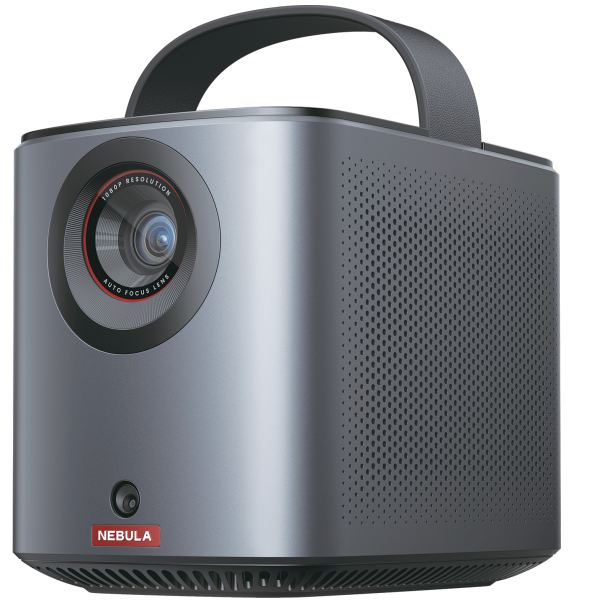
The Nebula Mars 3 Air Projector by Anker is a compact, portable projector designed to deliver a cinematic experience anywhere you go. Released in early 2024, it combines high-definition 1080p resolution with impressive 400 ANSI lumen brightness, making it ideal for indoor and outdoor movie nights, gaming sessions, or business presentations. Its lightweight and sleek design appeals to tech enthusiasts, travelers, and casual viewers seeking a versatile entertainment device.
One of its standout features is the built-in battery that supports up to 2.5 hours of continuous playback, allowing users to enjoy media without ta he need for constant power supply. The projector offers a large screen display capability of up to 150 inches, enhanced by autofocus and auto keystone correction for effortless setup. Additionally, it runs on Google TV, providing access to thousands of streaming apps, including Netflix and YouTube, directly from the device.
Priced between $420 and $600, depending on retailer and promotions, the Nebula Mars 3 Air balances performance and portability, targeting users who want a hassle-free projector for home entertainment, travel, or outdoor use. It is widely available through online marketplaces and major electronics stores, making it an accessible choice for a broad audience.
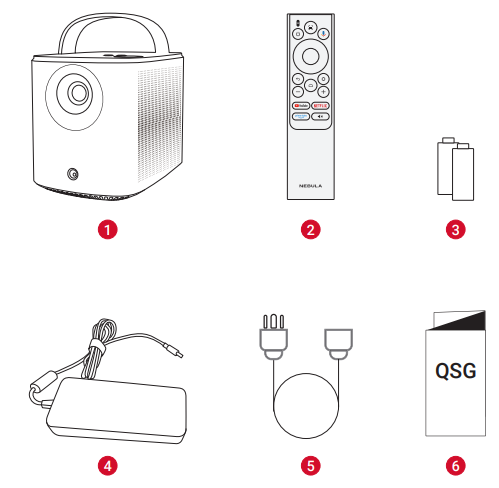
What's Included
- Nebula Mars 3 Air
- Remote Control
- AAA Battery × 2
- Power Adapter
- Power Cord
Note: The plug type varies by region. - Quick Start Guide
Specification of the Nebula Mars 3 Air Projector
- Resolution: Full HD 1920x1080p
- Brightness: 400 ANSI Lumens
- Display Technology: Single-chip DLP LED
- Contrast Ratio: 400:1
- Throw Distance: 2.6 to 13.1 feet (screen sizes 30" to 150")
- Aspect Ratio: 16:9 (HD)
- Battery Life: Up to 2.5 hours of video playback
- Audio: Dual 8W Dolby Audio speakers
- Connectivity: HDMI, USB, Wi-Fi, Bluetooth, audio out (3.5mm jack)
- Dimensions: 5.2" x 4.8" x 7.0"
- Weight: Approximately 3.7 pounds
- Features: Auto Focus, Auto Keystone Correction (horizontal & vertical), Geometric Correction, HDR support, Google TV with built-in apps including Netflix
- Noise Level: 28 dB during operation
Compared to similar portable projectors like the Epson EpiqVision Mini EF21 or the Anker Mars 3 standard model, the Mars 3 Air offers a competitive blend of portability with respectable brightness and sharpness, though it is best used in dim or controlled lighting conditions for optimal image quality.
Important Safety Instructions
Read all instructions before you use this product. Do not make any changes or create settings that are not described in this user guide. If physical injury, loss of data, or damage is caused by failure to follow instructions, the warranty does not apply.
Setup
- Do not use the product in any way other than described herein to avoid personal injury or property damage.
- Do not place this product on soft surfaces such as tablecloths or carpets; otherwise, the product could be a fire hazard.
- Do not place this product in areas susceptible to excessive dust and dirt or near any appliance generating a strong magnetic field.
- To prevent overheating, do not block or clog the ventilation openings.
- Never place this product in a confined space. Always leave enough space around this product for ventilation.
- Do not use the product in an environment where the temperature is too high or too low. Never expose the product to strong sunshine or wet environments.
- When this product is running for a long period of time, the surface may become hot. If this occurs, shut it down immediately and unplug the adapter. Resume operation after the product has cooled down.
- Always handle this product with care. Avoid touching the lens.
- Do not allow children to handle the product without supervision.
- Do not place heavy or sharp objects on this product.
- To avoid electric shock, do not disassemble the product.
- Avoid extreme vibrations as they may damage the internal components.
- Please ensure you use only the adapter offered by the manufacturer. Using an unauthorized adapter may be dangerous and violate the Terms of Use and product warranty.
- Users should comply with the laws and regulations of the corresponding countries and regions where the equipment is located (used), abide by professional ethics, pay attention to safety obligations, and strictly prohibit the use of our products or equipment for any illegal purposes. Our company will not be responsible for any violator's legal liability under any circumstances.
- Possibly hazardous optical radiation emitted from this product may be harmful to the eyes. Do not stare at the operating beam.
Hearing Safety
- To prevent hearing damage, do not listen for extended periods at high volume. Set the volume to a safe level.
Charging
- The adapter is for indoor use only.
- For pluggable equipment, the socket outlet shall be easily accessible.
- Due to the enclosure material, the product must only be connected to a USB 2.0 or higher.
- It is recommended to charge the product in an environment with a temperature that ranges from 5℃ ~25℃ / 41°F~77°F.
- When supplying power, place the device in an environment with a normal room temperature and good ventilation.
Battery
- The remote control contains batteries, which are a choking hazard. Keep the remote control out of the reach of children.
- Remove the batteries when the remote control has not been used for a long period of time.
- Replace the remote control batteries only with the same or an equivalent type.
- Batteries contain chemical substances, and they should be disposed of properly.
- Charge this device regularly. Do not store this device with a completely discharged battery.
Warning
- Replacing a battery with an incorrect type may defeat safeguards and create danger.
- Disposal of the battery/device in a fire or a hot oven, or other source of significant heat, or mechanically crushing, or cutting of the battery/device, may result in an explosion;
- Leaving the battery/device in an extremely hot environment may result in an explosion or leakage of flammable liquids or gases.
- The battery/device subjected to extremely low air pressure may result in an explosion or leakage of flammable liquids or gases.
Cleaning
- Use a soft, lint-free cloth. Never use liquid, gaseous, or easily flammable cleansers to clean.
- Do not use any liquid cleaning agents to clean the lens to avoid damaging the film coating on the lens.
- Wipe surfaces gently. Be careful that you do not scratch the surface.
- Use lens cleaning paper to clean the lens.
Repairs
- Do not make any repairs to this product yourself.
- Improper maintenance can result in injuries or product damage.
- Refer all servicing to qualified service personnel.
At a Glance
Projector
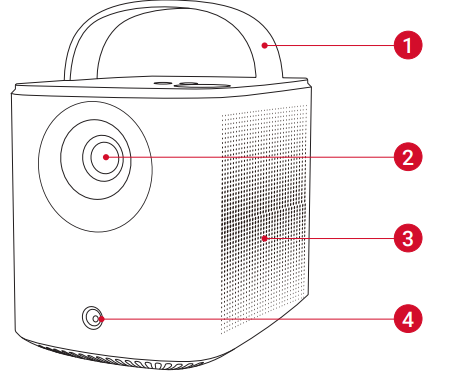
Front View
- Handle
- Lens
- Speaker
- Sensor (for autofocus and auto keystone correction)
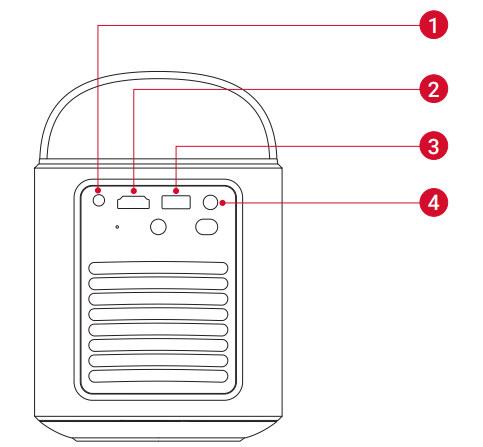
Rear View
- AUX-OUT port
Connect to an external sound output device - HDMI port
Connect to a playback device via HDMI output - USB-A port
Connect to a USB drive - DC-IN port
Connect to the power supply
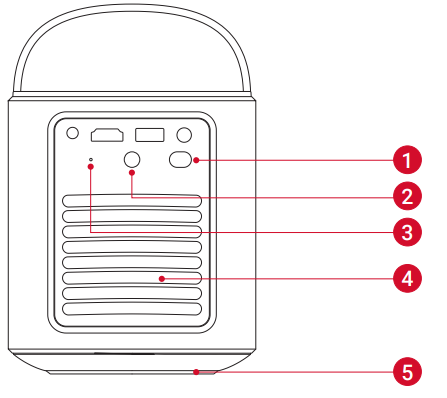
- Power button
Press for 3 seconds to turn on the projector or access the power-off menu - Infrared receiver
- Reset button
Press to reset your projector - Air ventilation (outlet)
- Air ventilation (inlet)
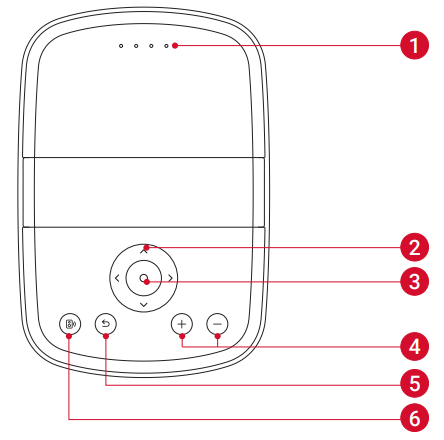
Top View
- Battery status LED
- Navigation button
- Confirmation button
- Volume up / down buttons
- Return button
- Bluetooth speaker button
Press to enter or exit Bluetooth speaker mode
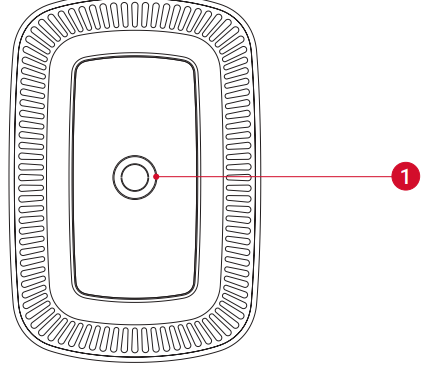
Bottom View
- Tripod socket
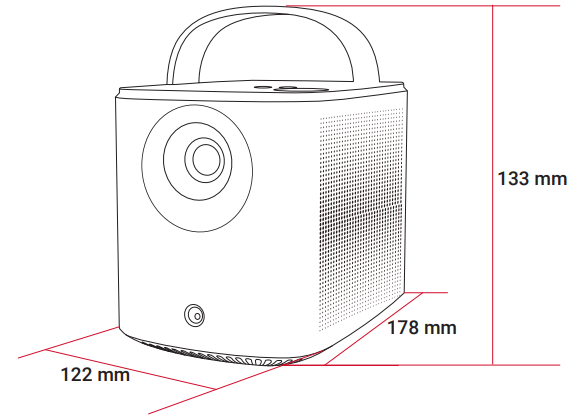
Dimensions
178 (L) × 122 (W) × 133 (H) mm / 7 (L) × 4.8 (W) × 5.2 (H) in
Remote Control
- Power on / off
- Navigation
- Return to the previous menu
- Open Prime Video
- Open Netflix
- Volume up / down
- Access the home menu
- Access more options
- Pause/resume/confirm selection
- Activate the Google Assistant
- Adjust focus
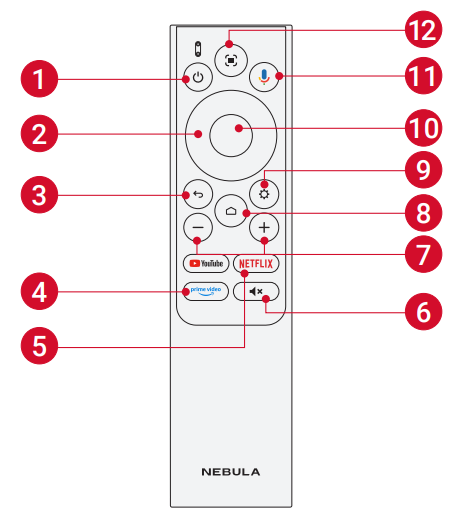
- Remote Control: Google TV RCU
- Model: D0442
Charging Your Projector
Before using it for the first time, fully charge the built-in battery using the provided adapter and power cord. When being charged, the battery status LED will light up.
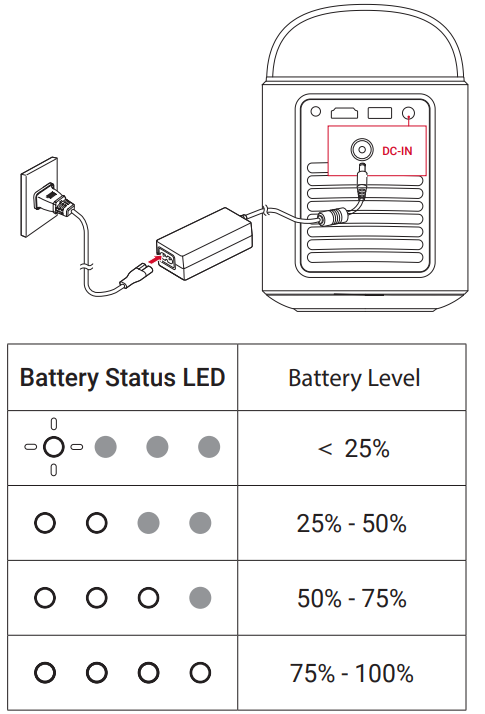
The distance between the projector and the projection surface determines the projection image size. For the best result, position the projector 0.8-4.0 m / 2.62-13.12 ft away from the projection surface to get a screen size of 30-150 inches.

Nebula Connect App
To easily control the projector, we recommend you download the Nebula Connect app.
- Download the Nebula Connect app from the App Store (iOS devices) or Google Play (Android devices).
- Enable Bluetooth on your smartphone.
- Open the Nebula Connect app and select [Mars 3 Air XXXXXX] as the device to be connected.
- Follow the on-screen instructions to complete the connection setup.
Troubleshooting for the Nebula Mars 3 Air Project
- Fails to Power On
- The projector may be out of power. Charge the projector for 15-30 minutes and see if the battery status LED lights up.
- Cannot Charge
- Use the included adapter and power cord to charge the projector.
- Try a different adapter (at least 90W) and power cord.
- Cannot connect to a Wi-Fi Network
- Place your projector within 16 ft / 5 m of the router and reconnect.
- Set your router to 2.4 GHz or 5 GHz and retry.
- Restart your projector and router and retry.
- Try a different Wi-Fi network or your phone's hotspot.
- Blurry Image
- Slightly move the projector or press
 on the remote to start autofocus.
 - To manually adjust the focus, go to [Settings] > [Projector] > [Focus Settings] > [Manual Focus Correction], and use the navigation buttons on the remote.
- Adjust the projection angle and direction, as well as the height of the projector,, if necessary.
- Slightly move the projector or press
- Distorted Image
- Update the firmware to the latest version. You will be informed once a new firmware version is detected.
- Go to [Settings] > [Projector] > [Image Correction] > [Perform Manual Keystone Correction].
- Move the projector left or right, or alter the tilt if necessary.
- No HDMI Signal
- Use a different HDMI cable.
- Connect your projector to another HDMI playback device.
- Connect the HDMI playback device to your TV with an HDMI cable to check if the device or cable is working.
- Adjust the HDMI playback device's output resolution/frequency to be the same as the projector's.
- How to Control Netflix with Mouse Mode
- Install Nebula Connect on your phone and connect with Nebula Mars 3 Air. Select Mouse mode. Use one finger to move and click, or two fingers to scroll.
- How to Play Videos without Wi-Fi
- Download videos to a USB drive in FAT32 format. For the following steps, see Play from a USB Drive.
Preventive measures include regular lens cleaning, avoiding exposure to dust and moisture, and charging the battery fully before storage. The nebula Mars 3 Air comes with a standard 1-year warranty covering manufacturing defects. For further assistance, users can contact Anker's customer support via their official website or authorized retailers.
Pros & Nebulaf the nebula Mars 3 Air Projector
Pros
- High-definition 1080p resolution with HDR support ensures crisp, vibrant visuals.
- Portability with a built-in 2.5-hour battery enables use without constant power.
- Integrated Google TV offers seamless access to popular streaming services, including Netflix.
- Auto focus and keystone correction simplify setup in various environments.
- Dual 8W Dolby Audio speakers provide clear and immersive sound without external devices.
- Brightness of 400 ANSI lumens is moderate; performance diminishes in brightly lit rooms.
- Contrast ratio of 400:1 may result in less defined blacks compared to higher-end projectors.
- Limited throw distance flexibility with no lens shift or zoom options.
- Battery life may be insufficient for extended events without external power.
Overall, the Nebula Mars 3 Air Projector offers excellent value for money in the portable projector market, especially for users prioritizing ease of use, streaming integration, and mobility over ultra-high brightness or professional-grade features.
Customer RevNebulaf the nebula Mars 3 Air Projector
Users commonly Nebulaethe Nebulaa Mars 3 Air Projector for its compact size, crisp 1080p image quality, and the convenience of built-in Google TV streaming apps. Many reviews highlight the quick autofocus and reliable battery life as significant benefits for outdoor and travel use. Star ratings frequently range from 4 to 4.5 out of 5.
Some customers note that image brightness can be underwhelming in well-lit environments, recommending use in darker rooms or during nighttime. A few users mention initial setup challenges related to tripod mounting and Wi-Fi connectivity, but most find these issues manageable. Overall, the projector is highly recommended for casual home theater setups, camping, and portable entertainment needs.
Faqs
How do I set up the nebula Mars 3 Air Projector for the first time?
What should I do if the nebula Mars 3 Air Projector image is blurry or out of focus?
Can I use the nebula Mars 3 Air Projector with gaming consoles and streaming devices?
How long does the battery last on the nebula Mars 3 Air Projector, and can I use it while charging?
What are the key features of the nebula Mars 3 Air Projector that enhance viewing experience?
How do I maintain and clean my nebula Mars 3 Air Projector to ensure longevity?
Why is the image on my nebula Mars 3 Air Projector dim or washed out in bright rooms?
What troubleshooting steps can I take if the nebula Mars 3 Air Projector won’t connect to Wi-Fi?
More nebula manuals
Leave a Comment