
Netgear EX3110 WiFi Range Extender User Manual
Content
Netgear EX3110 WiFi Range Extender: Complete Product Manual and Buyer Guide
Introduction
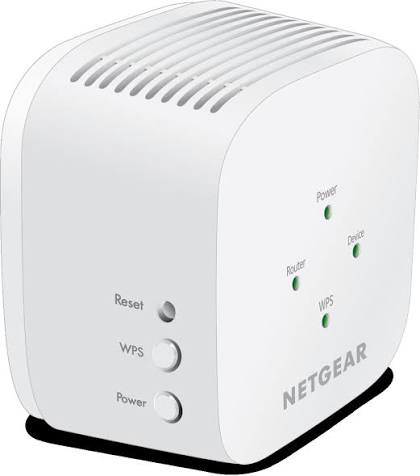
The netgear EX3110 WiFi Range Extender is a compact AC750 dual-band extender designed to improve wireless coverage in homes and small offices. It plugs directly into a wall outlet, making it easy to place where your signal starts to weaken, such as upstairs bedrooms, garages, basements, or remote corners of the house. With support for 2.4 GHz and 5 GHz bands, it helps reduce dead zones and deliver a more stable connection for streaming, browsing, video calls, and everyday smart home use.
This model is a practical choice for users who want a simple, affordable way to extend Wi‑Fi without upgrading to a full mesh system. The netgear EX3110 WiFi Range Extender is especially useful for households with a single router that struggles to cover multi-room layouts or thicker walls. It supports Wi‑Fi 5, offers up to 750 Mbps combined wireless speed, and includes WPS-based setup for quick installation. Its wall-plug form factor keeps installation clean and space-saving, while the dual-band design can help balance speed and range depending on device location.
Typical pricing for the EX3110 ranges from about $30 to $50 USD depending on retailer, region, and availability. It is commonly available through major electronics stores and online marketplaces, though stock can vary because it is an older but still widely sold budget extender. For users seeking a low-cost signal booster with reliable basics, the EX3110 remains a strong entry-level option.
Specifications
- Model: Netgear EX3110 AC750 dual-band WiFi range extender
- Wireless standard: Wi‑Fi 5 (802.11ac), backward compatible with 802.11a/b/g/n
- Speed rating: Up to 750 Mbps combined wireless throughput
- Frequency bands: 2.4 GHz and 5 GHz
- Typical band split: 300 Mbps on 2.4 GHz and 450 Mbps on 5 GHz
- Design: Wall-plug form factor with integrated power plug
- Security: WPA-PSK, WPA2-PSK, and WEP support
- Setup: WPS button, push-to-connect pairing, firmware upgradability
- Features: Dual-band operation, FastLane-style traffic optimization, reset button
- Approximate size: 2.85 x 2.85 x 2.55 in
- Approximate weight: 0.34 lb
Compared with newer mesh extenders, the EX3110 is less advanced but much more affordable. Compared with basic single-band repeaters, it offers better flexibility thanks to dual-band support and Wi‑Fi 5 compatibility. For users who mainly need stronger coverage rather than top-tier speed, the netgear EX3110 WiFi Range Extender delivers dependable performance at a lower cost than premium mesh systems.
Troubleshooting
Common issues with the EX3110 usually involve placement, pairing, or router compatibility. If the extender is not connecting, move it closer to the router during setup and make sure the Wi‑Fi password is correct. If speeds are slow, place the extender halfway between the router and the weak-signal area rather than inside the dead zone. A poor location can reduce performance even when the extender is technically connected.
- Problem: Power LED stays off. Fix: Try another outlet and verify the unit is fully seated in the wall socket.
- Problem: WPS setup fails. Fix: Restart the router and extender, then press WPS again within the pairing window.
- Problem: No internet after connecting. Fix: Reboot the router, reconnect to the extender’s network, and confirm the router has internet access.
- Problem: Weak performance. Fix: Reduce physical obstructions, avoid microwaves and thick walls, and update firmware.
- Problem: Device keeps dropping connection. Fix: Reset the extender, reconfigure it, and ensure the router firmware is current.
If the status LEDs indicate setup failure, a factory reset usually restores normal operation. Keep the extender in a ventilated area and avoid overcrowding the outlet to prevent heat buildup. Netgear typically provides online support, product manuals, and community help for the EX3110, along with warranty service depending on region and purchase channel. For direct assistance, use Netgear’s official support site or the support contact options listed for your country or region.
Pros & Cons
Pros
- Affordable way to extend Wi‑Fi coverage without buying a mesh system
- Dual-band support improves flexibility for streaming and general browsing
- Compact wall-plug design saves shelf space
- Easy WPS pairing makes setup beginner-friendly
- Good value for money for small homes, apartments, and basic dead-zone coverage
- Useful for smart TVs, laptops, phones, and smart home devices in moderate-range areas
Cons
- Older AC750 hardware is not ideal for very high-speed internet plans
- No Ethernet ports for wired device connections
- Performance depends heavily on placement and wall material
- Not mesh-compatible, so roaming may be less seamless than modern mesh systems
- Limited compared with higher-end extenders that offer stronger antennas or faster throughput
For budget buyers, the EX3110 offers strong value. Compared with a newer mesh extender or tri-band model, it is simpler and cheaper, but it will not match those products for speed, coverage consistency, or roaming convenience. The netgear EX3110 WiFi Range Extender is best for users who want reliable coverage expansion at a modest price.
Customer Reviews
Average user sentiment: 4.1 out of 5 stars
Customer feedback often highlights easy setup, solid range improvement, and good performance for everyday tasks. Many users praise the compact size and the ability to bring Wi‑Fi into bedrooms, offices, and upper floors without complicated installation. A common testimonial style comment is: “It took only a few minutes to set up, and my streaming issues in the back room disappeared.”
Frequent complaints focus on inconsistent speed when the extender is placed too far from the router and limited performance in homes with thick walls. Some users also note that it is not the best fit for fast gigabit internet plans or heavy gaming traffic. Overall, buyers who want a simple, budget-friendly extender tend to be satisfied, while users expecting mesh-level performance may want to look at newer alternatives.
Frequently Asked Questions
Is the netgear EX3110 WiFi Range Extender good for streaming?
Yes, it can handle HD streaming well when placed correctly and connected to a stable router signal.
Does it work with all routers?
It is designed to work with most standard Wi‑Fi routers and supports common Wi‑Fi security settings.
Is it worth buying in 2026?
Yes, if you need an affordable coverage boost and do not require mesh networking or very high throughput.
Faqs
How do I set up the netgear EX3110 WiFi Range Extender for the first time?
What is the best placement for the netgear EX3110 WiFi Range Extender to get stronger WiFi coverage?
Why is my netgear EX3110 WiFi Range Extender not connecting to the router?
Can the netgear EX3110 WiFi Range Extender work with any WiFi router?
What features does the netgear EX3110 WiFi Range Extender offer for faster home networking?
How do I use WPS to connect the netgear EX3110 WiFi Range Extender safely?
What should I do if the netgear EX3110 WiFi Range Extender shows weak signal or poor performance?
How should I maintain the netgear EX3110 WiFi Range Extender for long-term reliability?
More netgear manuals
Leave a Comment