
Netgear 54 Mbps Wireless Router WGR614 User Manual
Content
Netgear 54 Mbps Wireless Router WGR614: Complete Product Manual and Guide
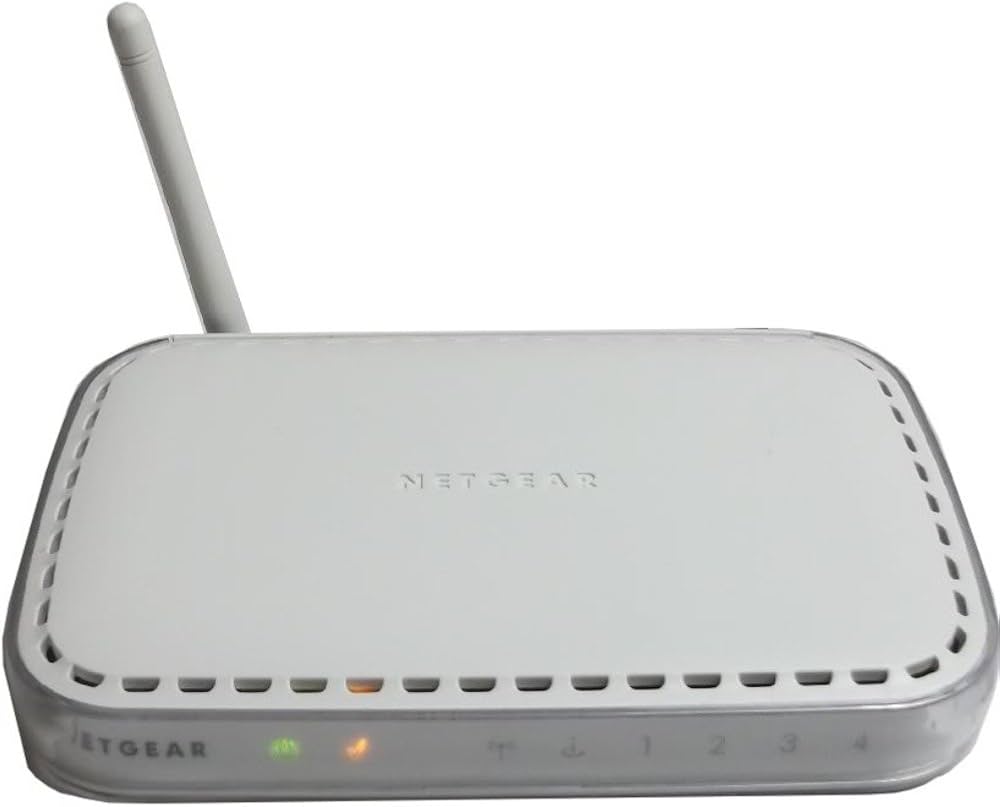
The netgear 54 Mbps Wireless Router WGR614 is a classic Wireless-G home networking router designed for simple, reliable internet sharing across small households and compact office setups. Built around 802.11g Wi-Fi, it delivers up to 54 Mbps wireless speed, making it a practical choice for web browsing, email, light streaming, online shopping, and connecting printers or desktop PCs. Its four-port 10/100 Ethernet switch also gives wired devices stable connections for tasks that benefit from consistent throughput, such as file transfers and legacy printers.
One of the main strengths of the netgear 54 Mbps Wireless Router WGR614 is its straightforward setup and dependable compatibility with older Windows, Mac, Linux, and UNIX-based systems. It was widely used because it combined essential features like NAT, firewall protection, and basic wireless security in a compact design. The router’s small footprint, passive cooling, and easy-to-manage interface made it especially attractive to first-time users and budget-conscious buyers looking for a no-frills home Wi-Fi solution.
Although it is an older model, the WGR614 still appeals to users who need a secondary router, a lab test device, or a replacement for legacy equipment. Typical price ranges today vary widely depending on condition, seller, and included accessories, with used units often available at low cost through online marketplaces and refurbished electronics outlets. For users searching for an affordable Wireless-G router, the WGR614 remains a recognizable and practical option for basic networking tasks.
Netgear WGR614 Specifications, Features, and Performance
The netgear 54 Mbps Wireless Router WGR614 offers a compact feature set that reflects the Wireless-G era while still meeting essential home networking needs. It is best suited for light-duty internet usage rather than modern high-bandwidth households.
- Wireless standard: IEEE 802.11g with backward compatibility for 802.11b devices
- Maximum wireless speed: Up to 54 Mbps
- Wireless frequency: 2.4 GHz band
- WAN port: 1 x 10/100 Mbps auto-sensing Ethernet
- LAN ports: 4 x 10/100 Mbps auto-sensing Ethernet
- Security: WEP encryption support and basic firewall functions
- Networking features: NAT, DHCP server, port forwarding, and router administration via web interface
- Dimensions: Approximately 6.9 x 1.1 x 4.7 inches
- Weight: About 0.7 lb
In performance terms, the WGR614 is designed for legacy 2.4 GHz environments and delivers adequate coverage for small rooms or apartments. Compared with modern dual-band routers, it lacks faster 802.11n/ac/ax speeds, advanced beamforming, and gigabit Ethernet. Against similar early Wireless-G routers, however, it was competitive because of its four-port switch, automatic speed negotiation, and easy consumer setup.
Troubleshooting Netgear WGR614 Common Problems and Fixes
Most issues with the netgear 54 Mbps Wireless Router WGR614 can be solved with basic reset, cabling, and configuration checks. If the router cannot connect to the internet, confirm that the modem is online, the WAN cable is firmly attached, and the router’s status lights are active. Power-cycle the modem first, then the router, and wait for both devices to fully restart before testing again.
- No wireless connection: Verify the SSID is broadcasting, Wi-Fi is enabled, and the client device is within range.
- Slow speeds: Reduce interference from cordless phones, microwave ovens, and thick walls; place the router in an open central location.
- Login issues: Use the default admin credentials only if the router has not been reconfigured; otherwise perform a factory reset.
- Intermittent drops: Check firmware status, replace worn Ethernet cables, and move the router away from metal objects.
- Error lights or no internet: Reboot both modem and router, then verify the WAN IP address in the admin panel.
Preventive care includes periodic restarts, secure password management, and keeping the unit in a cool, ventilated area. Warranty and support depend on the seller and product condition, since many units are now legacy devices. For help, use Netgear support resources, product manuals, firmware pages, or the support portal associated with the WGR614 product family. If purchasing used, confirm return policy and seller support before buying.
Pros and Cons of the Netgear 54 Mbps Wireless Router WGR614
Pros
- Simple setup and easy-to-use web-based management interface
- Reliable for basic browsing, email, and light home networking
- Four Ethernet LAN ports add flexibility for wired devices
- Compact design with passive cooling and low maintenance
- Good value for legacy networks and lab environments
Cons
- Limited to 54 Mbps wireless speeds, which is slow by modern standards
- Uses 2.4 GHz only, so it is more vulnerable to congestion and interference
- Lacks modern features such as dual-band Wi-Fi, gigabit ports, and advanced QoS
- WEP security is outdated compared with newer WPA/WPA2/WPA3 options
- Not ideal for streaming, gaming, or large households with many devices
For value for money, the WGR614 makes sense only when low-cost legacy connectivity is the goal. Compared with newer budget routers, it is far behind in speed and security, but it can still serve as a spare router, a simple access point in controlled setups, or a learning tool for networking basics.
Customer Reviews and User Feedback for Netgear WGR614
User feedback for the netgear 54 Mbps Wireless Router WGR614 is generally positive when the device is used within its intended limits. Many buyers praise its dependable basic performance, easy installation, and compact design, often giving it around 4 out of 5 stars for simple home networking tasks. Typical testimonials highlight that it “works well for a small apartment” and “is easy to set up even for beginners.”
Common complaints focus on slower speeds, weak performance in larger homes, and outdated security features. Some users also mention occasional connection drops when too many devices are active at once. Purchase recommendations are strongest for buyers who need a low-cost legacy router, replacement unit, or test bench router rather than a modern primary Wi-Fi solution. For modern internet plans and multiple streaming devices, a newer dual-band router is the better choice.
Frequently Asked Questions About the Netgear WGR614
- What is the Netgear WGR614 used for? It is used for basic wireless internet sharing, wired device connections, and small home networks.
- Is the WGR614 still good today? It is only suitable for legacy or low-demand use cases.
- How fast is the WGR614? It supports wireless speeds up to 54 Mbps on 802.11g.
- Does it support modern security? It is limited compared with current routers and should not be chosen for security-sensitive modern networks.
- Who should buy it? Users needing a basic, inexpensive Wireless-G router for older devices or simple networking setups.
Faqs
How do I set up the netgear 54 Mbps Wireless Router WGR614 for the first time?
What should I do if the netgear 54 Mbps Wireless Router WGR614 is not connecting to the internet?
How can I improve wireless performance on the netgear 54 Mbps Wireless Router WGR614?
Is the netgear 54 Mbps Wireless Router WGR614 compatible with modern devices and internet services?
How do I reset the netgear 54 Mbps Wireless Router WGR614 without losing control of the device?
What wireless security settings should I use on the netgear 54 Mbps Wireless Router WGR614?
Why does my netgear 54 Mbps Wireless Router WGR614 keep dropping the Wi‑Fi signal?
How should I maintain the netgear 54 Mbps Wireless Router WGR614 for long-term reliability?
More netgear manuals
- Netgear CM1100 Cable Modem User Manual
- Setup: Netgear Dual Band WiFi Mesh Extender EX6250 User Manual
- Netgear RBR350 Dual-band Mesh System User Manual
- Netgear CM500 High-Speed Cable Modem User Manual
- Netgear EX3110 WiFi Range Extender User Manual
- Netgear Range Max WiFi Range Extender WPN824EXT User Manual
Leave a Comment