
Netgear Range Max WiFi Range Extender WPN824EXT User Manual
Content
Netgear Range Max WiFi Range Extender WPN824EXT: Full Product Manual and Review
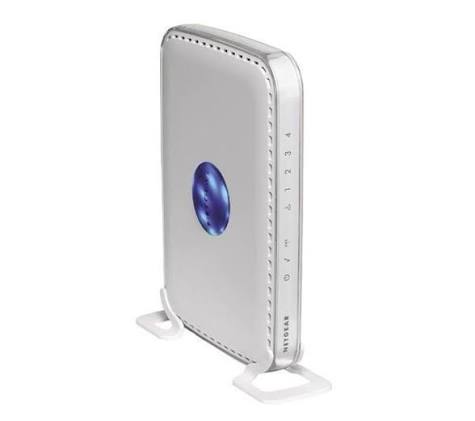
The netgear Range Max WiFi Range Extender WPN824EXT is a classic wireless range extender designed to improve coverage in homes and small offices that still rely on 2.4 GHz Wi‑Fi. Built around 802.11b/g networking, it uses seven internal antennas and supports wireless speeds up to 108 Mbps, making it a practical choice for extending signal into dead zones, remote rooms, basements, or upper floors. It also includes four 10/100 Mbps LAN ports plus one 10/100 Mbps Internet/WAN port, so it can support wired devices as well as wireless clients.
This model is best suited for users who need simple Wi‑Fi expansion rather than modern dual-band or mesh networking. It appeals to owners of older routers, legacy printers, desktop PCs, gaming consoles, and broadband setups that still benefit from 2.4 GHz-only compatibility. The netgear Range Max WiFi Range Extender WPN824EXT stands out for its straightforward design, broad compatibility with legacy wireless gear, and useful Ethernet connectivity. It is not a modern high-speed extender, but it remains relevant for basic coverage improvement in older networks.
Pricing for this model varies widely because it is largely discontinued and now sold through secondary marketplaces or remaining stock channels. Typical availability is limited, and prices can range from budget used-unit listings to higher collector-style resale prices depending on condition, accessories, and region.
Technical Specifications and Key Features
- Wireless standards: IEEE 802.11b and IEEE 802.11g on 2.4 GHz
- Maximum wireless speed: up to 108 Mbps under supported conditions
- Antennas: seven internal antennas for extended coverage and signal stability
- Ethernet ports: four LAN 10/100 Mbps ports and one Internet/WAN 10/100 Mbps port
- Security: 64-bit and 128-bit WEP, WPA-PSK, and WPA2-PSK support
- Power: 12 V DC, 1A output, 22W maximum
- Dimensions: 28 x 175 x 119 mm
- Weight: 0.3 kg
- Operating temperature: 0° to 40° C
- Operating humidity: up to 90% noncondensing
In real-world use, the WPN824EXT is best viewed as a legacy Wi‑Fi extender rather than a modern high-throughput device. Compared with current dual-band extenders, it offers much lower speed and fewer smart features, but it can still outperform basic router placement when the goal is simply to push signal farther into hard-to-reach areas. Its wired Ethernet ports also make it useful for connecting older equipment that lacks built-in wireless support.
Pros and Cons of the netgear Range Max WiFi Range Extender WPN824EXT
Pros
- Good legacy compatibility with 802.11b/g networks and older devices
- Seven internal antennas help improve coverage in weak-signal areas
- Four LAN ports are useful for wired desktops, printers, and game consoles
- Simple setup and straightforward operation for basic home networking
- Useful value for users who only need stable 2.4 GHz coverage
Cons
- Limited to 2.4 GHz Wi‑Fi and older standards, so performance is dated
- No support for modern 802.11n, 802.11ac, or Wi‑Fi 6 networks
- Maximum speed of 108 Mbps is low by current standards
- Security and feature set are behind newer extenders
- Better alternatives exist if you need faster streaming, gaming, or mesh coverage
For value for money, this device only makes sense if you already own compatible older networking gear or need a low-cost way to extend an existing 2.4 GHz network. If you want stronger speeds or broader compatibility, modern NETGEAR extenders or mesh systems are far better alternatives.
Customer Reviews and User Feedback
User feedback for the netgear Range Max WiFi Range Extender WPN824EXT is generally mixed-to-positive among owners of older networks, with many giving it around 3.5 to 4 out of 5 stars for basic reliability and expanded coverage. Customers often praise its easy installation, wired port flexibility, and ability to revive weak Wi‑Fi in distant rooms. Typical positive testimonials describe it as a dependable solution for older routers and simple internet use.
Common complaints focus on outdated speed, limited range compared with newer products, and weak performance in busy households with many devices. Some users also note that it is less ideal for high-definition streaming or modern gaming. A frequent recommendation is to buy it only if your network is already built around 2.4 GHz legacy equipment or if you need an inexpensive stopgap rather than a long-term upgrade.
Faqs
How do I set up the netgear Range Max WiFi Range Extender WPN824EXT for the first time?
Why is my netgear Range Max WiFi Range Extender WPN824EXT not connecting to my router?
What are the key features of the netgear Range Max WiFi Range Extender WPN824EXT?
Is the netgear Range Max WiFi Range Extender WPN824EXT compatible with any router?
How can I improve the signal performance of the netgear Range Max WiFi Range Extender WPN824EXT?
What should I do if the netgear Range Max WiFi Range Extender WPN824EXT keeps dropping the connection?
How do I reset the netgear Range Max WiFi Range Extender WPN824EXT safely?
How should I maintain the netgear Range Max WiFi Range Extender WPN824EXT for long-term reliability?
More netgear manuals
- Netgear CM500 High-Speed Cable Modem User Manual
- Setup: Netgear Nighthawk AX2400 WiFi 6 Router User Manual
- Setup: Netgear Dual Band WiFi Mesh Extender EX6250 User Manual
- Setup: Netgear Nighthawk Pro Gaming Router XR1000 User Manual
- Netgear 54 Mbps Wireless Router WGR614 User Manual
- How to Use: Netgear NeoTV Max (NTV300SL) Streaming Player User Manual
Leave a Comment