
Netgear CM500 High-Speed Cable Modem User Manual
Content
netgear CM500 High-Speed Cable Modem: Product Manual and Buyer Guide
Introduction
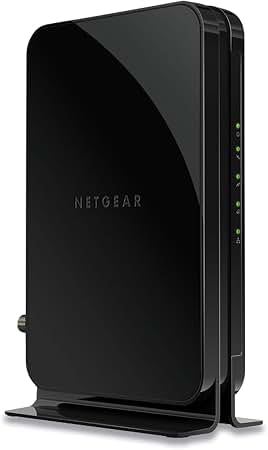
The netgear CM500 High-Speed Cable Modem is a compact DOCSIS 3.0 cable modem designed for households that want a reliable, fast, and easy-to-manage internet connection without renting equipment from a provider. Built with 16x4 channel bonding and a Gigabit Ethernet port, it supports smooth performance for everyday streaming, video calls, online classes, browsing, and light to moderate gaming. It is especially appealing to users who want a simple modem-only setup paired with their own router for better control and flexibility.
This model is a practical choice for cable internet customers who use major providers such as Xfinity, Spectrum, and Cox, depending on local compatibility. Its biggest selling points are straightforward setup, solid reliability, and strong value for money compared with higher-end cable modem options. The device is also compact, making it easy to place on a shelf or desk without taking up much space. The netgear CM500 High-Speed Cable Modem is best suited for small homes, apartments, and budget-conscious buyers who want a dependable modem for cable plans without paying for advanced DOCSIS 3.1 hardware they may not need.
In 2026, the estimated price range is typically around $50 to $80, depending on the retailer, promotions, and stock levels. Availability remains broad through major electronics stores and online marketplaces, though pricing may vary based on region and inventory. For users looking for a dependable DOCSIS 3.0 cable modem with strong compatibility and a simple feature set, the CM500 remains a common and practical option.
Specifications
- Model: NETGEAR CM500 High-Speed Cable Modem
- DOCSIS version: DOCSIS 3.0, backward compatible with DOCSIS 2.0
- Channel bonding: 16 downstream channels and 4 upstream channels
- Maximum advertised speed: Up to 680 Mbps on supported cable networks
- Ethernet port: 1 x 10/100/1000 Gigabit RJ-45 port
- Cable connection: Coaxial input
- Memory: 8 MB flash, 128 MB RAM
- Power: 12 VDC, 1.5A power adapter
- Dimensions: 2.4 x 4.9 x 7.3 inches
- Weight: 0.62 lb
- Operating temperature: 32° to 104°F
- Operating humidity: Up to 90% noncondensing
- Certifications: CableLabs certified for U.S. cable internet services
Compared with entry-level modems, the CM500 offers stronger channel bonding and faster wired throughput through its Gigabit Ethernet port. Compared with newer DOCSIS 3.1 models, it is less future-proof but usually much more affordable. For users on cable plans up to the mid-hundreds of Mbps, it delivers a strong balance of performance and cost.
Troubleshooting Common Problems with the netgear CM500 High-Speed Cable Modem
- No internet light or no connection: Check the coax cable, confirm the Ethernet cable is seated properly, and restart the modem and router. Power off the modem for at least 60 seconds before turning it back on.
- Blinking lights during startup: This often means the modem is syncing with the provider network. Wait several minutes after power-up. If the lights never stabilize, contact your ISP.
- Slow speeds: Test with a direct Ethernet connection, reboot the modem, and confirm your internet plan supports the speed tier you expect. Replace damaged cables if needed.
- Activation failure or MAC registration issue: Make sure the modem has been activated with your provider and that the MAC address is registered correctly in the account.
- Common error indicators: A solid power light with no downstream or online connection usually points to coax, signal, or activation issues rather than a hardware failure.
- Preventive measures: Keep the modem well ventilated, use quality coax and Ethernet cables, and avoid frequent unplugging.
The CM500 includes a limited warranty when purchased from an authorized reseller, and NETGEAR provides technical support for eligible purchases. For help, users can contact NETGEAR support at 1-888-NETGEAR in the U.S. and Canada, or 1-866-874-8924 for cable modem installation assistance. If problems persist, the cable provider should also verify line signal quality and service provisioning.
Pros and Cons of the netgear CM500 High-Speed Cable Modem
Pros
- Easy setup for most cable internet users, especially when paired with a separate Wi‑Fi router.
- Reliable DOCSIS 3.0 performance for everyday streaming, browsing, and work-from-home use.
- Gigabit Ethernet port supports fast wired connections to routers and PCs.
- Compact design fits easily into small home network setups.
- Strong value for money for users who do not need DOCSIS 3.1 features.
- Works well for moderate-speed internet plans and helps avoid monthly rental fees.
Cons
- Not ideal for very high-speed fiber-like cable plans or users wanting long-term future-proofing.
- No built-in Wi‑Fi, so a separate router is required.
- Limited to modem-only functionality, which may not suit users wanting an all-in-one gateway.
- DOCSIS 3.0 is older than newer modem standards, so upgrade-minded buyers may prefer DOCSIS 3.1 alternatives.
- Some users may find compatibility depends heavily on provider approval and local network support.
For budget buyers, the CM500 remains a strong deal. Compared with newer models, it is less advanced, but it often delivers better value for users with midrange cable plans who simply want a stable modem and do not need premium features.
Customer Reviews and Real-World Feedback
Customer feedback for the netgear CM500 High-Speed Cable Modem is generally positive, with many users rating it around 4.2 out of 5 stars for ease of installation, dependable performance, and solid value. Buyers often praise its compact size, stable connection, and ability to replace rental equipment quickly. A common testimonial style comment is: “Installed in minutes and immediately improved my wired speeds.”
Frequent complaints usually focus on activation issues, compatibility checks, and the fact that it does not include Wi‑Fi. Some users also mention that performance depends on the quality of the ISP signal and on selecting the correct plan tier. For most households with compatible cable service, the CM500 is recommended as a practical, no-frills modem. It is best for users who want an affordable upgrade from rented hardware and are comfortable using a separate wireless router.
Faqs
How do I set up the netgear CM500 High-Speed Cable Modem for the first time?
Why is my netgear CM500 High-Speed Cable Modem not coming online after installation?
Is the netgear CM500 High-Speed Cable Modem compatible with Xfinity, Spectrum, and Cox?
What internet speed is the netgear CM500 High-Speed Cable Modem best suited for?
How do I connect the netgear CM500 High-Speed Cable Modem to a Wi‑Fi router?
What should I do if the netgear CM500 High-Speed Cable Modem has slow internet speeds?
Does the netgear CM500 High-Speed Cable Modem work without a separate router?
How should I maintain and care for the netgear CM500 High-Speed Cable Modem?
More netgear manuals
- Setup: Netgear Dual Band WiFi Mesh Extender EX6250 User Manual
- Netgear Range Max WiFi Range Extender WPN824EXT User Manual
- Netgear 54 Mbps Wireless Router WGR614 User Manual
- Setup: Netgear Nighthawk AX2400 WiFi 6 Router User Manual
- Netgear CM1100 Cable Modem User Manual
- Setup: Netgear Nighthawk Pro Gaming Router XR1000 User Manual
Leave a Comment