
Setup: Netgear Dual Band WiFi Mesh Extender EX6250 User Manual
Content
Introduction
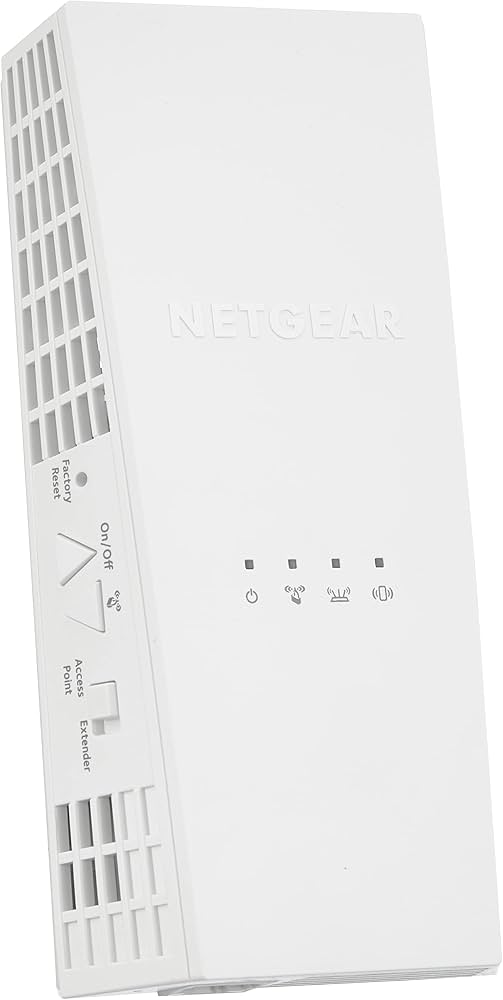
The Netgear Dual Band WiFi Mesh Extender EX6250 is a compact AC1750 range extender designed to improve wireless coverage in homes and small offices. It uses dual-band WiFi with 2.4 GHz and 5 GHz support, mesh roaming compatibility, and a Gigabit Ethernet port to deliver stronger connections for streaming, gaming, video calls, and smart home devices. With support for speeds up to 1.7 Gbps class performance, it is built for users who need to reduce dead zones without replacing their existing router.
This model is a strong fit for households with thick walls, multi-level layouts, or rooms where WiFi signals tend to drop. It works especially well for users who want a simple plug-in solution for extending coverage to bedrooms, basements, garages, or home offices. The wall-plug design, internal antenna system, and mesh smart roaming support make it easy to blend into everyday use while keeping devices connected as you move through the home.
As of current market listings, the estimated price range is typically around $50 to $100 depending on seller, condition, and whether it is new or renewed. Availability is generally good through major online retailers and electronics stores, though stock can vary. For shoppers comparing a WiFi range extender vs a mesh booster, the EX6250 stands out for its balance of speed, coverage, and value.
Specifications for the NETGEAR EX6250 AC1750 Dual Band WiFi Mesh Extender
- WiFi standard: IEEE 802.11ac
- WiFi class: AC1750
- Frequency bands: Dual band 2.4 GHz and 5 GHz
- Wireless speed: Up to 1.7 Gbps class performance
- Ethernet port: 1 Gigabit Ethernet port with auto-sensing support
- Dimensions: 6.34 x 3.2 x 1.75 in
- Weight: 0.66 lb
- Design: Wall-plug format with internal antenna
- Compatibility: Works with most standard WiFi routers and mesh-capable setups
- Typical use: Extending coverage for streaming, browsing, work-from-home, and smart home devices
In real-world use, the EX6250 is positioned as a practical step above basic single-band extenders and below full router replacement systems. Compared with entry-level WiFi boosters, it offers better performance on both bands and adds a Gigabit port for wired devices such as smart TVs, consoles, or desktop PCs. Compared with newer full-mesh kits, it is more affordable and easier to install, though it does not replace a dedicated multi-node mesh network.
Troubleshooting the NETGEAR EX6250 WiFi Mesh Extender
If the extender does not connect, restart both the router and the EX6250, then run the setup again near the router before moving it to its final location. A weak signal often means the extender is placed too far from the router; move it closer until the connection becomes stable, then reposition for best coverage. If devices keep dropping, check for interference from microwaves, cordless phones, or thick walls.
- Solid amber or poor signal issue: Relocate the extender closer to the router during setup.
- No internet through extender: Confirm the router has internet access and re-sync the extender.
- WPS setup failure: Try manual browser-based setup instead of WPS.
- Login or setup page not loading: Reconnect to the extender’s network and clear browser cache.
- Frequent disconnects: Update router firmware and keep the extender away from heat sources and heavy interference.
Preventive maintenance is simple: keep firmware current, avoid blocked ventilation, and place the unit where it can still receive a strong router signal. Warranty terms and support availability can vary by region and seller, so check the product’s official support page or retailer documentation for the latest coverage details. For help, use NETGEAR’s support center, online manuals, community forums, or retailer customer service for warranty-related assistance.
Pros and Cons of the NETGEAR EX6250 AC1750 Extender
Pros
- Strong value for money for users needing affordable coverage expansion.
- Dual-band support helps reduce congestion on busy home networks.
- Gigabit Ethernet port is useful for stable wired connections.
- Compact wall-plug design saves space and is easy to install.
- Mesh roaming support helps devices stay connected while moving around the home.
Cons
- Performance depends heavily on router quality and extender placement.
- Not a substitute for a premium multi-node mesh system in very large homes.
- Wireless speed is shared, so actual throughput may be lower than the advertised class rating.
- Some users may prefer a tri-band extender or newer WiFi 6 model for heavier traffic.
Compared with cheaper single-band extenders, the netgear Dual Band WiFi Mesh Extender EX6250 offers a better balance of speed, range, and features. Compared with newer mesh systems, it is less expensive and simpler to deploy, but it is best for targeted dead-zone coverage rather than whole-home premium networking.
Customer Reviews and Buyer Feedback
Customer feedback for the EX6250 is generally positive, with many users praising its easy setup, compact size, and noticeable improvement in upstairs rooms, garages, and home offices. A common star rating pattern is around 4 out of 5 stars, with buyers frequently describing it as a solid budget-friendly WiFi extender for everyday use.
- Typical praise: “Setup was quick, and the signal reached the back bedroom without trouble.”
- Typical praise: “The Gigabit Ethernet port made my smart TV connection much more stable.”
- Common complaint: “Placement matters a lot, and performance dropped when installed too far from the router.”
- Common complaint: “It improved coverage, but not as dramatically as a full mesh system.”
Buyers looking for an affordable WiFi range extender with dual-band support and simple setup will find the EX6250 a practical choice. It is best recommended for moderate coverage problems, not for replacing a weak router or covering a very large property on its own.
Faqs
How do I set up the netgear Dual Band WiFi Mesh Extender EX6250 for the first time?
Why is my netgear Dual Band WiFi Mesh Extender EX6250 connected but not giving internet access?
What is the best location for the netgear Dual Band WiFi Mesh Extender EX6250 to get stronger WiFi speed?
Does the netgear Dual Band WiFi Mesh Extender EX6250 work with any router or WiFi network?
How can I improve the performance of my netgear Dual Band WiFi Mesh Extender EX6250 for streaming and gaming?
Why does my netgear Dual Band WiFi Mesh Extender EX6250 keep dropping the signal or disconnecting?
How do I factory reset the netgear Dual Band WiFi Mesh Extender EX6250 safely?
What maintenance does the netgear Dual Band WiFi Mesh Extender EX6250 need over time?
More netgear manuals
- Netgear 54 Mbps Wireless Router WGR614 User Manual
- Netgear CM500 High-Speed Cable Modem User Manual
- Netgear CM1100 Cable Modem User Manual
- Netgear Range Max WiFi Range Extender WPN824EXT User Manual
- Netgear RBR350 Dual-band Mesh System User Manual
- Setup: Netgear Nighthawk AX2400 WiFi 6 Router User Manual
Leave a Comment