
Netgear CM1100 Cable Modem User Manual
Content
Netgear CM1100 Cable Modem Review and User Manual
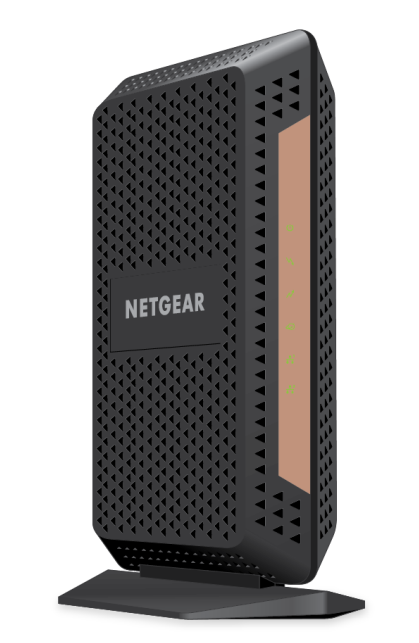
The Netgear CM1100 Cable Modem is a DOCSIS 3.1 multi-gig cable modem designed for households and small offices that want fast, reliable wired internet without renting a modem from their ISP. It is built to support cable plans up to 2 Gbps and includes two Gigabit Ethernet ports with link aggregation, making it a strong choice for users who want to maximize a high-speed connection through a compatible router. The CM1100 is especially appealing to Xfinity, Cox, Spectrum, and other major cable customers who need a modem that can handle modern broadband tiers while remaining backward compatible with DOCSIS 3.0 service.
One of the biggest advantages of the Netgear CM1100 Cable Modem is its balance of performance and practicality. It offers 32 downstream and 8 upstream channels, plus OFDM and OFDMA support for newer cable network standards. For many users, this means better headroom for speed upgrades, improved stability, and a future-ready setup compared with older DOCSIS 3.0-only models. The two Ethernet ports also provide flexibility for advanced networking setups, especially when paired with a router that supports link aggregation.
In terms of use cases, the CM1100 is ideal for streaming in 4K, competitive gaming, large file transfers, remote work, and busy homes with multiple devices. It is a modem only, so users will need a separate Wi-Fi router or mesh system. The typical price range is roughly $100 to $200 depending on retailer, condition, and promotions, with renewed or used units sometimes costing less. Availability remains broad through major online sellers and ISP-compatible device marketplaces.
Key Specifications and Performance Details
- DOCSIS version: DOCSIS 3.1 with backward compatibility for DOCSIS 3.0
- Channel bonding: 32 downstream and 8 upstream channels
- Advanced channel support: 2 OFDM downstream and 2 OFDMA upstream channels
- Ethernet ports: 2 Gigabit Ethernet ports with link aggregation support
- Maximum service tier: Up to 2 Gbps cable plans
- IPv6 support: Yes
- Wireless: No built-in Wi-Fi; requires separate router
- Voice support: No telephone ports
- Processor class: Broadcom platform commonly associated with the CM1100
- Dimensions: Approximately 8.8 x 3.4 x 5.9 inches
- Weight: About 1 pound
Compared with the CM1000, the Netgear CM1100 Cable Modem stands out for its dual Ethernet ports and link aggregation, which can better support multi-gig networking setups. Compared with all-in-one gateway devices, it offers cleaner modem-only performance and more flexibility for users who prefer their own router. For subscribers on speed tiers above 1 Gbps, the CM1100 is generally the stronger choice over older DOCSIS 3.0 modems.
Pros and Cons of the Netgear CM1100 Cable Modem
Pros
- Fast multi-gig support: Built for cable internet plans up to 2 Gbps, making it a strong upgrade for high-speed households.
- Two Gigabit ports: Helpful for link aggregation and advanced wired networking setups.
- Future-ready standard: DOCSIS 3.1 improves compatibility with newer ISP networks and higher-speed tiers.
- Good value for heavy internet users: Often cheaper over time than paying monthly rental fees to an ISP.
- Stable modem-only design: No router features to complicate performance or firmware management.
Cons
- No built-in Wi-Fi: A separate router is required, which adds to the total setup cost.
- No phone service support: Not suitable for users who need cable voice functionality.
- ISP approval required: Compatibility can vary by provider and plan, so activation should be confirmed first.
- Overkill for basic plans: If your internet speed is under 300 Mbps, a simpler modem may offer better value.
- Compared with newer alternatives: Some newer modems may offer more compact designs or updated internal platforms.
Customer Reviews and Real-World Feedback
Overall customer sentiment for the Netgear CM1100 Cable Modem is strong, with many users praising its speed, reliability, and easy activation on supported cable networks. A common rating pattern is around 4 to 4.5 stars out of 5, especially among buyers who upgraded from older DOCSIS 3.0 hardware. Users frequently mention smoother streaming, faster downloads, and fewer dropouts after switching.
Common praises include “solid performance for gigabit internet,” “easy setup,” and “great replacement for rental modems.” Frequent complaints focus on price, lack of Wi-Fi, and occasional ISP activation issues. Some customers also note that the benefits are most noticeable only when paired with a high-speed plan and a strong router. For buyers with compatible service and a need for multi-gig readiness, the Netgear CM1100 Cable Modem remains a smart purchase. For lower-speed plans, it may be more modem than necessary.
Faqs
How do I set up the netgear CM1100 Cable Modem for the first time with my ISP?
Why is my netgear CM1100 Cable Modem not getting an internet connection after setup?
Is the netgear CM1100 Cable Modem compatible with my router and internet plan?
What do the link aggregation and multi-gig features on the netgear CM1100 Cable Modem do?
How can I improve speed and stability on the netgear CM1100 Cable Modem?
What should I do if the netgear CM1100 Cable Modem keeps dropping connection?
Do I need a separate router with the netgear CM1100 Cable Modem?
How should I maintain and clean the netgear CM1100 Cable Modem for reliable long-term use?
More netgear manuals
- Netgear RBR350 Dual-band Mesh System User Manual
- Netgear 54 Mbps Wireless Router WGR614 User Manual
- Netgear EX3110 WiFi Range Extender User Manual
- Setup: Netgear Dual Band WiFi Mesh Extender EX6250 User Manual
- Netgear Nighthawk 5G Mobile Hotspot User Manual
- Netgear CM500 High-Speed Cable Modem User Manual
Leave a Comment