
Setup: Netgear Nighthawk AX2400 WiFi 6 Router User Manual
Content
Netgear Nighthawk AX2400 WiFi 6 Router Manual and Product Guide
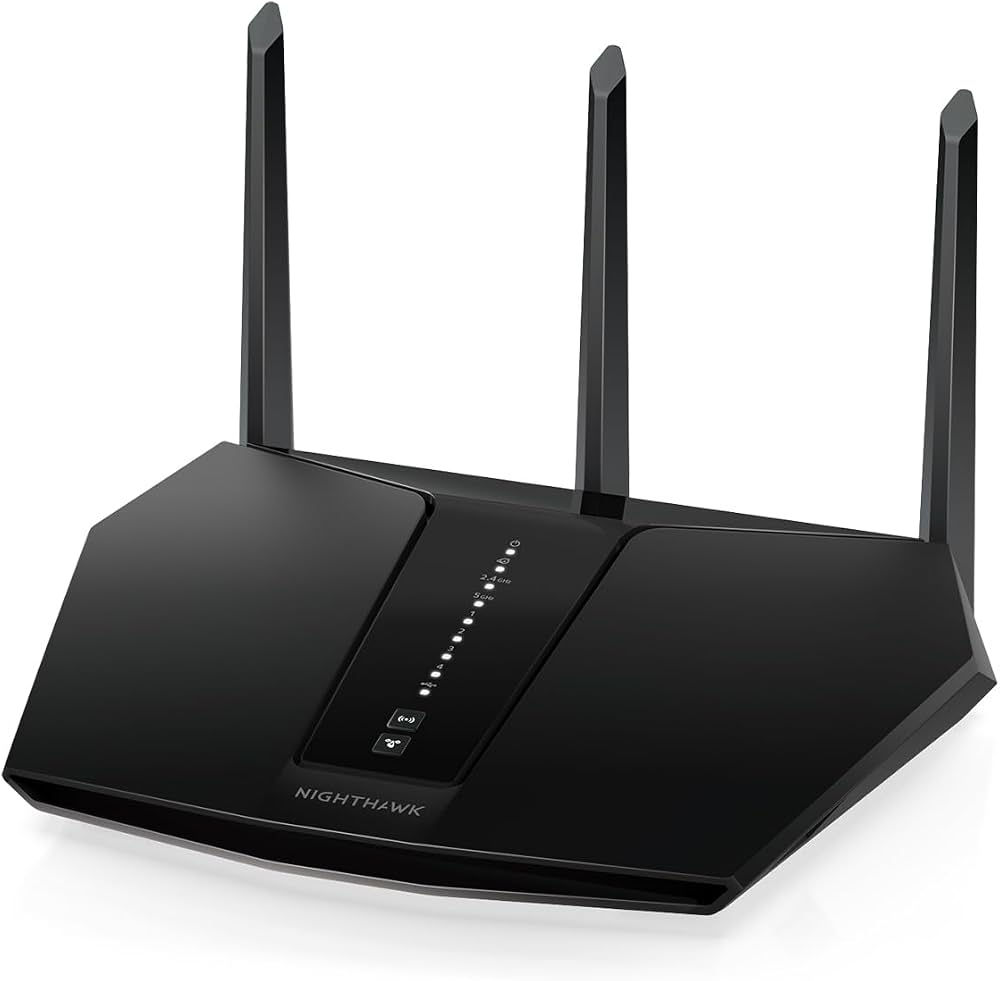
The netgear Nighthawk AX2400 WiFi 6 Router is a dual-band WiFi 6 router built for faster wireless performance, improved device handling, and dependable coverage in small to medium homes. With AX2400 class speeds, it combines up to 574 Mbps on 2.4 GHz and up to 1800 Mbps on 5 GHz, making it a strong fit for 4K streaming, online gaming, video calls, smart home devices, and everyday household internet use. It is also designed with five Gigabit Ethernet ports, including one WAN and four LAN ports, so wired devices such as desktops, game consoles, and streaming boxes can connect at full gigabit speeds.
This router stands out for its WiFi 6 efficiency, which helps reduce congestion when multiple devices are active at the same time. It is a practical upgrade for users coming from older WiFi 5 or WiFi 4 routers, especially in homes with several phones, laptops, tablets, and connected devices. The netgear Nighthawk AX2400 WiFi 6 Router is commonly positioned for users who want a balance of speed, coverage, and simplicity without stepping into premium tri-band or mesh systems. Availability is generally broad through major electronics retailers and online marketplaces, with typical pricing often landing in the mid-range segment depending on seller, region, and promotions. For shoppers comparing value, it offers a strong feature set for the price, especially when compared with basic dual-band routers and many entry-level WiFi 6 alternatives.
Pros and Cons of the Netgear Nighthawk AX2400 WiFi 6 Router
Pros
- Fast WiFi 6 performance: AX2400 speeds are well suited for streaming, video conferencing, and multitasking across multiple devices.
- Five Gigabit Ethernet ports: Great for wired setups that need stable, low-latency connections for PCs, consoles, or media devices.
- Good value for money: It delivers many of the advantages of WiFi 6 without the cost of higher-end mesh or tri-band models.
- Strong fit for small to medium homes: A practical choice for apartments, townhomes, and family homes with moderate coverage needs.
- Easy upgrade path: Users moving from older routers typically notice better responsiveness and smoother handling of multiple devices.
Cons
- Not a mesh system: Larger homes or thick-wall layouts may need additional access points or a mesh upgrade.
- Dual-band only: Compared with tri-band routers, heavy traffic environments may experience more shared-band congestion.
- Best for moderate households: Power users with very high-speed internet or many demanding devices may prefer a more advanced model.
- Alternatives may fit better: Mesh routers offer easier whole-home expansion, while premium gaming routers can provide more advanced tuning.
Overall, the netgear Nighthawk AX2400 WiFi 6 Router offers a solid balance of performance and affordability, making it a better value than many basic WiFi 6 routers while remaining less expensive than mesh WiFi kits or high-end gaming routers.
Customer Reviews for Netgear Nighthawk AX2400 WiFi 6 Router
Customer feedback for the netgear Nighthawk AX2400 WiFi 6 Router is generally positive, with many users praising its setup experience, stable speeds, and improved coverage compared with older routers. Review scores on major retail platforms often sit around 4.7 out of 5 stars, reflecting strong satisfaction among everyday buyers.
- Praise: “Much faster than my old router and handles streaming on multiple TVs without buffering.”
- Praise: “Easy to install, and the wired ports were a big plus for my desktop and console.”
- Complaint: Some users report that coverage can drop in larger homes or through multiple walls.
- Complaint: A few buyers mention that advanced users may want more customization or mesh support.
- Recommendation: Best for apartments, smaller homes, and families needing a dependable WiFi 6 upgrade.
For buyers looking for a reliable dual-band router with strong everyday performance, this model is an easy recommendation. If whole-home coverage across a large property is the priority, a mesh system may be a better choice.
Netgear Nighthawk AX2400 WiFi 6 Router Setup and Key Features
The router uses WiFi 6 technology to improve efficiency and speed across connected devices. It supports dual-band wireless networking, Gigabit Ethernet connections, and coverage suited to small and medium homes. The compact desktop design makes it easy to place on a shelf or office desk, and the included Ethernet ports simplify connections for wired networking setups.
- WiFi standard: WiFi 6 (802.11ax)
- Wireless class: AX2400
- Speed profile: up to 574 Mbps on 2.4 GHz and up to 1800 Mbps on 5 GHz
- Ethernet: 1 WAN port and 4 LAN ports
- Best use case: streaming, gaming, video calls, and smart home connectivity
If you are searching for a straightforward WiFi 6 router for small to medium homes, the netgear Nighthawk AX2400 WiFi 6 Router is a practical choice that combines speed, stability, and everyday usability.
Faqs
How do I set up the netgear Nighthawk AX2400 WiFi 6 Router for the first time?
Why is my netgear Nighthawk AX2400 WiFi 6 Router connection dropping, and how can I fix it?
What devices are compatible with the netgear Nighthawk AX2400 WiFi 6 Router?
How do I improve speed and coverage on the netgear Nighthawk AX2400 WiFi 6 Router?
Does the netgear Nighthawk AX2400 WiFi 6 Router support parental controls and guest WiFi?
How do I secure the netgear Nighthawk AX2400 WiFi 6 Router for better home network protection?
What should I do if the netgear Nighthawk AX2400 WiFi 6 Router is not showing internet access after setup?
How often should I update and maintain the netgear Nighthawk AX2400 WiFi 6 Router?
More netgear manuals
- Netgear Range Max WiFi Range Extender WPN824EXT User Manual
- Setup: Netgear Nighthawk Pro Gaming Router XR1000 User Manual
- Netgear CM500 High-Speed Cable Modem User Manual
- How to Use: Netgear NeoTV Max (NTV300SL) Streaming Player User Manual
- Setup: Netgear Dual Band WiFi Mesh Extender EX6250 User Manual
- How to Use: Netgear ADSL Modem with Ethernet or USB Connection DM602 User Manual
Leave a Comment