
Netgear Nighthawk Tri-band Mesh WiFi 6E System MR90 User Manual
Content
Netgear Nighthawk Tri-band Mesh WiFi 6E System MR90: Product Manual and Guide
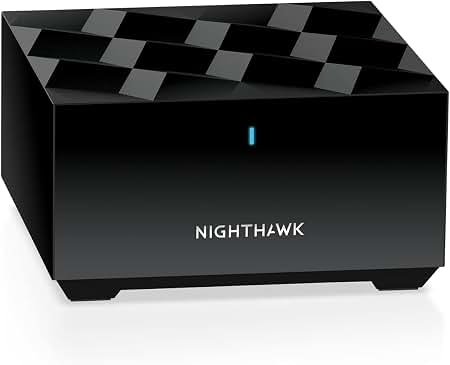
The Netgear Nighthawk Tri-band Mesh WiFi 6E System MR90 is a high-performance mesh router built for modern homes that need fast, stable, and low-latency wireless coverage. Designed around WiFi 6E, it adds the 6 GHz band for cleaner connections, better performance with compatible devices, and less congestion in busy environments. This makes the MR90 a strong choice for 4K and 8K streaming, competitive gaming, smart home networks, remote work, and households with many connected devices.
The system is aimed at users who want premium whole-home WiFi without managing a complex enterprise-style network. It supports fast wireless speeds, multi-gig wired connectivity, and mesh expansion for broader coverage across large homes. The MR90 is typically positioned in the premium consumer segment, with estimated pricing often ranging from about $100 for a standalone router on resale or promotional listings to higher bundle pricing for complete mesh kits, depending on region and availability. Availability can vary significantly by retailer, market, and whether the unit is sold as a standalone router or part of a mesh system package.
Its biggest selling points are tri-band WiFi 6E support, a dedicated 6 GHz band, strong mesh performance, and a practical port selection for wired devices. For users who need a future-ready router that can handle many devices while maintaining speed and consistency, the MR90 remains a compelling option.
Specifications for Netgear Nighthawk Tri-band Mesh WiFi 6E System MR90
- WiFi standard: WiFi 6E / IEEE 802.11ax
- Tri-band wireless: 2.4 GHz, 5 GHz, and 6 GHz bands
- Maximum combined speed: Up to 5.7 Gbps class performance
- Radio ratings: 2.4 GHz up to 900 Mbps, 5 GHz up to 2400 Mbps, 6 GHz up to 2400 Mbps
- 2.4 GHz radio: 3x3 design with 40 MHz channel width
- 5 GHz radio: 2x2 design with 160 MHz channel width
- 6 GHz radio: 2x2 design with 160 MHz channel width
- Device capacity: Up to 100 connected devices
- Coverage: Up to 2,500 square feet for the router unit
- Ethernet ports: Three Gigabit LAN ports and one 2.5 Gbps WAN port
- Design comparison: More advanced than WiFi 6 mesh systems because of 6 GHz support, and simpler than many WiFi 7 systems while still offering excellent performance
In benchmark terms, the MR90 class is built for sustained throughput, low interference, and strong multi-device performance rather than just peak speed in ideal conditions. Compared with standard dual-band routers, it offers better traffic distribution and more room for high-bandwidth devices.
Detailed Description of the MR90 Mesh WiFi 6E Router
The Netgear Nighthawk Tri-band Mesh WiFi 6E System MR90 works by distributing wireless traffic across three bands, which reduces congestion and improves responsiveness. The 6 GHz band is especially useful for newer laptops, phones, and streaming devices that support WiFi 6E, while the 2.4 GHz band provides longer-range compatibility for smart home products and older devices. The 5 GHz band handles the balance between speed and range, making it ideal for everyday use across the home.
In real-world use, the MR90 is well suited to large households, multi-floor homes, and spaces with many connected devices. It can support gaming consoles, security cameras, smart TVs, tablets, and work-from-home equipment at the same time without the heavy slowdowns common on older routers. The mesh design helps extend coverage and improve roaming as users move from room to room.
The hardware uses a compact, modern enclosure with a solid build quality typical of premium networking products. With a footprint of 5.51 x 5.51 x 3.62 inches and a weight of about 1.4 pounds, the router is stable on a shelf or desk without taking up much space. User experience is generally centered on simple setup, strong app-based management, and reliable performance once configured correctly.
Setup Guide for Netgear Nighthawk Tri-band Mesh WiFi 6E System MR90
- Unbox the MR90 and confirm that the router, power adapter, Ethernet cable, and documentation are included.
- Place the router in a central, open location away from thick walls, metal objects, and microwave ovens.
- Connect the WAN port to your modem or gateway using the included Ethernet cable.
- Plug in the power adapter and wait for the LED to indicate that the unit has powered on and initialized.
- Use a web browser or the Netgear management interface to begin the setup wizard.
- Create a WiFi network name and password, then configure guest access if needed.
- Pair satellites or mesh extenders if your kit includes them, placing each unit within a strong signal area for best roaming performance.
- Test internet access on a phone, laptop, and smart device to confirm stable connectivity.
For best results, keep firmware updated and avoid placing the router near reflective surfaces or heavy electrical interference. If pairing fails, move the satellite closer to the router during initial setup, then reposition it after synchronization. Never cover the ventilation openings, and disconnect power before moving cables or resetting hardware.
Troubleshooting the Netgear Nighthawk MR90
- No internet connection: Check the modem, verify the WAN cable, and restart both devices in the correct order.
- Weak signal in one room: Reposition the router higher and more centrally, or add a mesh satellite for better coverage.
- Device will not join WiFi: Confirm the password, forget the network on the device, and reconnect using the correct band.
- Slow speeds on 6 GHz: Make sure the client device supports WiFi 6E and is close enough for a strong 6 GHz signal.
- Setup loop or failed configuration: Restart the router, clear browser cache, and repeat the setup process from a stable connection.
- LED warning state: Check the router status in the admin page and review the internet and firmware sections for issues.
Preventive maintenance is simple: keep firmware updated, reboot occasionally, and place the unit in a well-ventilated area. If support is needed, Netgear provides warranty coverage and customer assistance through its official support channels. For help in the United States, Netgear support can be reached at +1 888 638 4327.
Pros and Cons of the Netgear Nighthawk Tri-band Mesh WiFi 6E System MR90
Pros
- Fast tri-band WiFi 6E performance with a dedicated 6 GHz band for low-congestion connections
- Strong support for many devices, making it ideal for smart homes and busy families
- 2.5 Gbps WAN port provides better future-proofing than basic gigabit-only routers
- Mesh-ready design helps maintain coverage across larger homes
- Good fit for gaming, streaming, and remote work at the same time
Cons
- Premium pricing compared with entry-level WiFi 6 routers
- Best 6 GHz performance depends on device compatibility and distance
- Standalone coverage may not be enough for very large homes without satellites
- Advanced features may feel excessive for users with basic browsing needs
Overall value is strongest for users who want better performance than a standard router and are willing to pay more for mesh flexibility. Compared with cheaper alternatives, the MR90 offers better long-term utility and stronger high-density wireless handling.
Customer Reviews of Netgear Nighthawk Tri-band Mesh WiFi 6E System MR90
Customer feedback for the MR90 is generally positive, with many users praising the speed, stable roaming, and improved performance on WiFi 6E devices. Average satisfaction trends commonly fall around 4 out of 5 stars in user discussions, especially among buyers upgrading from older dual-band routers. One typical comment is: “Setup was straightforward, and the 6 GHz band made a noticeable difference for my newer laptop and phone.”
Frequent praise includes better whole-home coverage, strong streaming performance, and a noticeable reduction in lag during gaming sessions. Common complaints usually involve price, the need for compatible devices to fully benefit from WiFi 6E, and the fact that some homes still require extra mesh units for full coverage. A recurring purchase recommendation is to buy the system if you want a premium router for a busy household, but choose a smaller model if your needs are limited to basic internet access.
Frequently mentioned issues include placement sensitivity, occasional setup confusion for first-time users, and the higher cost of expansion hardware. Even so, the MR90 remains a solid choice for users who want reliable mesh WiFi and modern wireless performance.
Faqs
How do I set up the netgear Nighthawk Tri-band Mesh WiFi 6E System MR90 for the first time?
What should I do if my netgear Nighthawk Tri-band Mesh WiFi 6E System MR90 is not connecting to the internet?
How many devices can the netgear Nighthawk Tri-band Mesh WiFi 6E System MR90 support at once?
Can the netgear Nighthawk Tri-band Mesh WiFi 6E System MR90 work with older WiFi devices?
Why is my netgear Nighthawk Tri-band Mesh WiFi 6E System MR90 not giving me full speed on the 6 GHz band?
How should I position the satellites in the netgear Nighthawk Tri-band Mesh WiFi 6E System MR90 for better whole-home coverage?
How do I access and change settings on the netgear Nighthawk Tri-band Mesh WiFi 6E System MR90?
How do I maintain the netgear Nighthawk Tri-band Mesh WiFi 6E System MR90 to keep it running well?
More netgear manuals
- Netgear Nighthawk Ultra-High Speed Modem CM2050V User Manual
- Netgear MP101 Digital Music Player User Manual
- Netgear Nighthawk M7 Mobile Router MH7110 User Manual
- Netgear Nighthawk Tri-band Mesh WiFi 6 System MR80 User Manual
- Netgear EX6130 AC1200 Dual Band WiFi Range Extender User Manual
- Netgear RBE371 Dual-Band Mesh WiFi 7 System User Manual
Leave a Comment