
Netgear MP101 Digital Music Player User Manual
Content
Introduction to the Netgear MP101 Digital Music Player
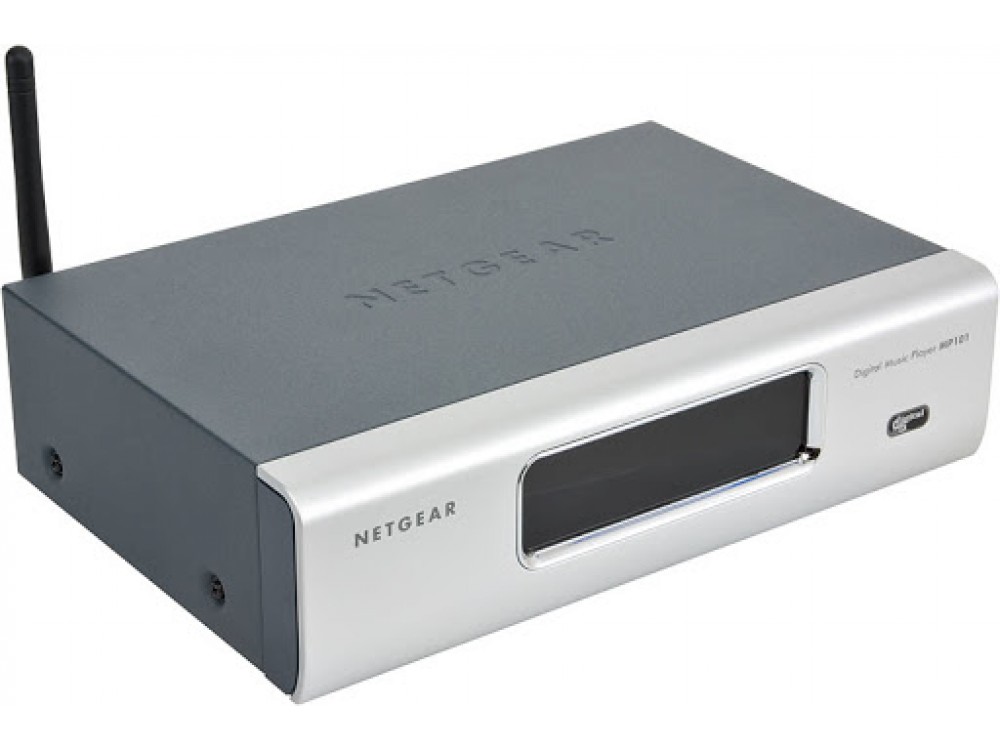
The Netgear MP101 Digital Music Player is a classic network audio player designed to bring digital music from a home network to a stereo system with minimal setup and strong format compatibility. Built for music lovers who want a simple way to stream MP3 and WMA collections, the MP101 offers both wired and wireless connectivity, making it a flexible option for home audio setups. It was designed to sit alongside a receiver or powered speakers and act as a dedicated music streamer rather than a general-purpose computer accessory.
One of the main benefits of the Netgear MP101 Digital Music Player is its combination of built-in 802.11b wireless networking and 10/100 Ethernet support, giving users the choice between cable-free convenience and a more stable wired connection. It also supports playlists, internet radio streaming, and direct analog audio output, which makes it practical for everyday listening in bedrooms, living rooms, or office spaces. The front display and remote control improve usability, while the compact design helps it fit easily into an existing audio rack.
This product is best suited for users with legacy digital music libraries, homeowners building a networked audio system, and collectors who want a straightforward internet radio and file playback device. Because it is an older model, availability is usually limited to secondhand marketplaces, refurbished listings, and archived support resources. Estimated pricing typically ranges from low-cost used-unit listings to modest refurbished bundle prices, depending on condition and accessories.
Specifications for the Netgear MP101 Digital Music Player
- Audio formats: MP3 up to 320 Kbps or variable bit rate, WMA 8/9 up to 192 Kbps, and internet radio via streaming MP3.
- Playlist support: M3U and PLS playlist formats.
- Outputs: RCA analog audio jacks and a 1/8-inch stereo mini-jack for headphones or powered speakers.
- Signal-to-noise ratio: Greater than 92 dB A-weighted for clean audio playback.
- Maximum output power: 55 mW at 16 ohms.
- Networking: Wired 10/100 Mbps Ethernet and wireless 802.11b support at 1, 2, 5.5, and 11 Mbps.
- Security: WEP encryption support in 40/64-bit and 128-bit modes.
- Physical size: 271 x 221 x 44 mm, weighing 0.62 kg.
- Power: 7.5V DC, 1.0A adapter requirement.
- Comparison: Compared with many early network audio players, the MP101 stands out for built-in wireless networking, but it lacks digital audio outputs and modern codec support found in newer music streamers.
Detailed Description of the Netgear MP101 Digital Music Player
The Netgear MP101 Digital Music Player functions as a dedicated network music bridge. It connects to a home network, locates shared music libraries or compatible streams, and sends audio output to a stereo receiver or powered speakers. Users can browse content with the included remote control and view track information on the front-panel display. The design emphasizes simplicity, so the unit is not overloaded with advanced media features; instead, it focuses on reliable playback of common music files and playlists.
In real-world use, the MP101 works well in homes that still maintain MP3 or WMA libraries on a PC or NAS device. It can also serve as an internet radio player for users who want a small, standalone audio source for casual listening. The housing is compact and functional, with a practical build intended for shelf placement near AV equipment. Materials are consistent with consumer electronics of its era, prioritizing durability and straightforward integration over premium styling.
User experience is centered on easy access to music rather than deep customization. The wired Ethernet option is helpful for dependable playback, while wireless support adds installation flexibility. The rear-panel audio layout can feel less convenient than front-access designs, but the overall system remains easy to understand for anyone familiar with home stereo equipment.
Setup Guide: How to Install and Configure the Netgear MP101 Digital Music Player
- Place the player near your stereo receiver, powered speakers, or home network equipment.
- Connect the power adapter and ensure the unit receives the correct 7.5V DC, 1.0A input.
- Choose a network connection: plug in the Ethernet cable for a wired setup or configure wireless 802.11b networking.
- Connect audio using the RCA outputs for a stereo receiver or the headphone mini-jack for powered speakers.
- Use the remote control and on-screen menu to search for music sources, playlists, and supported radio streams.
- Enter wireless security settings if required, noting that the unit supports WEP rather than modern Wi-Fi security standards.
- Test playback with a known MP3 file before loading larger libraries or internet radio stations.
For best results, use a stable wired connection if your wireless environment is crowded or if your router no longer supports legacy 802.11b devices well. Avoid placing the unit near heat sources, and make sure ventilation is not blocked. Do not connect the player to incompatible power supplies or attempt to open the unit while powered. If playback fails, recheck the network path, shared folder permissions, and supported file formats before changing hardware settings.
Troubleshooting the Netgear MP101 Digital Music Player
- No music appears: Confirm the source computer or server is powered on, sharing is enabled, and the MP3 or WMA files are in a supported format.
- Wireless connection fails: Check SSID, WEP key entry, and signal strength. The player is designed for older 802.11b networks, so router compatibility may be limited.
- No audio output: Verify the RCA cables or mini-jack connection, increase amplifier volume, and confirm the correct input source is selected.
- Playback stutters: Use Ethernet instead of wireless, reduce network congestion, and avoid streaming from an overloaded host computer.
- Unsupported file errors: Convert tracks to MP3 or compatible WMA versions, and use M3U or PLS playlists only.
Preventive maintenance includes keeping firmware and network settings documented, using known-good cables, and avoiding unsupported security modes. Since the MP101 is an older product, warranty coverage is typically limited or unavailable on used units. For help, check archived NETGEAR support resources and contact NETGEAR customer support at 1-888-638-4327 for general assistance, or 1-855-776-7233 for business support when applicable.
Pros and Cons of the Netgear MP101 Digital Music Player
Pros
- Built-in wireless and Ethernet support gives flexible installation options.
- Simple music playback interface is easy for non-technical users.
- Supports common legacy formats such as MP3 and WMA.
- RCA output makes it easy to connect to traditional stereo systems.
- Compact design fits well into home audio racks and entertainment centers.
Cons
- No digital audio outputs, which limits integration with modern DAC-centric systems.
- Wireless support is limited to older 802.11b networking and WEP security.
- Does not support many modern streaming formats or services.
- Rear-panel headphone jack is less convenient than front-access designs.
- Value for money depends heavily on low used pricing because the device is discontinued.
Compared with newer network music streamers, the Netgear MP101 Digital Music Player is less versatile but can still be worthwhile for users who want a low-cost legacy player for an existing MP3 library. It is a practical choice if simplicity matters more than modern app support or advanced audio output options.
Customer Reviews and User Feedback
Typical user feedback for the Netgear MP101 Digital Music Player is mixed but generally positive among legacy-audio enthusiasts. Many owners rate it around 4 out of 5 stars for easy setup, dependable playback, and useful wireless networking for its era. Users often praise the compact size, remote control, and ability to stream local music files without needing a full computer connected to the stereo.
Common complaints include limited codec support, outdated wireless security, and the absence of digital outputs. Some users also note that the rear-mounted audio connections can be awkward during installation. Buyers who understand its age usually appreciate it as an affordable way to revive older music collections, while first-time buyers expecting modern streaming features may be disappointed.
For best results, the MP101 is recommended for collectors, retro-tech users, and anyone with a compatible home network who wants a straightforward digital music player for MP3 and WMA playback.
Faqs
How do I set up the netgear MP101 Digital Music Player for the first time?
What should I do if my netgear MP101 Digital Music Player cannot find my music library?
Which audio formats does the netgear MP101 Digital Music Player support?
Can the netgear MP101 Digital Music Player connect through Wi-Fi and Ethernet?
Why does the netgear MP101 Digital Music Player keep disconnecting or buffering during playback?
Is the netgear MP101 Digital Music Player compatible with modern Mac, iTunes, or DRM-protected music?
How can I improve sound quality on the netgear MP101 Digital Music Player?
How should I clean and maintain the netgear MP101 Digital Music Player?
More netgear manuals
- Netgear Nighthawk Tri-band Mesh WiFi 6E System MR90 User Manual
- Netgear Nighthawk Tri-band Mesh WiFi 6 System MR80 User Manual
- Netgear Nighthawk Ultra-High Speed Modem CM2050V User Manual
- Netgear RBE371 Dual-Band Mesh WiFi 7 System User Manual
- Netgear Nighthawk M7 Mobile Router MH7110 User Manual
- Netgear Nighthawk Mesh WiFi 6 System MK62 User Manual
Leave a Comment