
Netgear Nighthawk Mesh WiFi 6 System MK62 User Manual
Content
Netgear Nighthawk Mesh WiFi 6 System MK62 Review and Product Manual
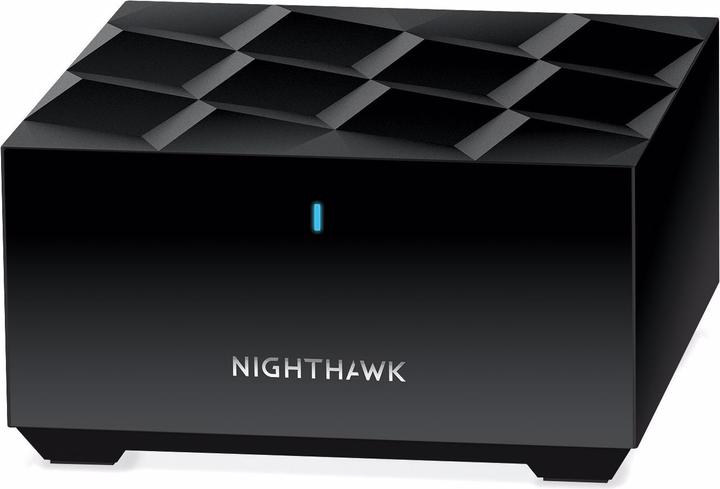
Introduction: What Is the Netgear Nighthawk Mesh WiFi 6 System MK62?
The Netgear Nighthawk Mesh WiFi 6 System MK62 is a dual-band whole-home mesh networking solution designed to deliver faster, more reliable wireless coverage across medium-sized homes. Built around a WiFi 6 router and one mesh satellite, it supports AX1800-class speeds, smoother streaming, responsive gaming, and better performance for busy households with many connected devices. It is especially useful for users who want to replace an aging router with a modern mesh WiFi system that can reduce dead zones and improve signal consistency in multiple rooms.
This system is a strong fit for families, remote workers, students, and smart-home users who need stable internet for video calls, 4K streaming, online learning, and everyday browsing. The setup is straightforward through the Nighthawk app, making the MK62 approachable even for users who are new to mesh networking. The system typically covers up to 3,000 square feet and supports 25+ devices, making it practical for apartments, condos, and small to mid-sized homes with heavy wireless usage.
The Netgear Nighthawk Mesh WiFi 6 System MK62 usually falls in the mid-range price category, often around the $150 to $250 range depending on seller, condition, and promotional pricing. Availability is generally broad through major online retailers and authorized electronics stores. For shoppers comparing mesh WiFi systems, the MK62 stands out for its balance of performance, easy installation, and WiFi 6 efficiency in a compact, dual-band package.
Key Specifications and Features
- WiFi 6 mesh system with one router and one satellite
- AX1800 dual-band wireless performance
- Coverage designed for up to 3,000 sq. ft.
- Supports 25+ connected devices
- Gigabit Ethernet ports for wired connections
- Compatibility with most internet service providers
- Nighthawk app support for setup and management
- NETGEAR Armor security support with subscription-based features after the trial period
Troubleshooting: Common Problems and Fixes
If the Netgear Nighthawk Mesh WiFi 6 System MK62 is not connecting properly, first restart the modem, router, and satellite, then verify that the Ethernet cable is securely connected to the router’s WAN port. If the satellite shows a poor connection, move it closer to the main router and place both units in open areas away from thick walls, microwaves, and cordless phones. For slow speeds, test your internet directly from the modem to confirm whether the issue is with the ISP or the mesh system.
Common setup issues often involve app pairing, outdated firmware, or temporary sync interruptions. If the Nighthawk app reports that the device cannot be found, reset the router only after confirming the correct modem connection and checking that the LED status lights are normal. While the MK62 user manual does not emphasize many public-facing error codes, signal LED behavior and app alerts are the main indicators to watch. Preventive care includes keeping firmware updated, rebooting occasionally, and avoiding satellite placement near large metal objects.
The MK62 comes with a limited 1-year hardware warranty and 90 days of basic technical support when purchased from an authorized reseller. For help, users can contact NETGEAR support through the official support portal, community forums, or the Nighthawk app support section. If you need immediate assistance, the best approach is to gather the model number, firmware version, and a description of the LED status before contacting support.
Pros & Cons of the Netgear Nighthawk Mesh WiFi 6 System MK62
- Pros: Easy setup with the Nighthawk app, which is helpful for first-time mesh users.
- Pros: Reliable whole-home coverage for up to 3,000 sq. ft., especially in small and medium homes.
- Pros: WiFi 6 support improves capacity for multiple devices, making it better for streaming and video calls.
- Pros: Good value for money compared with higher-end tri-band mesh systems.
- Pros: Compact design with Gigabit Ethernet ports for wired devices like consoles, PCs, and smart TVs.
- Cons: Dual-band design may be less powerful than premium tri-band mesh alternatives in very busy homes.
- Cons: The included satellite may not be enough for larger properties or homes with many walls.
- Cons: Advanced security features may require a subscription after the introductory period.
- Cons: Users needing top-tier performance for large multi-story homes may prefer the NETGEAR Orbi line or a more advanced mesh WiFi 6 system.
Overall, the Netgear Nighthawk Mesh WiFi 6 System MK62 offers strong value if you want dependable mesh coverage without paying premium prices. It is a practical alternative to basic routers and a more affordable step up from entry-level mesh kits. Compared with higher-end systems, it trades some peak performance for simplicity and lower cost.
Customer Reviews: What Users Say About the MK62
Customer feedback for the Netgear Nighthawk Mesh WiFi 6 System MK62 is generally positive, with many users rating it around 4 out of 5 stars for ease of setup, coverage improvement, and stable everyday performance. Reviewers frequently praise the simple app-based installation and the noticeable reduction in dead zones after switching from a standard router. One typical comment is that it “made the upstairs signal usable again” and worked well for streaming and remote work.
Common complaints focus on the limited number of Ethernet ports, the need for subscription services for some security features, and occasional drop-offs in very dense or large homes. Some users also note that performance is good for the price, but not class-leading compared with premium mesh alternatives. For buyers who want an affordable mesh WiFi 6 upgrade for everyday use, the MK62 is often recommended. Users with larger houses or heavier networking demands may want to consider a more powerful tri-band mesh system instead.
Quick Buying Verdict
The Netgear Nighthawk Mesh WiFi 6 System MK62 is a solid choice for households that need reliable mesh WiFi, easy setup, and better coverage without spending on a high-end system. It is best for mid-sized homes, streaming, gaming, and multi-device households that want a simple and effective upgrade.
Faqs
How do I set up the netgear Nighthawk Mesh WiFi 6 System MK62 for the first time?
What should I do if my netgear Nighthawk Mesh WiFi 6 System MK62 is not connecting after installation?
How far can the netgear Nighthawk Mesh WiFi 6 System MK62 cover, and how many devices can it handle?
Is the netgear Nighthawk Mesh WiFi 6 System MK62 compatible with older WiFi devices?
What ports and wired connection options does the netgear Nighthawk Mesh WiFi 6 System MK62 include?
Why is my netgear Nighthawk Mesh WiFi 6 System MK62 satellite showing weak performance or dropping connection?
How can I improve WiFi speed on the netgear Nighthawk Mesh WiFi 6 System MK62?
How often should I maintain the netgear Nighthawk Mesh WiFi 6 System MK62, and what care does it need?
More netgear manuals
- Netgear RBE371 Dual-Band Mesh WiFi 7 System User Manual
- Netgear WAC564 Insight Instant Mesh Multi-Mode Access Point User Manual
- Netgear Nighthawk Tri-band Mesh WiFi 6 System MR80 User Manual
- Netgear Nighthawk Mesh WiFi 6 System MK73 User Manual
- Netgear MP101 Digital Music Player User Manual
- Netgear 4-Stream AX1800 WiFi 6 Router RAX10 User Manual
Leave a Comment