
Netgear RBE371 Dual-Band Mesh WiFi 7 System User Manual
Content
netgear RBE371 Dual-Band Mesh WiFi 7 System Overview
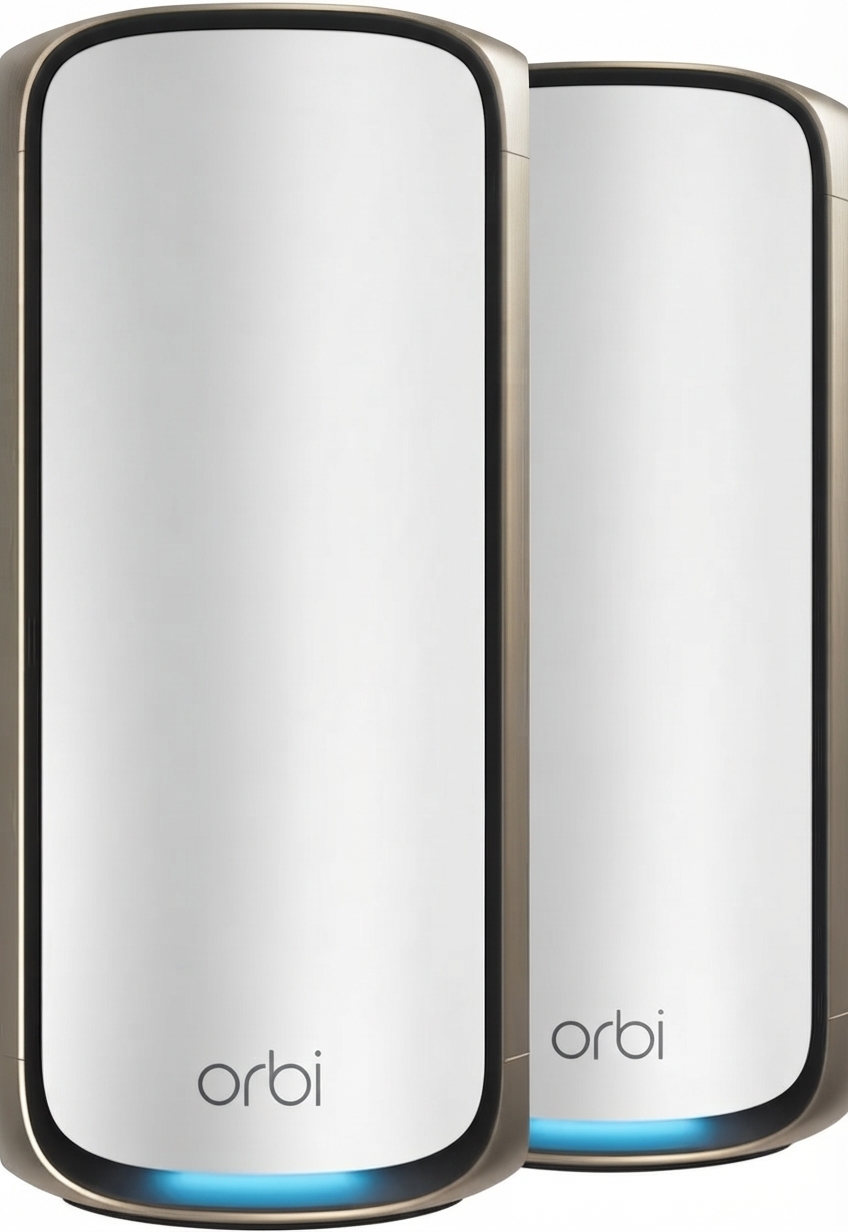
The netgear RBE371 Dual-Band Mesh WiFi 7 System is built for households that want fast, reliable whole-home coverage with a simple setup and modern multi-gig connectivity. As the router component in NETGEAR’s Orbi 370 series, the RBE371 combines WiFi 7 performance with dual-band mesh networking, making it a strong fit for streaming, gaming, remote work, smart home devices, and everyday browsing in medium to large homes.
Its biggest advantages are the WiFi 7 upgrade, enhanced backhaul for more stable mesh performance, and a 2.5 Gigabit Ethernet WAN port for faster internet plans. The system is designed for users who want strong wireless coverage without dealing with complicated networking tools. It also supports the Orbi app for guided setup, making it approachable for first-time mesh system owners and practical for families that need broad, consistent coverage.
The estimated price range typically falls in the mid-range premium category, with the router and satellite sold in different configurations depending on the bundle. The netgear RBE371 Dual-Band Mesh WiFi 7 System is generally available through NETGEAR and major electronics retailers, with pricing varying by region and package size. For buyers seeking a future-ready mesh WiFi 7 solution with multi-gig support, the RBE371 offers a compelling balance of speed, coverage, and ease of use.
Specifications for netgear RBE371 Dual-Band Mesh WiFi 7 System
- WiFi standard: WiFi 7 (802.11be)
- Band configuration: Dual-band with 5 GHz and 2.4 GHz support
- Combined wireless speed: Up to 5 Gbps
- Streams: 4 streams
- Processor: Quad-core 1.5 GHz processor
- Memory: 512 MB flash and 1 GB RAM
- Ethernet ports: 1 x 2.5G WAN port and 1 x 2.5G LAN port
- Mesh feature: Enhanced backhaul for stronger node-to-node performance
- Coverage: Up to 4,000 sq. ft. in a typical two-unit mesh setup
- Device capacity: Up to 70 connected devices in common Orbi 370 series configurations
- Antennas: High-performance internal antennas with power amplifiers
- Dimensions: 8.02 x 4.72 x 2.95 in
- Comparison: Faster and more future-ready than WiFi 6 mesh systems, while being simpler than many tri-band WiFi 7 competitors
In performance terms, this system is positioned as an entry-to-mid WiFi 7 mesh option with multi-gig wired support and strong coverage efficiency. Compared with older dual-band mesh systems, it offers better throughput, improved latency handling, and more headroom for high-speed internet plans.
Detailed Description of the netgear RBE371 Dual-Band Mesh WiFi 7 System
The netgear RBE371 Dual-Band Mesh WiFi 7 System works as the central router in a mesh network, distributing internet access to satellite units for wider coverage. It uses dual-band WiFi 7 technology to deliver faster wireless speeds and improved efficiency for multiple devices at once. The enhanced backhaul helps the router and satellite communicate more effectively, which is especially useful in homes with thick walls, multiple floors, or dead zones.
In real-world use, the system is well suited for 4K streaming, cloud backups, smart home automation, video calls, and online gaming. The 2.5G WAN port allows it to take advantage of faster broadband connections, while the 2.5G LAN port supports high-speed wired devices such as gaming consoles, desktop PCs, and network storage.
Build quality is typical of NETGEAR’s premium Orbi line, with a compact upright design and internal antennas that keep the appearance clean and modern. The housing is designed for standing placement, reducing clutter and helping with airflow. Users generally benefit from a straightforward experience, especially when pairing the router with Orbi satellites through the mobile app.
Setup Guide for netgear RBE371 Dual-Band Mesh WiFi 7 System
- Place the router in a central, open location near your modem and away from large metal objects, thick concrete walls, and other sources of interference.
- Connect the modem to the yellow 2.5G WAN port using the included Ethernet cable.
- Plug in the power adapter and wait for the router LED to indicate readiness.
- Download and open the Orbi app on your smartphone or tablet.
- Follow the app’s step-by-step prompts to create your network name, password, and admin settings.
- Power on the satellite and place it halfway between the router and the area with weak coverage.
- Allow the router and satellite to pair automatically or complete pairing through the app if needed.
- Test WiFi coverage in different rooms and adjust satellite placement if performance is uneven.
For best results, connect your fastest wired devices to the LAN port and keep the router elevated on a flat surface. Avoid covering ventilation openings or placing the unit near heat sources. If pairing fails, restart both devices and move the satellite closer during the initial sync process.
Troubleshooting the netgear RBE371 Dual-Band Mesh WiFi 7 System
- Slow speeds: Check whether your internet plan exceeds your router’s current modem or WAN configuration. Use the 2.5G port for multi-gig service and reboot the modem and router.
- Satellite not connecting: Move the satellite closer to the router, power cycle both units, and retry pairing through the Orbi app.
- Weak coverage: Reposition the router to a more central location and avoid placing it inside cabinets or behind televisions.
- No internet access: Confirm the modem is online, the Ethernet cable is fully inserted, and the WAN port is used instead of the LAN port.
- LED issues: Solid white generally indicates readiness; unexpected blinking can point to startup, syncing, or connection problems.
Preventive maintenance includes keeping firmware updated, restarting the system occasionally, and maintaining good physical placement. If issues continue, users can rely on NETGEAR support, warranty coverage, online knowledge base resources, and phone support in supported regions.
Pros & Cons of netgear RBE371 Dual-Band Mesh WiFi 7 System
Pros
- WiFi 7 support provides stronger future-proofing than WiFi 6 mesh systems.
- 2.5G WAN and LAN ports make it suitable for high-speed internet and wired devices.
- Enhanced backhaul improves stability between router and satellite units.
- Easy app-based setup is ideal for non-technical users.
- Clean, compact design fits modern home setups.
Cons
- Dual-band design may be less flexible than some tri-band mesh alternatives.
- Best performance depends on proper satellite placement.
- Premium pricing may be a drawback for budget buyers.
- Advanced networking users may want more manual tuning options.
Overall value is strong for users who want a simple, modern mesh system with multi-gig support and broad coverage. Compared with lower-cost alternatives, it delivers better long-term relevance and easier setup. Compared with more expensive tri-band WiFi 7 systems, it may sacrifice some peak flexibility but remains attractive for most homes.
Customer Reviews of the netgear RBE371 Dual-Band Mesh WiFi 7 System
Customer feedback for the netgear RBE371 Dual-Band Mesh WiFi 7 System is generally positive, with many users praising its easy setup, strong whole-home coverage, and noticeable speed improvements after upgrading from older routers. Average user sentiment often lands around 4 to 4.5 stars out of 5 for mesh systems in this class.
- “Setup was quick and the app made everything easy.” Users frequently appreciate the guided installation.
- “My dead zones disappeared after adding the satellite.” Coverage improvements are one of the most common compliments.
- “Great speeds on my gigabit plan.” Buyers with fast service often report excellent day-to-day performance.
- “I wish it had more advanced controls.” Some experienced users want deeper customization.
Common complaints usually relate to price, the need for careful placement, and expectations that dual-band mesh should match tri-band systems in every scenario. For most households, though, it is a recommended purchase when simplicity, speed, and modern WiFi 7 compatibility matter most.
Faqs
How do I set up the netgear RBE371 Dual-Band Mesh WiFi 7 System for the first time?
What should I do if my netgear RBE371 Dual-Band Mesh WiFi 7 System is connected but has no internet?
How many satellites can I add to the netgear RBE371 Dual-Band Mesh WiFi 7 System, and where should I place them?
Is the netgear RBE371 Dual-Band Mesh WiFi 7 System compatible with my ISP and existing modem?
Why is my netgear RBE371 Dual-Band Mesh WiFi 7 System slower than expected on WiFi 7 devices?
How do I fix satellite syncing problems on the netgear RBE371 Dual-Band Mesh WiFi 7 System?
What WiFi 7 features does the netgear RBE371 Dual-Band Mesh WiFi 7 System offer for gaming and streaming?
How should I maintain and secure the netgear RBE371 Dual-Band Mesh WiFi 7 System over time?
More netgear manuals
- Netgear Nighthawk Tri-band Mesh WiFi 6 System MR80 User Manual
- Netgear Nighthawk Mesh WiFi 6 System MK62 User Manual
- Netgear MP101 Digital Music Player User Manual
- Netgear WAC564 Insight Instant Mesh Multi-Mode Access Point User Manual
- Netgear Nighthawk Tri-band Mesh WiFi 6E System MR90 User Manual
- Netgear Nighthawk Mesh WiFi 6 System MK73 User Manual
Leave a Comment