
Setup: Panasonic Home Monitoring Camera with Ambient Light Floor KX-HNC850 User Guide
Content
Panasonic Home Monitoring Camera with Ambient Light Floor KX-HNC850

Introduction
The Panasonic Home Monitoring Camera with Ambient Light Floor KX-HNC850 combines advanced home security technology with an elegant design, offering discreet surveillance that fits seamlessly into modern living spaces. Designed as a sleek floor lamp, this device blends ambient lighting with high-definition monitoring, making it ideal for homeowners seeking an unobtrusive yet effective home security solution.
Key benefits include a 140-degree wide-angle HD camera with 1080p resolution, real-time 24/7 live video streaming, and built-in motion detection that triggers automatic recording and notifications. The integrated ambient light feature provides soft illumination, enhancing home ambiance while doubling as a security aid in low-light conditions. Two-way communication via a built-in microphone and speaker allows users to interact remotely, supporting both security and caregiving applications.
This camera is particularly suited for families monitoring children, seniors requiring care, or anyone wanting to keep an eye on valuables and pets without the intrusive look of traditional cameras. Its compatibility with Amazon Alexa and Google Assistant enhances smart home integration, while the easy plug-and-play setup eliminates the need for wall mounting or drilling.
Available in sophisticated finishes like black satin and fabric grey, the Panasonic KX-HNC850 is priced in the mid-range segment, typically around $250 to $300,, depending on the retailer. This price point reflects its premium features and design quality. It is widely available through authorized online stores and specialty electronics retailers.
Part names and functions

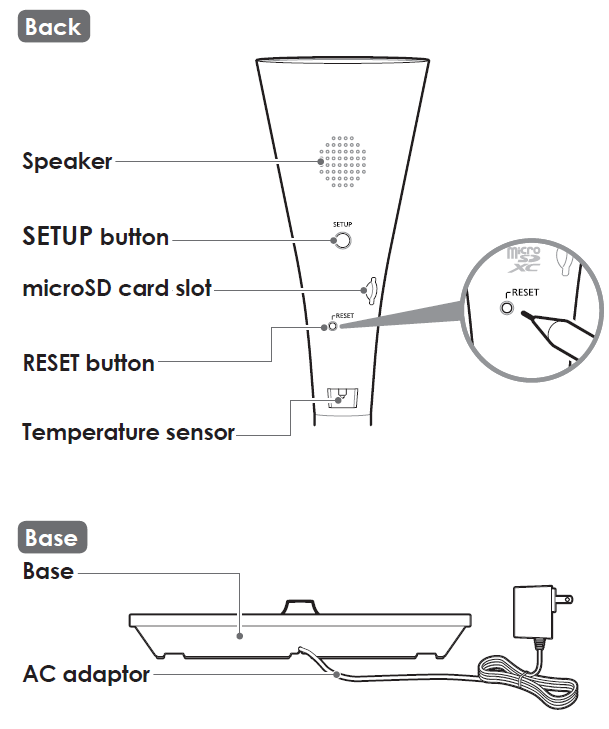
Specifications
- Standards: IEEE 802.11a/b/g/n
- Frequency range: 2.412 GHz – 2.462 GHz (channels 1 – 11) / 5.180 GHz – 5.320 GHz (channels 36–64) / 5.500 GHz – 5.700 GHz (channels 100–140) / 5.745 GHz – 5.825 GHz (channels 149–165)
- RF transmission power: 100 mW (peak transmission power)
- Encryption: WPA2™-PSK (TKIP/AES)‚ WPA™-PSK (TKIP/AES)‚ WEP (128/64 bit)
- Power source: 120 V AC‚ 60 Hz
- Power consumption: Standby: 4.2 W / Maximum: 12.5 W
- Power back-up batteries (not supplied)1: AA (LR6) alkaline batteries x 8
- Power back-up battery life*2‚ 3: Daytime approx. 60 min./night time approx. 30 min.
- Operating conditions: 0 °C – 40 °C (32 °F – 104 °F) / 20 % – 80 % relative air humidity (dry)
- Resolution: 1920 × 1080 pixel (Full HD)‚ 1280 × 720 pixel (HD)‚ 640 × 480 pixel (VGA)
- Image sensor: 2.0 megapixel CMOS
- Maximum illumination 4: Approx. 600 lumens Minimum illuminance required*5: 0 lx
- Focal length: Fixed (0.2 m (8 inches) – infinity)
- Camera field of view: Diagonal 140°
- microSD card:
- Type: microSDHC card (4 GB - 32 GB)‚ microSDXC card (64 GB - 256 GB)
- Speed: Class10‚ or UHS Speed Class 1 or higher
- Motion detection method: Visual sensor
- Dimensions (height × width × depth):
- 3 poles: Approx. 1‚800 mm × 306 mm × 306 mm (5 feet 10 7/8 inches × 12 1/32 inches × 12 1/32 inches)
- 2 poles: Approx. 1‚275 mm × 306 mm × 306 mm (4 feet 2 3/16 inches × 12 1/32 inches × 12 1/32 inches)
- 1 pole: Approx. 750 mm × 306 mm × 306 mm (2 feet 5 1/2 inches × 12 1/32 inches × 12 1/32 inches)
- Mass (weight):
3 poles: Approx. 4‚100 g (9.04 lb)
2 poles: Approx. 3‚650 g (8.05 lb) 1 pole: Approx. 3‚200 g (7.05 lb)- During battery operations‚ LED brightness can only be set to the low setting.
- Note that battery life may be much shorter depending on the brand of batteries being used.
- There will be a notification when batteries are nearing the end of their life.
- The light dims according to your setting.
- The infrared LEDs that surround the camera lens will illuminate in low-light conditions.
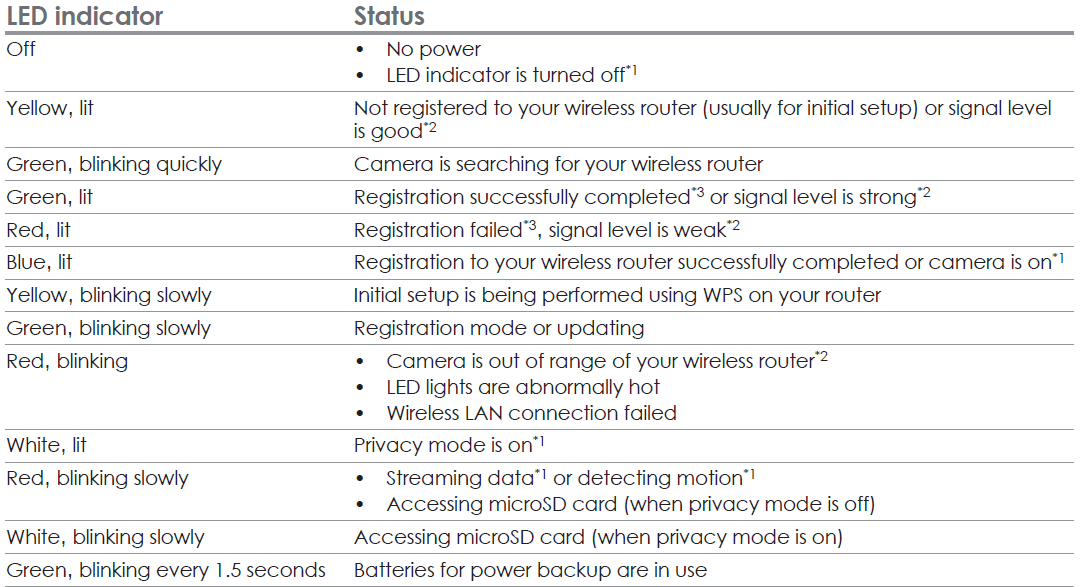
LED
Battery installation (for power backup)
You can insert 8 AA (LR6) batteries (not supplied) into the base to temporarily power the camera in the event of a power failure.
Important:
- Use only alkaline batteries.
- Do NOT use manganese‚ Ni-Cd‚ Ni-MH‚ lithium‚ or lithium-ion batteries.
- Confirm correct polarities (+ ‚- ).
- Disconnect the AC adaptor when inserting or replacing batteries.
- Batteries are only intended for short-term use.

Troubleshooting (Initial setup by Easy Setup)
What is WPS?
WPS is a function of wireless routers that is used to easily connect wireless devices to a wireless router.
A WPS button on a wireless router indicates that it has the WPS function. (Depending on the type of wireless router‚ the WPS function may be disabled on the wireless router even if there is a WPS button.)
If you have trouble during the initial setup‚ check the following causes/solutions first ‚ and then turn off the camera and restart it.


Troubleshooting (Initial setup by Manual Setup)


Warranty
Panasonic Products Limited Warranty
Limited Warranty Coverage (For USA Only)
If your product does not work properly because of a defect in materials or workmanship, Panasonic Corporation of North America (referred to as “the warrantor”) will, for the length of the period indicated on the chart below, which starts with the date of original purchase (“warranty period”), at its option either (a) repair your product with new or refurbished parts,(b) replace it with a new or a refurbished equivalent value product, or (c) refund your purchase price. The decision to repair, replace,, or refund will be made by the warrantor.

Pros & Cons of Panasonic Home Monitoring Camera with Ambient Light Floor KX-HNC850
Pros
- Elegant design: Functions as a stylish floor lamp, blending with home décor without the typical security camera appearance.
- High-definition video: 1080p full HD camera with a 140-degree wide-angle lens captures a broad field of view,, ew ensuring comprehensive monitoring.
- Motion detection with alerts: Automated detection triggers recordings and sends notifications, enhancing security responsiveness.
- Two-way communication: Allows clear conversations remotely, useful for senior care or communicating with family members.
- Smart home integration: Compatible with Alexa and Google Assistant for voice control and smart automation.
- Easy installation: No drilling or mounting needed; simply plug it into an outlet and connect via Wi-Fi.
- Ambient light feature: Adds functional ambient lighting, helping to avoid harsh lighting and improve night visibility.
Cons
- Price: Slightly higher than some basic indoor cameras, which might deter budget-conscious buyers.
- Limited mobility: As a floor lamp, it requires a power outlet nearby and is less portable than battery-operated models.
- App dependency: Full functionality, including alerts and live view, depends on the Panasonic HomeHawk app, which may have occasional connectivity issues reported.
- No outdoor rating: Designed for indoor use only, limiting versatility compared to some alternative cameras that are weatherproof.
Compared to conventional indoor cameras, like Ring or Nest indoor cams, the KX-HNC850 stands out with its integrated ambient lighting and stylish design, but may not suit users needing flexible placement or outdoor monitoring. Its value for money is strong,g given the multi-functionality and smart home compatibility it offers.
Customer Reviews of Panasonic Home Monitoring Camera with Ambient Light Floor KX-HNC850
Users generally praise the Panasonic Home Monitoring Camera with Ambient Light Floor KX-HNC850 for its discreet design and clear video quality. Many highlight the convenience of the two-way talk feature, especially for senior care and family communication, giving it an average rating of around 4.3 out of 5 stars. Customers appreciate the soft ambient lighting that doubles as a nightlight, which enhances its utility.
Common praises include easy setup, reliable motion detection, and seamless smart home integration with Alexa. Several reviews note that the 140-degree lens offers excellent coverage without distortion.
On the downside, some users report occasional app connectivity issues and express a desire for battery backup or more flexible placement options. A few mention the price as slightly steep compared to simpler models without ambient lighting.
Overall, buyers recommend the KX-HNC850 for those prioritizing aesthetics and integrated lighting in home monitoring. It is especially favored by families caring for elderly relatives or looking for a multi-purpose security camera that doubles as ambient lighting.
Faqs
How do I set up the panasonic Home Monitoring Camera with Ambient Light Floor KX-HNC850 for the first time?
What should I do if the panasonic Home Monitoring Camera with Ambient Light Floor KX-HNC850 fails to connect using WPS?
How can I enable and customize motion detection notifications on the panasonic Home Monitoring Camera with Ambient Light Floor KX-HNC850?
Is the panasonic Home Monitoring Camera with Ambient Light Floor KX-HNC850 compatible with all mobile devices and operating systems?
What steps can optimize the video and audio performance of the panasonic Home Monitoring Camera with Ambient Light Floor KX-HNC850?
How do I maintain and clean the panasonic Home Monitoring Camera with Ambient Light Floor KX-HNC850 to ensure longevity?
Can the panasonic Home Monitoring Camera with Ambient Light Floor KX-HNC850 record video locally, and how do I manage storage?
What should I do if the panasonic Home Monitoring Camera with Ambient Light Floor KX-HNC850 LED indicator shows red or unusual colors?
More panasonic manuals
- Usage: Panasonic Home Monitoring Camera KX-HNC815C User Guide
- Setup: Panasonic Home Monitoring Camera with Ambient Light KX-HNC855C User Manual
- Usage & Setup: Panasonic Water Leak Sensor KX-HNS103 Instruction Guide
- Setup: Panasonic Home Network System Digital Cordless Handset KX-HNH100 User Manual
- Usage & Setup: Panasonic Motion Sensor KX-HNS102 Instruction Guide
- How to Use: Panasonic Home Network System Access Keypad KX-HNK101 User Manual
Leave a Comment